
1. הקדמה
This manual provides essential information for the proper installation, operation, and maintenance of the LOKLNEYK Air Conditioner Control Board. This board serves as a replacement part for specific air conditioner models, designed to restore or enhance the functionality of your unit. Please read this manual thoroughly before attempting any installation or repair to ensure safe and effective use.
The LOKLNEYK Air Conditioner Control Board is engineered to address common issues arising from aging or faulty original equipment, ensuring stable and efficient operation of your air conditioning system.
2. זיכערקייַט אינפֿאָרמאַציע
WARNING: Risk of Electric Shock. Always disconnect power before servicing.
- Ensure the air conditioner unit is completely disconnected from its power source before beginning any installation or maintenance.
- Only qualified technicians or individuals with appropriate electrical knowledge should attempt to install or replace this control board.
- Wear appropriate personal protective equipment, including insulated gloves and safety glasses.
- Avoid touching live electrical components.
- Verify all connections are secure and correct before restoring power to the unit.
- Do not operate the air conditioner with damaged wiring or components.
3. פּראָדוקט איבערview
The LOKLNEYK Air Conditioner Control Board is a Printed Circuit Board (PCB) designed for specific air conditioner models. It acts as the central control unit, managing various functions such as compressor operation, fan speeds, temperature regulation, and display output.
טייל נומערן: CE-KFR26W/BP3, CE-KFR26W/BP2, CE-KFR26W/BP2(IR-120).D.13.WP2-1
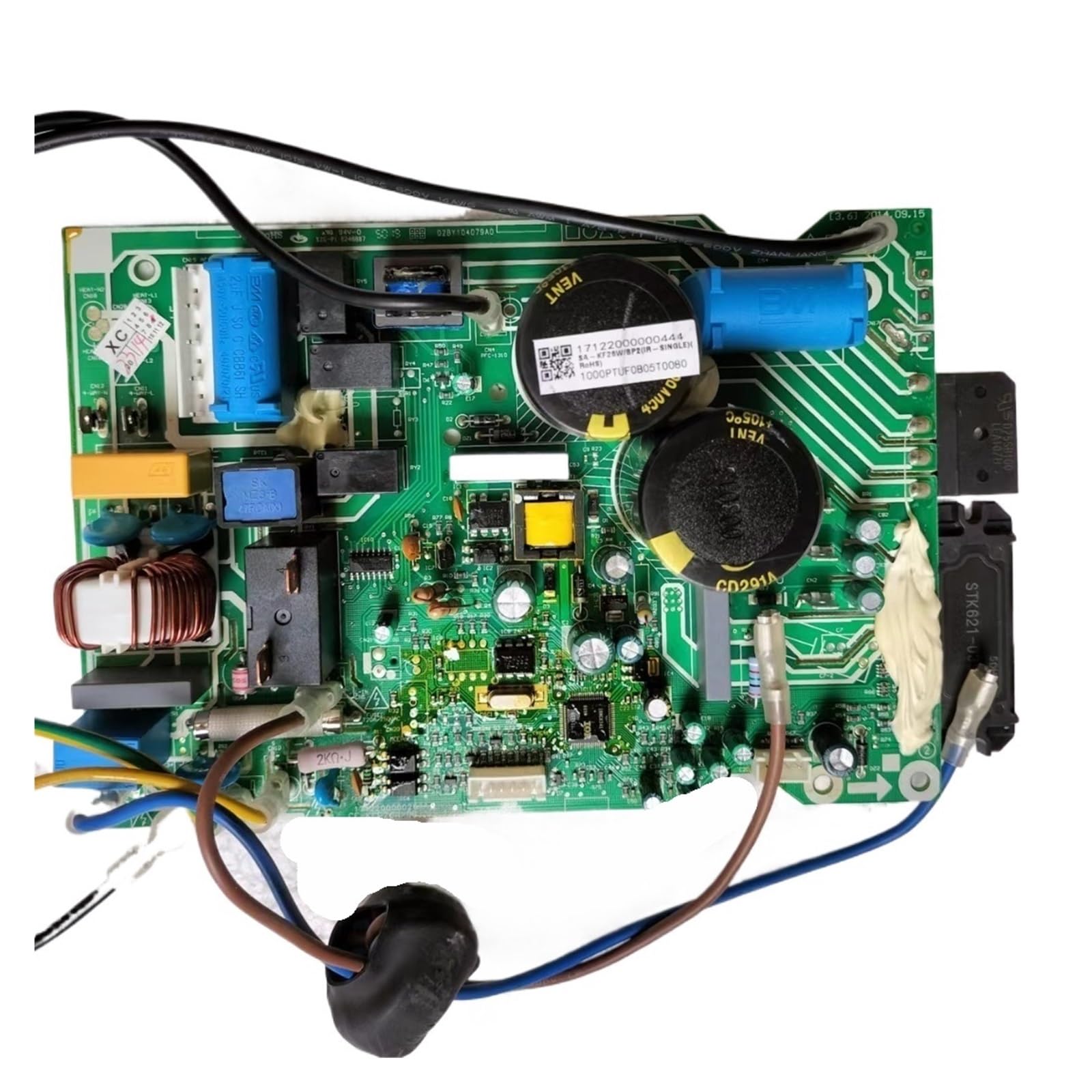
פיגורע 1: דערציען view of the LOKLNEYK Air Conditioner Control Board, showing circuit traces, solder points, and attached wiring harnesses.
4. Installation (Replacement Procedure)
This control board is a replacement component. Installation typically involves removing the existing faulty board and installing the new one. Due to the complexity and electrical nature of this task, professional installation is highly recommended.
4.1. צוגרייטונג
- דיסקאַנעקט מאַכט: Turn off the air conditioner unit at the thermostat and then completely disconnect power at the circuit breaker or main power switch. Verify power is off using a voltagE tester.
- צוטריט צו דער איינהייט: Open the air conditioner unit's housing to gain access to the existing control board. Refer to your air conditioner's service manual for specific access instructions.
- דאָקומענט פֿאַרבינדונגען: Before disconnecting any wires, take clear photographs or make detailed diagrams of all wire connections to the old board. Note the color, position, and type of each connector.
4.2. Removal of Old Board
- אָפּשטעקן דראָטן: Carefully disconnect all wiring harnesses and individual wires from the old control board. Use appropriate tools to release connectors without damaging them.
- Unmount Board: Remove any screws, clips, or fasteners securing the old control board in place. Carefully lift and remove the old board from the unit.
4.3. Installation of New Board
- מאָנטירן נייַ ברעט: Position the new LOKLNEYK control board in the same location as the old one. Secure it using the original screws, clips, or fasteners. Ensure it is firmly seated and not loose.
- פֿאַרבינדן די דראָטן ווידער: Using your photographs or diagrams, carefully reconnect all wiring harnesses and individual wires to the corresponding terminals on the new board. Double-check each connection for accuracy and security.
- דורכקוקן: Visually inspect all connections to ensure they are correct and tight. Ensure no wires are pinched or obstructing moving parts.
4.4. פּאָסטן-ינסטאַללאַטיאָן
- שליסן איינהייט: Carefully close and secure the air conditioner unit's housing.
- ומקערן מאַכט: Reconnect power to the air conditioner unit at the circuit breaker.
- טעסט אָפּעראַציע: Turn on the air conditioner and test its various functions (cooling, heating, fan speeds, modes) to ensure proper operation.
5. אַפּערייטינג ינסטרוקטיאָנס
The LOKLNEYK Air Conditioner Control Board functions as the core electronic component of your air conditioning system. Once correctly installed, it enables the normal operation of your air conditioner. There are no direct operating controls on the board itself; all operations are performed via your air conditioner's standard user interface (e.g., remote control, wall thermostat).
Ensure your air conditioner's user interface is functioning correctly after board replacement. If the unit does not respond to commands, refer to the Troubleshooting section.
6. וישאַלט
The LOKLNEYK Air Conditioner Control Board is designed for long-term reliability with minimal maintenance. However, periodic inspection can help ensure its longevity and optimal performance.
- האַלטן טרוקן: Ensure the area around the control board remains dry and free from moisture, which can cause short circuits and corrosion.
- ריינקייַט: Periodically, with power disconnected, gently clean any dust accumulation on the board using a soft brush or compressed air. Avoid using liquids.
- וויסואַל דורכקוק: During routine air conditioner maintenance, visually inspect the board for any signs of damage, such as burnt components, swollen capacitors, or loose connections.
- פאַכמאַן טשעק: Consider having a qualified technician inspect the internal components, including the control board, during annual air conditioner servicing.
7. טראָובלעשאָאָטינג
If your air conditioner exhibits issues after replacing the control board, or if you are replacing the board to resolve existing problems, refer to the following common scenarios:
- Frequent On/Off Cycles or Sudden Shutdowns: An aging or faulty motherboard can cause unstable operation. Replacing the board with a new unit featuring a robust circuit layout and reliable components can prevent these issues, ensuring continuous operation even in varying temperatures.
- Reduced Cooling/Heating Efficiency: If the air conditioner struggles to reach target temperatures, the control board might be failing to regulate the compressor and fan operations precisely. A new board can restore factory-level performance and improve temperature regulation.
- Increased Power Consumption: Inaccurate parameter regulation and high circuit losses in an old board can lead to energy waste. Replacing the board with an energy-efficient design optimizes power distribution, potentially lowering electricity costs.
- Complex Malfunctions (e.g., mode confusion, uncontrollable fan speeds, black display): These symptoms often indicate motherboard faults. Replacing the control board can resolve these issues comprehensively, avoiding repeated, ineffective repairs.
- Unit Does Not Power On or Respond:
- Verify power supply to the unit.
- Check all wire connections to the new board for security and correctness.
- Ensure the board is properly seated and secured.
- אויב פראבלעמען בלייבן, קאנסולטירט זיך מיט א קוואַליפֿיצירטן טעכניקער.
8. ספּעסאַפאַקיישאַנז
| פּונקט נאָמען | Air Conditioner Display Board / Control Board |
| טייל נומבערס | CE-KFR26W/BP3, CE-KFR26W/BP2, CE-KFR26W/BP2(IR-120).D.13.WP2-1 |
| אַפּפּליקאַטיאָן | Home Air Conditioner Repair / Replacement |
| פּעקל דימענשאַנז | 3.94 X 3.94 X 3.94 אינטשעס |
| פּונקט וואָג | 1.76 אונסעס |
| פאַבריקאַנט | junYun |
| ASIN | B0FZW57FS1 |
| ערשטער דאַטע בנימצא | 5 נאוועמבער 2025 |
9. קאָנטאַקט און שטיצן
For additional models, specific part inquiries, or technical support, please contact LOKLNEYK customer service. We are committed to assisting you in finding the correct parts and resolving any issues you may encounter.
Please have your air conditioner model number and the part number of the control board ready when contacting support.
Note: Due to the extensive selection of home appliance parts, not all items are listed. If you cannot locate a specific part, please reach out to us.