
הקדמה
This manual provides detailed instructions for the Saitake Wireless Arcade Fight Stick Joystick. It covers product features, setup, operation, connection methods, and troubleshooting to ensure optimal performance across various platforms including PC, Android, iOS, Nintendo Switch, PS3, and PS4.
פּראָדוקט איבערview
ווידעא: אן איבערview of the Saitake Arcade Fight Stick, showcasing its design, joystick, buttons, and key features.
שליסל פֿעיִקייטן
- מולטי-פּלאַטפאָרם קאַמפּאַטאַבילאַטי: Compatible with Windows PC, Android, iOS, Nintendo Switch 1/2, PS3, and PS4.
- Three Connection Methods: Supports Bluetooth, 2.4GHz wireless (with included receiver), and wired (Type-C) connections.
- Integrated Display Screen: A 1.9-inch functional display screen shows function options, volume, lighting effects, brightness, and language settings.
- 3.5 מם כעדפאָון דזשאַק: For audio output and communication.
- TURBO פונקציע: Equipped with standard turbo and upgraded auto turbo modes for rapid input execution.
- מאַקראָו פֿונקציע: Customize button mappings and create macro commands with up to 18 keystrokes, including trigger timestamps.
- הויך פּרעציזיע דזשויסטיק: Features an adjustable RGB light ring with 4 modes and 7 colors.
- נידעריק-פּראָfile רויטע סוויטשעס: Buttons utilize low-profile red switches for light pressure and quick response.
- ערגאָנאָמיק פּלאַן: Designed for comfortable and extended gaming sessions.
פּראָדוקט אויסלייג און קנעפּל פונקציעס
Familiarize yourself with the layout and functions of the arcade fight stick's buttons and controls.

Image: Detailed diagram of the Saitake Arcade Fight Stick showing the location and labels of all buttons and features.
- A: מעניו אָפּציע
- B: Joystick Function Option
- C: דזשויסטיק
- D: סקרין ווייַז
- E: טורבאָ קנעפּל
- F: אויסקלייַבן קנעפּל
- G: אָנהייב קנעפּל
- H: HOME קנעפּל
- I: קשר אָפּציע
- J: Touch Panel (for PS4 platform)
- K: Earphone & Microphone Option
- L: LSB קנעפּל
- M: RSB קנעפּל
- N: לב קנעפּל
- O: LT קנעפּל
- P: עאַרפאָנע כאָלעל
- Q: MACRO Button
- R: א קנעפּל
- S: רענטגענ קנעפּל
- T: ב קנעפּל
- U: Y קנעפּל
- V: RT קנעפּל
- W: רב קנעפּל
סעטאַפּ און קאַנעקשאַן
טשאַרדזשינג די מיטל
The arcade stick has a built-in 1000mAh rechargeable lithium battery. Connect the included USB Type-C cable to the device and a power source (e.g., computer USB port, USB wall adapter) to charge. The display screen will indicate charging status.
קאַנעקשאַן מעטהאָדס
The Saitake Arcade Fight Stick supports three primary connection methods:

Image: Visual representation of the Bluetooth switch, 2.4G receiver, and Type-C wired connection port.
- בלועטאָאָטה קאַנעקשאַן:
- Ensure the arcade stick is powered on and in Bluetooth pairing mode (refer to the display screen for status).
- On your device (Android, iOS, Switch, PS3, PS4, PC with Bluetooth), search for available Bluetooth devices.
- Select "Saitake Arcade Stick" to pair.
- 2.4GHz ווירעלעסס קאַנעקשאַן:
- Locate the 2.4GHz receiver in the hidden compartment on the back of the arcade stick.
- Plug the 2.4GHz receiver into a USB port on your PC, Switch dock, or PS3/PS4 console.
- The arcade stick should automatically connect to the receiver.
- ווייערד קשר:
- Connect the USB Type-C cable from the arcade stick to a USB port on your PC, Switch dock, or PS3/PS4 console.
- The device will automatically detect the wired connection.
מולטי-פּלאַטפאָרם קאַמפּאַטאַבילאַטי
The Saitake Arcade Fight Stick is designed for broad compatibility. The image below illustrates the supported systems.

Image: Icons representing Android, iOS, PC, Nintendo Switch, PS3, and PS4, indicating multi-system support.
אַפּערייטינג ינסטראַקשאַנז
אַלגעמיינע נוצן
Once connected, the arcade stick functions as a standard controller for compatible games. Use the joystick for directional input and the action buttons for in-game commands. The 1.9-inch display screen provides real-time information and allows for various adjustments.
TURBO פונקציע
The TURBO function allows for rapid, repeated input of a button press. This can be useful in games requiring fast button mashing.
- Standard Turbo: דרוק די TURBO button and the desired action button simultaneously to activate. The button will now rapidly repeat its input when held down.
- אַוטאָ טורבאָ: Some modes may offer an auto-turbo feature where the button repeats without needing to be held. Refer to the on-screen display for specific settings.
- אַדזשאַסטינג גיכקייַט: The display screen and encoder allow for adjusting the turbo speed settings.
- דעאַקטיווירן טורבאָ: דרוק די TURBO button and the action button again to deactivate.
מאַקראָו פונקציע
The MACRO function allows you to record a sequence of up to 18 keystrokes and assign them to a single button for complex command execution.
- אויפנעמען א מאקרא:
- דרוק די מאַקראָו button to enter recording mode. The display screen will indicate recording status.
- Perform the desired sequence of button presses and joystick movements.
- דרוק די מאַקראָו קנעפּל ווידער צו האַלטן רעקאָרדינג.
- Assign the recorded macro to a specific button by pressing that button.
- אויספירן א מאקרא: Press the assigned button to execute the recorded sequence.
- אויסמעקן א מאקרא: Refer to the display screen options or the full manual for instructions on clearing recorded macros.

Image: Visual explanation of the Turbo and Macro functions, highlighting their benefits for efficient gaming.
Display Screen and Audio Jack
- 1.9-inch Functional Display Screen: Use the encoder and buttons near the screen to navigate menus and adjust settings such as volume, lighting effects, brightness, and language. The screen also provides status updates.
- 3.5 מם כעדפאָון דזשאַק: Located on the side of the unit, this jack allows you to connect headphones or a headset for in-game audio and voice chat (if supported by the connected platform).
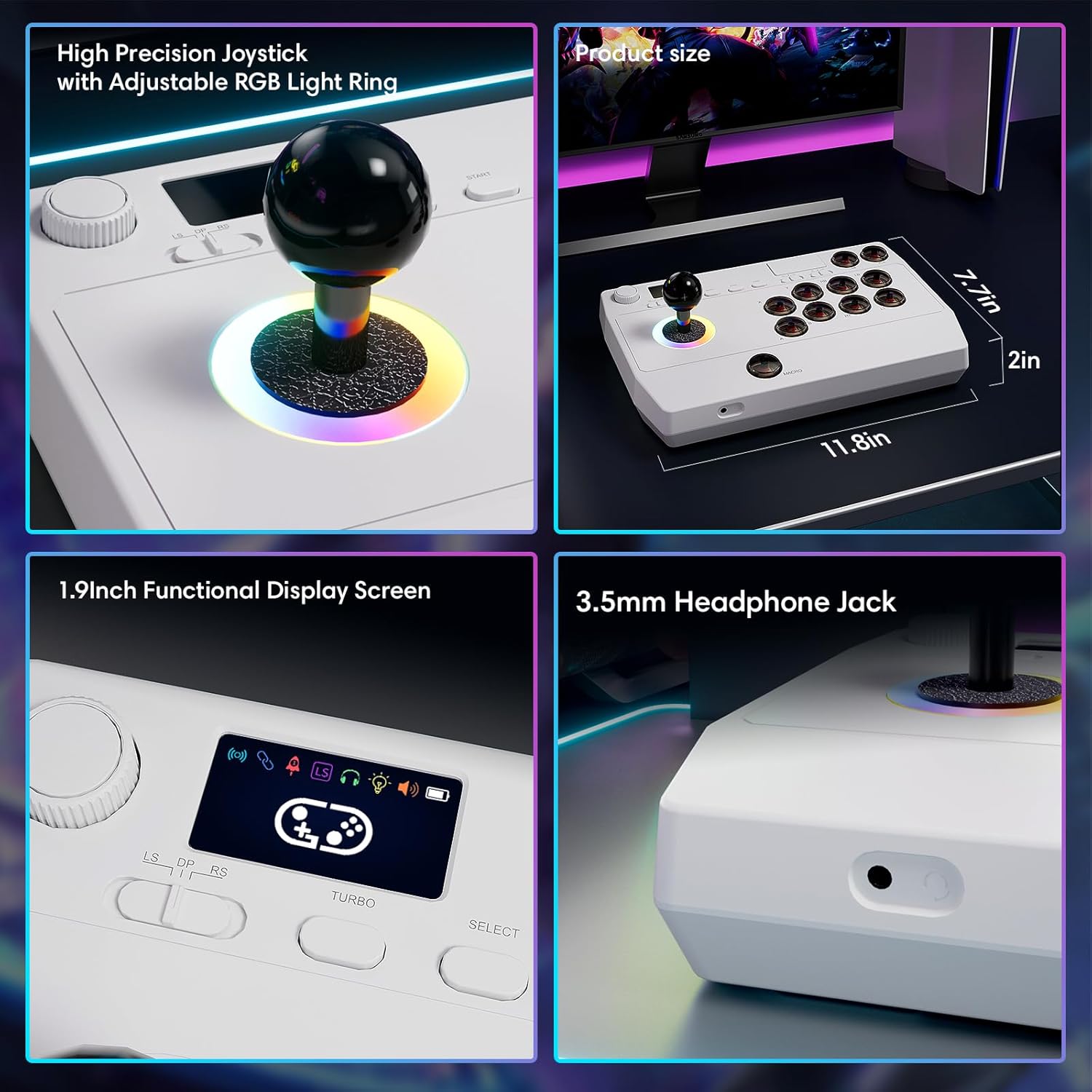
בילד: נאָענט-אַרויף views of the high-precision joystick with RGB lighting, the 1.9-inch functional display screen, and the 3.5mm headphone jack.
וישאַלט
- האַלטן די מיטל ריין דורך ווישן עס מיט אַ ווייך, טרוקן שטאָף.
- ויסמיידן יקספּאָוזינג די מיטל צו עקסטרעם טעמפּעראַטורעס, הומידיטי אָדער דירעקט זונשייַן.
- פרובירט נישט צו צענעמען דעם אפאראט, ווייל דאס קען בטל מאכן די גאראנטיע.
- Store the 2.4GHz receiver in its designated compartment when not in use to prevent loss.
טראָובלעשאָאָטינג
- אַפּאַראַט אַרבעט נישט אָן:
- Ensure the device is fully charged. Connect it to a power source using the USB Type-C cable.
- Cannot connect wirelessly:
- For Bluetooth, ensure the device is in pairing mode and your host device's Bluetooth is enabled.
- For 2.4GHz, ensure the receiver is securely plugged into a USB port and the arcade stick is in 2.4GHz mode.
- Try restarting both the arcade stick and the host device.
- Buttons or joystick are unresponsive:
- Ensure the device is properly connected (wired or wireless).
- Test the device on a different game or platform to rule out software issues.
- Check for any physical obstructions or damage to the buttons or joystick.
- Audio issues with 3.5mm jack:
- זיכער מאַכן אַז די כעדפאָונז זענען גאָר איינגעשטעקט.
- Check the volume settings on both the arcade stick's display and the host device.
- Test with a different pair of headphones.
ספּעסאַפאַקיישאַנז
| מאָדעל נאָמען | אַרקאַדע שטעקן |
| סאָרט | סאַיטאַקע |
| קאַמפּאַטאַבאַל דעוויסעס | Android, iOS, Nintendo Switch 1/2, PC, PlayStation 3/4 |
| קאָנטראָללער טיפּ | דזשויסטיק |
| קאַנעקטיוויטי טעכנאָלאָגיע | Bluetooth, USB (2.4GHz wireless, Wired Type-C) |
| נאָך פֿעיִקייטן | Ergonomic, Headphone Jack, Portable, Wireless, 1.9-inch Display Screen, TURBO Function, Macro Function, RGB Lighting |
| ייַזנוואַרג פּלאַטפאָרמע | דעסקטאָפּ, גיימינג קאַנסאָול, לאַפּטאָפּ, סמאַרטפאָון, טאַבלעט, טעלעוויזיע |
| מאַכט מקור | Battery Powered (Built-in 1000mAh Lithium Battery) |
| נומער דימענשאַנז | 11.61 X 0.71 X 7.68 אינטשעס |
| קאָליר | ווייַס |
וואָראַנטי און שטיצן
The Saitake Wireless Arcade Fight Stick Joystick comes with a 1 יאָר וואָראַנטי פון די דאַטע פון קויפן.
For technical support, troubleshooting assistance, or warranty claims, please contact Saitake customer service through their official website or the retailer where the product was purchased. Please have your purchase receipt and product model information ready.