
הקדמה
Thank you for choosing the Panana 37-inch Standing Desk Converter. This height-adjustable workstation is designed to transform your existing desk into an ergonomic sit-to-stand setup, promoting better posture and productivity. This manual provides essential information for safe assembly, operation, and maintenance of your new desk converter.

Image: The Panana Standing Desk Converter in use, showcasing its dual-level design with a laptop on the upper platform and a keyboard on the lower tray.
זיכערקייַט אינפֿאָרמאַציע
- לייענען אַלע ינסטראַקשאַנז קערפאַלי איידער פֿאַרזאַמלונג און נוצן.
- נישט איבערשטייגן די מאקסימום וואָג קאַפּאַציטעט פון 33 פונט (15 ק"ג). איבערלאָדן קען פאַרשאַפן אומסטאַביליטעט און שעדיקן.
- Ensure the desk converter is placed on a stable, level surface.
- האַלט הענט און פינגער פריי פון באַוועגלעכע טיילן בעת הייך אַדזשאַסטמענט צו פאַרמייַדן קניפּן.
- Distribute weight evenly on the desktop and keyboard tray.
- Do not allow children to operate or play with the desk converter.
- Regularly check all fasteners to ensure they are tight.
פּעקל אינהאַלט
The Panana Standing Desk Converter arrives almost fully assembled. Please verify that all components are present and undamaged.
- Main Desk Converter Unit (pre-assembled)
- קלאַוויאַטור טרייַ
- Mounting Hardware for Keyboard Tray
- ינסטרוקטיאָן מאַנואַל (דעם דאָקומענט)
סעטאַפּ און אַסעמבלי
The Panana Standing Desk Converter requires minimal assembly. Follow these steps to prepare your workstation:
- ופשליסן די אַפּאַראַט: Carefully remove the main desk converter unit and the keyboard tray from its packaging.
- צוטשעפּען די קלאַוויאַטור טאַץ:
- Locate the pre-drilled holes on the underside of the main unit and on the keyboard tray.
- Align the keyboard tray with the attachment points.
- Secure the keyboard tray using the provided mounting hardware (screws). Ensure it is firmly attached.
- Position on Desk: שטעלט דעם צוזאמענגעשטעלטן טיש קאָנווערטער אויף אייער עקזיסטירנדיקן טיש. מאַכט זיכער אַז עס איז צענטרירט און סטאַביל.
- צוגרייטן עקוויפּמענט: Place your monitors, laptop, and other office essentials on the top platform. Position your keyboard and mouse on the lower tray.

Image: The desk converter highlighting its height-adjustable feature and ease of assembly.
אַפּערייטינג ינסטראַקשאַנז
The Panana Standing Desk Converter features a gas spring lift system for smooth height adjustments.
- אַדזשאַסטינג הייך:
- To raise the desk: Gently squeeze the adjustment levers located on the sides of the top platform. While holding the levers, lift the platform to your desired standing height. Release the levers to lock it in place.
- To lower the desk: Gently squeeze the adjustment levers. While holding the levers, apply slight downward pressure to lower the platform to your desired sitting height. Release the levers to lock it in place.
- אָפּטימאַלע ערגאָנאָמיקס:
- When standing, ensure your monitor is at eye level and your elbows are at a 90-degree angle when typing.
- When sitting, maintain good posture with your feet flat on the floor and your back supported.

Image: Illustration of the strong gas spring system enabling smooth height transitions.
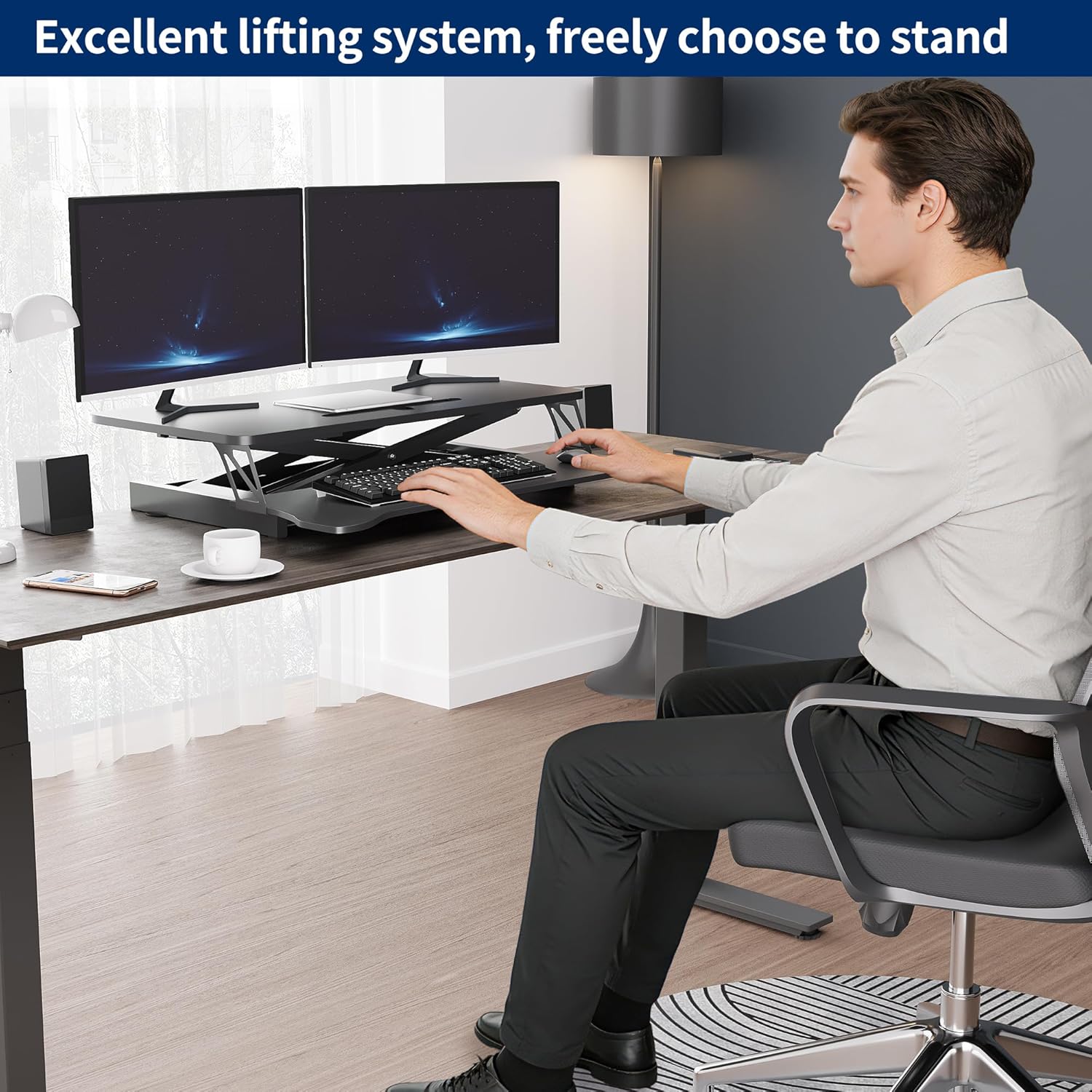
Image: User demonstrating the desk converter in a sitting position.

Image: The desk converter in a standing position, accommodating dual monitors and a laptop.
וישאַלט
To ensure the longevity and proper function of your Panana Standing Desk Converter, follow these simple maintenance guidelines:
- רייניקונג: ווישט די ייבערפלאַכן מיט אַ טרוקענעם שטאָף. פֿאַרמייַדט אַברייסיוו רייניקונגסמיטלען אָדער שטרענגע כעמיקאַלן וואָס קענען שאַטן די ענדיקונג.
- דורכקוק: קאָנטראָלירט פּעריִאָדיש אַלע שרויפֿן און פֿאַרבינדונגען צו זיכער מאַכן אַז זיי בלייבן פֿעסט. פֿעסטשטעלט אַלע לויזע פֿעסטערס ווי נויטיק.
- באַוועגונג: Ensure the gas spring mechanism operates smoothly. If you notice any stiffness, ensure no obstructions are present.
טראָובלעשאָאָטינג
| פּראָבלעם | מעגלעך סיבה | לייזונג |
|---|---|---|
| Desk is difficult to raise or lower. |
|
|
| Desk feels unstable or wobbly. |
|
|
| Keyboard tray is loose. |
|
|
ספּעסאַפאַקיישאַנז
| סאָרט: | Panana |
| מאָדעל נאָמען: | שטייענדיק דעסק קאָנווערטער |
| מאָדעל נומער: | BOCDLYXMJ |
| קאָליר: | שוואַרץ |
| גרייס: | 37 אינטשעס |
| פּראָדוקט גרייסן (ד x ב x ה): | 39.9D x 94W x 50.8H centimetres (15.7D x 37W x 20H inches) |
| הייך אַדזשאַסטמאַנט קייט: | 5.1 אינטשעס צו 20 אינטשעס (13 סענטימעטער צו 50.8 סענטימעטער) |
| וואָג קאַפּאַציטעט: | אַרויף צו 33 לבס (15 קג) |
| מאַטעריאַל: | אינזשענירטע האָלץ, צומיש שטאָל |
| פֿעיִקייטן: | Adjustable Height, Keyboard Tray Included, Monitor Stand, Gas Spring Lift System |
| אַסעמבלי פארלאנגט: | יא (מינימאל) |
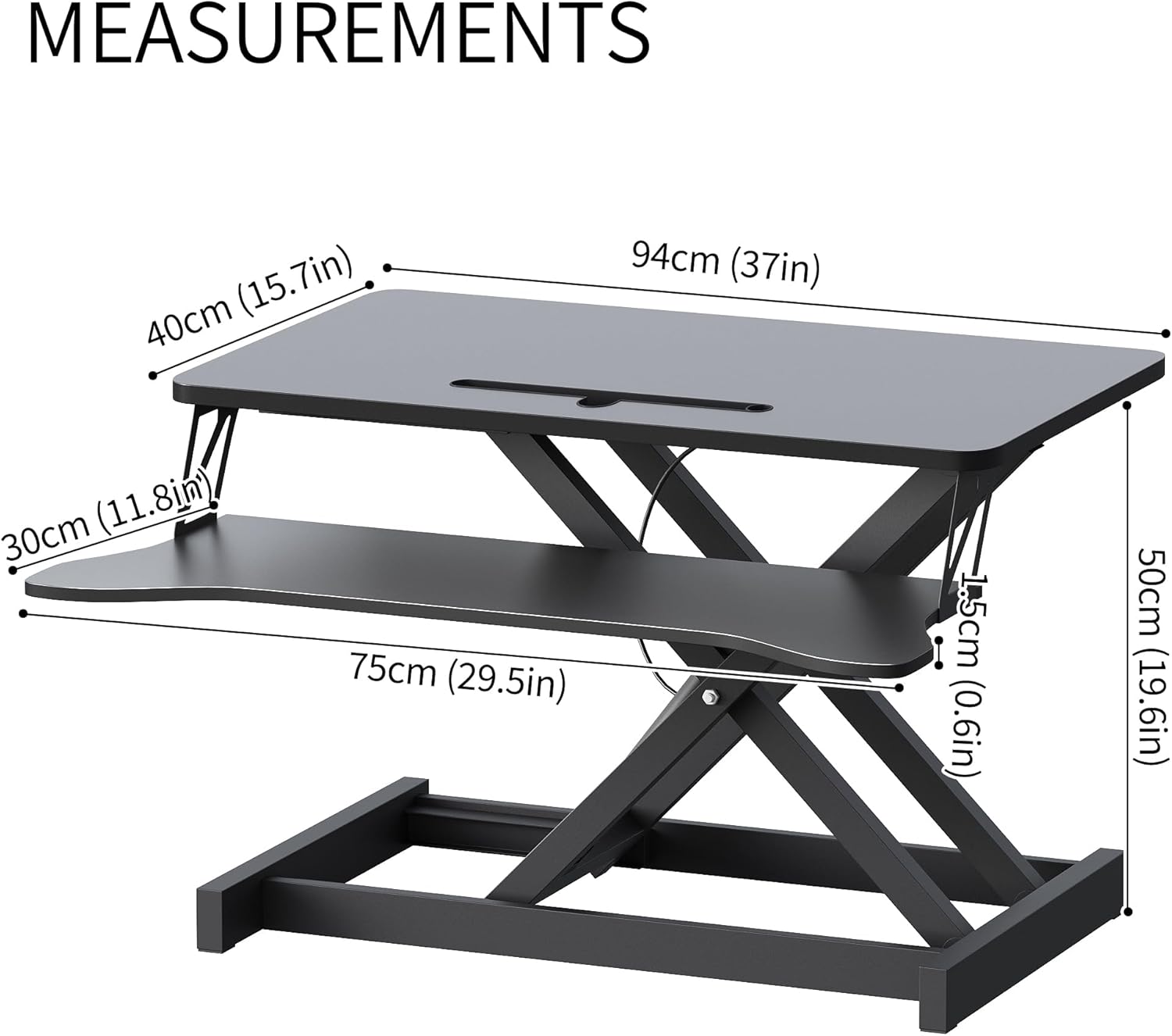
Image: Detailed measurements of the desk converter's dimensions.

Image: Visual representation of the desk converter's quality features, including rounded corners, sturdy metal bracket, smooth tabletop, and stable non-slip pads.
וואָראַנטי און שטיצן
Panana is committed to providing high-quality products. For specific warranty information or technical support, please refer to the warranty card included with your purchase or contact Panana customer service through the retailer where the product was purchased.
ביטע באַהאַלטן אייער קויפן-באַווייַז פֿאַר יעדע וואָראַנטי-פאָדערונג.