
1. הקדמה
Thank you for choosing the YINYOO KZ ZS12 PRO 2 USB C Wired Headphones. These in-ear monitors are designed to deliver high-fidelity audio with a multi-driver configuration and ergonomic comfort. This manual provides essential information for proper setup, operation, and maintenance to ensure optimal performance and longevity of your headphones.
2. פּראָדוקט איבערview
The KZ ZS12 PRO 2 headphones feature an advanced hybrid acoustic architecture designed for clear and immersive sound across various applications, from gaming to music listening.
שליסל פֿעיִקייטן:
- Dual-Sided 10* BA Driver Setup: Each side houses 4*31736 ultra-high frequency balanced armatures and 1*30019 mid-high frequency unit for seamless separation and detailed reproduction across frequencies.
- Powerful Dynamic Driver: Equipped with 1* 10mm ultra-low frequency dynamic driver with an optimized magnetic circuit and refined diaphragm design for exceptional bass depth and extension.
- Built-In Electronic Crossover Board: Ensures precise frequency division between dynamic and balanced armature drivers, minimizing interference and maximizing hybrid performance.
- Game-Ready Precision: Offers precise sound imaging, powerful transient response, and superior dynamics, ideal for competitive gaming.
- אוניווערסאַלע USB-C קאָמפּאַטאַביליטי: Easily connects to most everyday audio devices including laptops, desktops, tablets, phones, and gaming consoles.
- High-Performance Omnidirectional HD Microphone: Accurately captures voice for clear communication during calls or gaming.
- Balanced Three-Frequency Performance: Meticulously tuned for deep bass, clear mids, and smooth highs.
- Ergonomic Over-Ear Design: Designed to fit the natural curvature of the ear for secure and comfortable fit during long listening sessions.

Figure 2.1: KZ ZS12 PRO 2 USB C Wired Headphones, general product view.

Figure 2.2: KZ ZS12 PRO 2 earbud with hybrid acoustic architecture highlighted.

Figure 2.3: Diagram showing the internal driver breakdown of the KZ ZS12 PRO 2, including 31736 and 30019 balanced armatures and a 10mm dynamic driver.

פיגורע 2.4: דעטאַילעד view of the 10mm ultra-low frequency dynamic driver, highlighting its optimized magnetic circuit and diaphragm.

Figure 2.5: Illustration of the built-in electronic crossover board, responsible for precise frequency division between drivers.
3. פּעקל אינהאַלט
זיכער מאַכן אַז אַלע זאכן זענען פאַראַן ביים אויספּאַקן:
- KZ ZS12 PRO 2 USB C Wired Headphones (1 pair)
- USB-C Cable (with in-line microphone and controls)
- אויער-שפּיצן (פאַרשידענע גרייסן)
- באַניצער מאַנואַל

Figure 3.1: Contents of the KZ ZS12 PRO 2 package.
4. סעטאַפּ
4.1 אנשטעלן דעם קאבל
- Identify the left (L) and right (R) markings on both the earbuds and the cable connectors.
- Align the cable connector with the corresponding earbud. The 2-pin connector should slide in smoothly. Do not force it.
- פאַרזיכערן אַ זיכער קשר.
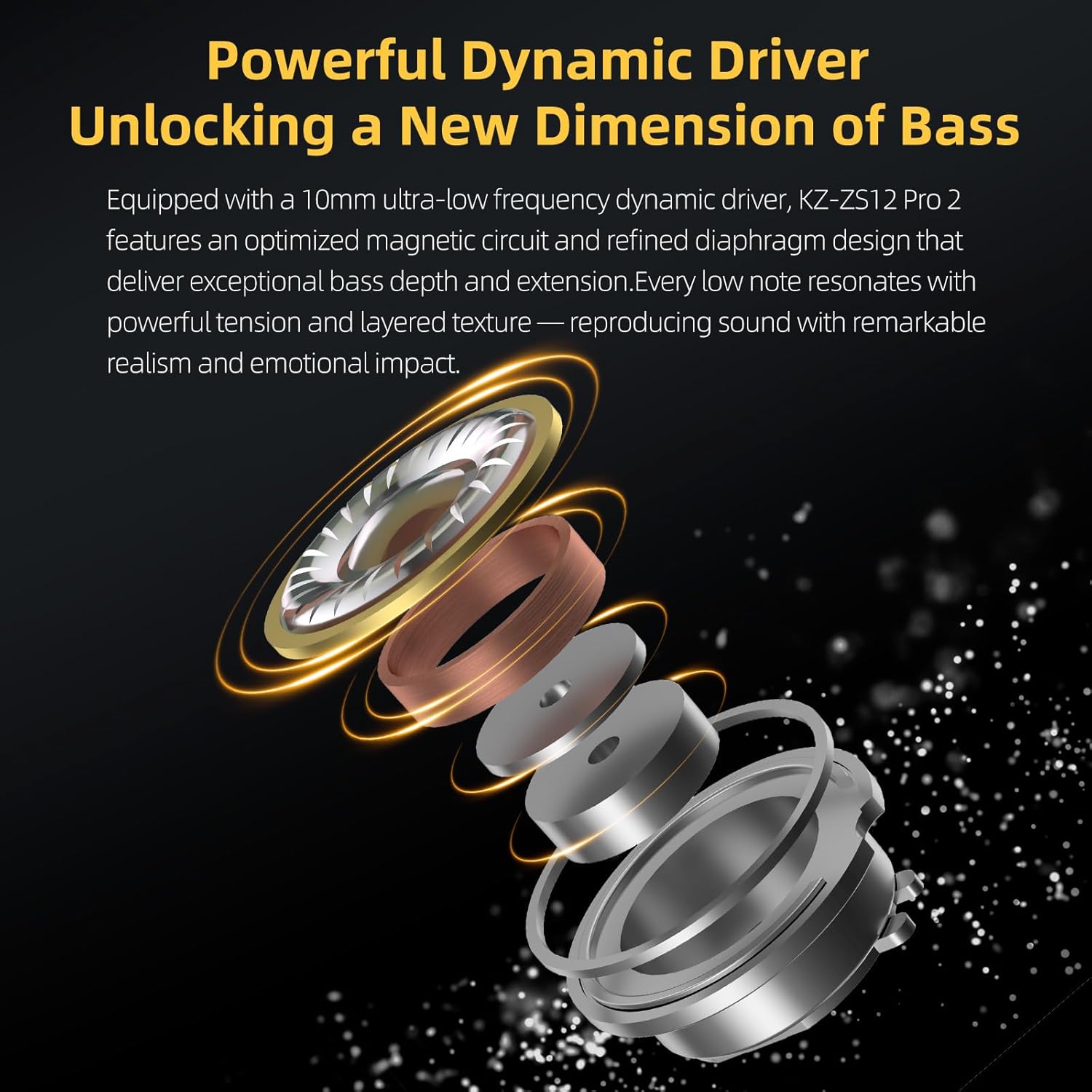
Figure 4.1: KZ ZS12 PRO 2 earbud with detachable cable attached.
4.2 Selecting and Installing Eartips
- Choose the eartip size that provides the best seal and comfort for your ears. A good seal is crucial for optimal sound quality and noise isolation.
- Gently remove the pre-installed eartips by twisting and pulling.
- Push the desired eartips onto the nozzle of the earbuds until they are securely attached.
4.3 טראָגן די כעדפאָונז
The KZ ZS12 PRO 2 features an ergonomic over-ear design for a secure fit:
- Insert the eartips into your ear canals.
- Loop the cable over the top of your ears, ensuring it rests comfortably behind your earlobe.
- Adjust the earbuds for a snug and comfortable fit.
4.4 קאַנעקטינג צו אַ מיטל
Connect the USB-C plug of the headphone cable directly to the USB-C port of your compatible audio device.

Figure 4.2: USB-C digital audio plug for KZ ZS12 PRO 2 headphones.
5. אַפּערייטינג ינסטרוקטיאָנס
5.1 אין-ליניע רימאָוט קאָנטראָל
The in-line remote on the cable provides convenient control over your audio and calls:
- Press once briefly: Play/Pause music, Answer call, Hang up call.
- Press and hold once: אָפּוואַרפן רופן.
- טאָפּל גיט: ווייַטער שפּירט.
- דרוק דריי מאָל אין אַ רודערן: פרייַערדיק שפּירט.

Figure 5.1: In-line remote control functions.
5.2 Sound Modes (Type-C Sound Card Version)
If you have the Type-C sound card version, you can switch between four preset sound modes using the tuning switches:
- Music Equalization Mode: Tri-band natural balance, suitable for various music styles.
- Low-Frequency Enhancement Mode: Deep, powerful low-frequency sounds; prominent instrument sounds.
- Tactical Balance Mode: Clear and precise positioning for gaming (FPS titles).
- פולע מאַכט מאָדע: Louder gunshots, prominent environmental sound effects for immersive gaming.

Figure 5.2: Tuning switches for sound modes.
6. וישאַלט
- רייניקונג: Regularly clean the eartips and earbud nozzles with a soft, dry cloth to prevent wax buildup.
- סטאָרידזש: Store the headphones in a clean, dry place when not in use to prevent tangling and damage.
- קאַבלע זאָרגן: Avoid sharp bends or excessive pulling on the cable to prolong its lifespan.
- וואַסער קעגנשטעל: The headphones are waterproof. However, avoid prolonged exposure to water or submersion.
7. טראָובלעשאָאָטינג
| פּראָבלעם | מעגלעך סיבה | לייזונג |
|---|---|---|
| קיין געזונט | Incorrect connection, low device volume, incompatible device. | Ensure cable is securely attached to earbuds and device. Increase device volume. Verify device compatibility with USB-C audio. |
| נעבעך געזונט קוואַליטעט | Loose eartips, dirty nozzles, damaged cable. | Replace eartips for a better seal. Clean earbud nozzles. Inspect cable for damage; replace if necessary. |
| מיקראָפאָן טוט נישט אַרבעטן | Device settings, cable issue. | Check microphone input settings on your device. Ensure cable is fully inserted. |
| אויערקנעפּלעך פאַלן גרינג אַרויס | Incorrect eartip size, improper wearing. | Try different eartip sizes for a more secure fit. Ensure cable is looped over the ear correctly. |
8. ספּעסאַפאַקיישאַנז
| שטריך | דעטאַל |
|---|---|
| מאָדעל נאָמען | zs12pro2 |
| נומער מאָדעל נומער | LIU9064 |
| סאָרט | YINYOO |
| קאָליר | טונקל |
| אַודיאָ דרייווער טיפּ | Hybrid Driver (5BA + 1DD) |
| כעדפאָונז דזשאַק | וסב-C |
| קאַנעקטיוויטי טעכנאָלאָגיע | ווייערד |
| ראַש קאָנטראָל | געזונט אפגעזונדערטקייט |
| סענסיטיוויטי | 109 דב |
| ימפּידאַנס | 35 אָהמס |
| מאַטעריאַל | Metal faceplate and resin shell |
| קאַבלע שטריך | דעטאַטשאַבלע |
| וואַסער קעגנשטעל מדרגה | וואָטערפּרוף |
| פּונקט וואָג | 2.65 אונסעס |
| פּעקל דימענשאַנז | 3.7 X 2.95 X 1.34 אינטשעס |

Figure 8.1: Technical specifications for KZ ZS12 PRO 2 headphones.
9. אפיציעלע פּראָדוקט ווידעאָס
Video 9.1: Official unboxing video for the KZ ZS12 PRO 2 headphones, demonstrating the contents and initial appearance.
ווידעא 9.2: אפיציעלע ווידעא שאוasing the KZ ZS12 PRO 2 Type-C wired headphones in use, highlighting their design and connectivity.
10. וואָראַנטי און שטיצן
Your YINYOO KZ ZS12 PRO 2 headphones come with a standard 30-day refund/replacement return policy. For specific warranty details, technical support, or service inquiries, please refer to the warranty card included in your package or contact YINYOO Audio directly through their official channels or the retailer where the product was purchased.
פֿאַר נאָך הילף, קענט איר באַזוכן די YINYOO Store on Amazon.