
הקדמה
This manual provides detailed instructions for the setup, operation, maintenance, and troubleshooting of your Autel MaxiSys MS909 S2 Diagnostic Scanner. Please read this manual thoroughly before using the device to ensure proper and safe operation.
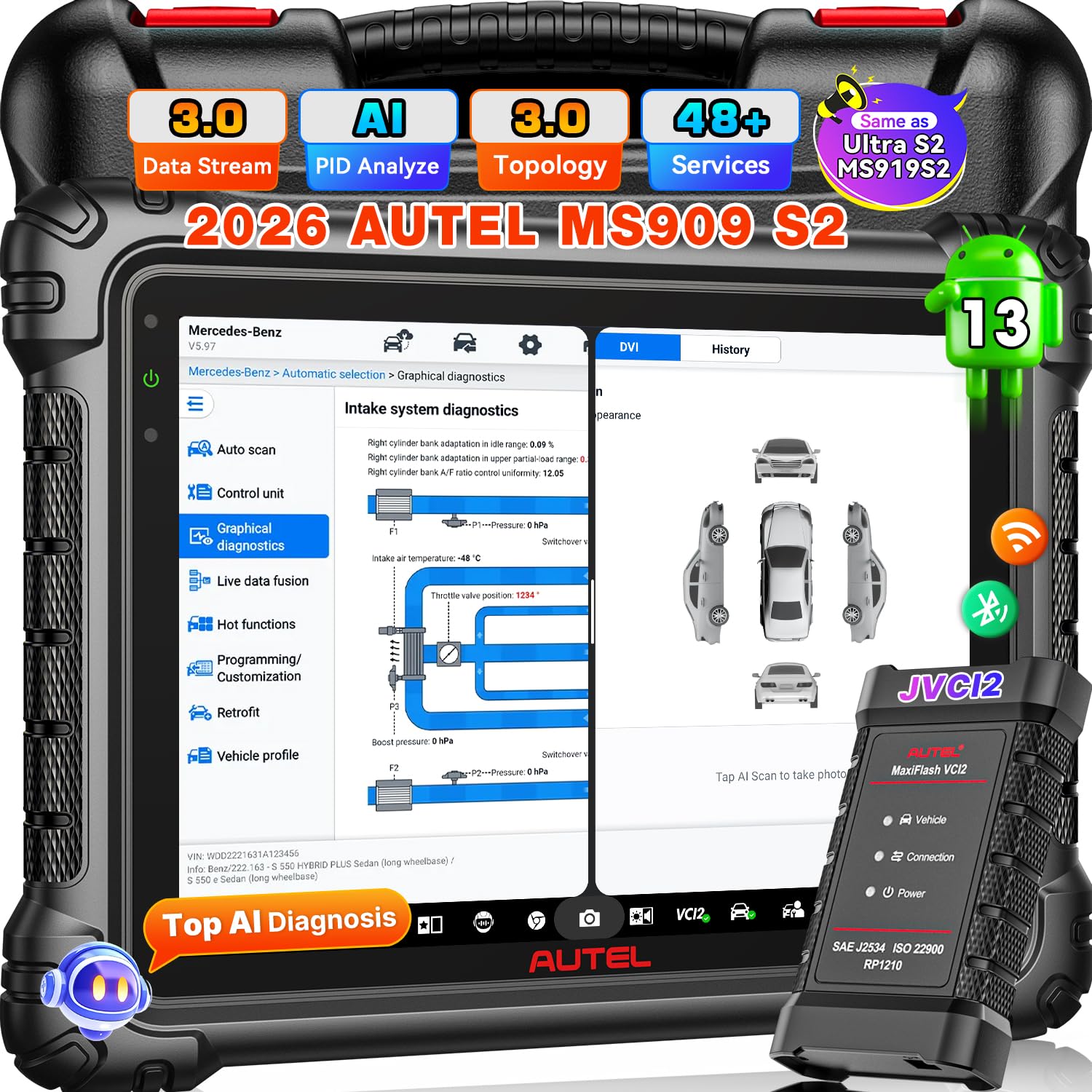
Image: Autel MaxiSys MS909 S2 Diagnostic Scanner with its main components.
סעטאַפּ
1. אַנפּאַקקינג און ערשט דורכקוק
Carefully unpack all items from the carrying case. Verify that all components listed below are present and undamaged. If any items are missing or damaged, contact customer support.
אַרייַנגערעכנט קאַמפּאָונאַנץ:
- Autel MaxiSys MS909 S2 Diagnostic Scan Tool
- MaxiFlash VCI (Vehicle Communication Interface)
- מאַכט אַדאַפּטער
- וסב קאַבלע
- באַניצער מאַנואַל (דעם דאָקומענט)
- קעריינג קאַסע

Image: A visual representation of the complete accessory list included with the Autel MaxiSys MS909 S2.
2. טשאַרדזשינג די מיטל
Connect the power adapter to the scan tool and a power outlet. Allow the device to charge fully before first use. The battery indicator on the screen will show charging status.
3. אײַנצושאַלטן און ערשטע קאָנפיגוראַציע
Press and hold the power button to turn on the device. Follow the on-screen prompts to complete the initial setup, including language selection, time zone, and Wi-Fi connection. Ensure a stable internet connection for software updates.
4. ווייכווארג דערהייַנטיקונגען
It is recommended to update the software to the latest version upon initial setup. Navigate to the 'Update' section on the main menu and download any available updates. The MS909 S2 includes 2 years of free software updates.
אַפּערייטינג ינסטראַקשאַנז
The Autel MaxiSys MS909 S2 is an advanced diagnostic tool designed for comprehensive vehicle analysis and maintenance. It operates on Android 13 and features a 2.7G 8-core processor for fast performance.

בילד: איבערview of the Autel MaxiSys MS909 S2 highlighting its AI features and enhanced hardware specifications.
1. זיך פֿאַרבינדן צו אַ פֿאָרמיטל
Connect the MaxiFlash VCI to the vehicle's OBD-II port. Connect the VCI to the MS909 S2 via Bluetooth or USB cable. The device will automatically establish communication with the vehicle.
2. דיאַגנאָסטישע פונקציעס
The MS909 S2 offers a wide range of diagnostic capabilities:
- OE All System Diagnosis: Perform comprehensive scans of all available vehicle systems (e.g., Engine, ABS, Airbag, Transmission).
- אויטאָ סקען 3.0: Quickly identify vehicle information and perform a full system scan.
- לייענען/אויסמעקן קאָדן: צוריקקריגן און אויסמעקן דיאַגנאָסטיק פּראָבלעם קאָודז (DTCs).
- Live Data Fusion: View real-time data parameters from multiple systems simultaneously for dynamic analysis.
- Enhanced PID Analysis: Visualize multiple parameters, detect system anomalies, and compare pre/post-repair data.

Image: Depiction of the OE Full System Diagnosis capability of the MS909 S2.
3. אַוואַנסירטע פֿעיִקייטן
- טאָפּאָלאָגיע מאַפּינג 3.0: Provides an OE-style system analysis, visual ECU mapping, and color-coded module status for quick fault identification.
- מאָטאָר טרוספּיד רעפּאַר: Access verified OEM-grade repair data, including procedures, wiring diagrams, DTCs, and specifications. (Note: This feature is optional and may require an additional subscription for US and Canada regions).
- ECU פּראָגראַמירן און קאָדירן: Program blank ECUs, reflash modules, and perform online coding for specific BMW, Mercedes-Benz, Audi, Porsche, VW, Infiniti, and Hyundai vehicles.
- 48+ סערוויס פונקציעס: Perform various maintenance services such as Oil Reset, EPB Reset, BMS Reset, SAS Reset, Throttle Reset, ABS Bleed, and more.
- 3000+ Bidirectional Control: Actuate vehicle components directly from the scanner to test their functionality.
- Multi-Point Digital Vehicle Inspection (DVI): Utilize AI-powered image analysis for dent/scratch detection and integrate with Autel TBE200/ITS600 for tire analysis.
- MAX Virtual Assistant: Use voice commands for hands-free navigation, system scans, and accessing maintenance tasks.
- Split-Screen Diagnostic: View multiple applications or data streams simultaneously for enhanced comparison and analysis.

Image: Illustration of Smart Topology Map 3.0 and Motor TruSpeed Repair functionalities.

Image: Demonstrates the extensive active test capabilities and OE ECU programming/coding features.
4. פאָרמיטל קאַווערידזש און פּראָטאָקאָלן
The MS909 S2 supports a wide range of vehicles, including 95% of post-2000 models and 85% of post-2019 models, with support for some 2026 production models. It incorporates new DOIP and CAN FD protocols for enhanced compatibility.
- FCA AutoAuth & SFD: Provides access to protected functions for 2017 & later FCA vehicles (Chrysler, Dodge, Jeep, Alfa Romeo, Fiat). (Note: FCA Auto Auth is for US, Canada, Mexico).
וישאַלט
1. ווייכווארג דערהייַנטיקונגען
Regularly check for and install software updates to ensure optimal performance, access to new features, and expanded vehicle coverage. Updates are available for 2 years free of charge.
2. רייניקונג און סטאָרידזש
האַלטן די מיטל ריין דורך ווישן עס מיט אַ ווייך, דamp cloth. Avoid using abrasive cleaners or solvents. Store the scanner in its carrying case in a dry, cool environment away from direct sunlight and extreme temperatures.
3. באַטערי קער
כדי צו פארלענגערן די לעבן פון די באַטעריע, זאָלט איר נישט אָפט אויסלאָדן די באַטעריע. לאָדט דאָס אַפּאַראַט רעגולער אויף, ספּעציעל אויב עס וועט ווערן אַוועקגעלייגט פֿאַר אַ לענגערע צייט.
טראָובלעשאָאָטינג
If you encounter issues with your Autel MaxiSys MS909 S2, refer to the following common problems and solutions:
- מיטל נישט פּאַוערינג אויף: Ensure the battery is charged. Connect the power adapter and try again. If the issue persists, contact customer support.
- VCI Malfunction: Check the connection between the VCI and the vehicle, and between the VCI and the scanner. Ensure the VCI is powered on.
- רעגיסטראַציע פּראָבלעמען: Verify your internet connection. Double-check your registration details. If problems persist, contact Autel customer support.
- פונקציע נישט געשטיצט: Vehicle compatibility varies by function. Ensure the vehicle model and year are supported for the specific function you are attempting. Consult the vehicle coverage list or contact support with your VIN.
- פּאַמעלעך פאָרשטעלונג: Ensure the device has sufficient storage space. Close unnecessary applications. Perform a software update if available.
ספּעסאַפאַקיישאַנז
| שטריך | באַשרייַבונג |
|---|---|
| סאָרט | Autel |
| מאָדעל | MaxiSys MS909 S2 |
| אָפּערייטינג סיסטעם | אַנדרויד 13 |
| פּראַסעסער | 2.7G 8-core |
| פאַרשטעלן גרייס | 11 אינטשעס |
| פאַרשטעלן האַכלאָטע | 2176*1600 |
| זכּרון | 12 גיגאבייט באַראַן + 256 גיגאבייט ראַם |
| באַטאַרייע קאַפּאַציטעט | 15000 מאַה |
| VCI | Upgraded VCI 2 |
| קאַנעקטיוויטי | Wi-Fi 6 |
| אַפּאַראַט | 16MP Front & 16MP Rear Dual Camera |
| מאַכט מקור | באַטאַרייע פּאַוערד |
| אַוטאָמאָטיווע פּאַסיק טיפּ | וניווערסאַל פּאַסיק |
| פאָרמיטל קאַווערידזש | 95% of post-2000 vehicles, 85% of post-2019 vehicles, some 2026 models. Supports DOIP/CAN FD. |
| UPC | 849438096700 |
| ASIN | B0FXMRS5FR |

Image: A detailed comparison table outlining the specifications of the Autel MS909 S2 against other Autel models.
וואָראַנטי און שטיצן
1. וואָראַנטי אינפֿאָרמאַציע
The Autel MaxiSys MS909 S2 comes with a 1-year manufacturer's warranty from the date of purchase. This warranty covers defects in materials and workmanship under normal use.
2. קונה שטיצן
For technical assistance, warranty claims, or any other inquiries, please contact Autel customer support:
- בליצפּאָסט: AutelStoreOnline@outlook.com
- טעכניש שטיצן: 24/7 professional technical support is available.
- דערהייַנטיקונגען: Enjoy 2 years of free software updates.
- נאָך-סאַלעס סערוויס: Lifetime after-sales service is provided.
- צוריקקער/אויסטוישן: 30-day refund and exchange policy.

Image: Representation of Autel's 24/7 customer support services.