
1. הקדמה
The Saunyoto PM166S Starlink Mini Battery Pack is an all-in-one portable power solution designed specifically for the Starlink Mini. It combines a high-capacity battery with a stable tripod stand, offering extended runtime and versatile usage for outdoor activities, remote work, and off-grid setups. This manual provides essential information for safe and efficient operation of your device.

Image: User working remotely outdoors with the Saunyoto Starlink Mini Battery Pack.
Key features include up to 6 hours of stable real-use runtime with its 166Wh / 45,000mAh high-capacity battery, smart power regulation to prevent voltage drops, and PD fast charging capabilities. Its durable alloy body with a high-carbon fiber tripod is IP67 waterproof and designed for harsh outdoor conditions, operating reliably from -4°F to 140°F.

Image: The Saunyoto Starlink Mini Battery Pack used in various outdoor scenarios.
2. וואָס איז אין דער קעסטל
באַשטעטיקן אַז אַלע זאכן זענען פאַראַן אין דיין פּעקל:
- 1x Saunyoto Starlink Mini Battery Pack (PM166S)
- 1x DC Cable
- 1x USB-C קאַבלע
- 1x פּאָרטאַטיוו סטאָרידזש באַג
- 1x באַניצער מאַנואַל

Image: All components included in the Saunyoto Starlink Mini Battery Pack package.
3. סעטאַפּ
The Saunyoto PM166S is designed for quick and easy setup without the need for additional tools.
3.1 Deploying the Tripod Stand
- Locate the button at the base of the battery pack.
- Press the button to release and deploy the integrated tripod legs. The legs will extend to provide a stable base.

Image: Detail of the tripod deployment button and ports.
3.2 Attaching the Starlink Mini
The battery pack features a mounting mechanism compatible with both 2024 and 2025 versions of the Starlink Mini.
- Align the Starlink Mini dish with the top of the battery pack's stand.
- Gently push the Starlink Mini onto the stand until it clicks securely into place.
- Connect the provided DC cable from the battery pack's DC output port to the Starlink Mini's power input.

Image: Compatibility with different Starlink Mini versions.
3.3 ערשט טשאַרדזשינג
Before first use, it is recommended to fully charge the battery pack. Use the provided USB-C cable and a 60W+ charger (Type-C 65W max input supported). The battery fully recharges in approximately 3 hours.
4. אַפּערייטינג ינסטרוקטיאָנס
4.1 פּאַוערינג אויף / אַוועק
Press the power control button once to turn on the battery pack. The built-in LED display will show the remaining battery level. To turn off, double-press the power button.
4.2 Powering the Starlink Mini
Once the Starlink Mini is attached and connected via the DC cable, power on the battery pack. The smart power regulation system will automatically adjust output based on the Starlink Mini’s real-time power demand, ensuring stable and uninterrupted internet.
The battery pack provides up to 6 hours of stable real-use runtime for the Starlink Mini.
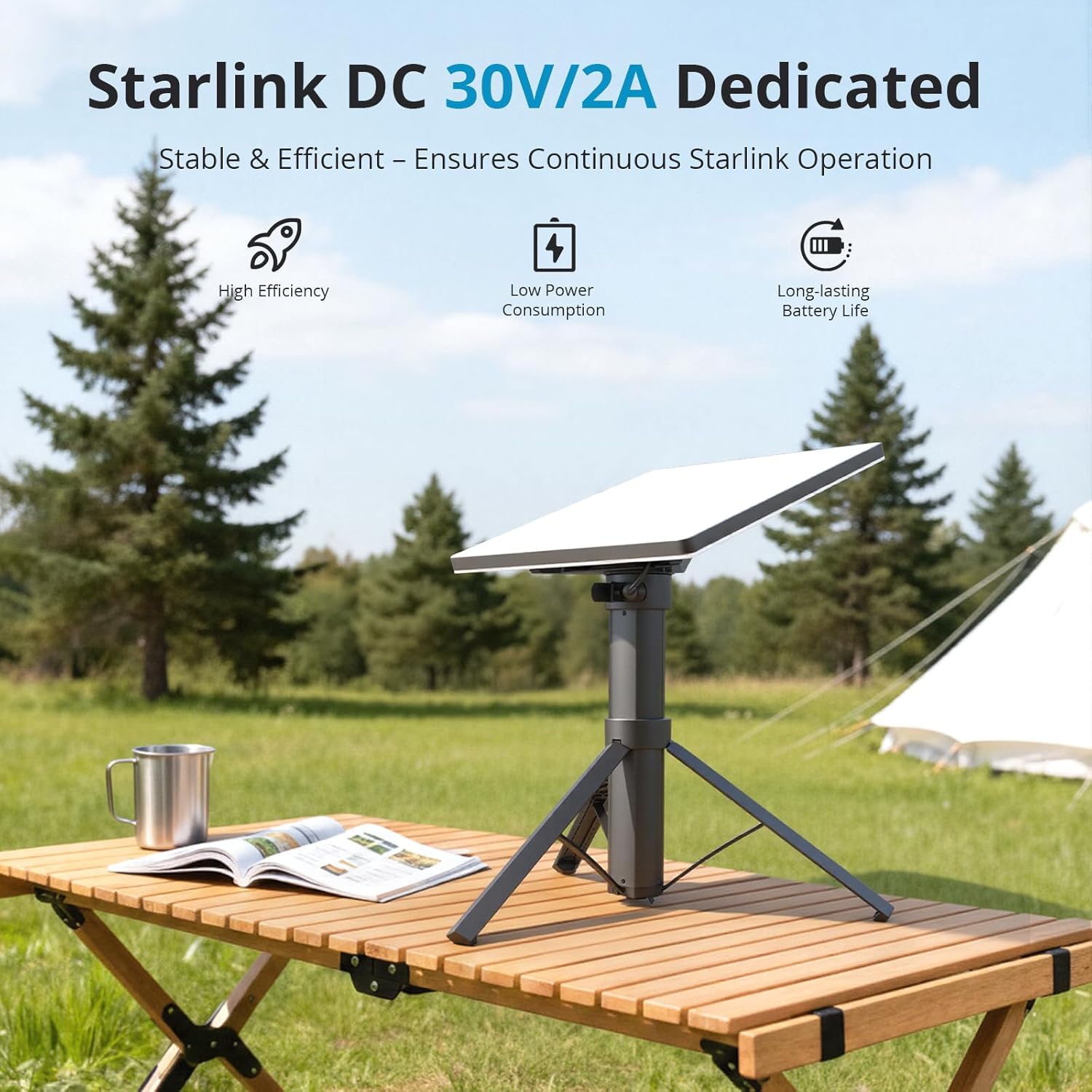
Image: Starlink Mini powered by the Saunyoto battery pack.
4.3 אויפלאָדן אַנדערע דעוויסעס
In addition to powering the Starlink Mini, the battery pack offers a Type-C 65W PD output for charging other USB-C devices such as laptops, phones, or cameras. The total output is up to 100W max, with priority given to the Starlink Mini for stable internet performance.
4.4 באַטערי לעוועל ינדיקאַטאָר
The built-in LED display on the battery pack shows the remaining battery percentage and real-time power input/output for both USB-C and DC ports.
Video: A brief showcase of the Starlink Mini Power Bank's features and functionality.
5. וישאַלט
Proper maintenance ensures the longevity and optimal performance of your Saunyoto PM166S Starlink Mini Battery Pack.
5.1 רייניקונג
- ווישן די יקסטיריער מיט אַ ווייך, טרוקן שטאָף.
- Avoid using harsh chemicals or abrasive materials that could damage the finish or waterproof seals.
5.2 סטאָרידזש
- האַלט די באַטעריע פּאַק אין אַ קיל, טרוקן אָרט אַוועק פון דירעקט זונשייַן און עקסטרעמע טעמפּעראַטורן.
- For long-term storage, ensure the battery is charged to approximately 50-70% to preserve battery health.
- Use the provided portable storage bag for protection during transport and storage.
5.3 Temperature Considerations
The device is designed to work reliably from -4°F to 140°F. In low outdoor temperatures, preheat the device indoors first for optimal performance.

Image: The battery pack's multiple protections against water and extreme temperatures.
6. טראָובלעשאָאָטינג
If you encounter issues with your Saunyoto PM166S, refer to the following common troubleshooting steps:
6.1 דיווייס גייט נישט אן
- Ensure the battery pack is sufficiently charged. Check the LED indicator.
- Press the power button firmly once. If it doesn't turn on, try charging the device.
6.2 Starlink Mini Connection Issues
- Verify that the DC cable is securely connected to both the battery pack and the Starlink Mini.
- Ensure the battery pack has enough charge and is powered on.
- The smart power regulation prevents voltage drops, but ensure the battery is not critically low.
6.3 Slow Charging or Discharging
- For optimal charging, use a 60W+ Type-C charger.
- Ensure the cables used are in good condition and support fast charging.
- If charging multiple devices, the total output is capped at 100W, and Starlink Mini receives priority. This may affect charging speed for other devices.
7. ספּעסאַפאַקיישאַנז
| שטריך | באַשרייַבונג |
|---|---|
| מאָדעל נומער | PM166S |
| באַטאַרייע קאַפּאַציטעט | 166 ווה / 45,000 מאַה |
| Starlink Mini Output | DC 30V/2A (60W) |
| וסב-C רעזולטאַט | 65 וואט פּד (מאַקס) |
| גאַנץ רעזולטאַט | 100 וו (מאַקסימום) |
| ריטשאַרדזש צייט | Approx. 3 hours (with 60W+ Type-C charger) |
| Runtime (Starlink Mini) | Up to 6 hours (real-use) |
| וואָטערפּרוף רייטינג | IP67 |
| אַפּערייטינג טעמפּעראַטור | -4°F צו 140°F (-20°C צו 60°C) |
| פּראָדוקט דימענשאַנז | 12.7 X 3.5 X 2.48 אינטשעס |
| פּונקט וואָג | 3.1 פונט |
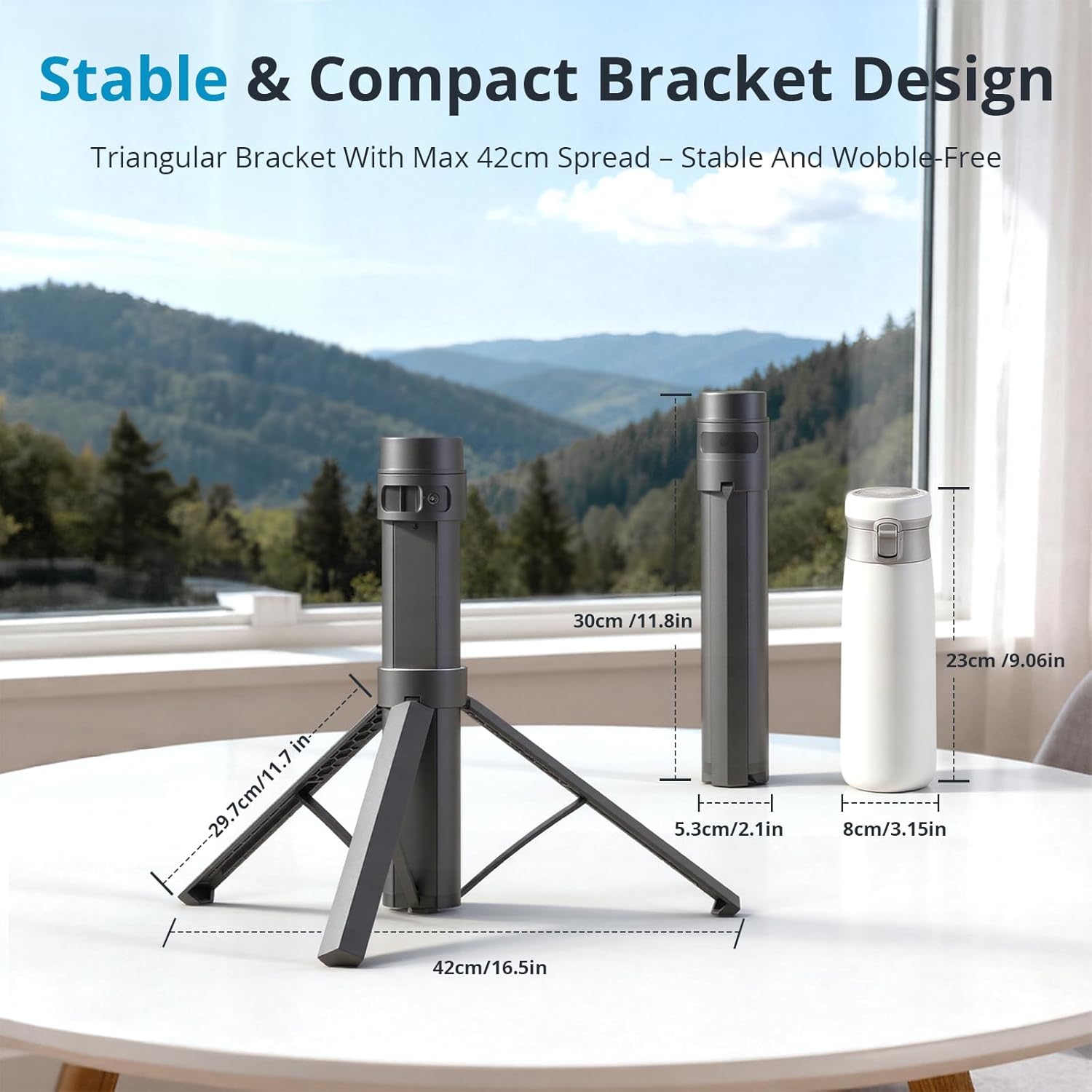
Image: Product dimensions and compact design.

Image: Battery capacity and estimated device runtimes.
8. וואָראַנטי און שטיצן
The Saunyoto PM166S Starlink Mini Battery Pack is backed by a 12-month warranty and Saunyoto's hassle-free support. Additionally, it includes a 1-month satisfaction guarantee, allowing for returns or exchanges if you are not completely satisfied.
For technical assistance, warranty claims, or product inquiries, please contact Saunyoto customer support through the official channels provided in your product packaging or on the Saunyoto webפּלאַץ.