
הקדמה
This manual provides detailed instructions for the safe and efficient operation of your TOOLTOP Silverflo 8586D-III PRO Hot Air Welding and Soldering Station. This 2-in-1 station is designed for SMD and BGA rework, featuring a hot air gun and a soldering iron with dual digital temperature displays and a 10-minute sleep mode.
זיכערקייַט אינפֿאָרמאַציע
ביטע ליינט אלע זיכערהייט ווארענונגען און אינסטרוקציעס קערפול איידער איר ניצט דעם פראדוקט. נישט נאכפאלגן די אינסטרוקציעס קען רעזולטירן אין עלעקטרישן שאק, פייער, אדער ערנסטע שאדן.
- Always operate the station in a well-ventilated area.
- The soldering iron tip and hot air nozzle reach very high temperatures. Avoid direct contact with skin or flammable materials.
- טראָגט פּאַסיקע פּערזענלעכע שוץ-עקוויפּמענט, אַרייַנגערעכנט זיכערהייטס-ברילן.
- Do not use the station near water or in damp באדינגונגען.
- Ensure the power cord is undamaged and properly grounded.
- Unplug the unit from the power source when not in use or before cleaning/maintenance.
- האַלטן אויס פון דערגרייכן פון קינדער.
פּעקל אינהאַלט
באַשטעטיקן אַז אַלע זאכן זענען פאַראַן אין פּעקל:
- 1 x Silverflo 8586D-III PRO Hot Air Welding and Soldering Station (main unit)
- 1 x הייסע לופט ביקס
- 1 x Soldering Iron
- 1 x Soldering Iron Stand with Cleaning Sponge
- 3 x הייסע לופט נאַזאַלז (פאַרשידענע סיזעס)
- קסנומקס X מאַכט קאָרד
- 1 x באַניצער מאַנואַל (דאָס דאָקומענט)
סעטאַפּ
- אויספּאַקן: נעמט פֿאָרזיכטיק אַרויס אַלע קאָמפּאָנענטן פֿון דער פּאַקאַדזשינג. קאָנטראָלירט אויב עס זענען פֿאַראַן שאָדנס.
- אָרט: Place the station on a stable, heat-resistant, and non-flammable surface. Ensure adequate ventilation around the unit.
- פאַרבינדן הייס לופט פּיסטאָל: Plug the hot air gun connector into the designated port on the front panel of the station. Ensure it is securely fastened.
- פאַרבינדן סאָלדערינג אייַזן: Plug the soldering iron connector into its designated port on the front panel. Place the soldering iron in its stand.
- מאַכט קשר: Connect the power cord to the station and then to a grounded electrical outlet.
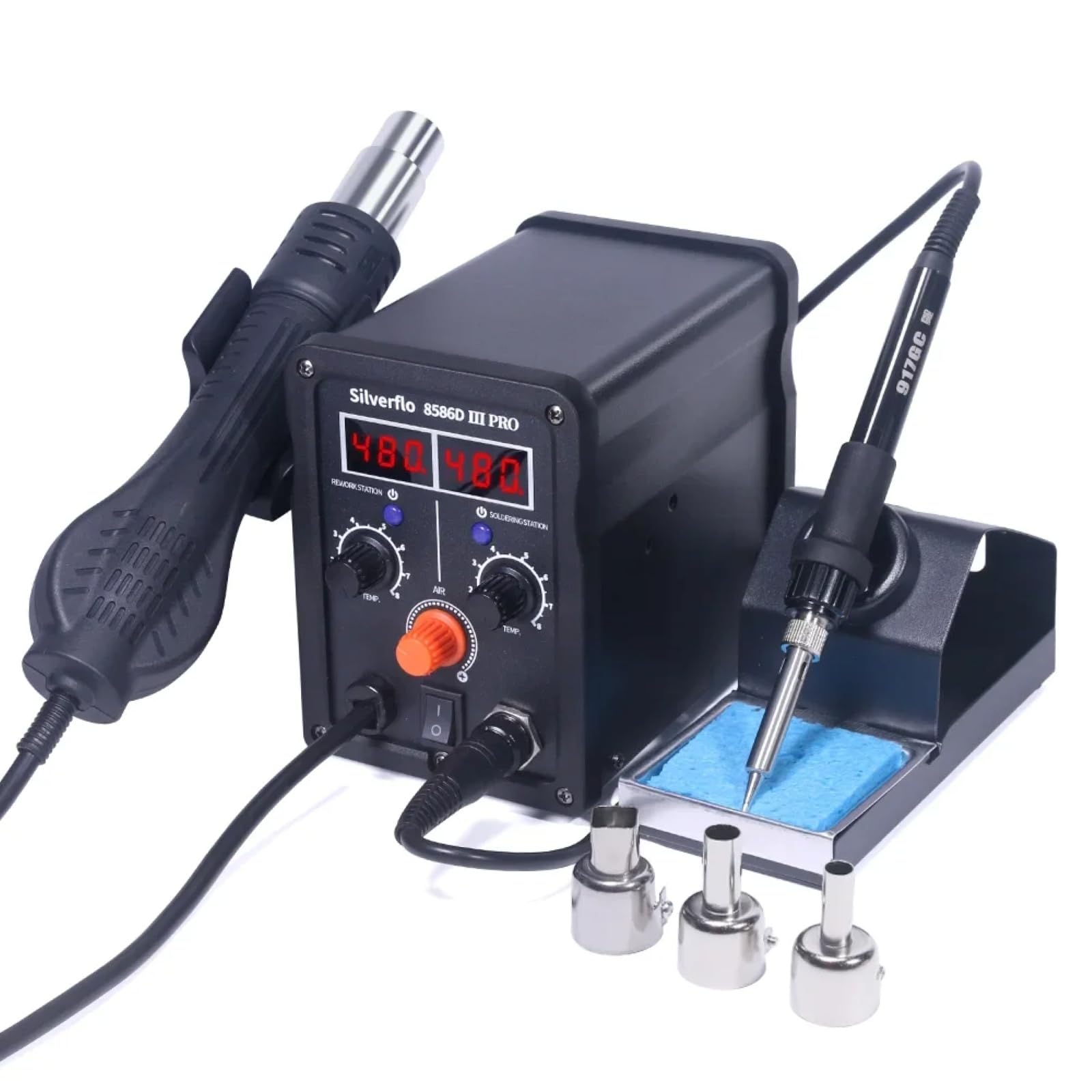
Image: The Silverflo 8586D-III PRO station with its hot air gun and soldering iron connected, ready for use.
אַפּערייטינג ינסטראַקשאַנז
מאַכט אויף / אַוועק
Locate the main power switch on the front panel of the station. Flip the switch to the "ON" position to power on the unit. The digital displays will illuminate. Flip to "OFF" to power down.
טעמפּעראַטור אַדזשאַסטמאַנט

Image: The control panel of the station, highlighting the dual digital temperature displays and the separate adjustment knobs for the hot air gun and soldering iron.
- Hot Air Gun: Use the "TEMP" knob under "REWORK STATION" to adjust the hot air temperature. The corresponding digital display will show the set temperature. Use the "AIR" knob to adjust the airflow.
- לאָטירונג אייַזן: Use the "TEMP" knob under "SOLDERING STATION" to adjust the soldering iron temperature. The corresponding digital display will show the set temperature.

בילד: א דעטאַלירטע view of the 75W soldering iron tip, illustrating its rapid heating capability for efficient work.
שלאָף מאָדע
The station features intelligent sleep modes to conserve energy and prolong component life.

Image: An illustration explaining the 10-minute sleep mode for the soldering iron. If no usage or movement is detected for over 10 minutes, the iron enters sleep mode. To reactivate, simply pick up the iron or adjust its temperature knob.
- 10-Minute Sleep Mode (Soldering Iron): If the soldering iron detects no usage or movement for more than 10 minutes, it will automatically enter sleep mode, reducing its temperature to a safe level. To wake it up, simply pick up the soldering iron or adjust its temperature knob.
- Magnetic Induction Sleep (Hot Air Gun): When the hot air gun is placed in its holder, it will automatically cool down and enter standby mode. Picking it up from the holder will cause it to quickly heat up to the preset temperature.
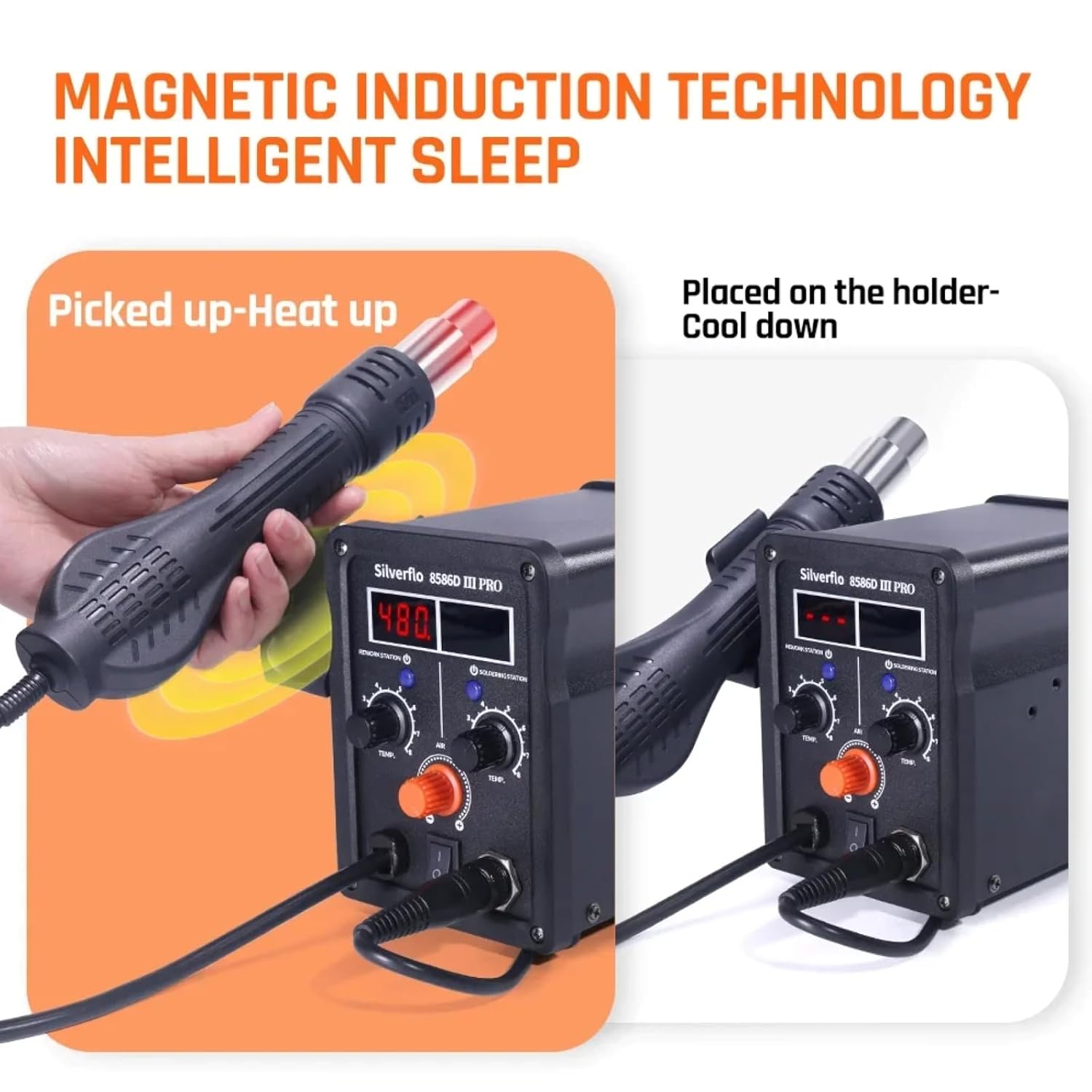
Image: A visual representation of the magnetic induction technology. The hot air gun heats up when picked from its holder and cools down when placed back, ensuring safety and energy efficiency.
דיגיטאַל טעמפּעראַטור קאַלאַבריישאַן
The station supports digital temperature calibration for enhanced accuracy. Refer to the specific instructions in the full manual for the calibration procedure, typically involving an external temperature sensor.

Image: The Silverflo 8586D-III PRO station alongside a digital temperature calibration device, illustrating the capability for precise temperature adjustments.
וישאַלט
- Soldering Iron Tip: רעגולער רייניקט די שפּיץ פון די לאָטעמייַזן מיטן אַרייַנגעשלאָסענעם שוואָם (דampened with water) or brass wool. Tin the tip with solder after each use to prevent oxidation. Replace tips when they become excessively worn or corroded.
- Hot Air Nozzles: זיכער מאַכן אַז די הייסע לופט נאַזאַלז זענען פריי פון שמוץ. רייניקט זיי לײַכט אויב נייטיק.
- איינהייט רייניקונג: Disconnect power before cleaning. Wipe the exterior of the station with a soft, dry cloth. Do not use abrasive cleaners or solvents.
- סטאָרידזש: האַלט די אַפּאַראַט אין אַ טרוקן, שטויב-פֿרייער סביבה ווען נישט אין באַנוץ.
טראָובלעשאָאָטינג
| פּראָבלעם | מעגלעך סיבה | לייזונג |
|---|---|---|
| Station does not power on. | קיין שטראָם צושטעל; שטראָם אויסשליס; דעפעקטיווע שטראָם שנור. | קאָנטראָלירט די עלעקטרישע ווענטיל; מאַכט זיכער אַז די מאַכט קנעפּל איז אויף; קאָנטראָלירט די מאַכט שנור פֿאַר שעדיקן. |
| לאָט אייַזן ווערט נישט וואַרעם. | Iron in sleep mode; Loose connection; Faulty heating element. | Pick up iron or adjust temperature; Check iron connection; Contact support if element is faulty. |
| Hot air gun not heating or no airflow. | Gun not picked up from holder; Loose connection; Airflow knob set to minimum. | Pick up gun from holder; Check gun connection; Adjust AIR knob. |
| Inaccurate temperature display. | דאַרף קאַליבראַציע; סענסאָר פּראָבלעם. | Perform digital temperature calibration; Contact support if issue persists. |
ספּעסאַפאַקיישאַנז
| שטריך | דעטאַל |
|---|---|
| מאָדעל | TT-Silverflo 8586D-III |
| רייטאַד מאַכט | 780 וו |
| סאָלדערינג אייַזן מאַכט | 75 וו |
| סאָלדער אייַזן טעמפּעראַטור קייט | 200°C ~ 480°C (392°F ~ 896°F) |
| הייס לופט ביקס טעמפּעראַטור קייט | 100°C ~ 480°C (212°F ~ 896°F) |
| ווייַז טיפּ | צווייענדיק דיגיטאַל ווייַז |
| שלאָף מאָדע | 10-Minute (Soldering Iron), Magnetic Induction (Hot Air Gun) |
| סערטיפיקאַטיאָנס | CE, RoHS |
| מאַכט צושטעלן וואָלtage | 120VUS, 220VEU, 230VUK, 240VAU (Specific to region) |
וואָראַנטי
This TOOLTOP Silverflo 8586D-III PRO Hot Air Welding and Soldering Station comes with a 1 יאָר וואָראַנטי from the date of purchase. This warranty covers manufacturing defects and workmanship under normal use. It does not cover damage caused by misuse, accident, unauthorized modification, or improper maintenance. Please retain your proof of purchase for warranty claims.
שטיצן
For technical assistance, troubleshooting beyond this manual, or warranty inquiries, please contact TOOLTOP customer support. Refer to the product packaging or the official TOOLTOP webזייטל פֿאַר די מערסט אַקטועלע קאָנטאַקט אינפֿאָרמאַציע.
Webפּלאַץ: www.tooltop.com
בליצפּאָסט: support@tooltop.com