
1. הקדמה
This manual provides instructions for the safe and effective operation, maintenance, and troubleshooting of your TOOLTOP 928D-III 110W Digital Temperature Adjustable Electric Soldering Iron. Please read this manual thoroughly before using the device to ensure proper function and safety.
The TOOLTOP 928D-III is a high-power electric soldering iron designed for various soldering applications. It features an adjustable digital temperature display, rapid heating, and intelligent functions such as sleep mode and temperature correction.
2. זיכערקייַט אינסטרוקציעס
ווארענונג: נישט נאכפאלגן די זיכערהייט אינסטרוקציעס קען רעזולטירן אין עלעקטרישן שאק, פייער, אדער ערנסטע שאדן.
- טראָגט שטענדיק פּאַסיקע פּערזענלעכע שוץ-אויסריכטונג, אַרייַנגערעכנט זיכערהייטס-ברילן, ווען איר אַפּערירט דעם סאָלדער-אייזן.
- Ensure the work area is well-ventilated to avoid inhaling solder fumes. Use a fume extractor if possible.
- Do not touch the soldering iron tip or heating element when the iron is powered on or cooling down, as temperatures can reach up to 480°C (896°F).
- שטעלט שטענדיק דעם לאָט-אייזן אין זײַן באַשטימטן שטאַנד ווען ער איז נישט אין באַנוץ.
- האַלט דעם סאָלדערייַזן אַוועק פון ברענענדיקע מאַטעריאַלן.
- Do not use the soldering iron near water or in damp באדינגונגען.
- Unplug the soldering iron from the power outlet when not in use or before performing maintenance.
- Do not modify the soldering iron or use it for purposes other than soldering.
- האַלטן אויס פון דערגרייכן פון קינדער.
3. פּראָדוקט איבערview און קאַמפּאָונאַנץ
Familiarize yourself with the various parts of your soldering iron.

בילד: איבערview of the TOOLTOP 928D-III soldering iron, highlighting its adjustable temperature, LED digital display, sleep function, temperature correction, C/F switching, and master switch. It also shows the large power heater element and fast heating capability.

Image: Detailed breakdown of the soldering iron components, including the SGS Certified Lead-Free Soldering Iron Tip, Stainless Steel Element Cover, High-Temp. Resistant Bakelite Thread Insert, High-Temperature and Slip Resistant Silicone Grip, Temp. Adjustable Buttons / Functions Switchable Buttons, Master Switch, and Anti-Flex Cable Cover.
- Soldering Iron Tip: The part that heats up and melts solder. Replaceable.
- Stainless Steel Element Cover: Protects the heating element.
- Bakelite Thread Insert: High-temperature resistant component for tip assembly.
- Silicone Grip: Provides a comfortable and heat-resistant hold.
- געפירט דיגיטאַל ווייַז: Shows the current temperature and settings.
- טעמפּעראַטור אַדזשאַסטמאַנט קנעפּלעך: Used to increase or decrease the temperature and navigate functions.
- בעל סוויטש: מאַכט די אַפּאַראַט אויף אָדער אַוועק.
- Anti-Flex Cable Cover: Protects the power cable connection.
4. סעטאַפּ
- אויספּאַקן: Carefully remove all components from the packaging. Ensure all parts listed in the "What's in the Box" section are present.
- טיפּ ינסטאַלירונג: Ensure the desired soldering tip is securely screwed into the heating element. Do not overtighten.
- אָרט: Place the soldering iron in its stand on a stable, heat-resistant surface. Ensure the stand is firm and will not tip over.

Image: A firm and light soldering iron holder with a silicone base for strong adsorption and good stability.
- מאַכט קשר: צאַפּן די מאַכט שנור אין אַ פּאַסיק עלעקטריקאַל ווענטיל.
5. אַפּערייטינג ינסטרוקטיאָנס
- מאַכט אויף: Flip the Master Switch to the "ON" position. The LED digital display will illuminate.
- טעמפּעראַטור אַדזשאַסטמאַנט:
- ניצן די Up און אַראָפּ arrow buttons to adjust the desired temperature. The temperature range is typically 90°C to 480°C (194°F to 896°F).
- The iron heats rapidly, reaching 300°C in approximately 18 seconds.
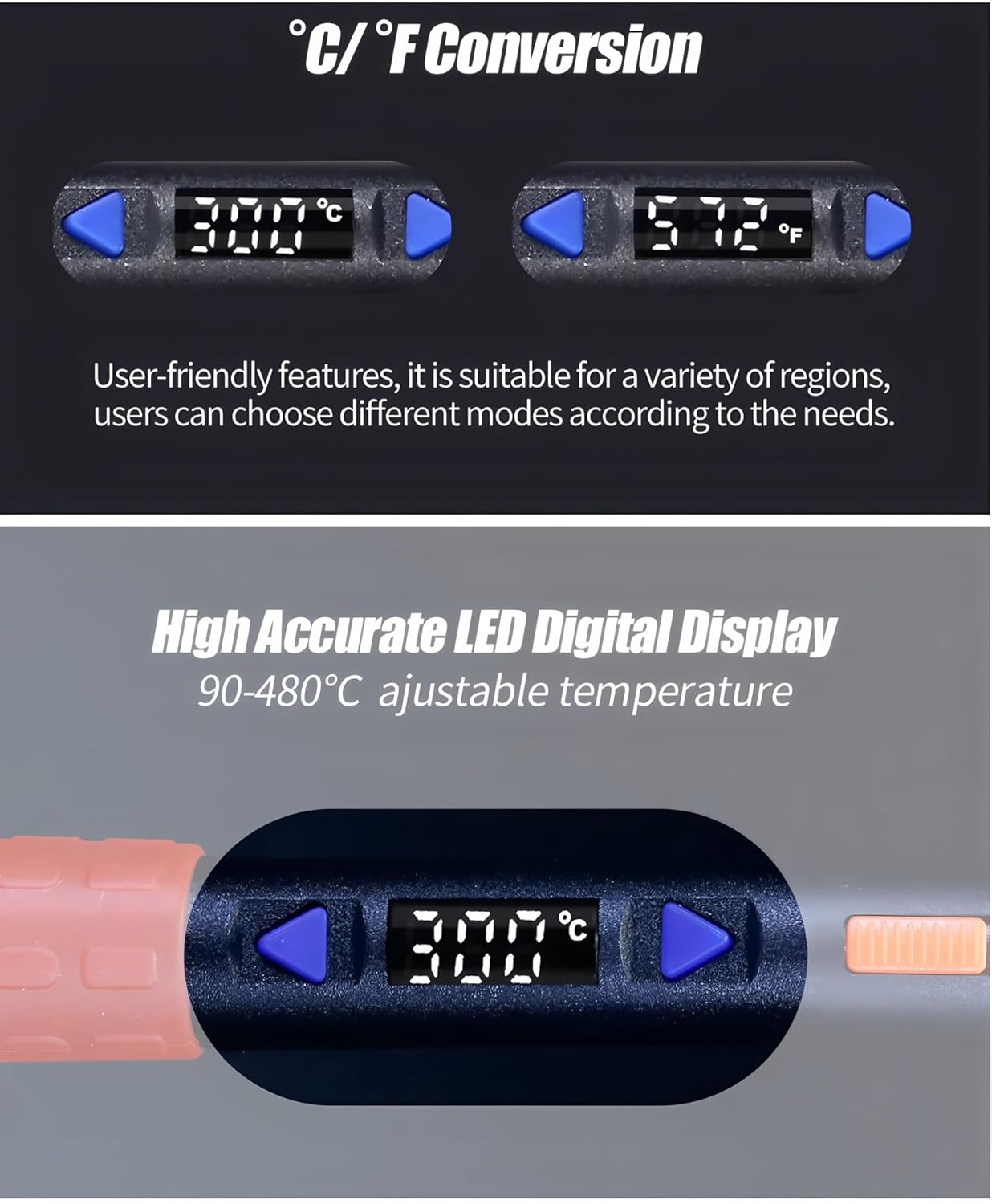
Image: Close-up of the LED digital display showing temperature in Celsius and Fahrenheit, demonstrating the C/F conversion feature and high accuracy.
- Celsius/Fahrenheit Switching:
- To switch between Celsius (°C) and Fahrenheit (°F), press and hold both the Up און אַראָפּ arrow buttons simultaneously for a few seconds until the unit changes.
- אינטעליגענטע שלאָף פונקציע:
- The soldering iron features an intelligent sleep function (0-99 minutes). If the iron remains static for the set sleep time, its temperature will automatically drop to 90°C to save energy and prolong tip life.
- To wake the iron from sleep mode, gently shake it. The iron will quickly return to its previously set operating temperature.

Image: Illustration of the intelligent sleep function, showing the display indicating "SLP" and the iron resting in its stand. A hand is shown gently shaking the iron to awaken it.
- טעמפּעראַטור קערעקשאַן:
- If the displayed temperature deviates from the actual tip temperature, a temperature correction function is available. Refer to the full product manual or manufacturer's website for detailed calibration steps.
- סאַדערינג: Once the desired temperature is reached, the iron is ready for use. Apply solder to the joint, not directly to the iron tip.
- מאַכט אַוועק: When finished, turn off the Master Switch and unplug the iron. Allow it to cool completely in its stand before storing.
6. וישאַלט
- טיפּ רייניקונג: רעגולער רייניגן די לאָטערינג שפּיץ מיט אַדamp sponge or brass wool. This helps prevent oxidation and ensures efficient heat transfer.
- טיפּ טינינג: After cleaning and before storage, apply a small amount of solder to the tip (tinning) to protect it from oxidation.
- טיפּ פאַרבייַט: Replace the soldering tip when it becomes excessively worn or corroded. Ensure the iron is cool and unplugged before changing tips.
- אַלגעמיינע רייניקונג: Wipe the body of the soldering iron with a soft, dry cloth. Do not use abrasive cleaners or solvents.
- סטאָרידזש: Store the soldering iron in a dry, safe place, away from dust and moisture, and out of reach of children.
7. טראָובלעשאָאָטינג
| פּראָבלעם | מעגלעך סיבה | לייזונג |
|---|---|---|
| אייַזן ווערט נישט וואַרעם. | Not plugged in; Master Switch off; Faulty power outlet; Damaged heating element. | Check power connection; Turn on Master Switch; Test outlet with another device; Contact support if element is damaged. |
| Temperature display is erratic or incorrect. | Loose tip; Sensor issue; Need for temperature correction. | Ensure tip is securely installed; Perform temperature correction; Contact support if issue persists. |
| סאָלדער צעשמעלצט זיך נישט לייכט. | Temperature set too low; Oxidized tip; Incorrect solder type. | Increase temperature; Clean and re-tin tip; Use appropriate solder for the application. |
| Iron enters sleep mode too quickly/not at all. | Sleep timer setting incorrect. | Adjust the sleep timer setting (refer to full manual for specific steps). |
8. ספּעסאַפאַקיישאַנז
- מאָדעל: TT-YIHUA 928D-III 110W
- מאַכט אָפּציעס: 65W, 90W, 110W (depending on model variant)
- טעמפּעראַטור קייט: 90°C - 480°C (194°F - 896°F)
- ווייַז: געפירט דיגיטאַל ווייַז
- באַהיצונג עלעמענט: Internal Heating Type Heating Core
- שנעל באַהיצונג: Reaches 300°C in approx. 18 seconds
- פאַנגקשאַנז: Intelligent Sleep, Temperature Correction, °C/°F Switching, Microcomputer Temp. Control, Security Master Switch
- סערטיפיקאַטיאָנס: CE, RoHS
- פאַבריקאַנט: TOOLTOP
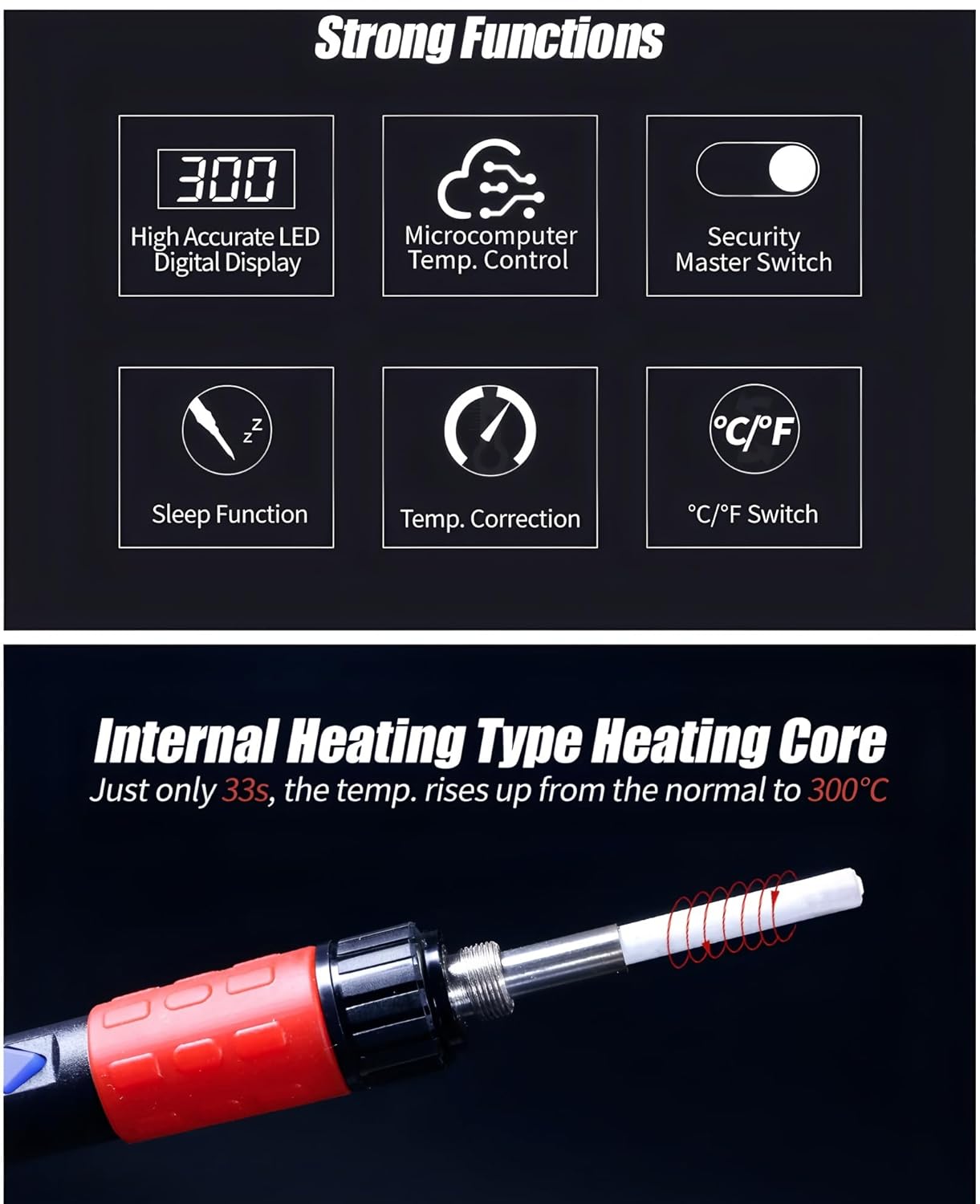
Image: Visual summary of the soldering iron's strong functions, including High Accurate LED Digital Display, Microcomputer Temp. Control, Security Master Switch, Sleep Function, Temp. Correction, and °C/°F Switch.

Image: Shows the internal heating type heating core, which heats up to 300°C in 33 seconds. Also illustrates low temperature application (90-250°C for pyrography) and high temperature application (300-480°C for desoldering).
9. וואָראַנטי
This product comes with a 1-year EU Spare Part Availability Duration. For specific warranty terms and conditions, please refer to the documentation included with your purchase or contact TOOLTOP customer support.
10. שטיצן
For technical assistance, troubleshooting not covered in this manual, or warranty claims, please contact TOOLTOP customer support through their official webזייטל אדער די קאָנטאַקט אינפֿאָרמאַציע וואָס איז צוגעשטעלט מיט אייער פּראָדוקט פּאַקאַדזשינג.
You can often find additional resources, FAQs, and updated information on the manufacturer's webפּלאַץ: www.tooltop.com (באַמערקונג: דאָס איז אַ פּלאַץ האָלדער URL, please refer to your product's official documentation for the correct support webפּלאַץ.)


