
הקדמה
This manual provides essential instructions for the setup, operation, and maintenance of your Skechers Newkirk Digital Watch, Model SR5252. Please read this manual thoroughly to ensure proper use and longevity of your timepiece.
פּראָדוקט איבערview
The Skechers Newkirk Digital Watch features a bold design with a blue polycarbonate case and a comfortable silicone strap. It includes a digital display with various functions and is designed for everyday wear.

Image: The Skechers Newkirk Digital Watch (Model SR5252) displayed on a wrist, showing its digital interface and blue silicone strap.
שליסל פֿעיִקייטן:
- דיגיטאַל ווייַז: Clear negative display for time and other functions.
- Magnetic Strap: Skechers Slip-Ins magnetic band for easy and secure fastening.
- וואַסער קעגנשטעל: Up to 100 meters (10 ATM), suitable for bathing, swimming, and snorkeling. Not recommended for diving.
- דוראַבאַל קאַנסטראַקשאַן: 51mm polycarbonate case with scratch-resistant acrylic crystal.
סעטאַפּ
1. ערשטע איינשפּאַרונג און צייט איינשטעלונג
Upon first use, the watch may require initial setup. Locate the buttons on the side of the watch. Typically, there are buttons labeled "MODE", "RESET", "START/STOP", and "EL/UNLOCK".

בילד: זייט view of the watch, highlighting the "EL/UNLOCK" button and other control buttons.
- אַקטיווירן דיספּליי: If the display is off, press the "EL/UNLOCK" button to activate it.
- אַרייַן צייט שטעלן מאָדע: Press and hold the "MODE" button until the time display starts flashing, indicating it is in setting mode.
- סטרויערן צייט: Use the "START/STOP" button to increase the value (hours, minutes, seconds) and the "RESET" button to move between different time units.
- באַשטעטיקן סעטטינגס: Once the desired time is set, press the "MODE" button again to exit the setting mode.
2. צופּאַסן דעם רימען
The blue silicone strap features a magnetic closure for easy adjustment and a secure fit.
- לייגט דעם זייגער אויף אייער האַנטגעלענק.
- Wrap the strap around your wrist and allow the magnetic ends to connect, securing the watch.
- Adjust the strap position for a comfortable and snug fit.
אַפּערייטינג ינסטראַקשאַנז
יקערדיק פאַנגקשאַנז:
- צייט ווייַז: The default screen displays the current time (hours, minutes, seconds) and day/date.
- באַקלייט: Press the "EL/UNLOCK" button briefly to illuminate the display for better visibility in low light conditions.
מאָדע סעלעקציע:
Press the "MODE" button to cycle through different functions such as stopwatch, alarm, and date display. The available modes will typically be indicated on the display.
- סטאַפּוואַטש: In stopwatch mode, use "START/STOP" to begin/pause timing and "RESET" to clear the stopwatch.
- שרעק: In alarm mode, use "START/STOP" and "RESET" to set the alarm time. Press "MODE" to activate/deactivate the alarm.
וישאַלט
Cleaning Your Watch:
- ווישט אָפּ דעם זייגער־קעסטל און רימען מיט אַ ווייכן, טרוקענעם שטאָף.amp שטאָף.
- Avoid using harsh chemicals, solvents, or abrasive cleaners, as these can damage the watch's finish or materials.
- For stubborn dirt on the silicone strap, a mild soap solution can be used, followed by rinsing with clean water and thorough drying.
וואַסער קעגנשטעל:
The watch is water resistant up to 100 meters (10 ATM). This means it is suitable for recreational swimming, bathing, and snorkeling. However, it is נישט designed for scuba diving or high-impact water sports.
- ניצט נישט די קנעפלעך בשעת די זייגער איז אונטערגעטובלט אין וואסער.
- Ensure the watch is completely dry before operating buttons after water exposure.
- פֿאַרמײַדט אויסשטעלן די זייגער צו עקסטרעמע טעמפּעראַטור ענדערונגען (למשל, הייסע שאַוערס און דערנאָך קאַלט וואַסער), ווײַל דאָס קען קאָמפּראָמיטירן די פֿאַרזיגלונגען.
באַטערי פאַרבייַט:
די זייגער ניצט אַ נאָרמאַלע זייגער באַטאַרייע. ווען דער עקראַן ווערט טונקל אָדער די פונקציעס ווערן נישט ריכטיק, קען עס זיין צייט צו טוישן די באַטאַרייע. עס איז רעקאָמענדירט צו לאָזן אַ קוואַליפֿיצירטן זייגער טעכניקער טוישן די באַטאַרייע צו זיכער מאַכן אַז די וואַסער קעגנשטעל פאַרזיגלונג איז ריכטיק מיינטיינד.
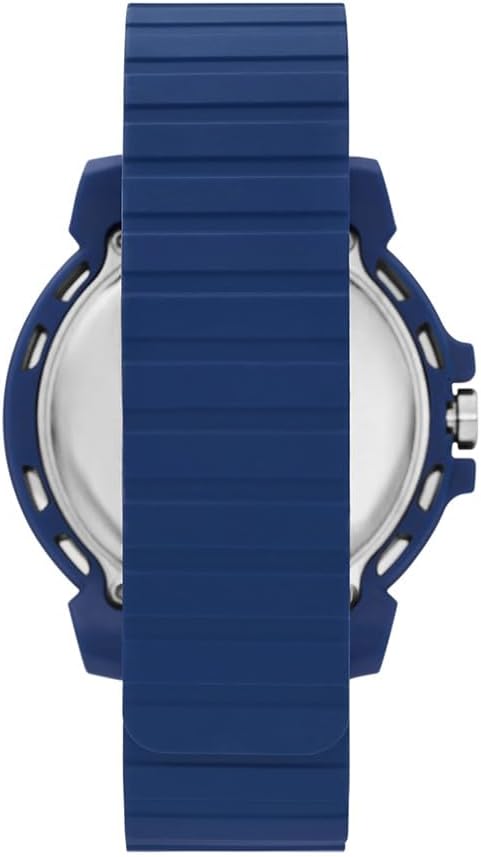
בילד: הינטערשטע view of the watch case, showing the back plate where the battery compartment is located.
טראָובלעשאָאָטינג
- דיספּליי איז ליידיק אָדער טונקל:
- Press the "EL/UNLOCK" button to activate the display.
- The battery may be low. Consider professional battery replacement.
- די צייט איז נישט ריכטיג:
- Refer to the "Initial Power On and Time Setting" section to reset the time.
- די קנעפּלעך זענען נישט ריספּאַנדינג:
- Ensure the watch is not in a locked mode (if applicable, check for a lock icon on the display).
- If the watch was recently exposed to water, ensure it is completely dry.
- A low battery can affect button responsiveness.
ספּעסאַפאַקיישאַנז
| מאָדעל נומער | SR5252 |
| ווייַז טיפּ | דיגיטאַל |
| באַוועגונג טיפּ | קוואַרץ |
| קאַסע מאַטעריאַל | פּאָליקאַרבאָנאַטע |
| קאַסע דיאַמעטער | 51 מם |
| קאַסע גרעב | 13 מם |
| קריסטאַל טיפּ | אַקריליק |
| רימען מאַטעריאַל | סיליקאָנע |
| רימען ברייט | 22 מם |
| רימען לענג | 210 מם |
| קלעפּיק טיפּ | מאַגנעטיק |
| וואַסער קעגנשטעל | 100 מעטער (10 אַטם) |
| פּראָדוקט דימענשאַנז | 10.11 X 7.59 X 7.49 סענטימעטער |
| פּראָדוקט וואָג | 181.44 ג |
וואָראַנטי אינפֿאָרמאַציע
This Skechers Newkirk Digital Watch comes with a לימיטעד וואָראַנטי. Details regarding the specific terms, duration, and coverage of this warranty are typically provided with the product packaging or can be obtained from the manufacturer's official webפּלאַץ.
ביטע באַהאַלטן אייער קויפן-באַווייַז פֿאַר יעדע וואָראַנטי-פאָדערונג.
שטיצן
For further assistance, technical support, or to inquire about service, please visit the official Skechers website or contact their customer service department. Contact information can usually be found on the product packaging or on the Skechers brand webפּלאַץ.
אָנליין שטיצן: www.skechers.com