
1. הקדמה
This manual provides essential information for the safe and efficient use of your Haier H55C95EUX 55-inch OLED 4K HDR Smart TV. Please read these instructions thoroughly before operating your television and retain them for future reference.
The Haier H55C95EUX features a 55-inch OLED display for deep blacks and vibrant colors, 4K HDR resolution, a 144Hz refresh rate for smooth motion, integrated Harman Kardon sound, and the Google TV operating system for smart functionality and voice control.

בילד 1.1: איבערview of Haier C95 Series OLED TV features, highlighting Harman Kardon audio, 144Hz gaming, Dolby Vision IQ, Dolby Atmos, HDR10+, Google TV, and 3GB RAM with 32GB storage.
2. זיכערקייַט אינפֿאָרמאַציע
שטענדיק פֿאָלגן די גרונטלעכע זיכערהייט מיטלען ווען איר ניצט דעם טעלעוויזיע צו רעדוצירן דעם ריזיקאָ פֿון פֿײַער, עלעקטרישן קלאַפּ און שאָדן.
- מאַכט מקור: פֿאַרבינדט דעם טעלעוויזיע נאָר צו אַן AC 220-240V, 50/60Hz מאַכט צושטעל.
- ווענטילאַטיאָן: זיכערט זיך אז עס איז דא גענוג ווענטילאציע ארום דעם טעלעוויזאר. בלאקירט נישט די ווענטילאציע עפענונגען.
- וואַסער און נעץ: שטעלט נישט אויס דעם טעלעוויזאר צו רעגן אדער פייכטקייט. שטעלט נישט קיין זאכן פול מיט פליסיקייטן, ווי למשל וואזאנעס, אויף דעם טעלעוויזאר.
- רייניקונג: נעמט ארויס דעם טעלעוויזאר פון דער וואנט-אויסשטעל איידער איר רייניגט. ניצט א ווייכן, טרוקענעם טוך. ניצט נישט קיין פליסיקע רייניגער אדער אייראזאל-רייניגער.
- מאָונטינג: If wall-mounting, ensure the wall mount is compatible with the VESA standard (100 x 100 mm) and can support the TV's weight.
- קינדער: Supervise children to ensure they do not play with the television.
3. וואָס איז אין דער קעסטל
פֿאָרזיכטיק אויספּאַקן די קעסטל און זיכער מאַכן אַז אַלע זאַכן זענען דאָרט און נישט געשעדיגט.
- Haier H55C95EUX 55-inch OLED 4K HDR Smart TV
- ווייַט קאָנטראָל
- באַניצער מאַנואַל (דעם דאָקומענט)
- מאַכט קאַבלע
- טעלעוויזיע שטאַנד קאָמפּאָנענטן (אויב אָנווענדלעך)
4. סעטאַפּ
4.1 גשמיות ינסטאַלירונג
Before installation, consider the TV's dimensions to ensure proper placement.

בילד 4.1: פראָנט view dimensions of the 55-inch Haier TV, indicating a width of 1225mm and a height of 749mm.

Image 4.2: Detailed dimensions of the Haier 55-inch TV, showing measurements with and without the stand.
סטאַנדאַרט ינסטאַלירונג
- לייגט דעם טעלעוויזאר מיטן פנים אראפ אויף א ווייכער, גראדער אויבערפלאך כדי צו פארמיידן שאדן צום עקראן.
- Attach the stand components to the designated slots on the bottom of the TV using the provided screws.
- זיכער מאַכן אַז דער שטאַנד איז זיכער באַפעסטיקט איידער איר שטעלט דעם טעלעוויזיע אויפֿרעכט.
וואַנט מאַונטינג
If wall-mounting, use a VESA-compatible mount (100 x 100 mm) and follow the mount manufacturer's instructions. Ensure the wall can support the TV's weight.
4.2 קאַנעקטינג דעוויסעס
אייער טעלעוויזיע איז אויסגעשטאַט מיט קייפל פּאָרטן פֿאַר פֿאַרבינדן עקסטערנע דעוויסעס.
- הדמי: Connect Blu-ray players, game consoles, or set-top boxes to the HDMI 2.1 ports for high-quality audio and video.
- וסב: פֿאַרבינדט USB סטאָרידזש דעוויסעס פֿאַר מעדיע ווידערשפּיל.
- עטהערנעט: פֿאַר אַ סטאַבילע דראָטיקע אינטערנעט פֿאַרבינדונג.
- בלועטאָאָטה: פֿאַרבינדט וויירלעסע כעדפאָונז אָדער אַנדערע בלועטוט דעוויסעס.
4.3 ערשטע איינשטראָם און אויפשטעל
- פֿאַרבינדט דעם מאַכט קאַבל צום טעלעוויזיע און אַ וואַנט אַוטלעט.
- דריק דעם מאַכט קנעפּל אויף דער ווײַט קאָנטראָל אָדער דעם טעלעוויזיע.
- Follow the on-screen instructions to complete the initial setup, including language selection, network connection (Wi-Fi or Ethernet), and Google TV account login.
5. אַפּערייטינג דיין טעלעוויזיע
5.1 רימאָוט קאָנטראָל
The included remote control allows you to navigate the TV's features. It may feature a solar cell for eco-friendly charging and USB-C for backup charging.

Image 5.1: The Haier TV remote control, featuring navigation, volume, and app access buttons.
5.2 גוגל טיווי צובינד
Your TV runs on Google TV, providing access to a wide range of streaming services, apps, and personalized content.

Image 5.2: The Google TV home screen, showcasing various streaming applications and content recommendations.
קול קאָנטראָל
Use the built-in voice control feature to search for content, launch apps, and control your TV hands-free. Simply say "Hey Google" or press the voice assistant button on your remote.

Image 5.3: Demonstrating voice control functionality with the Haier TV and Google TV.
5.3 בילד און קלאַנג סעטטינגס
OLED טעכנאָלאָגיע
The OLED display provides absolute blacks and infinite contrast for a lifelike viewינג דערפאַרונג.

Image 5.4: Visual representation of OLED technology, showcasing deep blacks and vibrant colors.
Harman Kardon Sound
Experience immersive audio with clear dialogues and cinematic depth, delivered by the integrated Harman Kardon sound system.

Image 5.5: Depiction of the Harman Kardon sound system, emphasizing clear and powerful audio.
Dolby Atmos
Enjoy three-dimensional, immersive sound that moves around you, enhancing your audio experience.
144 הז דערפרישן קורס
The 144Hz refresh rate ensures smooth and fluid motion, ideal for fast-paced content like gaming and sports.

Image 5.6: Visual comparison illustrating the fluidity of 144Hz motion compared to 60Hz, particularly beneficial for gaming.
6. וישאַלט
6.1 רייניקונג דיין טעלעוויזיע
- שטענדיק אויסשטעקן דעם טעלעוויזאר איידער איר רייניגט.
- ניצט אַ ווייכן, טרוקענעם, לינט-פֿרייעם שטאָף צו ווישן דעם עקראַן און קאַבינעט.
- פֿאַר שווערע פֿלעקן, לײַכט דריקןampווישט דעם שטאָף מיט וואַסער אָדער אַ ספּעציאַליזירטן עקראַן רייניגער. שפּריצט קיינמאָל נישט רייניגער גלייך אויפן עקראַן.
- ויסמיידן ניצן אַברייסיוו קלינערז, וואַקסעס אָדער סאָלוואַנץ.
6.2 ווייכווארג דערהייַנטיקונגען
Your Haier TV may receive software updates to improve performance and add new features. Ensure your TV is connected to the internet to receive these updates automatically or check for them manually through the settings menu.
7. טראָובלעשאָאָטינג
אויב איר טרעפט פּראָבלעמען מיט אייער טעלעוויזיע, באַזירט זיך אויף די פאלגענדע געוויינטלעכע לייזונגען:
| פּראָבלעם | מעגלעך לייזונג |
|---|---|
| קיין מאַכט | Check if the power cable is securely connected to the TV and the wall outlet. Ensure the outlet is functioning. Try pressing the power button on the TV itself. |
| קיין בילד נישט, אבער סאונד איז דא | קאָנטראָלירט די אינפוט מקור. מאַכט זיכער אַז די פֿאַרבונדענע דעווייס איז אנגעצונדן און אַרבעט ריכטיק. פּרוּווט אַן אַנדער HDMI קאַבל אָדער פּאָרט. |
| קיין קלאַנג, אָבער בילד איז דאָ | Check the volume level. Ensure the TV is not muted. Verify audio output settings (e.g., internal speakers, external sound system). Check audio cables if using external speakers. |
| ווייַט קאָנטראָל איז נישט ארבעטן | Check the remote control's battery level. Ensure there are no obstructions between the remote and the TV's IR sensor. If it's a solar remote, ensure it has sufficient light exposure. |
| נעץ קאַנעקשאַן ישוז | Restart your router and modem. Check Wi-Fi password. If using Ethernet, ensure the cable is connected properly. Try connecting to a different network if available. |
8. ספּעסאַפאַקיישאַנז
| שטריך | דעטאַל |
|---|---|
| מאָדעל נאָמען | H55C95EUX |
| פאַרשטעלן גרייס | 55 אינטשעס |
| ווייַז טעכנאָלאָגיע | OLED |
| האַכלאָטע | 4K (3840 X 2160) |
| דערפרישן קורס | 120 Hz (Motion Enhancement: 144Hz) |
| HDR פֿאָרמאַט שטיצט | Dolby Vision |
| אָפּערייטינג סיסטעם | גוגל טעלעוויזיע |
| אינערלעכער סטאָרידזש | 32 גיגאבייט |
| אַודיאָ סיסטעם | Harman Kardon 2.1 Sound System |
| Surround Sound Format | Dolby Atmos |
| קאַנעקטיוויטי | Bluetooth, Ethernet, HDMI (x4), USB (x1) |
| ווירעלעסס טעכנאָלאָגיע | בלועטאָאָטה, ווי-פי |
| קאָנטראָל מעטאָד | Remote Control, Voice |
| פּראָדוקט דימענשאַנז (דקסווקסה) | 29.5P x 122.5l x 76.8H cm (with stand) |
| VESA מאָונטינג סטאַנדאַרד | 100 רענטגענ 100 מם |
| ענערגיע עפעקטיווקייַט קלאַס (SDR) | פֿ (77 קווה/1000 שעה) |
| ענערגיע עפעקטיווקייַט קלאַס (HDR) | ג (70 קווה/1000 שעה) |
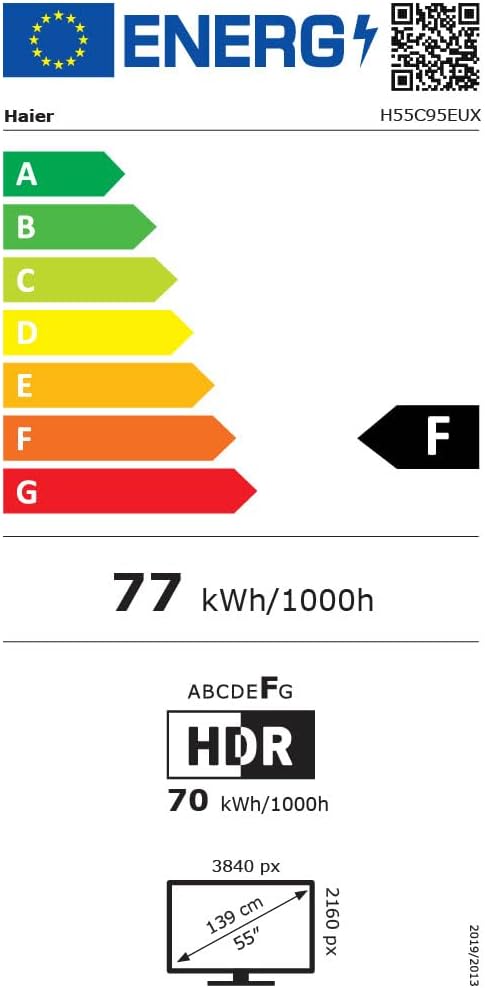
Image 8.1: EU Energy Label for the Haier H55C95EUX TV. For more details, visit the EPREL דייטאַבייס.
9. וואָראַנטי & שטיצן
Your Haier H55C95EUX television comes with a 2-יאָר פאַבריקאַנט ס וואָראַנטיביטע באַהאַלטן אייער קויפן באַווייַז פֿאַר וואָראַנטי קליימז.
For technical support, service, or further inquiries, please refer to the contact information provided on the official Haier webזייטל אדער אייער לאקאלן בארעכטיגטן סערוויס צענטער.


