
1. הקדמה
The GOYOJO GH192 is a handheld thermal imaging camera designed for various inspection tasks, including mechanical maintenance, home HVAC, and electrical inspections. It features a 240x240 infrared resolution, a 2MP visual camera, and fusion imaging capabilities for detailed thermal analysis. With a 25Hz refresh rate, it provides smooth and clear thermal imagery.

Figure 1: GOYOJO GH192 Thermal Imaging Camera in operation.
2. פּעקל אינהאַלט
באַשטעטיקן אַז אַלע זאכן זענען פאַראַן אין פּעקל:
- GH192 Thermal Camera Body
- וסב- C קאַבלע
- באַניצער מאַנואַל (דעם דאָקומענט)
3. סעטאַפּ
3.1 טשאַרדזשינג די באַטאַרייע
The device is equipped with a built-in 18650 lithium-ion battery (3.7V, 3500mAh).
- פֿאַרבינדט דעם צוגעשטעלטן USB-C קאַבל צום קאַמעראַ'ס USB-C פּאָרט.
- פֿאַרבינדט דעם אַנדערן עק פֿונעם USB-C קאַבל צו אַ קאָמפּאַטיבלע USB מאַכט אַדאַפּטער (נישט אַרייַנגערעכנט) אָדער אַ קאָמפּיוטער'ס USB פּאָרט.
- The charging indicator will illuminate. A full charge typically takes 3-4 hours.
- The battery provides up to 8 hours of continuous operation on a full charge.
3.2 ערשט מאַכט אויף
Press and hold the power button located on the device until the screen illuminates. The device will boot up and display the main interface.
4. אַפּערייטינג ינסטרוקטיאָנס
4.1 מאַכט אויף / אַוועק
- צו מאַכט אויף: דריקן און האַלטן די מאַכט קנעפּל.
- צו מאַכט אַוועק: דריק און האלט דעם מאַכט קנעפּל ביז אַ שאַטדאַון פּראָמפּט דערשיינט, און באַשטעטיקט.
4.2 אַרויסווייַזונג און נאַוויגאַציע
The GH192 features a 2.8" 240x320 IPS display. Use the directional buttons and selection button to navigate through menus and settings.
4.3 בילד מאָדעס
The device offers multiple image modes to suit different inspection needs:
- טערמאַל מאָדע: ווײַזט נאָר דאָס אינפֿראַרויט טערמישע בילד.
- Visual Mode: ווײַזט נאָר דאָס בילד פֿון דער 2MP וויזועלער קאַמעראַ.
- פיוזשאַן מאָדע: Blends the thermal image with the visual image for enhanced detail and context. This mode helps in identifying the exact location of temperature anomalies.
- פּיפּ (בילד-אין-בילד) מאָדע: Displays a smaller thermal image overlayed on the visual image.

Figure 2: Thermal and Visual Fusion for enhanced detail.
4.4 קאָליר פּאַלעטטעס
Select from 6 adjustable color palettes to visualize temperature differences effectively. Each palette highlights temperature variations in a distinct way.
- ווייַס הייס
- שוואַרץ הייס
- אייַזן רעד
- רעגנבויגן
- רויט הייס
- Fusion

Figure 3: Versatile Color Palettes and Temperature Units.
4.5 Temperature Measurement and Alarms
The GH192 provides accurate temperature measurements and tracking features:
- Automatic Center Spot: ווײַזט די טעמפּעראַטור אין צענטער פֿון עקראַן.
- Hot Spot Tracking: Automatically identifies and displays the highest temperature within the field of view.
- Cold Spot Tracking: Automatically identifies and displays the lowest temperature within the field of view.
- User-Defined Spots: Allows setting up to 3 custom measurement points.
- טעמפּעראַטור קייט: Measures temperatures from -4°F to 1022°F (-20°C to 550°C).
- טעמפּעראַטור אַלאַרם: Configurable high and low-temperature alarms provide visual and audio alerts when temperatures exceed or fall below set thresholds.

Figure 4: Hotspot Tracking and High-Temperature Alarm.
4.6 Emissivity and Distance Adjustment
For accurate temperature readings, adjust the emissivity setting based on the material being inspected and set the object distance. Refer to the device's settings menu for these adjustments.
4.7 Image Capture and Storage
Press the capture button to save thermal images. The device has 16GB of eMMC flash storage, capable of storing over 90,000 images.
4.8 דאַטאַ אַריבערפירן
צו איבערפירן בילדער צו א קאמפיוטער:
- Connect the GH192 to your computer using the USB-C cable.
- On the camera, enable transfer mode (usually prompted on the screen or found in settings).
- The camera will appear as a removable storage device on your computer, allowing you to access and transfer images.
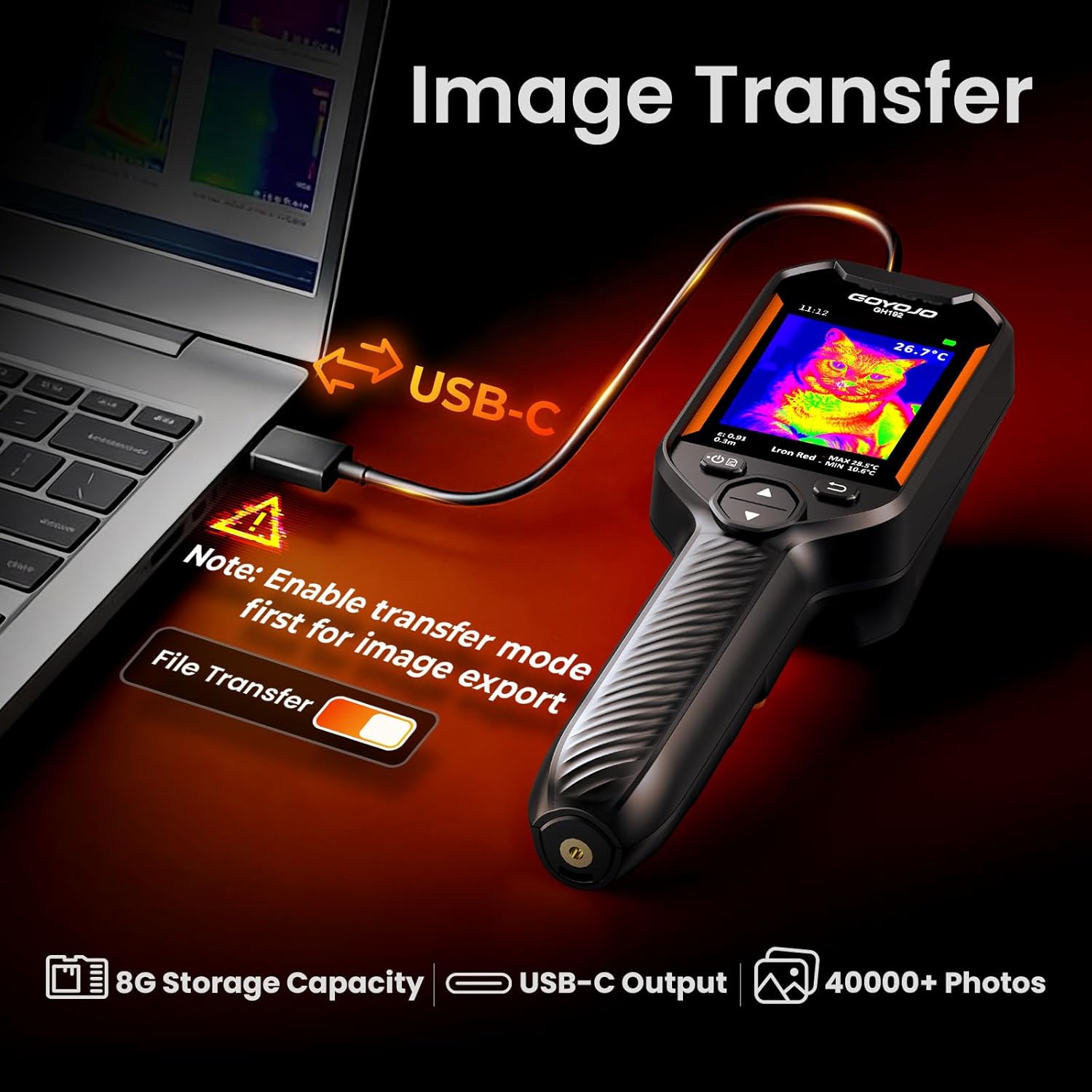
Figure 5: Image Transfer via USB-C.
5. וישאַלט
5.1 רייניקונג די מיטל
- ניצט אַ ווייכן, טרוקענעם שטאָף צו רייניקן דעם קאַמעראַ קערפּער.
- For the lens and screen, use a lens cleaning cloth and solution specifically designed for optical surfaces.
- דו זאלסט נישט נוצן אַברייסיוו קלינערז אָדער סאָלוואַנץ.
5.2 באַטערי קער
- לאָדט די באַטאַרייע רעגולער, אפילו אויב די דעוויס ווערט נישט אָפט גענוצט, כּדי צו האַלטן די באַטאַרייע געזונט.
- פֿאַרמײַדט פֿולשטענדיק אויסלאָדן די באַטעריע פֿאַר לענגערע פּעריאָדן.
- סטאָר די מיטל אין אַ קיל, טרוקן אָרט.
5.3 סטאָרידזש
When not in use, store the GH192 in its protective packaging or a suitable case to prevent damage. Avoid exposing the device to extreme temperatures or high humidity. The device is IP54 rated for protection against dust and splashing water, and designed to withstand a 6.6ft (2 meter) drop.

Figure 6: Durability features: 6.6ft Drop-Proof and IP54 Protection.
6. טראָובלעשאָאָטינג
| פּראָבלעם | מעגלעך סיבה | לייזונג |
|---|---|---|
| די מיטל טוט נישט מאַכט אויף. | נידעריגע באַטעריע אָדער אַפּאַראַט אַרבעט נישט ריכטיק. | Charge the battery for at least 30 minutes. If the issue persists, contact customer support. |
| ומפּינקטלעך טעמפּעראַטור רידינגז. | Incorrect emissivity setting or object distance. | Adjust emissivity based on the material. Ensure correct object distance is set. Calibrate if necessary (refer to advanced settings). |
| דער עקראַן איז פֿאַרפֿרוירן אָדער רעאַגירט נישט. | ווייכווארג פראבלעם. | Perform a soft reset by holding the power button for 10-15 seconds until the device restarts. |
| קען נישט איבערפירן בילדער צום קאמפיוטער. | Transfer mode not enabled or faulty USB-C cable. | Ensure transfer mode is enabled on the camera. Try a different USB-C cable or computer port. |
7. ספּעסאַפאַקיישאַנז
| שטריך | דעטאַל |
|---|---|
| מאָדעל | GH192 |
| ינפרערעד האַכלאָטע | 240x240 פּיקסעלס |
| וויסואַל קאַמעראַ | 2MP |
| ווייַז | 2.8" 240x320 IPS |
| דערפרישן קורס | 25 הז |
| טעמפּעראַטור ראַנגע | -4°F צו 1022°F (-20°C צו 550°C) |
| טעמפּעראַטור אַקקוראַסי | ±2°C אדער 2% |
| טערמאַל סענסיטיוויטי | <40mK |
| בילד מאָדעס | Thermal, Visual, Fusion, PIP |
| קאָליר פּאַלעטטעס | White Hot, Black Hot, Iron Red, Rainbow, Red Hot, Fusion |
| סטאָרידזש | 16GB eMMC (stores >90,000 images) |
| קאַנעקטיוויטי | וסב-C |
| באַטערי טיפּ | 18650 Li-ion (3.7V, 3500mAh) |
| באַטערי לעבן | ביז 8 שעה קאנטינעווער באניץ |
| טשאַרדזשינג צייט | 3-4 שעה |
| געווער | IP54, 6.6ft (2m) drop resistance |
| פּונקט וואָג | 260 גראַמז |
8. וואָראַנטי און שטיצן
For warranty information and technical support, please refer to the documentation provided with your purchase or visit the official GOYOJO webזייטל. האַלט דיין קויפן באַווייַז פֿאַר וואָראַנטי קליימז.