
הקדמה
This manual provides essential instructions for the safe and efficient operation of your Generic Portable Bluetooth Speaker with Solar Charging, Model B0FVMB2F8H. Please read this manual thoroughly before using the product and retain it for future reference.
זיכערקייַט אינפֿאָרמאַציע
- Do not expose the speaker to extreme temperatures or direct sunlight for prolonged periods when not in use, especially the solar panel.
- ויסמיידן דראַפּינג אָדער ונטערטעניק די רעדנער צו שטאַרק ימפּאַקץ.
- Do not disassemble, repair, or modify the speaker yourself. Contact qualified service personnel for any repairs.
- Keep the speaker away from water and liquids, despite its waterproof design, to prevent damage to internal components.
- Use only the specified charging cables and power adapters.
- האַלטן אויס פון דערגרייכן פון קינדער.
פּעקל אינהאַלט
ביטע טשעק די פּאַקעט פֿאַר די פאלגענדע זאכן:
- Portable Bluetooth Speaker (Model B0FVMB2F8H)
- וסב טשאַרדזשינג קאַבלע
- שנעל אָנהייב גייד
פּראָדוקט איבערview
Familiarize yourself with the components of your speaker:
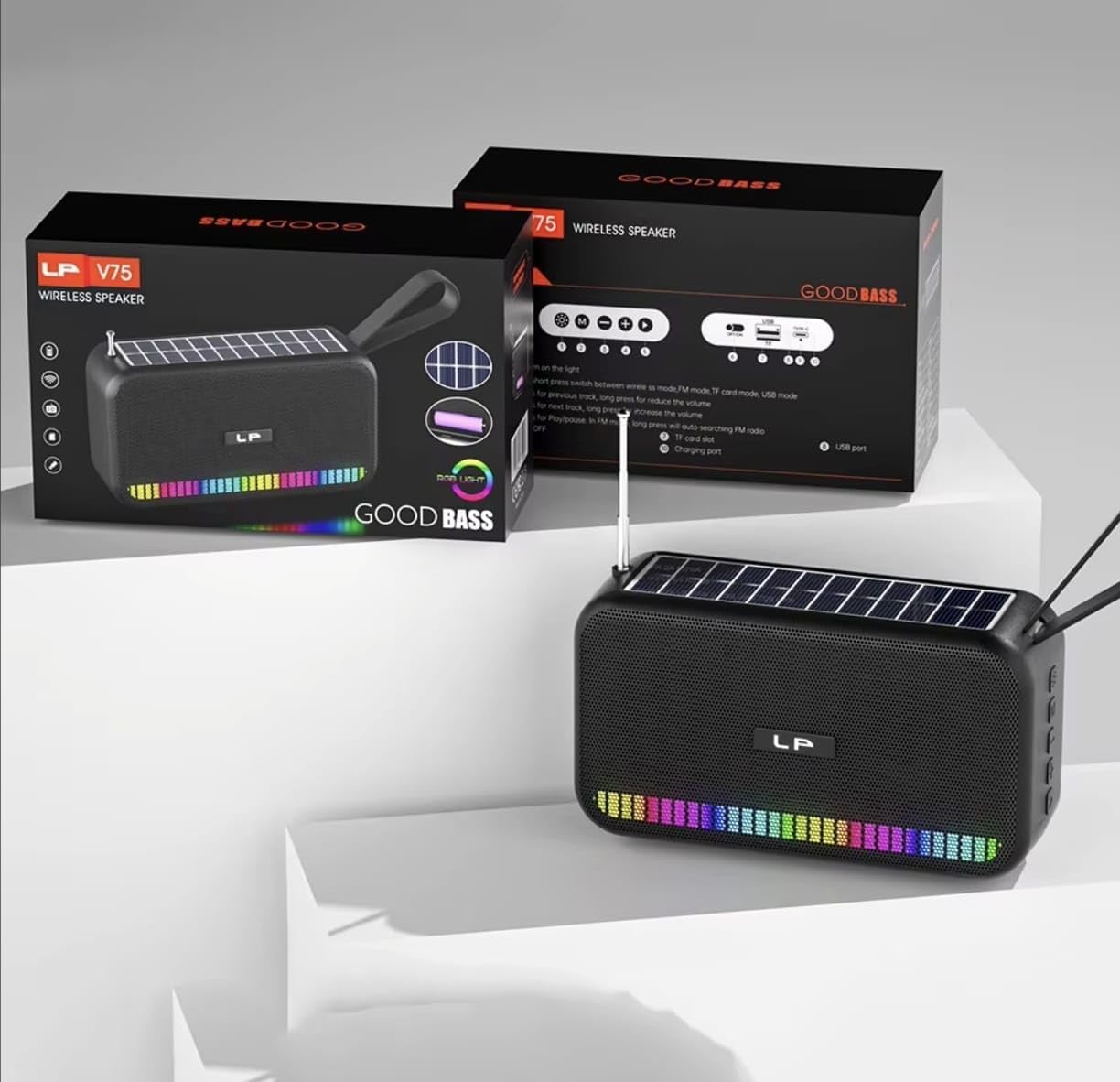
בילד: פראָנט view of the portable Bluetooth speaker, highlighting its solar panel, LED light display, and overall dimensions (approximately 170.5mm length, 95mm height, 60mm width).
- זונ פּאַנעל: Located on the top surface for solar charging.
- LED ליכט ווייַז: Front-facing lights that synchronize with music.
- קאָנטראָל קנעפּלעך: (Details not provided, assuming standard buttons for power, volume, mode, play/pause).
- וסב פּאָרט: פֿאַר טשאַרדזשינג און USB דרייוו ווידערשפּיל.
- טף קאַרד שפּעלטל: פֿאַר TF קאַרטל ווידערשפּיל.
- טשאַרדזשינג פּאָרט: For USB cable charging.
- אַנטענע: Extendable for FM radio reception.
- טראָגן רימען: פֿאַר פּאָרטאַביליטי.

בילד: דערציען view of the portable Bluetooth speaker, showing the battery compartment open with a rechargeable battery inserted. Also visible are the USB and charging ports.
סעטאַפּ
1. טשאַרדזשינג די ספּיקער
Your speaker offers two charging methods:
- זונ טשאַרדזשינג: Place the speaker with the solar panel facing direct sunlight. The charging indicator light will illuminate. Solar charging is ideal for maintaining battery life outdoors but may be slower than USB charging.
- USB טשאַרדזשינג: Connect the provided USB charging cable to the speaker's charging port and the other end to a USB power adapter (not included) or a computer's USB port. The charging indicator light will show charging status. A full charge typically takes several hours.
Ensure the speaker is fully charged before first use for optimal battery performance.
2. פּאָווערינג אויף / אויסגעלאשן
- צו מאַכט אויף: דריק און האלט דעם פּאַוער קנעפּל (געוויינטלעך באצייכנט מיט ⏻ or ON/OFF) for approximately 3 seconds until you hear an audible prompt or see the LED lights activate.
- צו מאַכט אַוועק: Press and hold the Power button again for approximately 3 seconds until the speaker powers down.
אַפּערייטינג ינסטראַקשאַנז
1. בלועטאָאָטה מאָדע
- אַרייַן בלועטאָאָטה מאָדע: Upon powering on, the speaker typically defaults to Bluetooth mode. If not, press the "M" (Mode) button until you hear the "Bluetooth Mode" prompt. The LED indicator will flash, indicating it's ready for pairing.
- פּאָרינג:
- אַקטיווירן בלועטוט אויף אייער מיטל (סמאַרטפאָון, טאַבלעט, אאז"וו).
- זוכן פֿאַר available Bluetooth devices. The speaker will appear as "B0FVMB2F8H" or a similar name.
- Select the speaker from the list to connect. Once paired, you will hear a confirmation sound, and the LED indicator will stop flashing.
- פּלייבאַק קאָנטראָל:
- שפּיל / פּויזע: דריקן די שפּיל / פּויזע קנעפּל (⏸).
- ווייַטער שפּור: Press the "Next" button (⏭).
- פֿריִערדיקע שפּור: Press the "Previous" button (⏮).
- באַנד אַרויף: Long press the "Next" button or use a dedicated Volume Up button.
- באַנד אַראָפּ: Long press the "Previous" button or use a dedicated Volume Down button.
2. עפעם ראַדיאָ מאָדע
- Enter FM Mode: Press the "M" (Mode) button repeatedly until you hear the "FM Radio" prompt.
- פאַרלענגערן אַנטענע: גאָר פאַרברייטערן די טעלאַסקאָפּיק אַנטענע פֿאַר בעסער אָפּטראָג.
- אַוטאָ סקאַן: דריק און האַלט דעם שפּיל/פּויזע קנעפּל (⏸) to automatically scan and save available FM stations. The speaker will cycle through frequencies and store them.
- Switch Stations: Use the "Next" (⏭) and "Previous" (⏮) buttons to navigate through the saved stations.
3. USB / TF קאַרטל ווידערשפּיל
- אריינלייגן מעדיע: Insert a USB flash drive into the USB port or a TF (MicroSD) card into the TF card slot. The speaker will automatically detect the media and switch to the corresponding playback mode.
- פּלייבאַק קאָנטראָל: Use the Play/Pause, Next, and Previous buttons for controlling playback, similar to Bluetooth mode.
4. LED Light Display
The speaker features dynamic RGB LED lights that can synchronize with your music. Specific controls for the LED lights (e.g., changing patterns, turning off) are not detailed in the product information, but they typically activate automatically with audio playback. If there is a dedicated light button, press it to cycle through modes or turn off the lights.
5. האַנדס-פֿרייַ פאַך
ווען פארבונדן דורך בלועטוט צו א סמאַרטפאָון, קען דער רעדנער געניצט ווערן פֿאַר הענט-פֿרײַע רופֿן.
- ענטפער רופן: דריקן די שפּיל / פּויזע קנעפּל (⏸) איין מאל צו ענטפֿערן אַן אַרײַנקומענדיקן רוף.
- סוף רופן: דריקן די שפּיל / פּויזע קנעפּל (⏸) once to end an ongoing call.
- אָפּוואַרפן רופן: דריק און האַלט דעם שפּיל/פּויזע קנעפּל (⏸) צו אפווארפן אן אנקומענדיקן רוף.
וישאַלט
- רייניקונג: ניצט אַ ווייכע, טרוקענע שטאָף צו רייניקן די רעדנער'ס ייבערפלאַך. ניצט נישט קיין שאַרפע רייניגער, אַלקאָהאָל, אדער כעמישע סאָלווענטן.
- זונ פּאַנעל: האַלט די זונ - פּאַנעל ריין און פריי פון שטויב אָדער דעבריס צו ענשור עפעקטיוו טשאַרדזשינג.
- סטאָרידזש: When not in use for extended periods, store the speaker in a cool, dry place. It is recommended to fully charge the battery every 3 months to prolong its lifespan.
טראָובלעשאָאָטינג
| פּראָבלעם | מעגלעך סיבה | לייזונג |
|---|---|---|
| דער רעדנער גייט נישט אן. | נידעריק באַטאַרייע. | Charge the speaker using the USB cable or place it in direct sunlight. |
| קען נישט פארבינדן דורך בלוטוט. | בלועטוט נישט איינגעשטעלט אויף דעם אפאראט; רעדנער נישט אין פארבינדונג מאָד; צו ווייט פון דעם אפאראט. | Ensure Bluetooth is on and the speaker is in pairing mode. Move device closer to speaker (within 10 meters). Forget previous pairings on your device and try again. |
| קיין קלאַנג אָדער נידעריקע וואָלומען. | Volume too low on speaker or connected device; incorrect mode selected. | Increase volume on both the speaker and your connected device. Ensure the correct mode (Bluetooth, FM, USB, TF) is selected. |
| די FM ראַדיאָ אָפּנאַם איז שוואַך. | אַנטענע נישט אויסגעשטרעקט; שוואַך סיגנאַל. | Fully extend the telescopic antenna. Try repositioning the speaker for better signal reception. |
| די USB/TF קארטל שפילט נישט. | אומרעכט file פֿאָרמאַט; קאַרטל/דרייוו נישט ריכטיק אַרײַנגעשטעלט; קאָרומפּירטע מעדיע. | פאַרזיכערן אַודיאָ fileדי טעקעס זענען אין א קאמפאטיבלן פֿאָרמאַט (למשל, MP3). לייגט אריין ווידער דעם USB דרייוו אדער TF קאַרטל. פּרוּווט אַן אַנדער USB דרייוו אדער TF קאַרטל. |
ספּעסאַפאַקיישאַנז
| מאָדעל נומער: | B0FVMB2F8H |
| קאַנעקטיוויטי טעכנאָלאָגיע: | בלועטאָאָטה |
| מאַכט מקור: | Solar, USB |
| שטיצט ראַדיאָ באַנדס: | FM (87.5-108 MHz) |
| ספּעציעלע פֿעיִקייטן: | Solar charging, LED light display, Multi-playback options (Bluetooth, FM Radio, USB, TF card) |
| קאַמפּאַטאַבאַל דעוויסעס: | Bluetooth devices, USB devices, TF cards, FM radio signals |
| ווייַז טיפּ: | געפירט |
| קאָליר: | שוואַרץ |
| פאַבריקאַנט: | כינע |
וואָראַנטי און שטיצן
דער פּראָדוקט קומט מיט אַ 15-טאָג וואָראַנטי פֿון דעם קויפֿדאַטום. די וואָראַנטי דעקט פֿאַבריקאַציע חסרונות. עס דעקט נישט שאָדן פֿאַראורזאַכט דורך אומרעכט באַניץ, אַקסאַדענטן, נישט-אָטעריזירטע מאָדיפֿיקאַציעס, אָדער נאָרמאַלער אָפּנוץ.
For warranty claims or technical support, please refer to the contact information provided by your retailer or the seller "CLASSYSA" on Amazon. Please retain your proof of purchase for warranty validation.