
H24-2201-B
Generic H24-2201-B 39.4" Drawer Computer Desk with USB Charger User Manual
Model: H24-2201-B
הקדמה
This manual provides essential information for the assembly, operation, and maintenance of your Generic H24-2201-B 39.4" Drawer Computer Desk with USB Charger. Please read these instructions carefully before assembly and use to ensure safe and efficient operation.
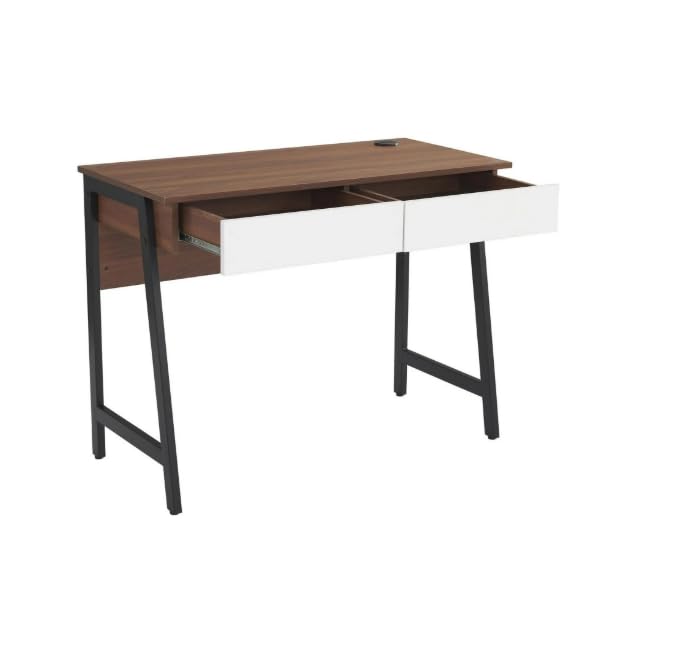
Image: The Generic H24-2201-B computer desk in walnut finish, featuring two white drawers and sturdy black metal legs. This image provides an overall view of the desk's design and dimensions.
זיכערקייַט אינפֿאָרמאַציע
It is crucial to follow all safety guidelines to prevent injury or damage to the product. Please observe the following:
- שטענדיק צוזאַמענשטעלן דעם טיש לויט די צוגעשטעלטע אינסטרוקציעס.
- נישט איבערשטייגן די וואָג לימיט פון 88 לב (40 קג). Overloading can compromise the desk's stability and structural integrity.
- זיכער מאַכן אַז דער טיש איז געשטעלט אויף אַ סטאַביל, גלייכער ייבערפלאַך צו פאַרמייַדן קיפּינג.
- Keep the desk away from direct heat sources, open flames, and excessive moisture.
- Avoid placing heavy objects on the edges of the desk to prevent damage or instability.
- קאָנטראָלירט פּעריִאָדיש אַלע פֿאַסטנערס צו זיכער מאַכן אַז זיי בלייבן פֿעסט.
פּעקל אינהאַלט
איידער איר הייבט אן צוזאמענשטעלן, זיכערט זיך אז אלע קאמפאנענטן וואס זענען אויסגערעכנט אונטן זענען פאראן און נישט באשעדיגט. אויב עפעס טיילן פעלן אדער זענען באשעדיגט, ביטע קאנטאקטירט קאסטומער סופארט.
- 1 x Desk Top (with integrated USB charger)
- 2 x Drawer Units
- 2 x Metal Leg Frames
- 1 x צוריק פּאַנעל
- פֿאַרזאַמלונג האַרדווער (שרויף, באָלץ, אַלען שליסל, אאז"ו ו)
- ינסטראַקשאַנז מאַנואַל
Note: All necessary assembly tools are included.
סעטאַפּ און אַסעמבלי
Assembly is required for this desk. It is recommended that צוויי מענטשן assemble the desk to ensure stability and ease of construction. Please follow the steps below carefully.
- אָפּלייגן קאַמפּאָונאַנץ: פֿאָרזיכטיק אַרויסנעמען אַלע טיילן פֿון דער פֿאַרפּאַקונג און לייגן זיי אויס אויף אַ ריינער, ווייכער ייבערפֿלאַך (למשל, אַ דעקע אָדער טעפּיך) כּדי צו פֿאַרמייַדן קראַצן.
- צוטשעפּען פוס ראַמען: Secure the metal leg frames to the underside of the desk top using the provided screws and Allen wrench. Ensure all connections are tight.
- אינסטאַלירן שופלאדן: Assemble the two drawer units according to their individual instructions. Once assembled, slide them into the designated slots under the desk top. Ensure the smooth sliding rails are properly aligned.
- צוטשעפּען הינטערשטע פּאַנעל: Secure the back panel to the rear of the desk structure. This adds stability and finishes the desk's appearance.
- לעצט טשעק: Once assembled, gently lift and move the desk to its desired location. Verify that all screws are tightened and the desk is stable.
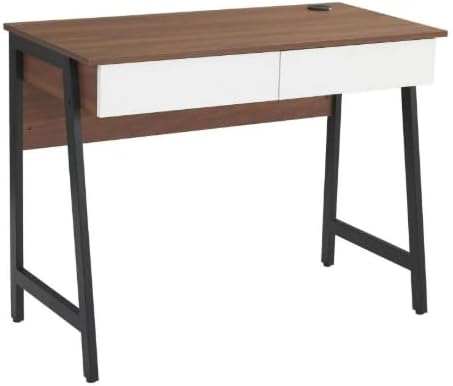
בילד: א צוזאמענגעשטעלטע view of the computer desk, highlighting the integration of the desk top, drawers, and metal leg structure. This image can serve as a visual reference during assembly.
אַפּערייטינג ינסטראַקשאַנז
ניצן די וסב טשאַרדזשינג פּאָרט
Your desk is equipped with a built-in USB charging port for convenient device charging.
- פאַרבינדן מאַכט: Ensure the desk's power cord (if applicable, usually from the USB hub) is securely plugged into a functional wall outlet.
- Plug in Devices: Connect your USB-compatible devices (e.g., smartphones, tablets, smartwatches) to the USB ports located on the desk surface.
- טשאַרדזשינג אָנווייַז: Your device should indicate that it is charging. If not, check the power connection and the USB cable.

בילד: א דעטאַלירטע view of the circular USB charging hub embedded in the desk's surface. It features three USB ports, allowing multiple devices to be charged simultaneously.
ניצן די סטאָרידזש שופלאָדן
The two integrated drawers provide convenient storage for your office supplies and personal items.
- עפן / פארמאכן: Gently pull the drawer handle to open and push to close. The smooth sliding rails ensure easy operation.
- וואָג לימיט: פֿאַרמײַדט איבערלאָדן די שופֿלאַדן צו פֿאַרזיכערן אַ גלאַטן אָפּעראַציע און פֿאַרמײַדט שאָדן צו די שופֿלאַד סליידס.
וישאַלט
Proper care will extend the life and maintain the appearance of your desk.
- רייניקונג: ווישן ריין מיט אַדamp שטאָף. פֿאַר שווערע פֿלעקן, ניצט אַ מילדע זייף לייזונג און טריקנט גלייך מיט אַ ריינעם שטאָף.
- ויסמיידן האַרב קעמיקאַלז: Do not use abrasive cleaners, strong detergents, or solvents, as these can damage the wood grain laminate finish.
- ספּילז: Promptly wipe up any spills to prevent water damage or staining. The scratch-resistant and waterproof finish offers protection, but immediate cleaning is recommended.
- פאַסטענערס: Periodically check and tighten all screws and bolts to ensure the desk remains stable.
טראָובלעשאָאָטינג
אויב איר טרעפט פראבלעמען מיט אייער טיש, זעט די פאלגנדע אלגעמיינע פראבלעמען און לייזונגען:
- שרייַבטיש איז וואַבבלי:
- זיכער מאַכן אַז אַלע פֿאַרזאַמלונג שרויפן און באָלץ זענען זיכער צוגעצויגן.
- Verify the desk is placed on a level surface. Adjust floor glides if present, or use shims if necessary.
- שופלאדן גליטשן נישט גלאט:
- קוק נאָך שטערונגען אין די שופלאָד סליידס.
- זייט זיכער אז די שופלאדן זענען נישט איבערגעלאדן.
- Verify that the drawer slides were installed correctly during assembly.
- USB פּאָרץ ניט טשאַרדזשינג:
- Confirm the desk's power cord (for the USB hub) is firmly plugged into a working electrical outlet.
- פרובירט אן אנדערן USB קאבל אדער דעווייס צו אויסשליסן קאבל/דעווייס פראבלעמען.
- Ensure the USB hub connection within the desk is secure (if accessible).
ספּעסאַפאַקיישאַנז
| מאָדעל נומער | H24-2201-B |
| סאָרט | גענעריק |
| דימענשאַנז (די רענטגענ וו x ה) | 48D x 100W x 76H סענטימעטער (18.9"D x 39.4"W x 29.9"H) |
| וואָג | 37.4 פונט (17 קג) |
| מאַטעריאַל | MDF, PB, Metal |
| ענדיקן טיפּ | Wood Grain Laminate |
| קאָליר | Walnut (with white drawers) |
| מאַקסימום וואָג קאַפּאַציטעט | 88 פונט (40 קג) |
| נומער פון גאַטקעס | 2 |
| ספּעציעלע פֿעיִקייטן | Built-in USB Charging Port, Scratch-Resistant & Waterproof Surface, Smooth Drawer Operation, Space-Saving Design |
| אַסעמבלי פארלאנגט | יא (רעקאָמענדירט 2 מענטשן) |
| אַרייַנגערעכנט אַסעמבלי מכשירים | יא |
וואָראַנטי און שטיצן
וואָראַנטי אינפֿאָרמאַציע: Warranty is not included with this product. Please contact the seller directly for any warranty-related inquiries or support.
קונה שטיצן: For any questions, missing parts, or assistance with assembly or operation, please contact the seller directly via Amazon messaging. Provide your order number and a detailed description of the issue for prompt assistance.
Manufacturer Contact Information: Not applicable. Please contact the seller directly via Amazon messaging.
Ask a question about this manual
Ask about setup, troubleshooting, compatibility, parts, safety, or missing instructions. Manuals+ will review the question and use this page’s manual context to help answer it.