
1. הקדמה
This manual provides essential information for the safe and efficient use of your Amzfast 24 Inch QHD 180Hz Gaming Monitor (Model AMZG24F6Q). Please read these instructions carefully before operating the device and retain them for future reference.
2. זיכערקייַט אינפֿאָרמאַציע
Observe the following safety precautions to prevent damage to the monitor or injury to yourself:
- שטעלט נישט אויס דעם מאָניטאָר צו רעגן אָדער פייכטקייט כּדי צו פֿאַרמייַדן פֿײַער אָדער שאָק געפֿאַרן.
- עפֿנט נישט דעם מאָניטאָר casinז. עס זענען נישטאָ קיין טיילן וואָס דער באַניצער קען סערוויסן אינעווייניק. לאָזט איבער אַלע סערוויסינג צו קוואַליפֿיצירטע סערוויס פּערסאָנעל.
- שטעלט דעם מאָניטאָר אויף אַ סטאַבילער, גלאַטער ייבערפלאַך כּדי צו פאַרהיטן אַז ער זאָל נישט פאַלן.
- זיכער מאַכן אַז די ווענטילאַציע אַרום דעם מאָניטאָר איז ריכטיק. בלאָקירט נישט די ווענטילאַציע עפענונגען.
- ניצט נאָר דעם מאַכט אַדאַפּטער וואָס ווערט צוגעשטעלט מיטן מאָניטאָר.
- נעמט ארויס דעם מאָניטאָר פֿון דער עלעקטרישער אַוטלעט בעת בליץ-שטורעמס אָדער ווען ער ווערט נישט גענוצט פֿאַר לאַנגע פּעריאָדן.
3. וואָס איז אין דער קעסטל
באַשטעטיקן אַז אַלע קאָמפּאָנענטן זענען פאַראַן ביים אויספּאַקן:
- Amzfast 24 Inch QHD 180Hz Gaming Monitor
- Monitor Base x 1
- מאַכט אַדאַפּטער x 1
- DP Cable (1.5m) x 1
- שנעל אָנהייב גייד
- באַניצער מאַנואַל (דעם דאָקומענט)

Image: Illustration of the monitor and included accessories.
4. סעטאַפּ
4.1 צוזאַמענשטעלן דעם מאָניטאָר שטאַנד
- נעמט פֿאָרזיכטיק אַרויס דעם מאָניטאָר און שטאַנד קאָמפּאָנענטן פֿון דער פּאַקאַדזשינג.
- באַפעסטיקט דעם שטאַנד באַזע צום שטאַנד אָרעם, באַזײַטיקנדיק עס מיט די צוגעשטעלטע שרויף.
- גלייכט אויס דעם צוזאמענגעשטעלטן שטאנד מיט די בארג-פונקטן אויף דער הינטערשטער זייט פונעם מאָניטאָר.
- Secure the stand to the monitor using the designated screws or quick-release mechanism.

בילד: הינטערשטע view of the monitor showing the stand attachment.
4.2 קאַנעקטינג צו אַ מיטל
The monitor features multiple input ports for versatile connectivity:
- DisplayPort (DP 1.4 x 2): Supports resolutions up to 2560x1440p at 180Hz. Use the included DP cable for optimal performance.
- HDMI (HDMI 2.0 x 2): Supports resolutions up to 2560x1440p at 144Hz.
- עאַרפאָנע דזשאַק: פֿאַר קאַנעקטינג פונדרויסנדיק אַודיאָ דעוויסעס.
- Connect one end of the DP or HDMI cable to the corresponding port on your computer or gaming console.
- פֿאַרבינדט דעם אַנדערן עק פֿונעם קאַבל צום פּאַסיקן אַרייַנגאַנג פּאָרט אויפֿן מאָניטאָר.
- Connect the power adapter to the monitor's DC IN port, then plug the adapter into a power outlet.
- אויב געוואונטשט, פֿאַרבינדט כעדפאָונז אָדער עקסטערנע רעדנערס צו די אויערפֿאָן דזשעק.

בילד: דעטאַלירט view of the monitor's rear ports and their labels.
4.3 ערשט מאַכט אויף
Press the power button located on the back of the monitor to turn it on. The monitor will automatically detect the active input source. If no signal is detected, ensure your device is powered on and the cables are securely connected.
Video: Official product video demonstrating the monitor's features, including setup and various functionalities.
5. אַפּערייטינג די מאָניטאָר
5.1 אויף-סקרין ווייַז (אָסד) מעניו
Navigate the OSD menu using the 5-way gaming joystick located on the back of the monitor. This menu allows you to adjust various display settings, including brightness, contrast, color modes, and gaming features.
5.2 Adjustable Stand Features
The monitor's ergonomic stand offers multiple adjustment options for optimal viewטרייסט:
- הייך אַדזשאַסטמאַנט: Lift the monitor from 0-130mm to your preferred height.
- דרייט: Rotate the screen -90° to 90° for portrait or landscape orientation.
- סוויוול: Swivel the monitor L30° to R30° horizontally.
- טילט: Adjust the screen angle from -5° to 22° (+/-2°).
Image: Visual guide to the monitor's adjustable stand capabilities.
5.3 גיימינג פֿעיִטשערס
Enhance your gaming experience with these integrated features:
- 180Hz Refresh Rate & 1ms MPRT: Provides faster, clearer gaming visuals with reduced motion blur.
- אַדאַפּטיוו סינק: Reduces screen tearing and stuttering, compatible with both AMD FreeSync and G-SYNC.
- קינסטלעכע אינטעליגענץ קראָסכער: An on-screen crosshair overlay for improved aiming accuracy in games.
- נאַכט זעאונג: Enhances visibility in dark in-game environments.

Image: Demonstrates the AI Crosshair and Night Vision game assist modes.
5.4 Display Quality and Eye Care
The monitor offers a high-quality visual experience with features designed for eye comfort:
- QHD 2560x1440p Resolution: Delivers extreme clarity and fine detail.
- שנעל IPS פּאַנעל: Ensures vibrant colors and wide viewינג אַנגלעס.
- 10-bit Color Depth (8bit+FRC), 96% DCI-P3, 130% sRGB, HDR Display: Provides a wide range of accurate and vivid colors.
- Hardware Low Blue Light: רעדוצירט שעדלעכע בלוי ליכט ימישאַנז.
- אַנטי-פליקער: Minimizes screen flickering for comfortable viewing.
- Anti-glare: רעדוצירט רעפלעקציעס פון אַמביאַנט ליכט.

Image: Highlights the eye care technologies integrated into the monitor.
6. וישאַלט
6.1 רייניקונג די מאָניטאָר
כדי צו אויפהאלטן דעם מאָניטאָר'ס אויסזען און פאָרשטעלונג:
- שטענדיק אָפּשטויסן די מאָניטאָר איידער רייניקונג.
- ניצן אַ ווייך, לינט-פֿרייַ שטאָף לייטלי דampגעוואשן מיט וואַסער אָדער אַ ניט-אַברייסיוו פאַרשטעלן רייניגער.
- שפריצט נישט רייניגער גלייך אויפן עקראַן.
- פֿאַרמײַדט ניצן אַלקאָהאָל, אַמאָניאַק, אָדער אַברייסיוו רייניגער, ווײַל זיי קענען שאַטן דעם עקראַן אָדער קאָמפּיוטער.asing.
6.2 קאַבלע מאַנאַגעמענט
The monitor stand includes a cable organizer to help keep your workspace tidy. Route cables through the designated loop on the stand arm.
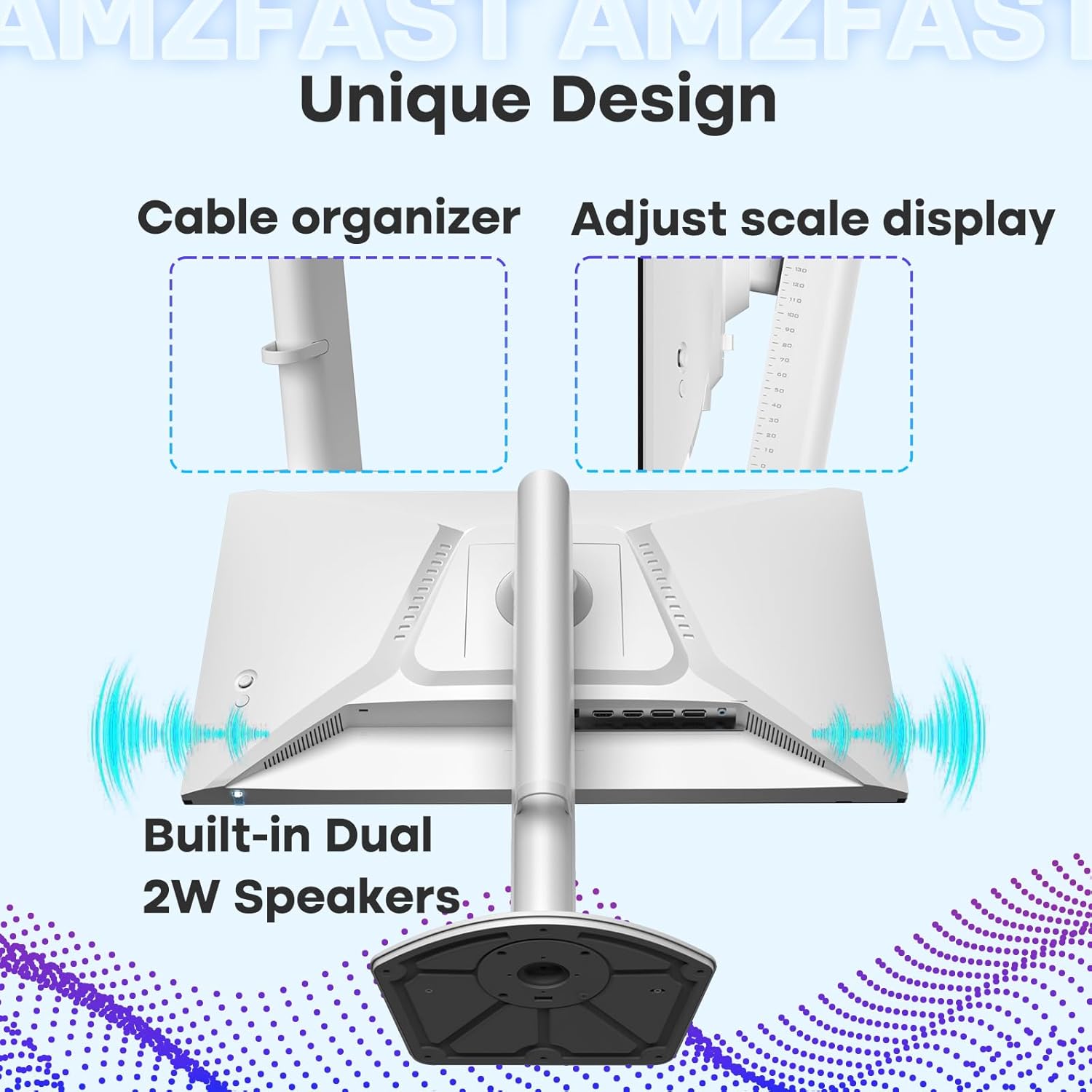
Image: Demonstrates the cable organizer feature on the monitor stand.
7. טראָובלעשאָאָטינג
אויב איר טרעפט פּראָבלעמען מיט אייער מאָניטאָר, זעט די פאלגענדע געוויינטלעכע פּראָבלעמען און לייזונגען:
| פּראָבלעם | מעגלעך סיבה / לייזונג |
|---|---|
| קיין בילד אויף פאַרשטעלן |
|
| בילד איז פארשוואומען אדער פארדרייט |
|
| Screen flickers or goes black intermittently |
|
| No sound from built-in speakers or earphone jack |
|
8. ספּעסאַפאַקיישאַנז
| שטריך | באַשרייַבונג |
|---|---|
| מאָדעל נומער | AMZG24F6Q |
| פאַרשטעלן גרייס | 24 אינטשעס |
| טאַפליע טיפּ | שנעל IPS |
| האַכלאָטע | 2560 x 1440 (QHD ברייט 1440p) |
| דערפרישן קורס | 180 הז |
| ענטפער צייט | 1ms (MPRT) |
| אַדאַפּטיוו סינק | Compatible with AMD FreeSync and G-SYNC |
| קאָליר דעפּט | 10-bit (8bit+FRC) |
| קאָליר גאַמע | 96% DCI-P3, 130% sRGB |
| HDR שטיצן | HDR10 |
| ברייטנאַס | 300 קאַנדעלאַ פּער קוואַדראַט מעטער |
| קאַנעקטיוויטי | 2 x DisplayPort 1.4, 2 x HDMI 2.0, 1 x Earphone Jack |
| ספּיקערז | געבויט-אין צווייענדיק ספּיקערז |
| ערגאָנאָמיקס | Height Adjustable (0-130mm), Pivot (-90°~90°), Swivel (L30°, R30°), Tilt (-5°~22°) |
| וועסאַ בארג | 100 מם X 100 מם |
| פּראָדוקט דימענשאַנז | 8.54 X 21.22 X 19.72 אינטשעס |
| פּונקט וואָג | 12.87 פונט |
9. וואָראַנטי און שטיצן
9.1 פּראָדוקט וואָראַנטי
This Amzfast monitor comes with a 1-year warranty from the date of purchase, covering manufacturing defects. Please retain your proof of purchase for warranty claims.
9.2 צוריקקומען פּאָליטיק
A 30-day refund/replacement policy is available from the date of purchase. Refer to your retailer's specific return terms for details.
9.3 קונה שטיצן
For technical assistance or further inquiries, please visit the official Amzfast store or contact customer support. You can find more information and contact options at the Amzfast Official Store.