
הקדמה
This manual provides essential information for setting up, operating, and maintaining your Roku 32-Inch Select Series 1080p Full HD Smart TV. Designed for a delightful streaming experience, this TV offers excellent picture quality, clear sound, and automatic updates. Please read this manual thoroughly before using your television.
וואָס איז אין די קעסטל
באַשטעטיקן אַז אַלע קאָמפּאָנענטן זענען פאַראַן אין דער פּאַקאַדזשינג:
- Roku 32-Inch Select Series 1080p Full HD Smart TV
- ווייַט קאָנטראָל
- שטאַנד (2 שטיקלעך)
- Stand Screws (4 pieces)
- מאַכט קאַבלע
- באַניצער מאַנואַל (דעם דאָקומענט)

Image: Contents of the Roku TV box, showing the television, remote control, two stand pieces, and four screws.
סעטאַפּ אינסטרוקציעס
1. אנשטעלן דעם טעלעוויזיע שטאנד
- Carefully place your TV face-down on a soft, clean surface to prevent damage to the screen.
- Align the stand pieces with the screw holes on the bottom of the TV.
- Secure each stand piece with two screws using a Phillips head screwdriver. Do not overtighten.
2. פֿאַרבינדן מאַכט און דעוויסעס
- פֿאַרבינדט דעם מאַכט קאַבל צום טעלעוויזאָרס מאַכט אַרייַנגאַנג און דערנאָך צו אַ וואַנט אַוטלעט.
- Connect your external devices (e.g., cable box, gaming console, Blu-ray player) to the available HDMI ports on the back of the TV. This model features 3 HDMI ports.
- For older devices, use the AV input ports (yellow, white, red).
- An optical audio output is available for connecting to soundbars or home theater systems.
- A USB port is provided for media playback.

בילד: הינטערשטע view of the Roku TV displaying HDMI, AV, Antenna, USB, Optical, and Headphone ports.
3. ערשטע איינשטראָם און נעץ פֿאַרבינדונג
- דריק דעם מאַכט קנעפּל אויף דער ווײַט קאָנטראָל אָדער דעם טעלעוויזיע.
- פֿאָלגט די אינסטרוקציעס אויף דעם עקראַן צו אויסקלײַבן אײַער שפּראַך און זיך פֿאַרבינדן צו אײַער Wi-Fi נעץ.
- Activate your Roku account or create a new one. This is required to access streaming channels and features.
אַפּערייטינג ינסטראַקשאַנז
1. Roku OS Interface
The Roku OS provides a simple and intuitive home screen for accessing all your entertainment. Easily navigate between streaming apps, live TV, and connected devices.

Image: The Roku TV home screen with a menu on the left and app icons on the right, including Netflix, Disney+, Apple TV, and Roku Channel.
2. שטימע ווײַטקאָנטראָל
Your Roku TV comes with a voice remote for convenient control. Use your voice to search for content, launch apps, and control playback.
- שטימע זוך: Press the voice button and speak your command (e.g., "Find comedies," "Open Netflix").
- אַפּ דורכוועג: דעדאַקייטאַד קנעפּלעך צושטעלן שנעל אַקסעס צו פאָלקס סטרימינג באַדינונגען.
- באַנד קאָנטראָל: אַדזשאַסטירן די באַנד מיט די זייט קנעפּלעך.
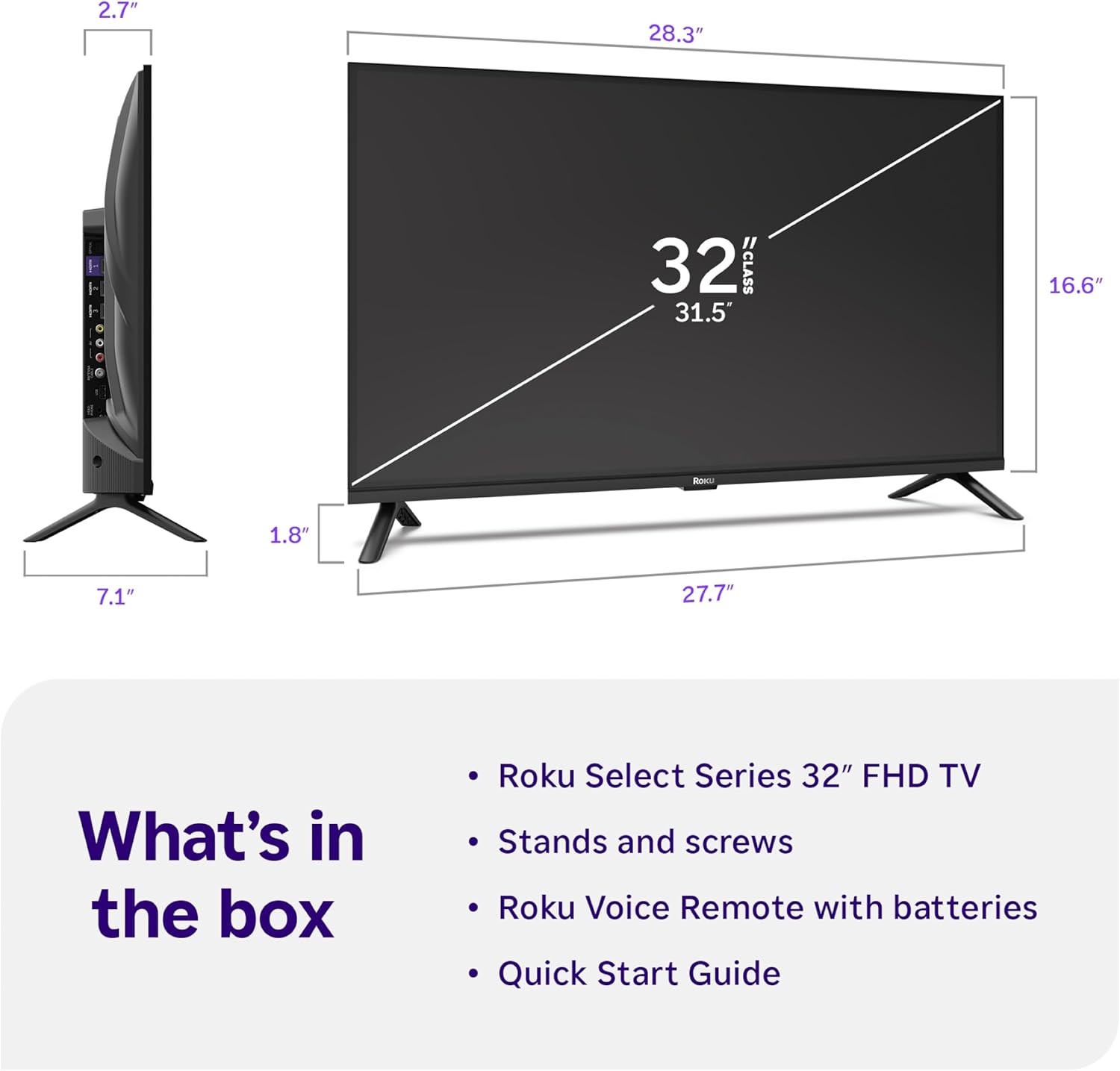
Image: Close-up of the Roku Voice Remote, highlighting buttons for TV power, volume, mute, voice search, instant replay, options, and dedicated app shortcuts.
3. סטרימינג אַפּפּס און לייוו טעלעוויזיע
Access thousands of streaming channels, including Netflix, Disney+, Hulu, Prime Video, and Apple TV+. The Roku Channel also offers free live TV and on-demand content.

Image: A vibrant Roku TV home screen displaying a selection of popular streaming applications and recommended shows.
4. בילד סעטטינגס
אָפּטימיזירן דיין viewing experience with various picture settings:
- Roku Smart Picture: Automatically adjusts picture mode for optimal viewing.
- בילד מאָדעס: Choose from presets like Movie, Sports, Vivid, Standard, or Low Power.
- קוסטאָמיזאַטיאָן: Adjust brightness, contrast, sharpness, color, and tint for a personalized picture.
5. סאָונד סעטטינגס
Enhance your audio experience:
- Dolby Audio: Enjoy clear speech and louder sound.
- געזונט מאָדעס: Select from Standard, Dialogue, Movie, Music, or Night mode.
- Bluetooth Headphone Mode: Connect your wireless headphones to listen without disturbing others.

Image: A child wearing wireless headphones while watching the Roku TV, demonstrating the Bluetooth Headphone Mode.
6. קלוגע היים אינטעגראַציע
Your Roku TV is compatible with various smart home ecosystems:
- קול קאָנטראָל: Use Roku Voice, Siri, Alexa, or Google Assistant for hands-free control.
- עפּל עירפּליי: Effortlessly share videos, photos, and music from your Apple devices.
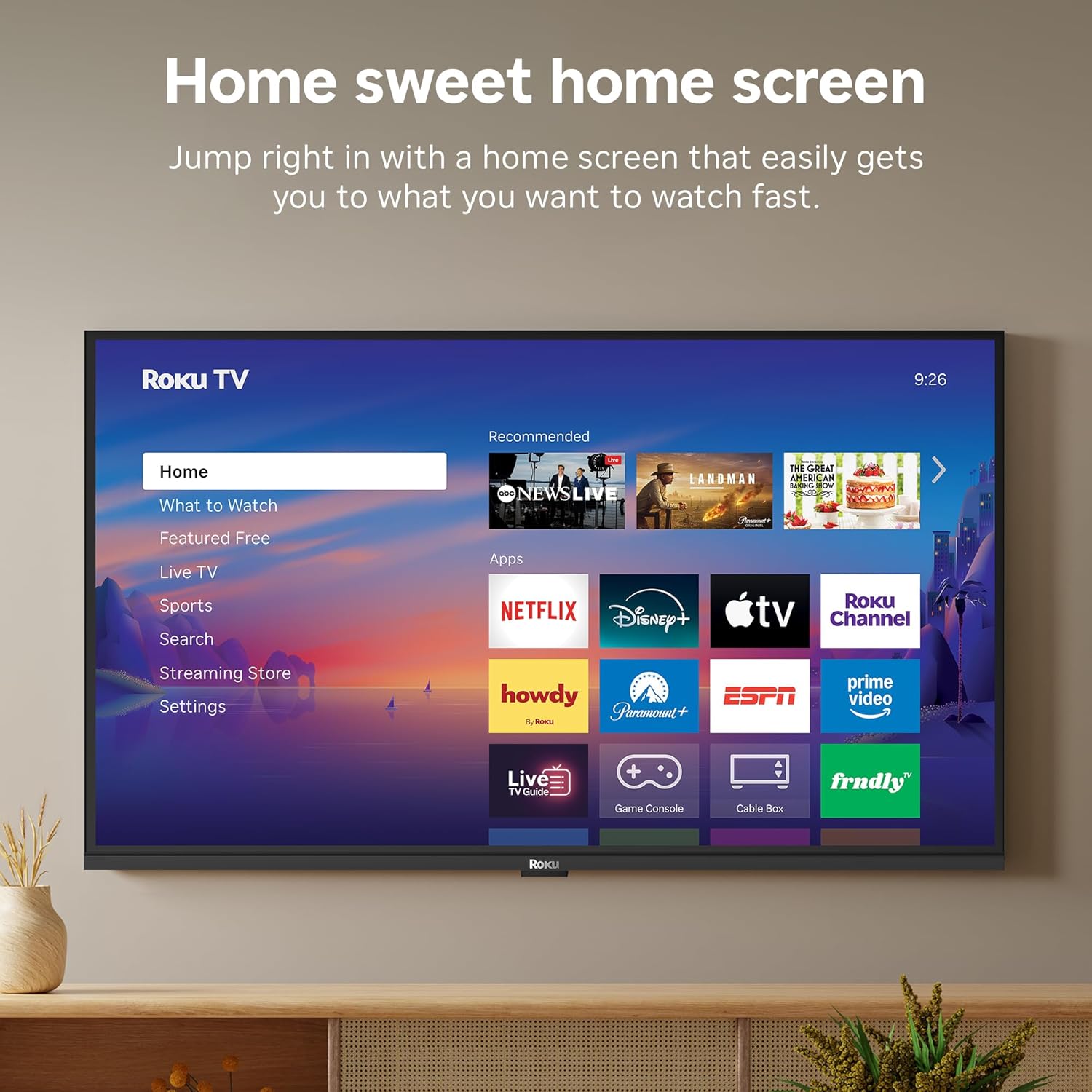
Image: The Roku TV screen displaying smart home compatibility logos for Roku Smart Home, Apple AirPlay, Apple Home, Alexa, and Google Home, with a smart speaker nearby.
7. פּאַרענטאַל קאָנטראָלס
Manage content access with built-in parental controls, including V-Chip technology, to ensure a safe viewאַ סביבה פֿאַר קינדער.
אפיציעלע פּראָדוקט ווידעאָ
ווידעא: אן איבערview of the Roku TV OS, demonstrating its user-friendly interface, app selection, and smart features. This video is provided by Roku, Inc.
ספּעסאַפאַקיישאַנז
- פאַרשטעלן גרייס:
- 32 אינטשעס
- רעזאלוציע:
- 1080 פּ גאַנץ הד
- ווייַז טעכנאָלאָגיע:
- געפירט
- דערפרישן קורס:
- 60 הז
- ספּעציעלע פֿעיִקייטן:
- Bluetooth Headphone Mode, Dolby Audio, Voice Remote, Roku Smart Picture
- קאַנעקטיוויטי טעכנאָלאָגיע:
- בלועטאָאָטה, ווי-פי
- ייַזנוואַרג צובינד:
- 3 HDMI Ports, 1 USB Port, S/PDIF (Optical Audio Out)
- אַפּערייטינג סיסטעם:
- ראָקו אַס
- פּראָדוקט גרייסן (ד x ב x ה):
- 7.1"ד רענטגענ 28.3"וו רענטגענ 18.4"ה
- נומער וואָג:
- 7.7 Pounds (with stand)
- VESA Mount Standard:
- 200 רענטגענ 200 מם
- מאָדעל נומער:
- 32 ר 3 ע 5
- UPC:
- 829610009469
טראָובלעשאָאָטינג
If you encounter issues with your Roku TV, please refer to the following common solutions:
- קיין מאַכט: זיכער מאַכן אַז דער עלעקטרישער קאַבל איז זיכער פֿאַרבונדן סיי צום טעלעוויזיע און סיי צו אַן אַרבעטנדיקן עלעקטרישן אַוטלעט. פּרוּווט אַן אַנדער אַוטלעט.
- קיין בילד/קלאַנג: Verify that the correct input source is selected on your TV. Check all cable connections (HDMI, AV, etc.) for looseness.
- ווייַט ניט ריספּאַנדינג: Replace the batteries in your remote control. Ensure there are no obstructions between the remote and the TV.
- נעץ פֿאַרבינדונג פּראָבלעמען: Restart your Wi-Fi router and modem. Go to the TV's Settings > Network > Check connection to diagnose and reconnect.
- אַפּ לאָודט זיך נישט: Restart the app. If the issue persists, try removing and reinstalling the app from the Roku Channel Store.
For more detailed troubleshooting, visit the official Roku support webפּלאַץ.
וישאַלט
To ensure the longevity and optimal performance of your Roku TV, follow these maintenance guidelines:
- רייניקונג די פאַרשטעלן: ווישט אָפּ דעם עקראַן מיט אַ ווייכן, טרוקענעם מיקראָפיבער שטאָף. פֿאַר שווערע פֿלעקן, ווישט אָפּ דעם עקראַן לייכט.ampווישט דעם שטאָף מיט וואַסער אָדער אַ ספּעציעל געמאַכטע לייזונג פֿאַר עלעקטראָניק. שפּריצט נישט קיין פליסיקייט גלייך אויפן עקראַן.
- רייניקונג פון די טעלעוויזיע קערפער: ניצט אַ ווייכע, טרוקענע שטאָף צו ווישן די אויסערלעכע זייט פון דער טעלעוויזיע. פֿאַרמייַדט אַברייסיוו רייניגער אָדער סאָלווענטן.
- ווענטילאַטיאָן: זיכערט זיך אז די טעלעוויזיע'ס ווענטילאציע עפענונגען זענען נישט פארשטאפט צו פארמיידן איבערהיצונג. האלט גענוג פלאץ ארום דעם טעלעוויזיע פאר לופט צירקולאציע.
- ווייכווארג דערהייַנטיקונגען: Your Roku TV automatically receives software updates. Ensure your TV is connected to the internet to receive the latest features and performance improvements.
- מאַכט פאַרוואַלטונג: נעמט ארויס דעם טעלעוויזאר פון דער עלעקטרישער ווענטיל בעת בליץ-שטורעמס אדער ווען עס וועט בלייבן אומבאוואכט פאר לאנגע צייטן.
וואָראַנטי און שטיצן
וואָראַנטי אינפֿאָרמאַציע
Roku warrants the hardware of this device against defects in materials and workmanship under normal use for a period of one (1) year from the date of purchase ("Warranty Period"). If Roku determines that the device’s hardware is defective during the Warranty Period, Roku’s sole obligation, and your exclusive remedy, will be to either repair or replace the unit with either a new or rebuilt device, at its option. This warranty applies if the device is used in accordance with the provided documentation.
Important information about warranty returns and replacements is available on the Roku support site. You may also return a device for any reason, subject to the terms of the applicable return policy: 1) Within thirty (30) days from the date of purchase from Roku; or 2) within the applicable return period if purchased from an authorized reseller or distributor. Additional details regarding product returns can be found on the Roku support site.
קונה שטיצן
For further assistance, technical support, or to access the full range of support resources, please visit the official Roku support webזייטל. איר קענט דאָרט געפֿינען אָפֿט געשטעלטע פֿראַגעס, טראָובלעשווטינג גיידס, און קאָנטאַקט אינפֿאָרמאַציע פֿאַר קונה סערוויס.