
הקדמה
Thank you for choosing the LIORQUE Wireless Weather Station YGH6208. This device provides accurate indoor and outdoor temperature and humidity readings, weather forecasts, and features a DCF radio-controlled clock with alarm functions. This manual will guide you through the setup, operation, and maintenance of your weather station.
פּעקל אינהאַלט
- 1 x LIORQUE Wireless Weather Station (Main Unit)
- 1 רענטגענ דרויסנדיק סענסאָר
- 3 x AAA Batteries (for Main Unit)
- 2 x AAA Batteries (for Outdoor Sensor)
- 1 x באַניצער מאַנואַל (דאָס דאָקומענט)
פּראָדוקט איבערview
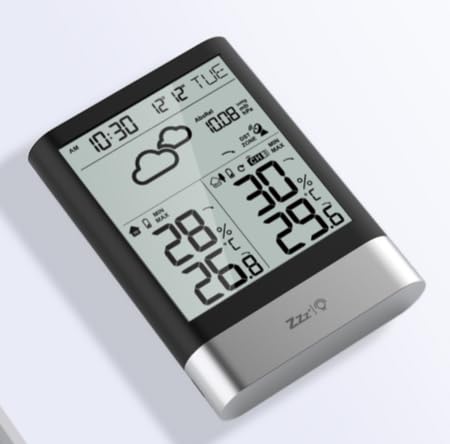
בילד 1: LIORQUE Wireless Weather Station Main Unit. This image shows the front view of the main display unit, highlighting its LCD screen and compact design.
הויפּט אַפּאַראַט פֿעיִקייטן:
- 4.3-inch LCD screen with backlight
- דרינענדיק טעמפּעראַטור און הומידיטי אַרויסווייַזן
- דרויסנדיקע טעמפּעראַטור און הומידיטי אַרויסווייַזונג
- וועטער פאָרויסזאָגן ייקאַנז
- DCF radio-controlled clock with manual setting option
- Double alarm clock with snooze function
- Calendar and day of the week display (7 languages)
- Max/Min temperature and humidity records
- Air pressure display and weather trend
- 12/24 שעה צייט אַרויסווייַזן
פֿעיִטשערס פֿאַר דרויסנדיקע סענסאָרן:
- Wireless transmission up to 100m (open area)
- מעזשערמאַנט פון טעמפּעראַטור און הומידיטי
- Supports hanging or standing placement
- Data updated every 30 seconds
- Supports up to 3 sensors (one included)
סעטאַפּ
1. באַטאַרייע ייַנמאָנטירונג
- דרויסנדיק סענסאָר: Open the battery compartment cover on the back of the outdoor sensor. Insert 2 x AAA batteries, ensuring correct polarity (+/-). Close the cover.
- הויפּט אַפּאַראַט: Open the battery compartment cover on the back of the main unit. Insert 3 x AAA batteries, ensuring correct polarity (+/-). Close the cover.
- The main unit will power on and display indoor readings.
2. סענסאָר פּערינג
After installing batteries in both units, the main unit will automatically search for the outdoor sensor. The outdoor temperature and humidity should appear on the main unit's display within a few minutes. If the outdoor readings do not appear:
- Ensure both units are within range (up to 100m in open air).
- Press the "TX" button inside the outdoor sensor's battery compartment to manually send a signal.
- On the main unit, press and hold the "CHANNEL" button to initiate a manual search for the sensor.
3. ערשטע סעטטינגס (צייט, דאטום, איינסן)
The weather station will attempt to synchronize with the DCF radio signal for automatic time setting. This may take several hours, especially in areas with weak signals. You can manually set the time and date if needed.
- מאַנואַל צייט באַשטעטיקן: Press and hold the "MODE" button to enter time setting mode. Use the "UP" and "DOWN" buttons to adjust values and "MODE" to confirm and move to the next setting (e.g., 12/24 hour format, hour, minute, year, month, day, language for day of week).
- טעמפּעראַטור וניץ: Press the "°C/°F" button to switch between Celsius and Fahrenheit.
- לופט דרוק איינהייטן: Press the "BARO" button to cycle through air pressure units (e.g., hPa, inHg).
אַפּערייטינג ינסטראַקשאַנז
ווייַז אינפֿאָרמאַציע
The 4.3-inch LCD screen displays various information:
- צייט און דאַטע: Current time, date, and day of the week.
- אינעווייניק לייענונגען: Current indoor temperature and humidity.
- Outdoor Readings: Current outdoor temperature and humidity from the connected sensor.
- וועטער פאָרעקאַסט: Icons indicating predicted weather conditions (e.g., sunny, cloudy, rainy).
- לופט דרוק: Current atmospheric pressure and trend.
- באַקלייט: The screen backlight activates with a light touch and returns to normal brightness after 10 seconds to conserve battery.
שרעק זייגער פונקציע
The weather station features a double alarm clock with snooze.
- באַשטעטיקן אַלאַרמס: דריק דעם "ALARM" קנעפל צו view Alarm 1. Press "ALARM" again to view Alarm 2. Hold "ALARM" to enter alarm setting mode. Use "UP" and "DOWN" to adjust the hour and minute, and "ALARM" to confirm.
- אַקטיווירן/דעאַקטיווירן אַלאַרמס: בשעת viewing an alarm, press "UP" to toggle it on or off. An alarm icon will appear when active.
- סנוז פונקציע: When an alarm sounds, press any button (except "ALARM OFF") to activate snooze. The alarm will sound again after a set interval. Press "ALARM OFF" to stop the alarm completely.
מאַקסימום און מינימום רעקאָרדס
The weather station records the maximum and minimum indoor/outdoor temperature and humidity values.
- Press the "MAX/MIN" button once to display maximum recorded values.
- Press "MAX/MIN" again to display minimum recorded values.
- Press "MAX/MIN" a third time to return to current readings.
- To clear records, hold the "MAX/MIN" button while viewביי די רעקאָרדס.
וישאַלט
- באַטערי פאַרבייַט: Replace batteries in both the main unit and outdoor sensor when the low battery indicator appears on the display. Always replace all batteries at the same time.
- רייניקונג: Clean the display and unit surfaces with a soft, damp שטאָף. דו זאלסט נישט נוצן אַברייסיוו קלינערז אָדער סאָלוואַנץ.
- דרויסנדיק סענסאָר פּלייסמאַנט: For optimal performance and longevity, install the outdoor sensor in a shaded area, protected from direct sunlight and rain. Ensure it is within the 100m wireless range of the main unit.
טראָובלעשאָאָטינג
| פּראָבלעם | מעגלעך לייזונג |
|---|---|
| קיין דרויסנדיקע טעמפּעראַטור/פֿײַכטקייט אַרויסווייַזונג. |
|
| אומרעכטע צייט־אויסשטעלונג. |
|
| דער עקראַן איז טונקל אָדער ליידיק. |
|
| וועטער פאָרויסזאָגן שיינט נישט ריכטיק. |
|
ספּעסאַפאַקיישאַנז
- מאָדעל: YGH6208
- סאָרט: LIORQUE
- ווייַז טיפּ: לקד
- מאַכט מקור (הויפּט אַפּאַראַט): 3 X AAA באַטעריז (אַרייַנגערעכנט)
- מאַכט מקור (דרויסנדיק סענסאָר): 2 X AAA באַטעריז (אַרייַנגערעכנט)
- ווירעלעסס קייט: אַרויף צו 100 ם (עפענען שטח)
- טעמפּעראַטור אַקיעראַסי: ±0.5 °C
- סענסאָר טעכנאָלאָגיע: פאַנק (דראָטלאָז)
- ספּעציעלע פֿעיִקייטן: DCF Radio Clock, Alarm, Snooze, Weather Forecast, Max/Min Records, Backlight
- אַרייַנגערעכנט קאַמפּאָונאַנץ: Weather Station Main Unit, Outdoor Sensor
וואָראַנטי און שטיצן
LIORQUE products are designed for reliability and performance. For warranty information or technical support, please refer to the contact details provided with your purchase or visit the official LIORQUE webזייטל. ביטע באַהאַלטן אייער קויפן באַווייַז פֿאַר וואָראַנטי קליימז.