
הקדמה
This manual provides detailed instructions for the installation, operation, and maintenance of your CHORTAU B-T006 4K+1080P Dual Dash Cam. Please read this manual thoroughly before using the product to ensure proper function and safety.

Image: The CHORTAU B-T006 Dash Cam showcasing its main features including 4K+1080P recording, Wi-Fi connectivity, app control, parking monitoring, WDR/HDR, G-sensor, night vision, voice recording, and a 2.99-inch IPS display.
פּעקל אינהאַלט
באַשטעטיקט אַז אַלע זאכן וואָס זענען אויסגערעכנט אונטן זענען אַרייַנגערעכנט אין אייער פּעקל. אויב עפּעס פעלנדיק אָדער צעבראָכן, ביטע קאָנטאַקטירט קונה שטיצע.
- 4K Main Drive Recorder (Front Camera)
- 1080P דערציען אַפּאַראַט
- Type-C Car Charger
- 64 גיגאבייט מיקראָסד קאָרט
- Removal Pin
- Wiring Trim Tool
- Japanese Instruction Manual
- 3M VHB Double-Sided Tape
- Electrostatic Window Film (2 sheets)
- וואָראַנטי קאַרד

Image: Visual representation of all components included in the product package, such as the main dash cam unit, rear camera, car charger, microSD card, and installation accessories.
פּראָדוקט איבערview
The CHORTAU B-T006 is a dual dash cam system designed to record both front and rear views of your vehicle. It features a 4K front camera and a 1080P rear camera, providing comprehensive coverage.

בילד: פראָנט view of the dash cam, highlighting its compact size with approximate dimensions of 1.3 inches in height and 3.66 inches in width. The lens is labeled "ULTRA WIDE ANGLE LENS F1.8 DIGITAL RECORDER".
שליסל פֿעיִקייטן:
- הויך רעזאָלוציע רעקאָרדינג: 4K (front) + 1080P (rear) for clear video evidence.
- ברייט ווינקל לענסעס: Front 170° and Rear 140° to cover multiple lanes.
- געבויט-אין ווי-פי: Connect to the 'viidure' app for real-time viewing, playback, and downloads.
- ג-סענסאָר: אויטאָמאַטיש פֿאַרשליסט פֿוסtagע ביים אימפּאַקט צו פאַרמייַדן אָווועררייטינג.
- 24-שעה פּאַרקינג מאָניטאָרינג: Motion detection and time-lapse recording for continuous surveillance (requires hardwire kit, sold separately).
- שלייף רעקאָרדינג: אויטאָמאַטיש איבערשרייבט עלטסטע files ווען די זכּרון קאָרט איז פול.
- WDR/HDR Technology: Improves video clarity in varying light conditions, especially at night.
- 2.99-inch IPS LCD Screen: פֿאַר גרינג viewנוצן און מעניו נאַוויגאַציע.
סעטאַפּ און ינסטאַלירונג
Follow these steps to properly install your dash cam system.
1. צוגרייטן די מיקראָסד קאַרטל:
- Insert the included 64GB microSD card into the dash cam's card slot.
- Format the microSD card within the dash cam's settings menu before first use to ensure optimal performance.
2. Install the Front Camera:
- רייניקט דעם ווינטשילד געגנט וואו איר פּלאַנירט צו מאָנטירן די דאַש קאַם.
- Apply the electrostatic window film to the cleaned area.
- Attach the 3M VHB double-sided tape to the dash cam mount, then firmly press the mount onto the electrostatic film.
- מאַכן זיכער אַז די אַפּאַראַט האט אַ קלאָר view of the road and does not obstruct your driving vision.
3. Install the Rear Camera:
- Mount the rear camera on the rear windshield using the provided adhesive, ensuring a clear view.
- Route the rear camera cable to the front dash cam, tucking it neatly along the vehicle's headliner and pillars using the wiring trim tool.
- פֿאַרבינדט דעם קאַבל פֿון דער הינטערשטער קאַמעראַ צום באַשטימטן פּאָרט אויף דער פֿאָדערשטער דאַש קאַם.
4. מאַכט קאַנעקשאַן:
- Connect the Type-C car charger to the dash cam and plug the other end into your vehicle's cigarette lighter socket.
- The dash cam will automatically power on and begin recording when the vehicle engine starts.

Image: A visual guide demonstrating the simple installation process, including connecting the Type-C car charger and the rear camera to the main unit. It also shows the detachable design of the mount using 3M VHB tape.
אַפּערייטינג ינסטראַקשאַנז
יקערדיק אָפּעראַציע:
- מאַכט אויף / אַוועק: The device powers on automatically with vehicle ignition and powers off when the engine is turned off. You can also manually power it on/off by pressing and holding the power button.
- רעקאָרדינג: Recording starts automatically when the device is powered on. A red indicator light or icon on the screen confirms recording is active.
- מעניו נאַוויגאַציע: Use the physical buttons on the device to navigate through the menu options on the IPS screen.
צוויי-קאַנאַל רעקאָרדינג:
The dash cam records simultaneously from both the front and rear cameras. The front camera captures 4K UHD video with a 170° wide-angle view, while the rear camera records 1080P Full HD video with a 140° wide-angle view.

Image: An illustration showing the dual-channel recording capability, with the front camera capturing a 170° wide-angle view in 4K and the rear camera capturing a 140° wide-angle view in 1080P, covering both the front and rear of the vehicle.

Image: A graphic demonstrating the wide coverage of the front 4K UHD camera (170 degrees) and the rear 1080P FHD camera (140 degrees), ensuring comprehensive recording around the vehicle.
Wi-Fi and App Connection
The dash cam features built-in Wi-Fi for seamless connection to your smartphone via the 'viidure' app (available for Android and iOS).
קאַנעקטינג צו די אַפּ:
- Download the 'viidure' app from your smartphone's app store.
- Turn on the dash cam's Wi-Fi function (refer to the device's menu).
- On your smartphone, go to Wi-Fi settings and connect to the dash cam's Wi-Fi network (SSID and password will be displayed on the dash cam screen).
- Open the 'viidure' app. You can now view פאַקטיש-צייט פאָאָtage, צוריקשפּילן רעקאָרדירטע ווידעאָס, און אראָפּלאָדן fileס גלייך צו דיין טעלעפאָן.
The app allows for easy sharing of recorded videos to social media platforms.
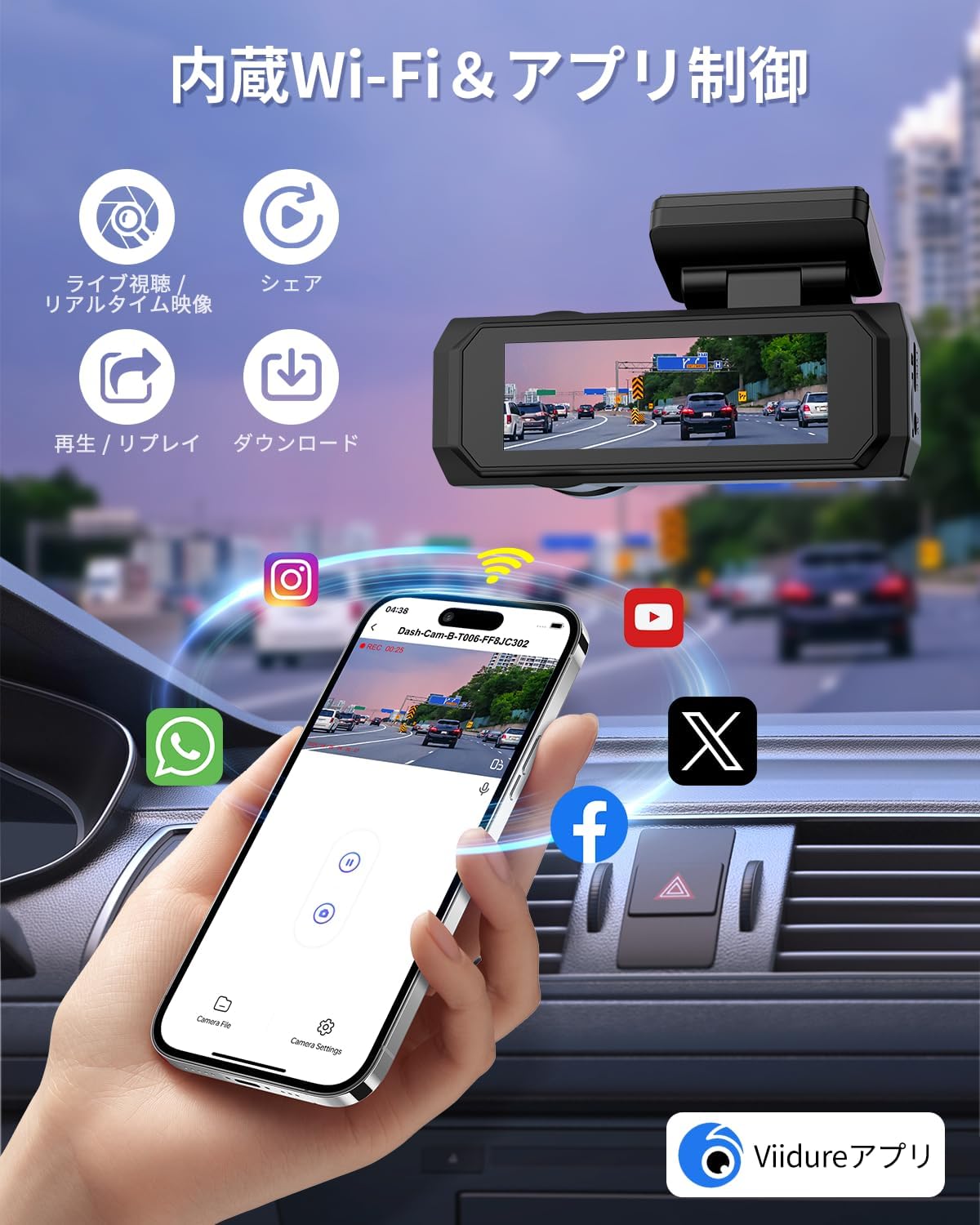
Image: A smartphone screen showing the 'viidure' app interface, connected to the dash cam, with options for live view, sharing, playback, and downloading videos. Social media icons are also visible, indicating sharing capabilities.
Parking Monitoring & G-Sensor
The dash cam offers advanced parking surveillance features to protect your vehicle when parked.
24-שעה פּאַרקינג מאָניטאָרינג:
- When enabled, the dash cam can monitor your vehicle for 24 hours.
- This feature typically requires a hardwire kit (sold separately) to provide continuous power to the dash cam when the vehicle is off.
- It can utilize motion detection or time-lapse recording to save storage space while providing continuous coverage.
G-סענסאָר שוץ:
- The built-in G-sensor detects sudden impacts or collisions.
- Upon detection, it automatically locks the current video segment, preventing it from being overwritten by loop recording. This ensures critical accident footage ווערט אויפגעהיט ווי באווייז.
- The G-sensor sensitivity can usually be adjusted in the dash cam's settings.

Image: A graphic illustrating the 24-hour parking monitoring mode, which requires a hardwire kit. It also depicts the G-sensor locking footage upon impact and the loop recording function overwriting old files.

Image: A visual representation of the 24-hour parking monitoring system, showing a car protected by the dash cam's continuous surveillance. A hardwire kit is indicated as necessary for this function.
שלייף רעקאָרדינג
The dash cam utilizes loop recording to ensure continuous recording without manually clearing the memory card.
- When the microSD card reaches its storage limit, the system automatically overwrites the oldest unlocked video files.
- Video segments are typically recorded in 1, 2, or 3-minute intervals (configurable in settings).
- Files locked by the G-sensor or manually locked will not be overwritten.
- The device supports microSD cards up to 256GB (64GB card included).

Image: A graphic explaining seamless loop recording, where the dash cam automatically overwrites the oldest footage when the 64GB memory card is full. It also shows how G-sensor activated recordings are locked and protected.
Night Vision & WDR/HDR
The CHORTAU B-T006 is equipped with advanced technologies to ensure clear recordings even in low-light conditions.
- Super Night Vision: The F1.8 large aperture lens and advanced sensor enhance light intake, providing clear images at night.
- WDR (Wide Dynamic Range) & HDR (High Dynamic Range): These technologies balance exposure in scenes with both very bright and very dark areas, ensuring details are captured without overexposure or underexposure. This is crucial for identifying license plates and road signs in challenging lighting.
- The lens assembly consists of 6 layers of glass for optimal image quality.

Image: A visual demonstrating the dash cam's super night vision, highlighting the F1.8 large aperture lens, WDR&HDR technology, and 6-layer lens construction for enhanced clarity in low-light conditions.

Image: A diagram explaining the WDR (Wide Dynamic Range) function, showing how it corrects for overexposed and underexposed areas in a single frame to produce a balanced image. Features like F1.8 large aperture, WDR&HDR, and 6-layer glass lens are highlighted.
וישאַלט
געהעריגע אויפהאלטונג גאראנטירט די לאנגעוויטי און אפטימאלע פערפארמאנס פון אייער דעש קעם.
- ריין די לענסעס: Regularly wipe the front and rear camera lenses with a soft, lint-free cloth to ensure clear recordings. Avoid abrasive materials.
- מיקראָסד קאַרטל וישאַלט: Format the microSD card monthly to prevent data corruption and maintain recording efficiency. Back up important files איידער פאָרמאַטטינג.
- Firmware דערהייַנטיקונגען: Check the CHORTAU official website periodically for firmware updates. Updating firmware can improve performance and add new features.
- אַפּערייטינג טעמפּעראַטור: פֿאַרמײַדט אויסשטעלן די דאַש קאַם צו עקסטרעמע טעמפּעראַטורן פֿאַר לענגערע פּעריאָדן.
טראָובלעשאָאָטינג
If you encounter issues with your dash cam, refer to the following common problems and solutions.
| פּראָבלעם | מעגלעך סיבה / לייזונג |
|---|---|
| די דאַש קאַם גייט נישט אָן. |
|
| די אויפנאמע שטעלט זיך אפ אומגעריכט. |
|
| ווידעא שפּילtage איז פארשוואומען אדער נישט קלאר. |
|
| Wi-Fi פֿאַרבינדונג פּראָבלעמען. |
|
| דער G-סענסאר איז צו סענסיטיוו/נישט סענסיטיוו גענוג. |
|
If the problem persists after trying these solutions, please contact CHORTAU customer support.
ספּעסאַפאַקיישאַנז
| שטריך | דעטאַל |
|---|---|
| מאָדעל נאָמען | ב-ט006 |
| סאָרט | CHORTAU |
| פראָנט קאַמעראַ האַכלאָטע | 4K UHD (8 Million Pixels) |
| דערציען אַפּאַראַט האַכלאָטע | 1080 פּ גאַנץ הד |
| פראָנט קאַמעראַ ווינקל | 170° ברייט ווינקל |
| הינטערשטע קאַמעראַ ווינקל | 140° ברייט ווינקל |
| ווייַז | 2.99-אינטש IPS LCD |
| עפענונג | F1.8 Large Aperture Lens |
| קאַנעקטיוויטי | געבויט-אין 5 ג ווי-פי |
| ספּעציעלע פֿעיִקייטן | G-Sensor, HDR/WDR Technology, Parking Monitor, Loop Recording, Motion Detection, Voice Recording |
| סטאָרידזש | שטיצט ביז 256 גיגאבייט מיקראָסד קאַרטל (64 גיגאבייט אַרייַנגערעכנט) |
| פּראָדוקט דימענשאַנז | בעערעך 10 רענטגענ 10 רענטגענ 10 סענטימעטער |
| וואָג | 380 ג |
| מאַכט מקור | Car Charger (Type-C) |
וואָראַנטי און שטיצן
CHORTAU is committed to customer satisfaction and provides comprehensive support for its products.
- 12-חודש וואָראַנטי: Your CHORTAU B-T006 Dash Cam comes with a 12-month warranty from the date of purchase. This warranty covers manufacturing defects and ensures product reliability.
- לעבן טעכניש שטיצן: CHORTAU offers lifetime technical support for all its products. If you encounter any issues or have questions, please do not hesitate to contact our support team.
- קאָנטאַקט אינפֿאָרמאַציע: Refer to the warranty card included in your package or the CHORTAU official website for the most up-to-date customer service contact details.
ביטע האַלטן דיין דערווייַז פון קויפן פֿאַר וואָראַנטי קליימז.