
הקדמה
This manual provides detailed instructions for the setup, operation, and maintenance of your EIGIIS KE3P Military GPS Smart Watch. Please read this manual thoroughly to ensure proper use and to maximize the features of your device.
וואָס איז אין די קעסטל
- 1x EIGIIS Military Smart Watch for Men
- 1x טשאַרדזשינג קאַבלע
- 1x באַניצער מאַנואַל
פּראָדוקט איבערview
Familiarize yourself with the components and controls of your EIGIIS KE3P Smart Watch.

פיגורע 1: פראָנט view of the EIGIIS KE3P Smart Watch, showcasinזײַן גראָבן דיזײַן און לעבעדיקן אַרויסווייַז.

פיגורע 2: צוריק view of the EIGIIS KE3P Smart Watch, highlighting the optical heart rate and blood oxygen sensors.

פיגורע 3: זייַט view of the EIGIIS KE3P Smart Watch, showing the physical buttons and the integrated LED flashlight.
שליסל קאַמפּאָונאַנץ:
- 1.45-אינטש TFT דיספּלעי: Full-touch color screen for interactive use.
- Upper Button (Home): Navigates to the home screen or activates specific functions.
- Lower Button (Back): Returns to the previous screen or activates specific functions.
- LED פלאַשליגהט: Integrated on the side for illumination.
- אָפּטיש סענסאָרס: Located on the back for heart rate and sleep monitoring.
- טשאַרדזשינג פּאָרט: Magnetic charging pins on the back for power input.
- מיקראָפאָן און רעדנער: For Bluetooth calling functionality.
סעטאַפּ
Follow these steps to set up your EIGIIS KE3P Smart Watch.
1. טשאַרדזשינג די מיטל
Before first use, fully charge your smartwatch. Connect the magnetic charging cable to the charging port on the back of the watch and plug the USB end into a power adapter (not included).

Figure 4: The EIGIIS KE3P Smart Watch connected to its magnetic charging cable, illustrating its 530mAh battery capacity.
2. אַפּ אינסטאַלאַציע און פּערינג
Your smartwatch is compatible with iOS 13+ and Android 5.0+ devices. Download the companion app (e.g., 'GloryFit' or as specified in the watch manual) from your device's app store. Follow the in-app instructions to pair your watch via Bluetooth.
Video 1: Demonstrates the process of connecting the EIGIIS KE3P Smart Watch to a smartphone via the companion app, including Bluetooth pairing steps.
Video 2: An unboxing video for the EIGIIS KE3P Smart Watch, showing the contents of the package and initial device handling.
אַפּערייטינג ינסטראַקשאַנז
Learn how to use the various features of your EIGIIS KE3P Smart Watch.
1. איינגעבויטע דזשי-פי-עס טרעקינג
The smartwatch features built-in GPS with support for six satellite systems for faster and more accurate positioning. Use this feature to track your outdoor activities and routes.

Figure 5: The EIGIIS KE3P Smart Watch displaying a GPS-tracked route during an outdoor activity.
Video 3: A guide on correctly using the GPS function of the EIGIIS KE3P Smart Watch for outdoor tracking.
2. געפֿירט פלאַשליגהט
Activate the built-in LED flashlight with bright, flash, and SOS modes for convenience in low-light conditions.

Figure 6: The EIGIIS KE3P Smart Watch with its powerful LED flashlight activated, providing illumination.
Video 4: Showcases the LED flashlight feature of the EIGIIS KE3P Smart Watch, demonstrating its utility in dark environments.
3. Bluetooth Calling & Message Notifications
With a built-in microphone and speaker, you can make and receive calls directly from your wrist. The watch also displays real-time alerts from various applications.

Figure 7: The EIGIIS KE3P Smart Watch showing an incoming Bluetooth call, illustrating its hands-free communication capability.
4. 24-Hour Health Monitoring
The smartwatch continuously monitors your heart rate, blood oxygen, and sleep patterns. Sync data to the app for a comprehensive overview of your health metrics.

Figure 8: The EIGIIS KE3P Smart Watch showing real-time heart rate data, part of its continuous health monitoring features.

Figure 9: The EIGIIS KE3P Smart Watch presenting sleep monitoring data, including sleep stagעס און געדויער.
5. 100+ ספּאָרט מאָדעס
Track your performance across over 100 sports modes, including steps, heart rate, and calories burned. The 3ATM water resistance rating makes it suitable for various water sports.
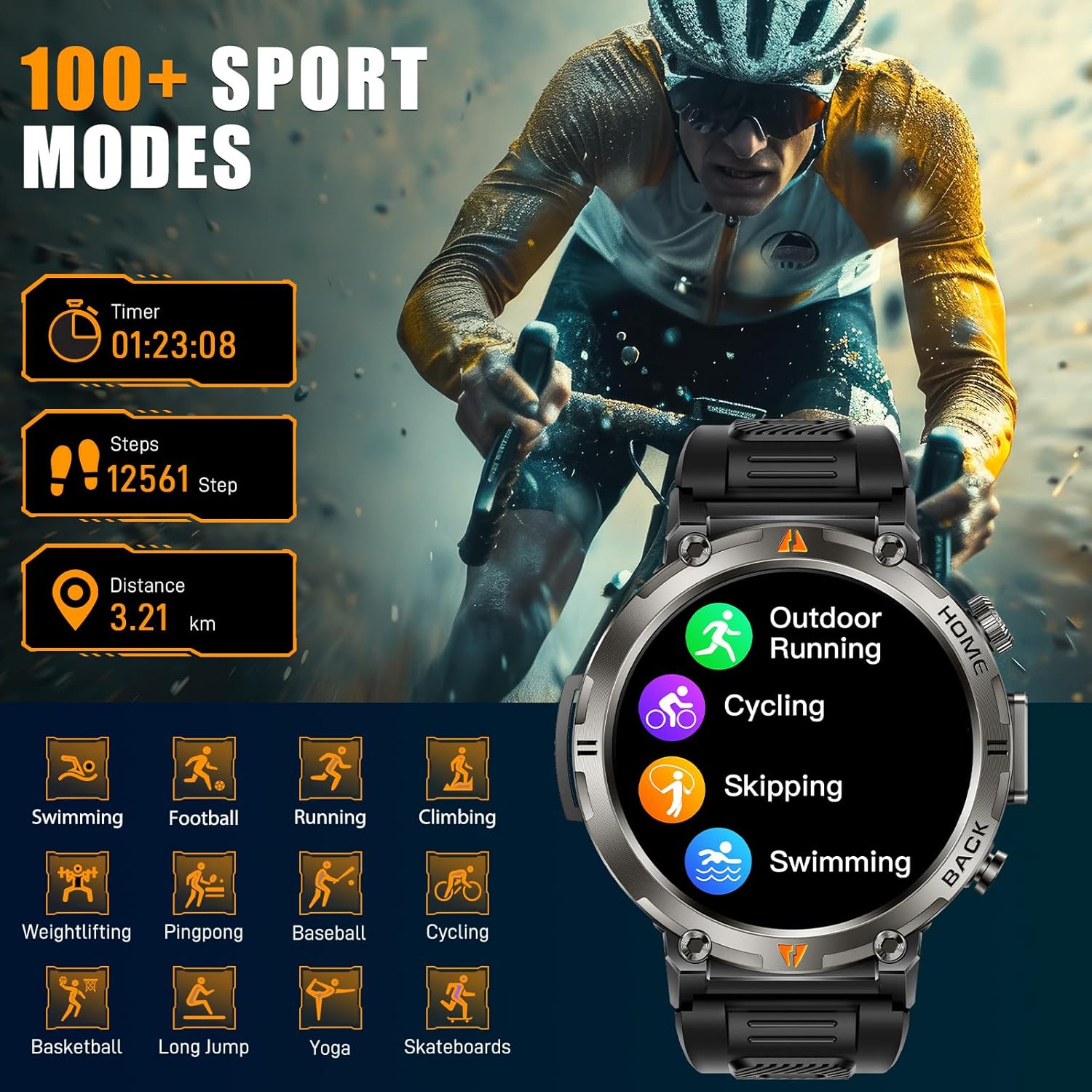
Figure 10: The EIGIIS KE3P Smart Watch interface showing a selection of its 100+ available sports tracking modes.
6. אייגענע זייגער פנימער
Personalize your smartwatch with a variety of pre-installed watch faces or create your own using the companion app.

Figure 11: The EIGIIS KE3P Smart Watch showcasing its 1.45-inch full-touch TFT display with various customizable watch face options.
וישאַלט
To ensure the longevity and optimal performance of your EIGIIS KE3P Smart Watch, follow these maintenance guidelines:
- רייניקונג: ווישט רעגולער אויס דעם זייגער־עקראַן און רימען מיט אַ ווייכן, טרוקענעם שטאָף. פֿאַר שווערן שמוץ, ניצט אַ לייכט טרוקענעם שטאָף.amp שטאָף און טריקנט גוט אויס. פֿאַרמייַדט שאַרפע כעמיקאַליעס.
- טשאַרדזשינג: Use only the provided charging cable. Ensure the charging contacts on both the watch and the cable are clean and dry before charging.
- וואַסער ויסשטעלן: While the watch is 3ATM waterproof, avoid prolonged exposure to hot water, steam, or high-velocity water. Dry the watch thoroughly after exposure to water.
- סטאָרידזש: האַלט די זייגער אין אַ קיל, טרוקן אָרט ווען נישט אין באַנוץ. פֿאַרמייַדט עקסטרעמע טעמפּעראַטורן.
טראָובלעשאָאָטינג
If you encounter any issues with your EIGIIS KE3P Smart Watch, refer to the following common solutions:
- זייגער טוט זיך נישט אן: זיכער מאַכן אַז די זייגער איז גאָר אויפגעלאָדן. פֿאַרבינדט עס צום טשאַרדזשער פֿאַר לפּחות 30 מינוט.
- נישט געקענט צופּאַסן מיטן טעלעפאָן: Make sure Bluetooth is enabled on your phone and the watch is within range. Restart both the watch and your phone, then try pairing again through the app.
- נישט פּינקטלעכע געזונט דאַטן: זייט זיכער אז די זייגער טראָגט זיך גוט אויף אייער האַנטגעלענק, נישט צו ענג אדער צו לויז. רייניקט דעם סענסאָר געגנט אויף דער הינטערשטער זייגער.
- מעלדונגען נישט באקומען: Check app permissions on your phone to ensure the companion app has access to notifications. Verify that notifications are enabled within the watch's settings and the companion app.
- קורץ באַטאַרייע לעבן: Reduce screen brightness, disable unnecessary features (e.g., continuous heart rate monitoring if not needed), and ensure the watch is fully charged regularly.
אויב די פראבלעם בלייבט, ביטע קאנטאקטירט קאסטומער סופארט.
ספּעסאַפאַקיישאַנז
| שטריך | דעטאַל |
|---|---|
| פּראָדוקט דימענשאַנז | 6.73 X 4.37 X 1.06 אינטשעס |
| פּונקט וואָג | 5.6 אונסעס |
| נומער מאָדעל נומער | קעקסנומקס |
| באַטעריז | 1 C באַטעריעס פארלאנגט (אריינגערעכנט) |
| פאַבריקאַנט | EIGIIS |
| שטייענדיק פאַרשטעלן ווייַז גרייס | 1.45 אינטשעס |
| זכּרון סטאָרידזש קאַפּאַסיטי | 128 מב |
| אָפּערייטינג סיסטעם | iPhone אַנדרויד |
| ספּעציעלע פֿעיִקייטן | Built-in GPS, 3 Modes Flashlight, 530 mAh Big Battery, 3ATM waterproof, Compass, 1.45'' Big Screen, 360*360 Pixels, Bluetooth Calling, Contact Person, Call Records, Voice Assistant, Workout Records, Heart Rate, Sleep Monitor, Messages, Weather, Music, Breath Training, Stopwatch, Timer, Alarm Clock, Calendar, Calculator, Find Phone, Remote Camera Control |
| באַטאַרייע קאַפּאַציטעט | 530 מיליamp שעהן |
| קאַנעקטיוויטי טעכנאָלאָגיע | בלועטאָאָטה |
| ווירעלעסס קאָמוניקאַציע סטאַנדאַרד | בלועטאָאָטה |
| באַטאַרייע צעל זאַץ | ליטהיום יאָן |
| גפּס | געבויט-אין גפּס |
| פאָרעם | קייַלעכיק |
| פאַרשטעלן גרייס | 1.45 אינטשעס |
וואָראַנטי און שטיצן
This EIGIIS KE3P Smart Watch is compatible with iOS 13+ and Android 5.0+ (not for PC or tablets). We provide 24-hour customer support to ensure your satisfaction. For any inquiries or assistance, please contact our support team.