
1. הקדמה
This manual provides detailed instructions for the safe and efficient use of your Surfans F20 Pro Android Hi-Res Music Player. Please read this manual thoroughly before operating the device and retain it for future reference.
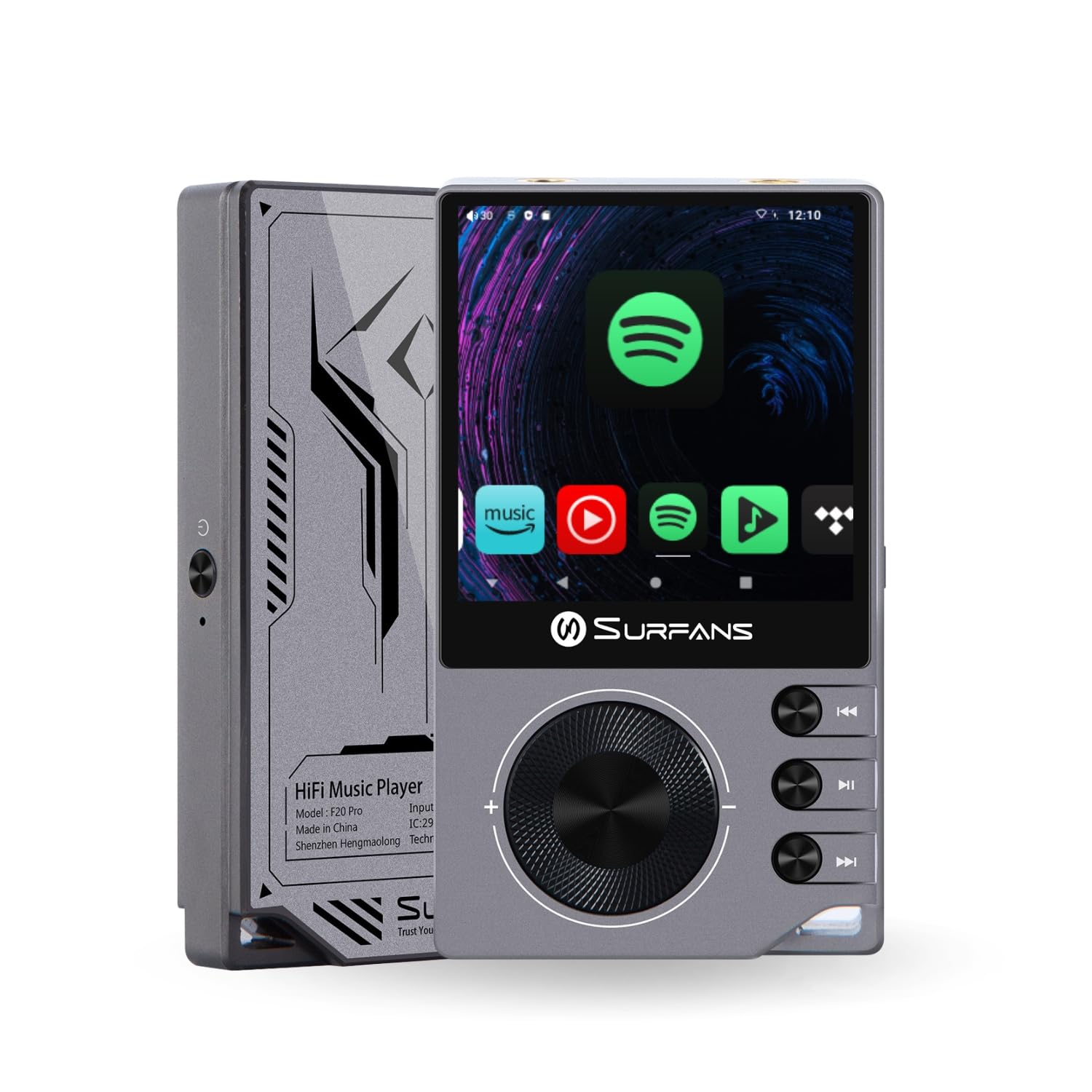
The Surfans F20 Pro Hi-Res Music Player, showcasing its compact design and touchscreen interface.
2. פּעקל אינהאַלט
באַשטעטיקן אַז אַלע זאכן זענען פאַראַן אין פּעקל:
- Surfans F20 Pro Hi-Res Music Player
- וסב טיפּע- C קאַבלע
- 32 GB MicroSD Memory Card (pre-installed or separate)
- פּראַטעקטיוו קאַסע
- באַניצער מאַנואַל (דעם דאָקומענט)
3. דיווייס איבערview
Familiarize yourself with the physical components and ports of your F20 Pro player.

פראָנט און צוריק view of the Surfans F20 Pro, highlighting its robust CNC metal chassis and button layout.
3.1. שליסל פֿעיִקייטן
- Dual ESS9018Q2M DACs: For high-fidelity audio processing.
- Octa-Core Android 12 System: Enables streaming app compatibility and smooth operation.
- 3.5mm Single-Ended & 4.4mm Balanced Outputs: Versatile headphone connectivity.
- Bluetooth 5.0 with LDAC: High-quality wireless audio transmission.
- צוויי-באַנד Wi-Fi (2.4GHz און 5GHz): For stable internet connectivity.
- יקספּאַנדאַבאַל סטאָרידזש: שטיצט ביז 1TB דורך MicroSD קאַרטל.
- 2.7-אינטש טאָוטשסקרין: ינטואַטיוו באַניצער צובינד.
4. סעטאַפּ
4.1. טשאַרדזשינג די מיטל
Before first use, fully charge the F20 Pro. Connect the included USB Type-C cable to the device's charging port and a compatible USB power adapter (not included) or computer USB port. The charging indicator will show the charging status.
4.2. אריינשטעלן א מיקראָסד קאַרטל
The F20 Pro supports MicroSD cards up to 1TB for expanded storage. Locate the MicroSD card slot on the side of the device. Gently insert the card until it clicks into place. To remove, push the card in again until it springs out.
4.3. ערשטע איינשאַלטונג
Press and hold the power button until the screen illuminates. Follow the on-screen prompts to complete the initial setup, including language selection and Wi-Fi connection.
4.4. קאַנעקטינג צו ווי-פי
נאַוויגירן צו סעטטינגס > נעץ און אינטערנעט > Wi-Fi. Select your desired network and enter the password if prompted. The F20 Pro supports both 2.4GHz and 5GHz Wi-Fi bands.

The Surfans F20 Pro demonstrating its dual-band Wi-Fi capability for fast and stable connections.
4.5. בלועטאָאָטה פּערינג
צו פֿאַרבינדן בלועטוט כעדפאָונז אָדער רעדנערס:
- מאַכן זיכער אַז דיין בלועטאָאָטה מיטל איז אין פּערינג מאָדע.
- On the F20 Pro, go to סעטטינגס> קאָננעקטעד דעוויסעס> פּאָר נייַ מיטל.
- Select your device from the list and confirm pairing.

An illustration of the Bluetooth 5.0 chip, indicating support for high-resolution wireless audio codecs like LDAC.
5. אַפּערייטינג די מיטל
5.1. יקערדיק נאַוויגאַציע
The F20 Pro features a 2.7-inch touchscreen for navigation. Swipe to scroll, tap to select, and use the physical buttons for quick controls:
- מאַכט קנעפּל: Power on/off, screen on/off.
- באַנד ראָד: אַדזשאַסטירט אַודיאָ אַרויסגאַנג באַנד.
- פּלייבאַק קאָנטראָל קנעפּלעך: שפּילן/פּויזע, נעקסטע ליד, פריערדיקע ליד.
5.2. מוזיק פּלייבאַק
The F20 Pro supports various audio formats including DSD512, 192kHz/24bit, FLAC, WAV, WMA, M4A, MP3, MP2, and AAC.
5.2.1. לאקאלע Files
אַריבערפירן מוזיק files to the device's internal storage or MicroSD card via USB connection to a computer. Use the pre-installed music player application to browse and play your library.
5.2.2. סטרימינג אַפּליקאַציעס
The Android 12 operating system allows installation of streaming apps like Spotify, Apple Music, Tidal, or YouTube. Connect to Wi-Fi and download apps from the Google Play Store or other compatible sources.

The Surfans F20 Pro's screen showing various streaming application icons, demonstrating its Android capabilities.
5.3. Headphone Connections
The device offers both single-ended and balanced audio outputs.
- 3.5 מם איין-ענדיקט אַוטפּוט: Standard headphone jack (125mW/32Ω).
- 4.4 מם באַלאַנסט רעזולטאַט: For enhanced audio performance with compatible headphones (500mW/32Ω).

נאָענט-אַרויף view of the 3.5mm single-ended and 4.4mm balanced audio output ports on the Surfans F20 Pro.
6. וישאַלט
6.1. רייניקונג
Use a soft, dry, lint-free cloth to clean the device. Avoid using abrasive cleaners or solvents, which may damage the surface.
6.2. ווייכווארג דערהייַנטיקונגען
Periodically check for software updates to ensure optimal performance and access to new features. Updates can typically be found in סעטטינגס > סיסטעם > סיסטעם דערהייַנטיקונג.
6.3. באַטערי קער
To prolong battery life, avoid fully discharging the device frequently. Store the device in a cool, dry place when not in use for extended periods.

אַן אינערלעכער view of battery cells, representing the long-lasting battery capacity of the F20 Pro.
7. טראָובלעשאָאָטינג
If you encounter issues with your F20 Pro, refer to the following common problems and solutions:
| פּראָבלעם | מעגלעך סיבה | לייזונג |
|---|---|---|
| די מיטל טוט נישט מאַכט אויף | נידעריגע באַטאַרייע; סיסטעם קראַך | Charge the device; Press and hold the power button for 10-15 seconds to force restart. |
| קיין געזונט רעזולטאַט | Volume too low; Incorrect output selected; Faulty headphones | Increase volume; Check headphone connection; Test with different headphones. |
| קענען ניט פאַרבינדן צו ווי-פי | Incorrect password; Out of range; Router issue | Verify password; Move closer to router; Restart router. |
| Slow performance/App crashes | צו פיל אַפּפּס לויפן; ווייניק סטאָרידזש; אַלטמאָדישע ווייכווארג | Close background apps; Free up storage; Check for system updates. |
8. ספּעסאַפאַקיישאַנז
Detailed technical specifications for the Surfans F20 Pro:
| שטריך | דעטאַל |
|---|---|
| סאָרט | Surfans |
| מאָדעל נאָמען | F20 PRO |
| דאַק טשיפּס | דואַל ESS9018Q2M |
| אפ-Amps | Dual OPA1612 |
| אָפּערייטינג סיסטעם | אַנדרויד 12 |
| באַראַן | 3 גיגאבייט |
| אינערלעכער סטאָרידזש | 32 גיגאבייט |
| יקספּאַנדאַבאַל סטאָרידזש | ביז 1TB דורך MicroSD קאַרטל |
| פאַרשטעלן גרייס | 2.73 אינטשעס |
| קאַנעקטיוויטי | Aux, Bluetooth 5.0 (LDAC), USB Type-C, Wi-Fi (2.4GHz & 5GHz) |
| אַודיאָ אַוטפּוץ | 3.5mm Single-Ended (125mW/32Ω), 4.4mm Balanced (500mW/32Ω) |
| שטיצט אַודיאָ פֿאָרמאַטירונגען | DSD512, 192kHz/24bit, FLAC, WAV, WMA, M4A, MP3, MP2, AAC |
| קאָליר | גרוי |

An illustration of the dual ESS9018K2M DAC chips, central to the F20 Pro's high-resolution audio capabilities.
9. וואָראַנטי אינפֿאָרמאַציע
The Surfans F20 Pro comes with a 1-יאָר וואָראַנטי פֿון דעם קויפֿדאַטום. די וואָראַנטי דעקט פֿאַבריקאַציע חסרונות און אַרבעט אונטער נאָרמאַל נוצן. עס דעקט נישט שעדיקן געפֿירט דורך אומרעכט נוצן, אַקסאַדענטן, נישט-אָטעריזירטע מאָדיפֿיקאַציעס, אָדער נאָרמאַל טראָגן און טרער. ביטע האַלטן דיין קויפֿבאַווייַז פֿאַר וואָראַנטי קליימז.
10. קונה שטיצן
For further assistance, technical support, or warranty inquiries, please contact Surfans customer service through the official website or your retailer. You may also find additional resources and FAQs online.