
1. הקדמה
The AJAZZ AKP03 Macro Keypad Stream Controller is a versatile device designed to enhance productivity and streamline workflows for gamers, streamers, and professionals. Featuring six programmable keys with LCD displays, three physical knobs, and three toggle switches, it offers extensive customization options for various tasks.
This manual provides detailed instructions for setting up, operating, and maintaining your AKP03 device, ensuring optimal performance and user experience.
2. פּראָדוקט פֿעיִקייטן
- Six Programmable Macro Keys: Customizable LCD displays for single or continuous actions.
- Three Physical Knobs: For precise control over various functions.
- Three Toggle Switches: Additional control options.
- איין-קליק אפעראציע: Instant execution of macro commands, text input, application launches, and media control.
- Intuitive Driver Software: Drag-and-drop functionality for easy key assignment and property configuration.
- ברייט קאַמפּאַטאַבילאַטי: Seamless integration with platforms like Streamlabs, Twitch, YouTube, and various software applications on Windows and Mac.
- Removable 40° Stand: Provides an ergonomic viewing angle and stable placement.

פיגורע 2.1: איבערview of the AJAZZ AKP03 Macro Keypad, highlighting its programmable buttons, toggle switches, and scroll wheels.
3. פּעקל אינהאַלט
באַשטעטיקן אַז אַלע זאכן זענען פאַראַן אין דיין פּעקל:
- AJAZZ AKP03 Macro Keypad Stream Controller
- וסב-C צו וסב-א קאַבלע
- Removable 40° Stand
- באַניצער מאַנואַל (דעם דאָקומענט)
4. סעטאַפּ
4.1 פיזיש קאַנעקשאַן
- Attach the removable 40° stand to the bottom of the AKP03 for an ergonomic angle, if desired.
- Connect the provided USB-C cable to the USB-C port on the AKP03.
- פֿאַרבינדט דעם USB-A עק פֿונעם קאַבל צו אַ פֿאַראַן USB פּאָרט אויף אײַער קאָמפּיוטער (פּיסי אָדער מעק).
- דער מיטל וועט קער אויף אויטאָמאַטיש.

Figure 4.1: Attaching the removable 40° stand to the AKP03.
4.2 ווייכווארג ינסטאַלירונג
To unlock the full customization capabilities of your AKP03, you must install the dedicated driver software.
- עפֿענען דיין web browser and navigate to the official AJAZZ webפּלאַץ: www.a-jazz.com.
- Locate the 'Driver Download' section.
- זוכן פֿאַר 'AKP03' or browse for the corresponding driver for your model.
- Download the driver software compatible with your operating system (Windows or macOS).
- לויפן די ינסטאַללער און נאָכגיין די אינסטרוקציעס אויף דעם עקראַן צו פאַרענדיקן די ינסטאַלירונג.
- ריסטאַרט דיין קאָמפּיוטער אויב געבעטן.
Video 4.1: Demonstrates the software installation process and initial setup for the AJAZZ Macro Keypad.
5. אַפּערייטינג ינסטרוקטיאָנס
5.1 Customizing Keys and Knobs
The AKP03's driver software provides a user-friendly interface for customization:
- Launch the 'Stream Dock AJAZZ' software from your desktop or applications folder.
- The software will display a visual representation of your AKP03.
- To assign an action, drag and drop a desired function (e.g., launch application, media control, macro command) from the software's library onto one of the six programmable keys.
- For knobs, select the knob in the software and assign functions such as volume control, scrolling, or zooming.
- You can configure properties for each assigned action, including specific file װעגן, web URLs, or macro sequences.
- The LCD displays on the keys will update to show the assigned icon or text.
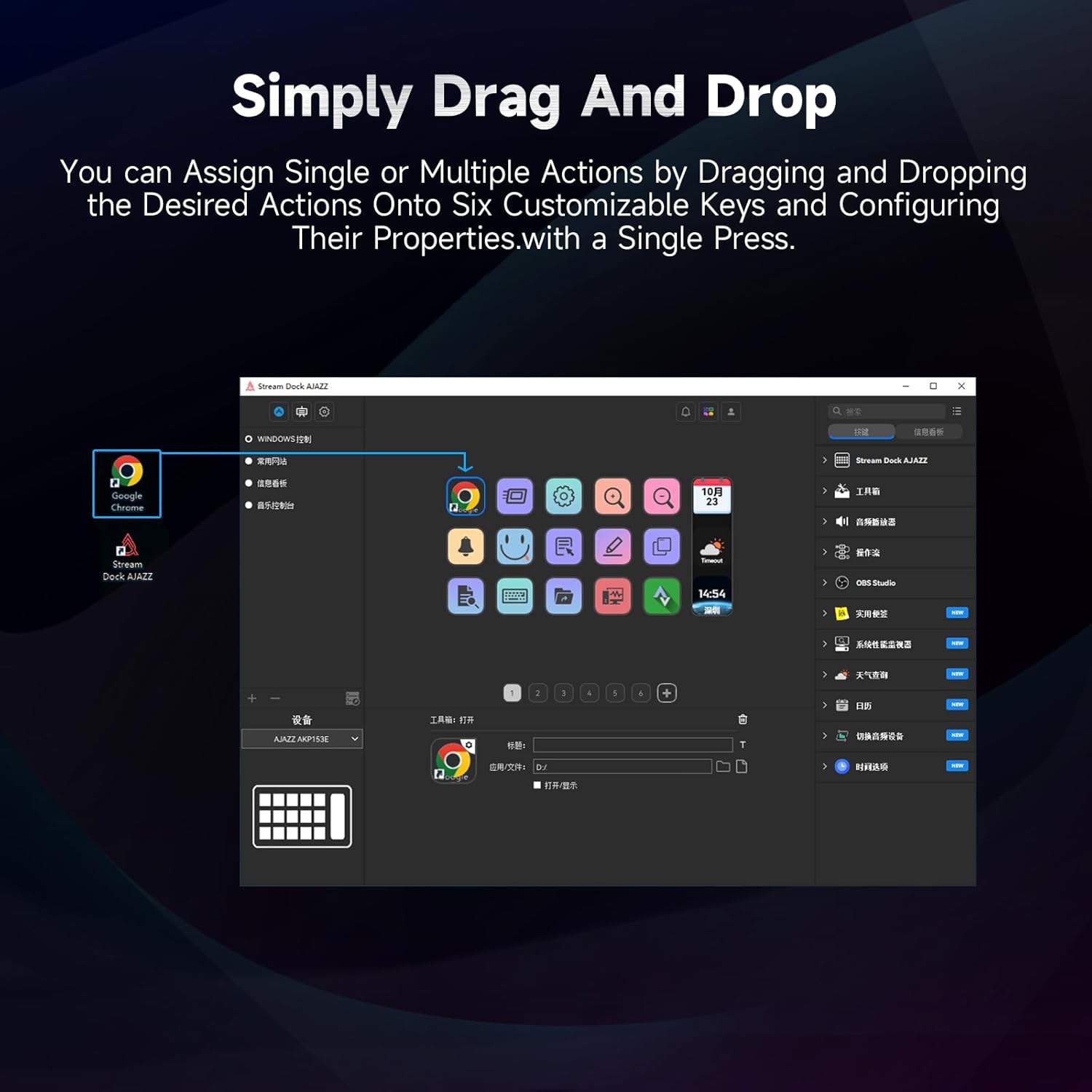
Figure 5.1: Customizing keys using the drag-and-drop interface in the AJAZZ software.
Video 5.1: Demonstration of assigning actions to keys for launching web pages and software with a single click.
5.2 Using Profiles and Pages
The software supports multiple profiles and pages, allowing you to switch between different sets of key assignments for various applications or tasks.
- שאַפֿן אַ נייַע פּראָfiles for specific games, editing software, or streaming setups.
- אין יעדער פּראָfile, you can create multiple pages of key assignments, accessible by navigating through the device's buttons or software interface.
- The AKP03 automatically switches to the relevant profile when a linked application is in focus.
Video 5.2: Illustrates the multi-functional capabilities and profile switching of the AKP03 for various tasks.
6. וישאַלט
To ensure the longevity and optimal performance of your AJAZZ AKP03, follow these maintenance guidelines:
- רייניקונג: Use a soft, dry cloth to wipe the surface of the device. Avoid abrasive cleaners or solvents.
- סטאָרידזש: האַלט דעם אַפּאַראַט אין אַ קיל, טרוקן אָרט אַוועק פון דירעקט זונשייַן און עקסטרעמע טעמפּעראַטורן.
- קאַבלע זאָרגן: פֿאַרמײַדט צו בייגן אָדער דרייען דעם USB קאַבל צו פֿיל כּדי צו פֿאַרמײַדן שאָדן.
- ווייכווארג דערהייַנטיקונגען: Regularly check the AJAZZ website for software and firmware updates to ensure compatibility and access to new features.
7. טראָובלעשאָאָטינג
If you encounter issues with your AKP03, refer to the following common troubleshooting steps:
- מיטל ניט דערקענט:
- Ensure the USB cable is securely connected to both the AKP03 and your computer.
- פּרוּווט קאַנעקטינג צו אַ אַנדערש וסב פּאָרט.
- ריסטאַרט דיין קאָמפּיוטער.
- Verify that the driver software is correctly installed and up to date.
- קנעפּלעך רעאַגירן נישט:
- Check the software to ensure keys are properly assigned and the correct profile איז אַקטיוו.
- זיכער מאַכן אַז די דרייווער ווייכווארג לויפט אין הינטערגרונט.
- ווייכווארג ישוז:
- ריאינסטאלירן די דרייווער ווייכווארג.
- Check for software updates on the AJAZZ webפּלאַץ.
8. ספּעסאַפאַקיישאַנז
| שטריך | דעטאַל |
|---|---|
| סאָרט | AJAZZ |
| מאָדעל נאָמען | AKP03 |
| קאַמפּאַטאַבאַל דעוויסעס | פּיסי, לאַפּטאַפּ |
| קאָנטראָללער טיפּ | קלאַוויאַטור |
| קאַנעקטיוויטי טעכנאָלאָגיע | וסב-C |
| קנעפּל קוואַנטיטעט | 6 Programmable Keys (with LCD displays), 3 Physical Knobs, 3 Toggle Switches |
| פּונקט וואָג | 0.32 קילאָגראַמס |
| נומער דימענשאַנז (L X W X H) | 5 X 3 X 2 אינטשעס |
| מאַכט מקור | קאָרדעד עלעקטריק |
9. וואָראַנטי און שטיצן
9.1 וואָראַנטי אינפֿאָרמאַציע
The AJAZZ AKP03 Macro Keypad Stream Controller comes with a 1-יאָר לימיטעד וואָראַנטי פֿון דעם קויפֿדאַטום. די וואָראַנטי דעקט פֿאַבריקאַציע חסרונות און מאַלפאַנגקשאַנז אונטער נאָרמאַל נוצן. עס דעקט נישט שעדיקן געפֿירט דורך מיסברויך, אַקסאַדאַנץ, נישט-אָטעריזירטע מאָדיפֿיקאַציעס, אָדער אומריכטיקע ינסטאַלירונג.
ביטע האַלטן דיין דערווייַז פון קויפן פֿאַר וואָראַנטי קליימז.
9.2 קונה שטיצן
For technical assistance, troubleshooting, or warranty inquiries, please contact AJAZZ customer support:
- Webפּלאַץ: www.a-jazz.com (Refer to the 'Support' or 'Contact Us' section)
- בליצפּאָסט: [Insert Customer Support Email, if available]
- טעלעפֿאָן: [Insert Customer Support Phone Number, if available]
Our support team is available to assist you with any questions or concerns regarding your product.