
1. וויכטיק סאַפעטי אינסטרוקציעס
Please read all instructions carefully before using the Philco Planetary Mixer PBP90B. Keep this manual for future reference.
- Always ensure the mixer is unplugged from the power outlet before assembling, disassembling, or cleaning.
- טונקט נישט איין דעם מאָטאָר־איינהייט, שנור, אדער שטעקער אין וואַסער אדער אַנדערע פליסיקייטן.
- דיזער אַפּאַראַט איז נישט געמיינט פֿאַר באַנוץ דורך מענטשן מיט פֿאַרקלענערטע פֿיזישע, סענסאָרישע אָדער גייסטיקע מעגלעכקייטן, אָדער אַ מאַנגל אין דערפֿאַרונג און וויסן, סיידן זיי האָבן באַקומען השגחה אָדער אינסטרוקציעס וועגן באַנוץ דעם אַפּאַראַט דורך אַ מענטש פֿאַראַנטוואָרטלעך פֿאַר זייער זיכערקייט.
- נאָענט השגחה איז נייטיק ווען קיין אַפּפּליאַנסע איז געניצט דורך אָדער לעבן קינדער.
- פֿאַרמײַדט קאָנטאַקט מיט באַוועגלעכע טיילן. האַלט הענט, האָר, קליידער, ווי אויך שפּאַטלען און אַנדערע כלים ווײַט פֿון די קלאַפּערס בעתן באַנוץ כּדי צו רעדוצירן דעם ריזיקאָ פֿון שאָדן צו מענטשן און/אָדער שאָדן צום מיקסער.
- דו זאלסט נישט אַרבעטן קיין אַפּפּליאַנסע מיט אַ דאַמידזשד שנור אָדער צאַפּן, אָדער נאָך די אַפּפּליאַנסע מאַלפאַנגקשאַנז אָדער איז דראַפּט אָדער דאַמידזשד אין קיין וועג.
- די נוצן פון אַטאַטשמאַנץ נישט רעקאַמענדיד אָדער סאָלד דורך דער פאַבריקאַנט קען פאַרשאַפן פייַער, עלעקטריש קלאַפּ אָדער שאָדן.
- דו זאלסט נישט נוצן די אַפּפּליאַנסע ינ דרויסן.
- דו זאלסט נישט לאָזן די שנור הענגען איבער די ברעג פון אַ טיש אָדער טאָמבאַנק.
- דו זאלסט נישט שטעלן דעם אַפּפּליאַנסע אויף אָדער לעבן אַ הייס גאַז אָדער עלעקטריש בורנער, אָדער אין אַ העאַטעד ויוון.
- Always operate the mixer on a flat, stable, and dry surface.
- Ensure the mixer head is securely locked down before operation.
2. פּראָדוקט איבערview
The Philco Planetary Mixer PBP90B is a versatile kitchen appliance designed for various mixing tasks, from whipping light creams to kneading heavy doughs. It features a powerful 900W motor, a 5-liter stainless steel bowl, and 12 speed settings plus a Turbo function.
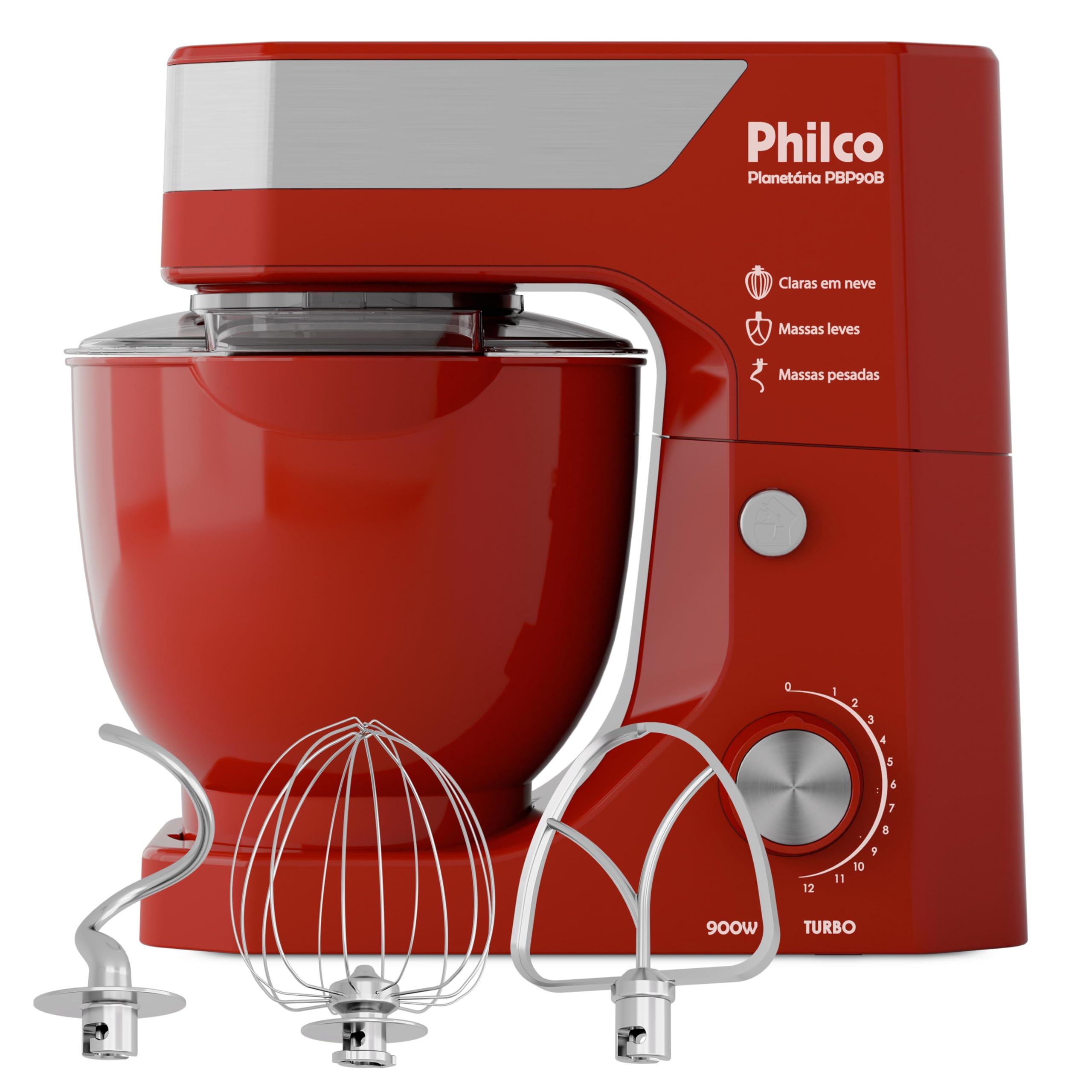
Image: Philco Planetary Mixer PBP90B with all included accessories.
קאַמפּאָונאַנץ:
- Motor Unit/Head: Contains the motor, speed control knob, and attachment hub.
- Tilt-Head Release Button: Allows the head to be tilted up for easy access to the bowl and beaters.
- 5-ליטער נישט-ראסטיקער שטאל שיסל: גרויסע קאַפּאַציטעט שיסל פֿאַר פֿאַרשידענע רעצעפּטן.
- שפּריצן גאַרד: פאַרהיט די ינגרידיאַנץ פון שפּריצן אויס בעת מישן.
- וויסק: For whipping eggs, cream, and light batters.
- Flat Beater: For mixing medium batters, cake mixes, and frostings.
- טייג קרוק: For kneading heavy doughs like bread and pizza.
- גיכקייט קאָנטראָל קנעפּל: Adjusts mixing speed from 1 to 12, with a Turbo function.
- ניט-סליפּ באַזע: ינשורז פעסטקייַט בעשאַס אָפּעראַציע.

Image: The three interchangeable beaters: whisk, flat beater, and dough hook.
3. סעטאַפּ
- אַנפּאַק: Carefully remove all components from the packaging. Remove any protective films or stickers.
- ריין: Before first use, wash the mixing bowl, splash guard, and all beaters in warm, soapy water. Rinse thoroughly and dry completely. Wipe the motor unit with a damp שטאָף.
- אָרט: Place the mixer on a clean, dry, flat, and stable surface. Ensure there is enough space around the mixer for safe operation. The non-slip base will help keep the unit stable.
- צוטשעפּען שיסל: Press the tilt-head release button and lift the motor head. Place the 5-liter stainless steel bowl onto the base, twisting it clockwise until it locks securely into place.
- Attach Beater: Select the appropriate beater for your recipe (whisk, flat beater, or dough hook). Insert the beater shaft into the attachment hub on the underside of the motor head, twisting it until it clicks into place.
- נידעריקער קאָפּ: Gently lower the motor head until it locks into position. You should hear a click. Ensure it is fully locked before proceeding.
- Attach Splash Guard (Optional): If desired, place the splash guard over the bowl before lowering the head. The opening on the splash guard allows for easy addition of ingredients during mixing.
- פאַרבינדן מאַכט: Ensure the speed control knob is set to '0' (off). Plug the power cord into a suitable 127V electrical outlet.

Image: Mixer head tilted up for beater attachment.
4. אַפּערייטינג ינסטרוקטיאָנס
The Philco Planetary Mixer PBP90B offers 12 speeds and a Turbo function for precise control over your mixing tasks.
- לייג ינגרידיאַנץ: With the mixer head lowered and locked, add your ingredients to the mixing bowl. You can use the opening in the splash guard to add ingredients while mixing.
- אויסקלייַבן גיכקייַט: Turn the speed control knob to the desired speed setting (1-12). Start with a lower speed and gradually increase as needed to prevent splashing.
- טורבאָ פונקציע: For quick bursts of high power, turn the knob to the 'Turbo' setting. Release the knob to return to the previous speed or '0'.
- מיקסינג גיידליינז:
- וויסק: Use for whipping egg whites, cream, meringues, and light batters. Start at low speed and gradually increase to higher speeds (e.g., 8-12).

Image: Mixer with whisk attachment.
- Flat Beater: Ideal for mixing cakes, cookies, frostings, mashed potatoes, and quick breads. Use medium speeds (e.g., 4-8).

Image: Mixer with flat beater attachment.
- טייג קרוק: Designed for kneading heavy doughs such as bread, pizza, and pasta. Use low speeds (e.g., 1-3).

Image: Mixer with dough hook attachment.
- וויסק: Use for whipping egg whites, cream, meringues, and light batters. Start at low speed and gradually increase to higher speeds (e.g., 8-12).
- הערט אויף צו מישן: When finished, turn the speed control knob to '0' (off). Unplug the mixer from the power outlet.
- Remove Bowl and Beater: Press the tilt-head release button and lift the motor head. Remove the beater by twisting and pulling it down. Unlock the mixing bowl by twisting it counter-clockwise and lift it off the base.
5. וישאַלט און רייניקונג
Proper cleaning and maintenance will ensure the longevity and optimal performance of your Philco Planetary Mixer PBP90B.
- שטענדיק אויסשטעקן: Before cleaning, always ensure the mixer is unplugged from the power outlet.
- מאָטאָר אַפּאַראַט: ווישט אָפּ די אויסערלעכע זייט פון דער מאָטאָר־איינהייט מיט אַ ווייכן, טרוקענעם שטאָף.amp טוך. ניצט נישט קיין שרײַבנדיקע רייניגער און טונקט נישט אײַן דעם מאָטאָר־אײנהייט אין וואַסער.
- Mixing Bowl, Beaters, and Splash Guard: Wash these parts immediately after use in warm, soapy water. Rinse thoroughly and dry completely. These components are נישט שפולמאשין זיכער.
- עקשנות: For stubborn food residue, soak the bowl and beaters in warm, soapy water for a few minutes before cleaning.
- סטאָרידזש: Store the mixer and its accessories in a clean, dry place. Ensure all parts are dry before storing.
6. טראָובלעשאָאָטינג
If you encounter any issues with your Philco Planetary Mixer PBP90B, refer to the following common problems and solutions:
- דער מיקסער טוט זיך נישט אן:
- זיכער מאַכן אַז די מאַכט שנור איז זיכער אַרייַנגעשטעקט אין אַ אַרבעטנדיק עלעקטריש ווענטיל.
- Check if the speed control knob is set to '0' before turning it to a speed setting.
- באַשטעטיקן אַז דער מיקסער קאָפּ איז גאָר אַראָפּגעלאָזט און פֿאַרשפּאַרט אין פּלאַץ.
- Beater does not reach ingredients at the bottom of the bowl:
- The mixer is designed for planetary action, which covers the entire bowl. Ensure you are using the correct beater for the consistency of your ingredients.
- For very small quantities, it might be necessary to scrape down the sides of the bowl manually.
- Excessive noise or vibration during operation:
- Ensure the mixer is placed on a stable, flat surface.
- Verify that the mixing bowl and beater are correctly installed and locked.
- Avoid overloading the mixer with ingredients, especially heavy doughs. Reduce the quantity if necessary.
- מיקסער שטעלט זיך אפ בעתן אפעראציע:
- The mixer may have overheated due to prolonged use or heavy load. Turn off the mixer, unplug it, and let it cool down for at least 30 minutes before resuming use.
- Check for any obstructions that might be preventing the beater from moving freely.
If the problem persists after trying these solutions, please contact Philco customer support.
7. ספּעסאַפאַקיישאַנז
| סאָרט | PHILCO |
| מאָדעל נומער | PBP90B |
| מאַכט | 900 וו |
| קאַפּאַציטעט | 5 ליטער |
| נומער פון ספּידז | 12 + טורבאָ |
| מאַטעריאַל | Stainless Steel (Bowl, Blade Material) |
| דימענשאַנז (די רענטגענ וו x ה) | 30P x 37.3L x 34.2A cm (Approx. 30 x 37.3 x 34.2 cm) |
| Voltage | 127V |
| אַרייַנגערעכנט קאַמפּאָונאַנץ | Planetary Mixer, 5-liter bowl, 1 whisk, 1 flat beater, 1 dough hook |
| ספּעציעלע פֿעיִקייטן | Planetary action, 12 speeds + Turbo, Anti-splash lid, Non-slip base |
| קיילימ - וואַשער סאַפע | ניין |
8. וואָראַנטי
This Philco Planetary Mixer PBP90B comes with a standard manufacturer's warranty against defects in materials and workmanship. The specific duration and terms of the warranty may vary by region and retailer. Please retain your proof of purchase for warranty claims.
Extended warranty options may be available for purchase from your retailer. Refer to the warranty card included with your product or contact Philco customer support for detailed warranty information.
9. שטיצן
For technical assistance, spare parts, or any questions regarding your Philco Planetary Mixer PBP90B, please contact Philco customer support.
You can find contact information, FAQs, and service center locations on the official Philco webפּלאַץ:
Visit Philco Official Webפּלאַץ
Please have your product model number (PBP90B) and serial number (if applicable) ready when contacting support.