
הקדמה
This manual provides instructions for the VINABTY RT22R3KECA Replacement Voice Remote Control. This remote is designed to function as a replacement for specific Hyundai and Continental Edison television models, offering voice search capabilities and standard remote control functions.
Key features include an ergonomic design, sensitive buttons for quick response, and a durable ABS construction. It operates with a transmission distance of up to 10 meters.
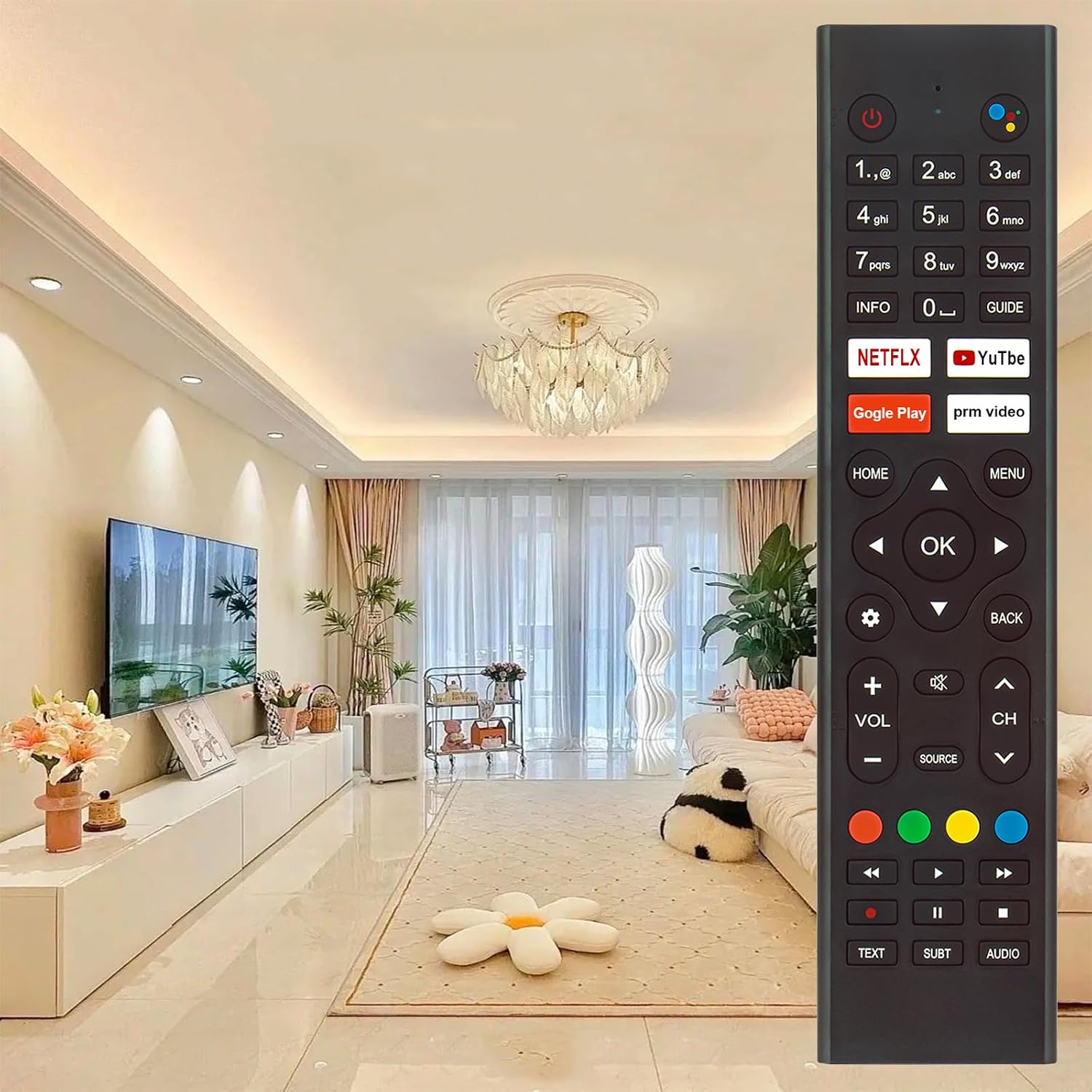
Image: The VINABTY RT22R3KECA remote control, showcasing its design and button layout in a typical home environment.
סעטאַפּ
1. באַטאַרייע ייַנמאָנטירונג
די ווײַטקאָנטראָל דאַרף צוויי AAA באַטעריעס (נישט אַרייַנגערעכנט) פֿאַר אָפּעראַציע.
- געפֿינען די באַטאַרייע אָפּטייל אויף די צוריק פון די ווייַט קאָנטראָל.
- רוקט דעם באַטעריע דעקל אַראָפּ צו עס עפענען.
- אַרײַנשטעלן צוויי AAA באַטעריעס, און זיכער מאַכן אַז די פּאָזיטיוו (+) און נעגאַטיוו (-) טערמינאַלן זענען ריכטיק אויסגעשטעלט מיט די מאַרקירונגען אינעווייניק אין דעם אָפּטייל.
- לייגט צוריק דעם באַטעריע דעקל דורך עס צוריקצורוקן אין זיין פּאָזיציע ביז עס קליקט זיכער.

בילד: View of the remote control's back with the battery cover removed, showing the battery compartment for two AAA batteries.
2. צוזאַמענשטעלן מיט דיין טעלעוויזיע
This remote control is a voice search remote and requires pairing with your television before full functionality, especially voice control, can be utilized. Refer to your TV's user manual for specific pairing instructions, as the process can vary by TV model. Generally, pairing involves:
- Ensuring your TV is powered on.
- Accessing the TV's settings menu (often under "Remotes & Accessories" or "Bluetooth Settings").
- Following the on-screen prompts to add a new remote control or Bluetooth device.
- Pressing and holding specific buttons on the VINABTY remote (e.g., "OK" and "Home" simultaneously, or a dedicated pairing button if present) until the TV detects it.
Once successfully paired, the remote control will function correctly.
אַפּערייטינג ינסטראַקשאַנז
The VINABTY RT22R3KECA remote control offers intuitive operation with clearly labeled buttons.
נאָרמאַל פאַנגקשאַנז
- מאַכט קנעפּל: Located at the top right, used to turn the TV on or off.
- נומער פּאַד: פֿאַר דירעקט קאַנאַל אַרייַנגאַנג.
- Navigation Pad (OK, Up, Down, Left, Right): פֿאַר מעניו נאַוויגאַציע און סעלעקציע.
- Volume Control (VOL +/-): אַדזשאַסטירט די טעלעוויזיע'ס באַנד.
- Channel Control (CH +/-): טוישט טעלעוויזיע קאַנאַלן.
- היים קנעפּל: Returns to the TV's main home screen.
- מעניו קנעפּל: Accesses the TV's settings or options menu.
- צוריק קנעפּל: קערט צו די פריערדיקע פאַרשטעלן אָדער מעניו.
- מקור קנעפּל: אויסקלייבט אריינגאנג קוועלער (HDMI, AV, אאז"וו).
- דעדיקירטע אַפּ קנעפּלעך: שנעלער צוטריט צו פּאָפּולערע סטרימינג סערוויסעס ווי נעטפליקס און יוטוב.
Voice Control Functionality
After successful pairing, the voice control feature allows you to issue commands to your TV using your voice.
- געפינען די Voice Search Button (often represented by a microphone icon or colored dots) near the top of the remote.
- Press and hold the Voice Search Button.
- Speak your command clearly into the remote control. Examples include "Open Netflix," "זוכן פֿאַר action movies," or "Change to Channel 5."
- Release the button once you have finished speaking.

Image: The VINABTY RT22R3KECA remote control with an overlay highlighting the voice search button and its microphone icon.
The remote control operates effectively up to a distance of 10 meters from the television.
וישאַלט
To ensure the longevity and optimal performance of your VINABTY RT22R3KECA remote control, follow these maintenance guidelines:
- רייניקונג: ווישט אָפּ די ווײַטקאָנטראָל רעגולער מיט אַ ווייכן, טרוקענעם שטאָף. פֿאַר שווערן שמוץ, אַ ביסל ווישטampווישט דעם שטאָף מיט וואַסער אָדער אַ מילדן, נישט-שרייַבנדיקן רייניגער. פֿאַרמייַדט ניצן שטרענגע כעמיקאַלן אָדער סאָלווענטן.
- באַטערי זאָרגן: Replace batteries when the remote's response becomes sluggish or it stops functioning. If the remote will not be used for an extended period, remove the batteries to prevent leakage and potential damage.
- סטאָרידזש: האַלט די ווײַטקאָנטראָלירטע אַפּאַראַטור אין אַ קיל, טרוקן אָרט, ווײַט פֿון דירעקטער זון און עקסטרעמע טעמפּעראַטורן.
- געווער: The remote is constructed from durable ABS material with soft rubber buttons, designed for long-term use. Avoid dropping the remote or exposing it to excessive force.

Image: Diagram illustrating the features of the remote control, including sensitive buttons for fast response, durable ABS materials, and a comfortable grip.
טראָובלעשאָאָטינג
If you encounter issues with your VINABTY RT22R3KECA remote control, consider the following troubleshooting steps:
- ווייַט ניט ריספּאַנדינג:
- Check the batteries. Ensure they are inserted correctly with the correct polarity and are not depleted. Replace with fresh batteries if necessary.
- זיכער מאַכן אַז עס זענען נישטאָ קיין שטערונגען צווישן דער ווײַטקאָנטראָל און דעם טעלעוויזיע'ס אינפֿראַרוד ופנעמער.
- איבערצייגט אז די ווײַטקאָנטראָל איז גלייך געצילט אויפן טעלעוויזיע.
- שטימע קאנטראל ארבעט נישט:
- Confirm that the remote control is properly paired with your TV. If unsure, attempt to re-pair it according to the "Pairing with Your TV" section and your TV's manual.
- Ensure your TV supports voice control and that the feature is enabled in its settings.
- Speak clearly and hold the voice button while speaking.
- קנעפּלעך אַרבעטן נישט ריכטיק:
- Clean the remote control, especially around the buttons, to remove any dirt or debris that might be causing stickiness or preventing proper contact.
- If only specific buttons are not working, and battery replacement doesn't help, there might be an internal issue.
If these steps do not resolve the issue, please refer to the "Support and Contact" section for further assistance.
ספּעסאַפאַקיישאַנז
| סאָרט | VINABTY |
| מאָדעל נאָמען | RT22R3KECA |
| מאָדעל נומער | RT22R3KECA (Mfr Part Number: BYDE-RT22R3KECA) |
| ספּעציעלע פֿעיִקייטן | Ergonomic, Voice Search |
| קאַנעקטיוויטי טעכנאָלאָגיע | ינפרערעד |
| קאָנטראָללער טיפּ | קול קאָנטראָל |
| מאַקסימום קייט | 10 מעטער |
| קנעפּל קוואַנטיטעט | 25 |
| פּונקט וואָג | 60 גראַמז |
| נומער דימענשאַנז (L X W X H) | 18L x 4W x 1H centimeters (approximately 8.11 x 1.85 x 0.98 inches) |
| מאַכט מקור | 2 X AAA באַטעריז (ניט אַרייַנגערעכנט) |

Image: Diagram showing the length, width, and thickness dimensions of the VINABTY RT22R3KECA remote control.

Image: The VINABTY RT22R3KECA remote control overlaid with text indicating an upgraded smart chip for stable performance, set against a futuristic circuit board background.
קאָמפּאַטיבלע טעלעוויזיע מאָדעלס
This VINABTY RT22R3KECA remote control is compatible with the following television models:
- Hyundai: HY-TVSAND43-004, HY-TVSAND55-55-001, HY-TVSAND55-00551 US
- Continental Edison: CELED55SAUDV23B7, CELED65UHDSA23B7, CELED32SAHDV23B7, ED55C05UHD-MM, ED65C05UHD-MM
Please verify your TV model number against this list to ensure compatibility.
שטיצן און קאָנטאַקט
For any questions regarding the compatibility or operation of your VINABTY RT22R3KECA remote control, or if you encounter any issues not resolved by the troubleshooting steps, please contact our customer support.
It is recommended to contact us before purchase if you are unsure about the remote's suitability for your device. If the remote you received does not work as expected, please reach out for assistance.
Contact information is typically available through your purchase platform or the VINABTY official webפּלאַץ.