
1. הקדמה
This manual provides essential information for the safe and efficient operation of your Ulefone Armor Pad 5 Pro 5G Rugged Tablet. Please read it thoroughly before using the device.
The Ulefone Armor Pad 5 Pro is a rugged tablet designed for demanding environments, featuring 5G connectivity, a powerful MediaTek Dimensity 7400X processor, a large 24200mAh battery with 120W fast charging, and an 11-inch FHD+ display. It is built to withstand harsh conditions with IP68/IP69K and MIL-STD-810H certifications.
2. וואָס איז אין דער קעסטל
באַשטעטיקן אַז אַלע זאכן זענען פאַראַן אין דיין פּראָדוקט פּאַקאַדזשינג:
- 1 x Ulefone Armor Pad 5 Pro Tablet
- 1 x AC Power Charger (120W)
- 1 x Type-C to Type-C Data Cable (100cm)
- 1 x Handle Stand & 1 x Screwdriver & 6 x Screws
- 1 x Pry Opener
- 1 x Protective Film (Pre-installed)
- מולטי-שפּראַך באַניצער מאַנואַל
- Charging Instruction Card
- Safety Prompt Statement
- וואָראַנטי קאַרד
Video: Armor Pad 5 Pro Unboxing. This video demonstrates the unboxing process and contents of the Ulefone Armor Pad 5 Pro package.
3. פּראָדוקט איבערview
שליסל פֿעיִקייטן
- Global 5G Network: Supports dual SIM dual standby for convenient and efficient connectivity.
- 24200mAh Battery & 120W Fast Charger: Extended battery life with rapid charging and 10W reverse charging capability.
- MediaTek Dimensity 7400X 5G: Advanced 4nm process octa-core CPU for high-level streaming, multitasking, and gaming.
- 32GB RAM + 512GB ROM & Android 15: Ample storage (expandable up to 2TB) and the latest Android OS with enhanced features.
- 11-inch FHD+ Display & IP68/69K & MIL-STD-810H Shield: Durable Corning Gorilla Glass screen with 1920x1200 resolution and 600 nits brightness, certified for ruggedness.
- Dual 64MP Rear Camera & 32MP Front Camera: Includes a 64MP night vision camera with 4 infrared LEDs and a 64MP Sony IMX682 main camera for detailed images.
- Dual Versatile LED Lights & Dual Warning Lights: Two 1000-lumen LED lights (warm/white) and dual warning lights (64 LEDs) for emergency alerts.
- Exclusive Handle Stand: Durable alloy handle stand for secure one-handed operation or use as a robust kickstand.
- נאָך פֿעיִקייטן: uSmart Expansion Connector, Widevine L1, Wifi 6E, Fingerprint Unlock, NFC, Headset-Free FM Radio, Custom Key, Outdoor Toolbox, 3-Card Slot, GPS+GLONASS+Beidou+Galileo+QZSS+NavIC, Gloves Mode.

בילד: פראָנט view of the Ulefone Armor Pad 5 Pro tablet, showcasinג זײַן אַרויסווײַזונג.

בילד: הינטערשטע view of the Ulefone Armor Pad 5 Pro, highlighting the dual LED lights and the integrated handle stand.
Video: Armor Pad 5 Series Design. This video provides an overview of the tablet's design and physical features.
4. סעטאַפּ
4.1 Inserting SIM/MicroSD Cards
- געפינט די SIM/MicroSD קאַרטל טאַץ אויף דער זייט פון די טאַבלעט.
- Use the provided pry opener to carefully open the protective cover of the card tray.
- Gently pull out the card tray.
- Place your Nano SIM cards and/or MicroSD card into the designated slots on the tray. Ensure correct orientation.
- Carefully reinsert the tray into the tablet and press the protective cover firmly to ensure a watertight seal.
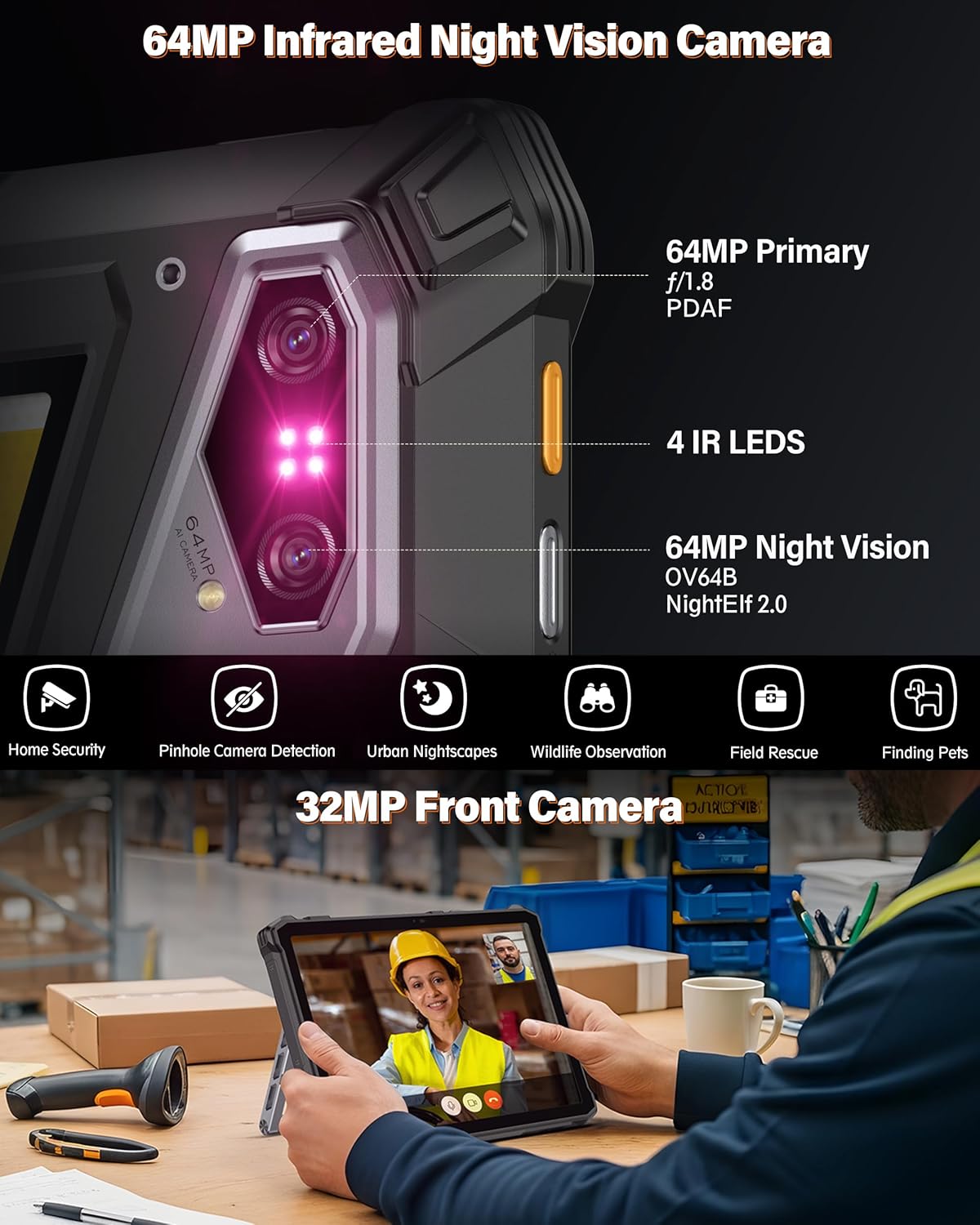
Image: Close-up of the SIM card tray on the Ulefone Armor Pad 5 Pro.
4.2 ערשט מאַכט אויף
- Press and hold the Power button (located on the side) until the Ulefone logo appears on the screen.
- פֿאָלגט די אינסטרוקציעס אויף דעם עקראַן צו פֿאַרענדיקן די ערשטע סעטאַפּ, אַרייַנגערעכנט שפּראַך אויסוואַל, Wi-Fi פֿאַרבינדונג, און Google חשבון סעטאַפּ.
5. אפערירן אייער טאַבלעט
5.1 אַרויסווייַזונג און נאַוויגאַציע
The tablet features an 11-inch FHD+ display with a resolution of 1920x1200 pixels and 600 nits maximum brightness for clear visibility even outdoors. Navigate the Android 15 operating system using touch gestures.

Image: The 11-inch FHD+ display of the Ulefone Armor Pad 5 Pro, showing vibrant visuals.
5.2 קאַמעראַ פונקציעס
The tablet is equipped with a dual 64MP rear camera system, including a 64MP night vision camera with 4 IR LEDs, and a 32MP front camera. Open the Camera app to access various modes and settings.
- נאַכט זעאונג קאַמעראַ: Activate night vision mode to capture images and videos in low-light or complete darkness. The 4 IR LEDs enhance visibility.
- הויפּט אַפּאַראַט: Use the 64MP main camera for high-resolution photos and 4K video recording.
- פראָנט אַפּאַראַט: The 32MP front camera is suitable for video calls and selfies.

Image: The 64MP Night Vision Camera of the Ulefone Armor Pad 5 Pro, showing its infrared capabilities.
5.3 Dual LED Lights and Warning Lights
The tablet features two versatile LED lights and dual warning lights for various situations:
- Versatile LED Lights: Each light provides up to 1000 lumens. You can switch between warm or white light modes to suit your needs, such as for camping or general illumination.
- ווארענונג ליכטער: Activate these powerful twin signals (64 LEDs in total) for immediate attention in emergencies. They can be set to constant or flashing modes.

Image: The Ulefone Armor Pad 5 Pro displaying its Dual Versatile LED Lights in use.
Video: Ulefone Armor Pad 5 Series Dual LED and Warning Lights. This video demonstrates the functionality of the tablet's versatile LED lights and warning lights.
5.4 Handle Stand Usage
The integrated handle stand, crafted from durable alloy, provides multiple functionalities:
- טראגט: Use the handle for secure one-handed carrying across challenging terrain.
- קיקקסטאַנד: Deploy the stand to prop up the tablet for hands-free viewing or interaction. It offers adjustable viewינג אַנגלעס.

Image: The Ulefone Armor Pad 5 Pro with its handle stand deployed, allowing for hands-free use.
Video: Armor Pad 5 Series Accessory Ecosystem Showcase. This video highlights the versatility of the handle stand and other accessories.
5.5 קאַנעקטיוויטי
The Armor Pad 5 Pro supports a range of connectivity options:
- 5G נעץ: הנאה האָבן פון הויך-גיכקייט מאָביל דאַטן קאָנעקטיוויטי.
- Wi-Fi 6E: For fast and stable wireless internet connections.
- NFC: פֿאַר קאָנטאַקטלאָזע צאָלונגען און שנעלע פּערינג מיט קאָמפּאַטיבלע דעוויסעס.
- בלועטאָאָטה: פֿאַרבינדט וויירלעסע כעדפאָונז, רעדנערס און אַנדערע בלועטוט אַקסעסאָריעס.
- גפּס: Integrated GPS, GLONASS, Beidou, Galileo, QZSS, and NavIC for precise navigation.
5.6 Outdoor Toolbox and Custom Key
The tablet includes a pre-installed Outdoor Toolbox with various utility apps like a compass, sound meter, and magnifier. The Custom Key can be programmed to quickly access frequently used functions or apps.
6. וישאַלט
6.1 שטאַרקייט פֿעיִקייטן
The Ulefone Armor Pad 5 Pro is built to be highly durable:
- IP68/IP69K שאַץ: Certified for water and dust resistance, allowing submersion in water and protection against high-pressure water jets.
- MIL-STD-810H סערטיפיצירט: Meets military standards for resistance against drops, shocks, and extreme temperatures.
To maintain its ruggedness, ensure all port covers are securely closed before exposing the tablet to water or dust.

Image: Visual representation of the Ulefone Armor Pad 5 Pro's IP68/69K and MIL-STD-810H ruggedness certifications.
6.2 באַטערי קער
The tablet features a 24200mAh battery with 120W fast charging and 10W reverse charging:
- טשאַרדזשינג: ניצט דעם צוגעשטעלטן 120W טשאַרדזשער און טיפּ-C קאַבל פֿאַר אָפּטימאַלער שנעלער טשאַרדזשינג.
- פאַרקערט טשאַרדזשינג: The tablet can act as a power bank to charge other devices using its 10W reverse charging capability.
- באַטאַרייע לאָנדזשעוואַטי: פֿאַרמײַדט עקסטרעמע טעמפּעראַטורן און אָפֿט גאָר אויסלאָדן די באַטעריע כּדי צו פֿאַרלענגערן איר לעבנסדויער.

Image: Details on the 24200mAh dual-cell battery and 120W fast charging feature of the Ulefone Armor Pad 5 Pro.
7. טראָובלעשאָאָטינג
If you encounter issues with your Ulefone Armor Pad 5 Pro, consider the following general troubleshooting steps:
- מיטל ניט ריספּאַנדינג: דריק און האלט דעם פּאַוער קנעפּל פֿאַר בערך 10-15 סעקונדעס צו צווינגען אַ ריסטאַרט.
- טשאַרדזשינג ישוז: Ensure the charger and cable are securely connected and undamaged. Try a different outlet.
- נעץ קאַנעקטיוויטי: Check if airplane mode is off. Verify SIM card insertion and network settings. For Wi-Fi, try restarting your router.
- אַפּ מאַלפאַנגקשאַנז: Clear the cache and data of the problematic app in Settings > Apps, or uninstall and reinstall the app.
- ווייכווארג דערהייַנטיקונגען: Ensure your tablet's software is up to date by checking Settings > System > System update.
For persistent issues, refer to the official Ulefone support resources or contact customer service.
8. ספּעסאַפאַקיישאַנז
| שטריך | באַשרייַבונג |
|---|---|
| סאָרט | אולעפאָן |
| מאָדעל נאָמען | Armor Pad 5 Pro |
| פּראַסעסער | MediaTek Dimensity 7400X 5G (Octa-core, up to 2.6 GHz) |
| באַראַן זכּרון | 32 GB (12GB + 20GB adjustable RAM) |
| אינערלעכער סטאָרידזש | 512 גיגאבייט (אויסברייטבאר ביז 2 טב דורך מיקראָסד) |
| אָפּערייטינג סיסטעם | אַנדרויד 15 |
| פאַרשטעלן גרייס | 11 אינטשעס |
| ווייַז האַכלאָטע | 1920x1200 pixels (FHD+) |
| ווייַז ברייטנאַס | 600 Nits Max |
| ווייַז דערפרישן קורס | 90 הז |
| דערציען אַפּאַראַט | Dual 64MP (64MP Main + 64MP Night Vision with 4 IR LEDs) |
| פראָנט אַפּאַראַט | 32 מפּ |
| באַטאַרייע קאַפּאַציטעט | 24200 מאַה |
| טשאַרדזשינג | 120 וואט שנעלע טשאַרדזשינג, 10 וואט פאַרקערטע טשאַרדזשינג |
| גראָבקייט | IP68/IP69K, MIL-STD-810H סערטיפיצירט |
| קאַנעקטיוויטי | 5G, Wi-Fi 6E, Bluetooth, NFC, USB |
| נאַוויגאַציע | GPS, GLONASS, Beidou, Galileo, QZSS, NavIC |
| דימענסיעס (L x B x H) | 10.62" x 1.09" x 7.07" |
| וואָג | 1328 ג (2.9 פונט) |
9. וואָראַנטי און שטיצן
The Ulefone Armor Pad 5 Pro comes with a 12-month manufacturer warranty in the US. For any product-related questions, technical assistance, or warranty claims, please contact Ulefone customer support.
You can typically find contact information on the official Ulefone webוועבזייטל אדער דורך דעם הענדלער וואו איר האט געקויפט דעם אפאראט.