
1. הקדמה
Thank you for choosing the LOEWE Leo Wireless Headphones. These premium headphones are designed to deliver an exceptional audio experience with advanced features such as Hi-Res Audio, adaptive noise cancellation, and real-time voice translation. This manual provides essential information for setting up, operating, and maintaining your headphones to ensure optimal performance and longevity.
2. פּעקל אינהאַלט
איידער נוצן, ביטע זיכער מאַכן אַז אַלע זאכן זענען פאַראַן אין דער פּאַקעט:
- LOEWE Leo Wireless Headphones
- וסב-C טשאַרדזשינג קאַבלע
- AUX to USB-C Audio Cable
- לעדער קעריינג קאַסע
- שווער קעריינג פאַל
- Cable Pouch
- באַניצער מאַנואַל (דעם דאָקומענט)
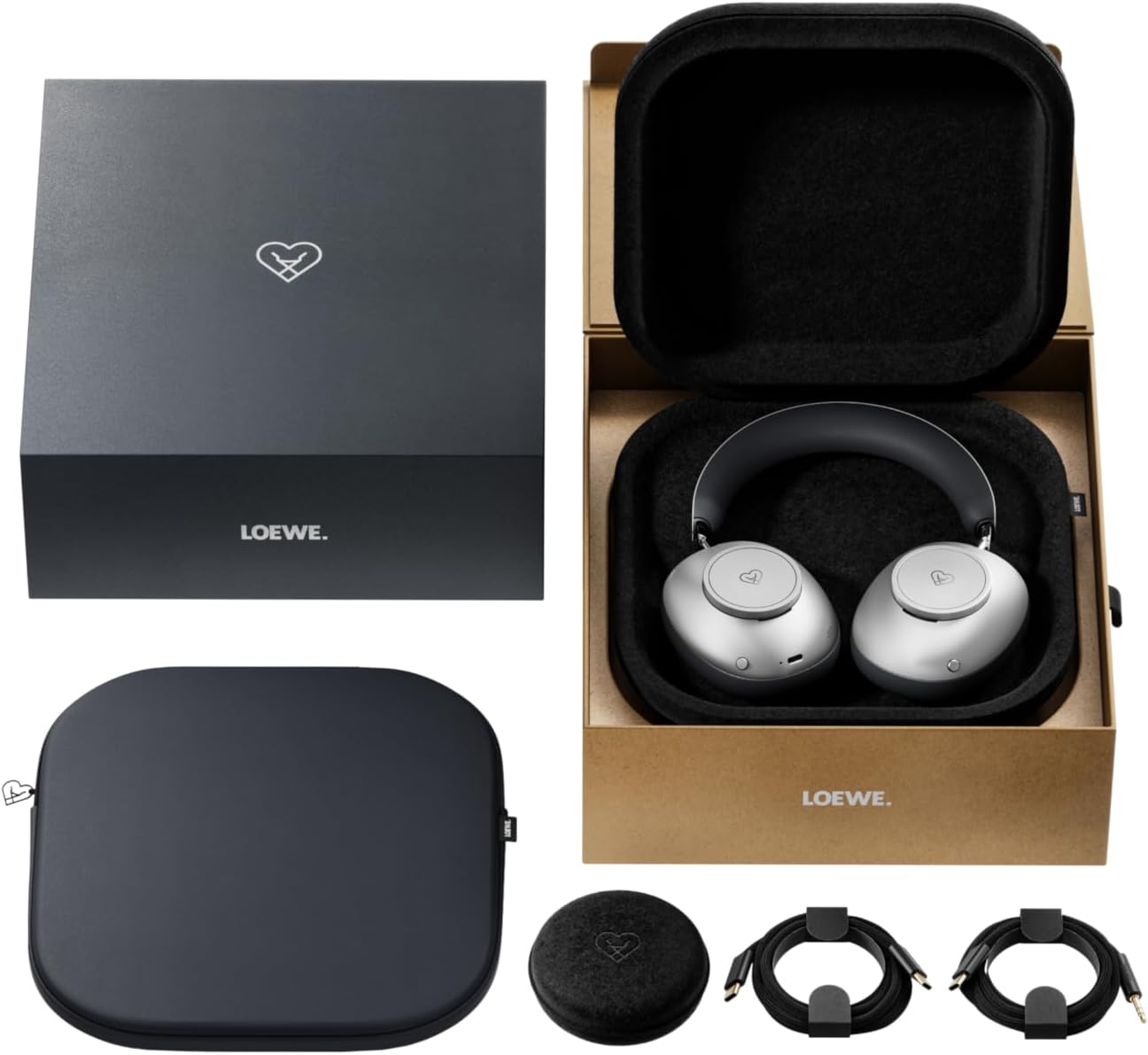
Image: The LOEWE Leo Wireless Headphones package contents, showing the headphones, USB-C cable, AUX cable, leather case, hard case, and cable pouch.
3. פּראָדוקט איבערview
Familiarize yourself with the physical components and controls of your LOEWE Leo headphones.

בילד: פראָנט view of the LOEWE Leo Wireless Headphones, showcasinג די אויערקעפּלעך און קאָפּבאַנד.
3.1. קאָנטראָלן און פּאָרטן
The headphones feature intuitive controls for easy operation:
- קאָנטראָל דייאַלז: Two precision-crafted rotary wheels for volume adjustment and navigation.
- קאַמף קנעפּלעך: Dedicated buttons for playback control, ANC modes, and voice translation activation.
- וסב- C פּאָרט: For charging and wired audio connection.
- 3.5 מם דזשאַק: For traditional wired audio connection.

בילד: דעטאַלירט view of the earcup, highlighting the control dial, USB-C port, and 3.5mm audio jack.
4. געטינג סטאַרטעד
4.1. טשאַרדזשינג די כעדפאָונז
Before first use, fully charge your LOEWE Leo headphones. A full charge provides up to 65 hours of continuous playback.
- פֿאַרבינדט דעם צוגעשטעלטן USB-C טשאַרדזשינג קאַבל צום USB-C פּאָרט אויף די כעדפאָונז.
- פֿאַרבינדט דעם אַנדערן עק פֿונעם קאַבל צו אַ קאָמפּאַטיבלע USB מאַכט אַדאַפּטער (נישט אַרייַנגערעכנט) אָדער אַ קאָמפּיוטער'ס USB פּאָרט.
- דער LED אינדיקאַטאָר אויף די כעדפאָונז וועט ווייַזן דעם טשאַרדזשינג סטאַטוס. עס וועט טיפּיש אויסלעשן אָדער טוישן קאָליר אַמאָל גאָר טשאַרדזשד.
4.2. מאַכט אויף / אויסגעלאשן
- צו מאַכט אויף: דריק און האלט דעם פּאַוער קנעפּל פֿאַר אַרום 3 סעקונדעס ביז דער LED אינדיקאַטאָר צינדט זיך אָן.
- צו מאַכט אַוועק: דריק און האלט דעם פּאַוער קנעפּל פֿאַר אַרום 3 סעקונדעס ביז דער LED אינדיקאַטאָר גייט אויס.
4.3. בלועטאָאָטה פּערינג
The LOEWE Leo headphones utilize Bluetooth Low Energy (BLE) for faster pairing and reduced power consumption.
- מאַכן זיכער אַז די כעדפאָונז זענען פּאַוערד אַוועק.
- Press and hold the Power button for approximately 5 seconds until the LED indicator flashes rapidly, indicating pairing mode.
- אויף אייער דעווייס (סמאַרטפאָן, טאַבלעט, קאָמפּיוטער), אַקטיווירט בלועטוט און זוכט פֿאַר פֿאַראַן דעווייסעס.
- Select "LOEWE Leo" from the list of found devices.
- אַמאָל קאָננעקטעד, די געפירט גראדן וועט האַלטן פלאַשינג און בלייבן האַרט בלוי.
4.4. ווייערד קאַנעקשאַן
For a wired audio experience, use the supplied AUX to USB-C cable.
- Connect the USB-C end of the AUX cable to the headphones.
- Connect the 3.5mm end of the AUX cable to your audio source's 3.5mm jack.
- די כעדפאָונז וועלן אויטאָמאַטיש איבערגיין צו ווייערד מאָדע.
5. אפערירן אייערע כעדפאָונז
5.1. Audio Playback and Volume Control
Use the control dials and action buttons for managing your audio:
- באַנד אַרויף / אַראָפּ: Rotate the designated control dial.
- שפּיל / פּויזע: Press the central action button once.
- ווייַטער שפּור: Double-press the central action button.
- פֿריִערדיקע שפּור: Triple-press the central action button.

Image: Close-up of the earcup's control dial, used for volume and navigation.
5.2. Adaptive Noise Cancellation (ANC)
The LOEWE Leo features advanced adaptive noise cancellation that continuously analyzes your environment and adjusts in real-time.
- Activate/Deactivate ANC: Press the dedicated ANC button once.
- דורכזעיקייַט מאָדע: Press the ANC button twice to allow ambient sounds to pass through, enhancing situational awareness.

Image: Illustration of the adaptive noise cancellation feature, depicting sound wave management.
5.3. Real-time Voice Translation
Communicate across language barriers with the integrated real-time voice translation feature.
- Ensure your headphones are connected to a device with internet access and the LOEWE companion app installed.
- Activate the translation feature via the dedicated button or the companion app.
- Speak into the headphone's microphone. The translated audio will be played back in real-time.

Image: Earcup detail showing the microphone for voice input and the 'leo' icon, representing the real-time translation function.
5.4. Dolby Atmos and Spatial Audio
Experience immersive sound with Dolby Atmos and spatial audio support. This feature is automatically enabled when compatible content is played through a connected device that supports these audio technologies.
6. וישאַלט און קער
6.1. רייניקונג
- ווישט די כעדפאָונז מיט אַ ווייכן, טרוקענעם, לינט-פֿרייע שטאָף.
- ניצט נישט קיין שרײַבנדיקע רייניגער, אַלקאָהאָל, אדער כעמישע סאָלווענטן.
- Keep moisture away from openings.
6.2. באַטערי קער
- פֿאַרמײַדט אָפֿט פֿולשטענדיק אויסצולאָדן די באַטעריע.
- האַלט די כעדפאָונז אין אַ קיל, טרוקן אָרט ווען זיי ווערן נישט גענוצט פֿאַר לענגערע צייטן.
- The battery is user-replaceable, contributing to the product's longevity.
6.3. מאָדולאַר פּלאַן
The LOEWE Leo headphones feature a durable modular design with replaceable components, such as ear cushions and headbands. This design allows for easy replacement of worn parts, extending the product's lifespan.

Image: The modular construction of the LOEWE Leo headphones, showing detachable earcups and headband for maintenance or replacement.
7. טראָובלעשאָאָטינג
If you encounter issues with your LOEWE Leo headphones, refer to the following common solutions:
- קיין מאַכט: זיכער מאַכן אַז די קאָפּהערער זענען גאָר אָנגעלאָדן. פֿאַרבינדט זיי צו אַ מאַכט מקור מיטן USB-C קאַבל.
- קיין קול:
- קאָנטראָלירט דעם באַנד לעוועל אויף ביידע די כעדפאָונז און אייער פֿאַרבונדענע מיטל.
- Ensure the headphones are properly paired via Bluetooth or the AUX cable is securely connected.
- Try restarting both the headphones and the audio source device.
- בלועטאָאָטה דיסקאַנעקשאַן:
- Ensure the headphones are within the Bluetooth range of your device (typically 10 meters).
- Disable and re-enable Bluetooth on your device, then attempt to re-pair.
- Clear the LOEWE Leo from your device's Bluetooth history and pair again.
- ANC אַרבעט נישט עפֿעקטיוו:
- Ensure the earcups form a good seal around your ears. Adjust the fit if necessary.
- Verify that ANC is activated.
- Voice Translation Issues:
- Check your device's internet connection.
- Ensure the LOEWE companion app is up-to-date and configured correctly.
- רעד קלאָר און מיט אַ מיטלמעסיקן טעמפּאָ.
If problems persist, please contact LOEWE customer support.
8. ספּעסאַפאַקיישאַנז
| שטריך | באַשרייַבונג |
|---|---|
| מאָדעל נאָמען | לעאָ |
| מאָדעל נומער | 64641J10 |
| קאַנעקטיוויטי טעכנאָלאָגיע | Wireless (Bluetooth), Wired |
| ווירעלעסס קאָמוניקאַציע | בלועטאָאָטה לאָו ענערגיע (בלע) |
| געזונט פֿעיִקייטן | Hi-Res Audio, Dolby Atmos, Spatial Audio |
| ראַש קאַנסאַליישאַן | Adaptive Noise Reduction (ANC) |
| ספּעציעלע פֿעיִקייטן | Real-time Voice Translation, Modular Design with Replaceable Components |
| באַטערי לעבן | ביז 65 שעה (אומגעפער) |
| קאָנטראָל טיפּ | Button Control, Rotary Dials |
| קאַמפּאַטאַבאַל דעוויסעס | Cellular Phone, Tablet, Computer, Laptop |
| וואָג | 3 Kilograms (product weight as listed, may include packaging) |
9. וואָראַנטי און שטיצן
9.1. פאַבריקאַנט'ס גאַראַנטיע
The LOEWE Leo Wireless Headphones come with a 2-יאָר פאַבריקאַנט ס וואָראַנטידי וואָראַנטי דעקט חסרונות אין מאַטעריאַלן און אַרבעט אונטער נאָרמאַל נוצן. ביטע האַלטן דיין קויפן באַווייַז פֿאַר וואָראַנטי קליימז.
For specific terms and conditions of the warranty, please refer to the warranty card included in your product packaging or visit the official LOEWE webפּלאַץ.
9.2. קונה שטיצן
For technical assistance, troubleshooting, or warranty inquiries, please contact LOEWE customer support through their official webזייטל אדער די קאָנטאַקט אינפֿאָרמאַציע וואָס איז צוגעשטעלט אין אייער פּראָדוקט דאָקומענטאַציע.
אָנליין רעסורסן: Visit the official LOEWE webזייטל פֿאַר אָפֿט געשטעלטע פֿראַגעס, ווייכווארג דערהייַנטיקונגען, און נאָך שטיצע רעסורסן.