
1. הקדמה
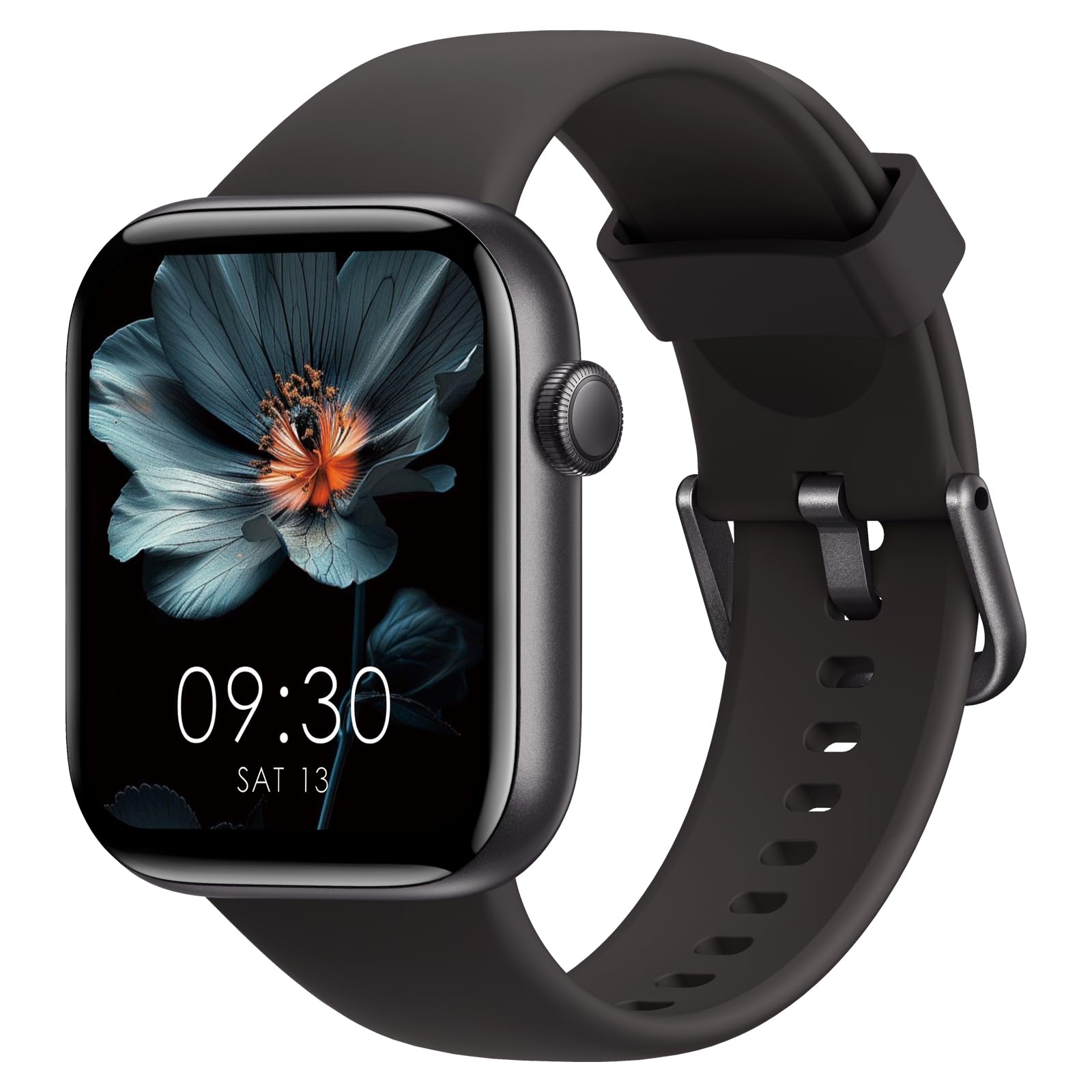
Thank you for choosing the AcclaFit Smartwatch P5. This device is designed to enhance your daily life by providing comprehensive health monitoring, fitness tracking, and smart communication features. Please read this manual carefully to ensure proper use and optimal performance of your smartwatch.

2. סעטאַפּ
2.1 וואָס איז אין דער קעסטל
- AcclaFit Smartwatch P5
- טשאַרדזשינג קאַבלע
- באַניצער מאַנואַל
2.2 אויפלאָדן די סמאַרטוואַטש
פארן ערשטן באניץ, לאדט גוט אויף אייער סמאַרטוואַטש. פארבינדט דעם טשאַרדזשינג קאַבל צום טשאַרדזשינג פּאָרט אויף דער הינטערשטער זייגער פון דער זייגער און שטעקט דעם USB עק אין א נאָרמאַלן USB מאַכט אַדאַפּטער (נישט אַרייַנגערעכנט) אדער א קאָמפּיוטער'ס USB פּאָרט. דער זייגער דיספּליי וועט ווייזן דעם טשאַרדזשינג סטאַטוס.
2.3 אַפּ אינסטאַלאַציע און פּערינג
To unlock the full potential of your AcclaFit Smartwatch P5, download and install the 'H Band' app on your smartphone.
- Scan the QR code provided in the manual or search for 'H Band' in your smartphone's app store (compatible with Android 5.0+ and iOS 10.0+). You can also visit the official app webפּלאַץ: H Band App.
- זיכער מאַכן אַז אייער טעלעפאָן'ס בלועטוט איז ענייבאַלד.
- Open the 'H Band' app, register, and log in.
- Follow the in-app instructions to search for and pair your AcclaFit Smartwatch P5. The app will guide you through the connection process.

2.4 Initial Setup and Personalization
After successful pairing, you can personalize your smartwatch settings through the 'H Band' app. This includes setting personal information, notification preferences, and choosing your preferred watch face.
3. אַפּערייטינג ינסטרוקטיאָנס
3.1 יקערדיק קאָנטראָלס
- טאָוטשסקרעען: סווייפּ אַרויף, אַראָפּ, לינקס, אָדער רעכטס צו נאַוויגירן דורך מעניוז און פונקציעס. צאַפּן צו סעלעקטירן.
- זייַט קנעפּל: דריקן צו צוריקקומען צום היים־עקראַן אדער אויפוועקן דעם דעווייס. לאנג דריקן פאר מאַכט־אָפּציעס.
3.2 בלועטוט רופן און קלוגע נאטיפיקאציעס
The AcclaFit Smartwatch P5 features a built-in microphone and Hi-Fi speaker, allowing you to answer and make calls directly from your wrist when connected to your smartphone via Bluetooth.
- מאַכן / ענטפֿערן קאַללס: When a call comes in, you can answer or reject it directly on the watch. To make a call, access the dial pad or contacts list on the watch.
- נאָטיפיקאַטיאָנס: Receive SMS messages and notifications from social media apps (Facebook, Twitter, WhatsApp, LinkedIn, Messenger, etc.) directly on your smartwatch. The watch will vibrate to alert you. Manage notification settings via the 'H Band' app.

3.3 געזונט מאָניטאָרינג
The smartwatch provides comprehensive health data, viewable on the watch and in detail within the 'H Band' app.
- האַרץ קורס מאָניטאָרינג: Integrated high-precision PPG sensor for 24-hour heart rate tracking. Data is stored for 7 days to monitor long-term changes.
- מאָניטאָרינג פון בלוט זויערשטאָף (SpO2): Measures blood oxygen levels using a reflective light sensor.
- מאָניטאָרינג פון בלוט דרוק: Measures blood pressure using a reflective light sensor.
- שלאָף מאָניטאָרינג: Tracks sleep quality in three stages: awake, light sleep, and deep sleep. Helps identify sleep patterns and improve sleep duration and quality.
- פעריאד טראַקינג: For female users, the watch supports menstrual cycle tracking.

3.4 פֿיטנעס טראַקינג
The AcclaFit Smartwatch P5 supports over 140 professional and advanced workout modes to make your training more scientific and diverse.
- אַקטיוויטעט טראַקינג: Tracks daily activity data such as steps, active minutes, distance, and calories burned.
- ספּאָרט מאָדעס: Includes modes for yoga, swimming, HIIT, running, jump rope, cycling, badminton, football, and many more. Monitor your workout status in real-time.
- ברידינג עקסערסייז: Guided breathing exercises to help you relax and manage stress.


3.5 אנדערע פֿעיִקייטן
- מוזיק קאָנטראָלס: קאָנטראָלירט מוזיק ווידערשפּיל אויף אייער סמאַרטפאָון גלייך פֿון אייער זייגער.
- וועטער פאָרויסזאָגן: באַקומען וועטער דערהייַנטיקונגען אין רעאַל-צייט אויף דיין האַנטגעלענק.
- זייגער פּנים קאַסטאַמייזיישאַן: Choose from over 100 watch faces or personalize with your own images.
- קלוג שרעק: שטעלט אַלאַרמס גלייך אויף דער זייגער אָדער דורך דער אַפּ.
- זיציק דערמאָנונג: באַקומט וואָרענונגען צו זיך רירן אויב איר זענט געווען צו לאַנג נישט אַקטיוו.
- געפֿינען מיין טעלעפאָן: Locate your paired smartphone using your smartwatch.
4. וישאַלט
4.1 רייניקן אייער סמאַרטוואַטש
Regularly clean your smartwatch and strap to prevent skin irritation and maintain device hygiene.
- Wipe the watch screen and body with a soft, damp, לינט-פֿרייַ שטאָף.
- For the silicone strap, you can use mild soap and water, then rinse thoroughly and dry completely before wearing.
- פֿאַרמײַדט די נוצן פֿון שאַרפֿע כעמיקאַלן אָדער אַברייזיוו מאַטעריאַלן, ווײַל די קענען שאַטן דעם אַפּאַראַט.
4.2 באַטערי קער
- Avoid extreme temperatures, which can shorten battery life.
- Charge the device regularly, but avoid leaving it fully charged or fully discharged for extended periods.
4.3 וואַסער קעגנשטעל (IP68)
The AcclaFit Smartwatch P5 is IP68 waterproof, meaning it can withstand immersion in water up to 1.5 meters for 30 minutes. You can wear it for washing hands, showering, swimming, and diving.
- וויכטיק: Do not wear the smartwatch in hot water, including hot showers or saunas, as steam and high temperatures can compromise the water seal.
- After exposure to water, ensure the watch is dry before charging to prevent damage to the charging contacts.

5. טראָובלעשאָאָטינג
If you encounter issues with your AcclaFit Smartwatch P5, please refer to the following common solutions:
- מיטל נישט קער אויף: זיכער מאַכן אַז די זייגער איז גאָר אויפגעלאָדן. פֿאַרבינדט עס צום טשאַרדזשער און וואַרט אַ פּאָר מינוט איידער איר פּרוּווט עס ווידער אָנצוצינדן.
- פֿאַרבינדונג פּראָבלעמען (בלוטוט):
- זיכער מאַכן אַז בלועטוט איז ענייבאַלד אויף דיין סמאַרטפאָון און די זייגער.
- זייט זיכער אז די זייגער איז אינעם בלוטוט ראַנגע פון אייער טעלעפאָן.
- ריסטאַרט ביידע דיין סמאַרטפאָון און סמאַרטוואַטש
- Unpair the device from the 'H Band' app and your phone's Bluetooth settings, then attempt to pair again.
- ומפּינקטלעך געזונט דאַטן:
- זייט זיכער אז די זייגער טראָגט גוט אויף אייער האַנטגעלענק, נישט צו ענג אדער צו לויז.
- רייניקט דעם סענסאר אויף דער הינטערשטער זייגער.
- Environmental factors and individual physiology can affect readings. The data is for reference and not for medical diagnosis.
- נאטיפיקאציעס נישט דערשיינען:
- Check notification settings in the 'H Band' app to ensure they are enabled for desired applications.
- Ensure your phone's notification permissions are granted to the 'H Band' app.
- Verify that the watch is connected to your phone via Bluetooth.
- עקראַן רעאַגירט נישט: Try restarting the watch by long-pressing the side button. If unresponsive, allow the battery to fully drain and then recharge it.
If problems persist, please contact AcclaFit customer support.
6. ספּעסאַפאַקיישאַנז
| שטריך | דעטאַל |
|---|---|
| סאָרט | AcclaFit |
| מאָדעל נומער | P5 |
| אָפּערייטינג סיסטעם | טראָגן OS 3.0 |
| ווייַז גרייס | 1.85 אינטשעס |
| האַכלאָטע | 320 X 240 אָדער העכער |
| קאַנעקטיוויטי טעכנאָלאָגיע | בלועטאָאָטה |
| ווירעלעסס קאָמוניקאַציע סטאַנדאַרד | בלועטאָאָטה |
| באַטאַרייע קאַפּאַציטעט | 400 מיליamper-hour (mAh) |
| דורכשניטלעך באַטאַרייע לעבן | 15 טעג |
| וואַסער קעגנשטעל מדרגה | IP68 (Resistant to water up to 1.5 meters) |
| שטיצט אַפּפּליקאַטיאָן | Alarm Clock (via H Band app) |
| ספּעציעלע פֿעיִקייטן | Weather Forecasts, Touch Screen, Phone Call, Activity Tracker, Multi-Sport Tracker, Heart Rate Monitor, Blood Pressure Monitor, Blood Oxygen Monitor |
| קאַמפּאַטאַבאַל דעוויסעס | Smartphones (iOS 10.0+ and Android 5.0+) |
| באַנד מאַטעריאַל טיפּ | סיליקאָנע |
| Case Material Type | פּלאַסטיק |
| גפּס | קיין גפּס |
| User Interface Interaction | מיקראָפאָן, טאָוטשסקרין |
7. וואָראַנטי & שטיצן
7.1 וואָראַנטי אינפֿאָרמאַציע
The AcclaFit Smartwatch P5 comes with an Extended Warranty. Please refer to the warranty card included in your package or contact AcclaFit customer service for detailed terms and conditions.
7.2 קונה שטיצן
For any questions, technical assistance, or support regarding your AcclaFit Smartwatch P5, please visit the official AcclaFit webזייטל אדער קאנטאקט זייער קאסטומער סערוויס דעפארטמענט. קאנטאקט אינפארמאציע קען געווענליך געפונען ווערן אויף דער פראדוקט פארפאקונג אדער די אפיציעלע בראנד webפּלאַץ.