
הקדמה
This manual provides detailed instructions for the setup, operation, maintenance, and troubleshooting of your GMKtec Mini PC M2Pro S. This compact desktop computer is equipped with an 11th generation Intel Core i7-1185G7 processor, 32GB DDR4 RAM, and a 512GB NVMe SSD, designed for efficient performance in various applications. Please read this manual thoroughly before using the device to ensure proper functionality and longevity.
פּעקל אינהאַלט
באַשטעטיקט אַז אַלע זאכן וואָס זענען אויסגערעכנט אונטן זענען פאַראַן אין אייער פּעקל:
- 1 x GMKtec Nucbox Mini PC Computer
- 1 x מאַכט אַדאַפּטער
- 1 x וועסאַ מאָונט מיט שרויפן
- 1 x HDMI קאַבלע
- 1 x באַניצער מאַנואַל (דאָס דאָקומענט)

Image: Contents of the GMKtec Mini PC M2Pro S retail box.
פּראָדוקט איבערview
The GMKtec Mini PC M2Pro S is a high-performance, compact desktop solution. Key features include:
- פּראַסעסער: 11th Gen Intel Core i7-1185G7 (up to 4.8 GHz, 4 Cores, 8 Threads, 12MB Cache)
- זכּרון: 32GB DDR4 SODIMM (dual-channel, expandable up to 64GB)
- סטאָרידזש: 512GB M.2 2280 NVMe SSD (PCIe3.0, expandable up to 2TB), additional M.2 2242 SATA slot (expandable up to 2TB)
- גראַפיקס: Intel Iris Xe Graphics G7 96EU
- ווייַז רעזולטאַט: Supports triple 4K displays via 2 x HDMI (4K@60Hz) and 1 x USB Type-C (4K@60Hz)
- נעץ: 2.5Gbps LAN (RJ45), WiFi 6 (802.11ax), Bluetooth 5.2
- פּאָרץ: USB 3.2, USB Type-C (40Gbps), Audio (3.5mm CTIA)
- קאָאָלינג: Upgraded quiet cooling fan with copper vapor chamber and multiple exhaust vents
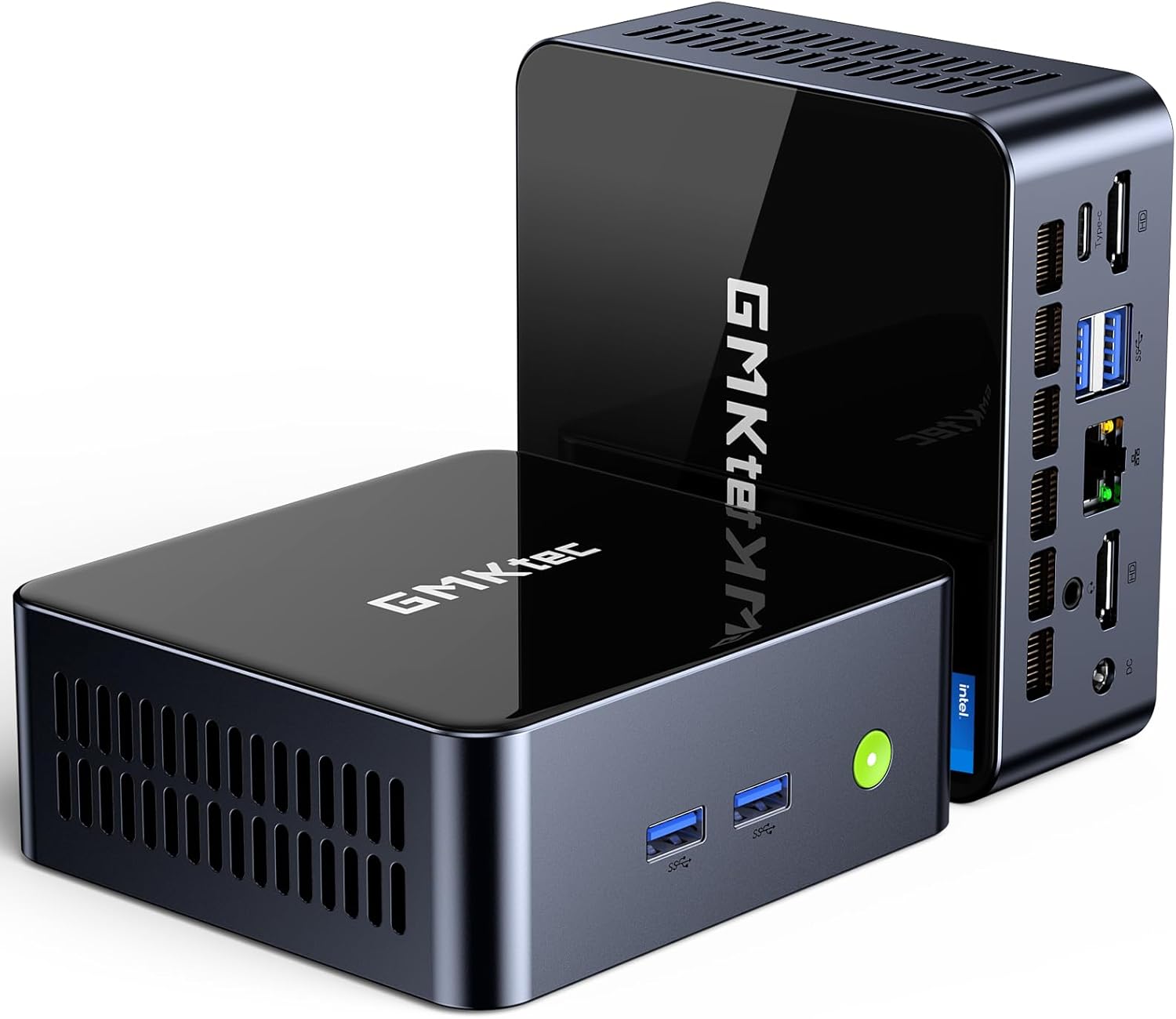
בילד: פראָנט view of the GMKtec Mini PC M2Pro S.
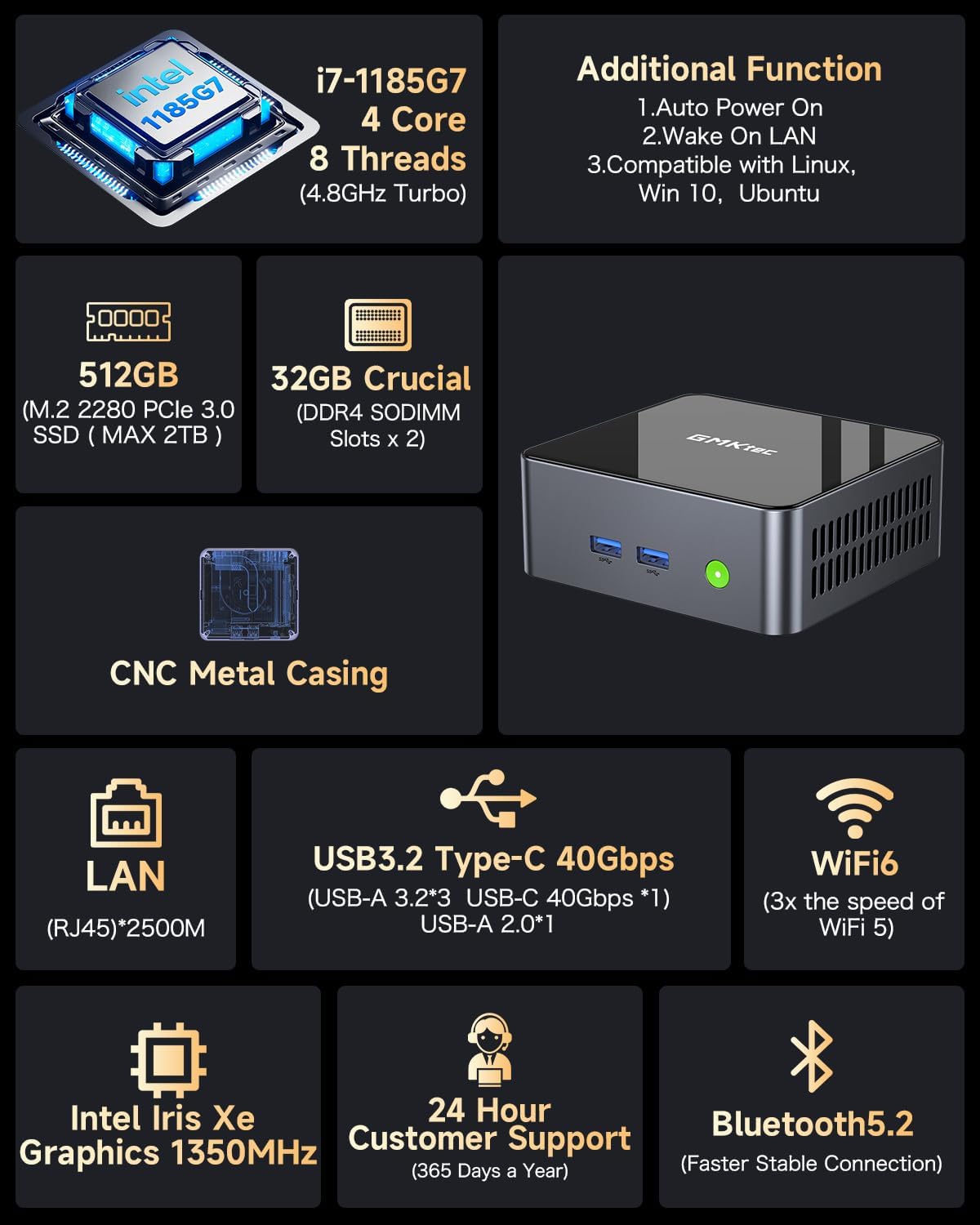
בילד: איבערview of the GMKtec Mini PC M2Pro S features and specifications.
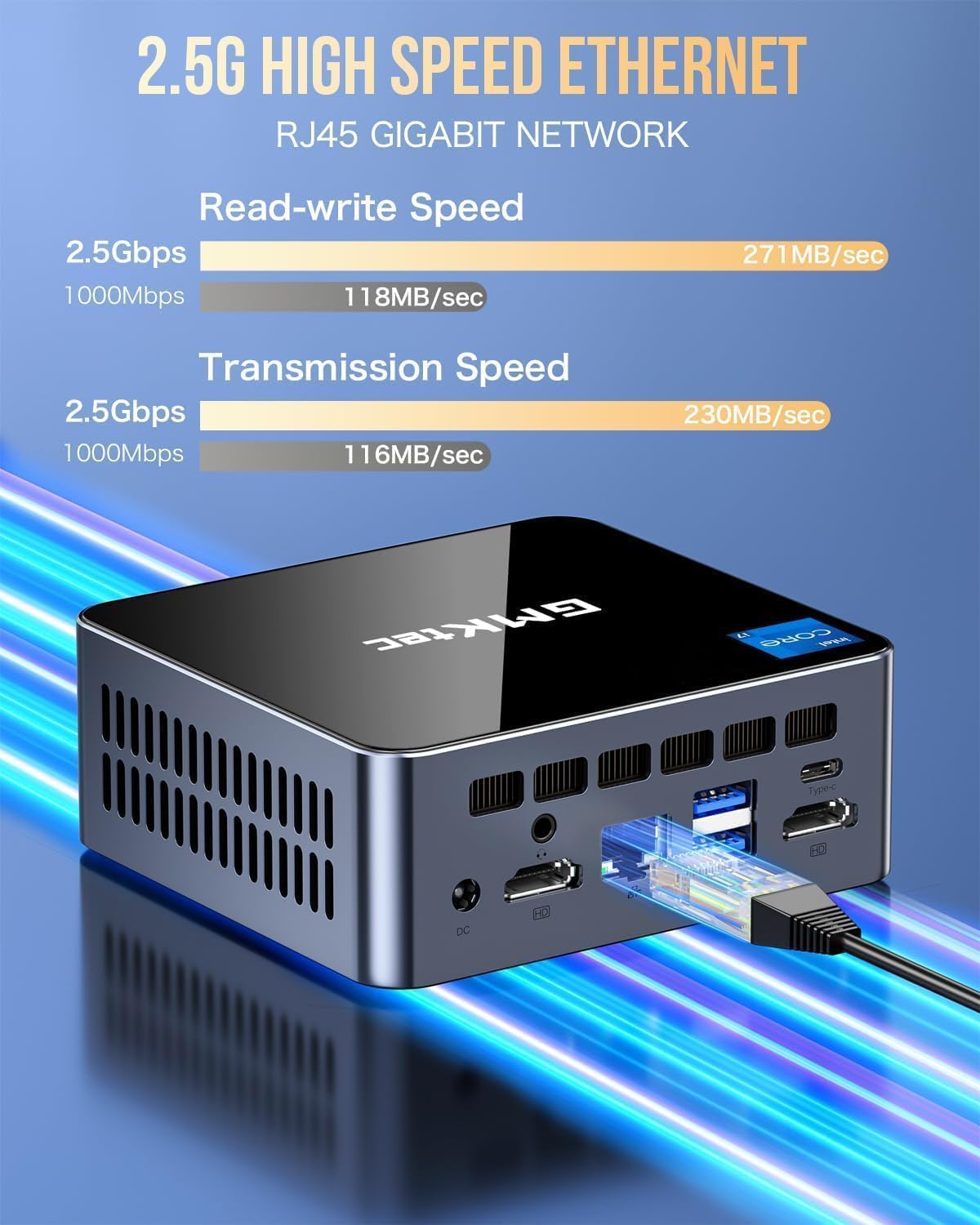
בילד: דעטאַלירט view of the multi-purpose ports on the GMKtec Mini PC M2Pro S.
סעטאַפּ גייד
- פאַרבינדן פּעריפעראַלס: Connect your monitor(s) using the HDMI or USB Type-C ports. Connect your keyboard and mouse to the available USB ports.
- נעץ קאַנעקשאַן: For a wired connection, plug an Ethernet cable into the 2.5Gbps LAN port. For wireless, the device supports WiFi 6 and Bluetooth 5.2, which can be configured after initial boot.
- מאַכט קשר: Connect the provided power adapter to the DC IN port on the mini PC and then to a power outlet.
- מאַכט אויף: Press the power button located on the front of the mini PC. The system will boot up.
- ערשטע ווינדאָוס סעטאַפּ: Follow the on-screen instructions to complete the Windows 11 Pro setup, including language, region, network, and user account creation.
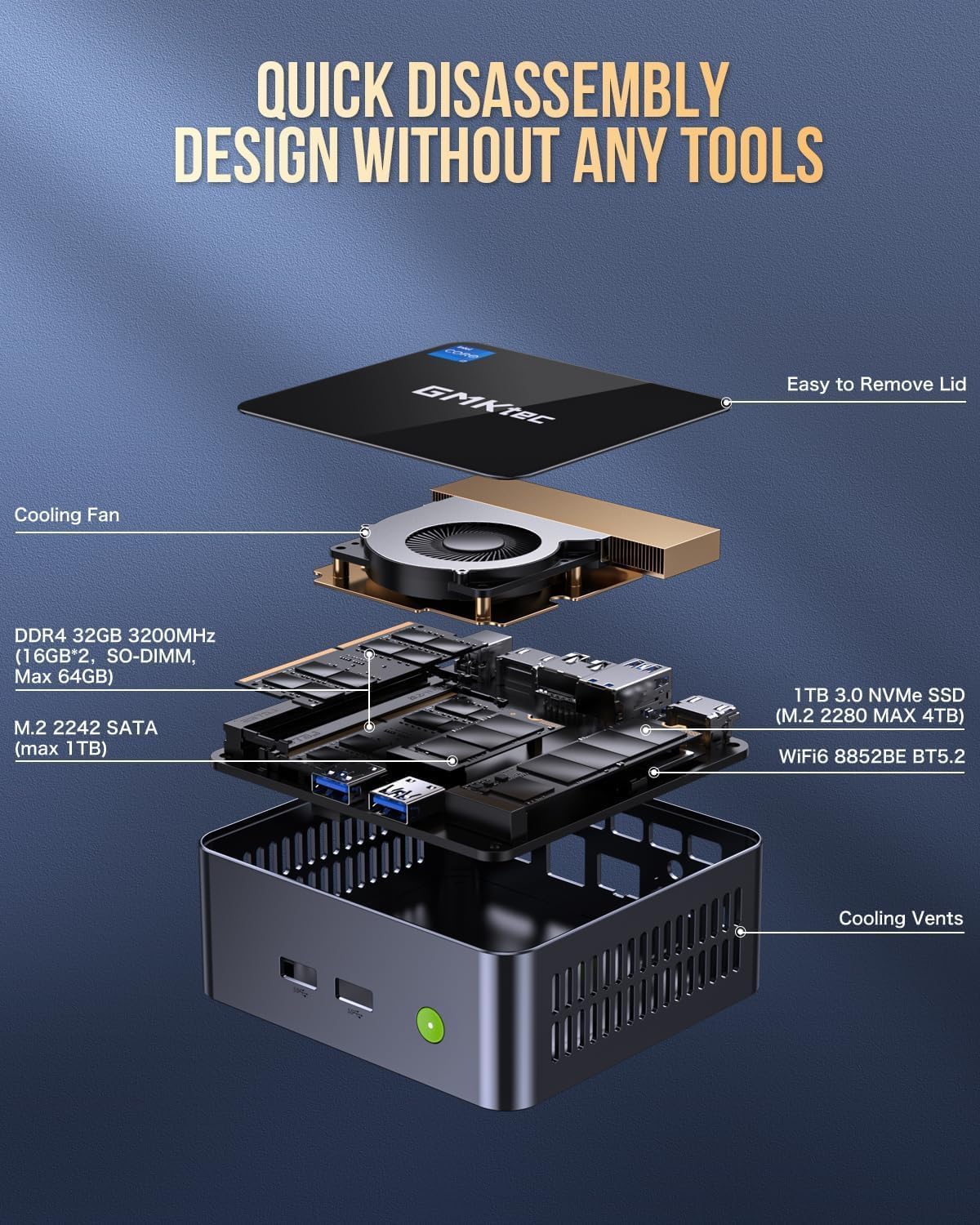
Image: Desktop placement and VESA mount installation options for the Mini PC.
אַפּערייטינג ינסטראַקשאַנז
מאַכט אויף / אַוועק
- צו מאַכט אויף: דרוק די מאַכט קנעפּל אויף די פראָנט פון די מיטל.
- צו פאַרמאַכן אַראָפּ: דריקט דעם סטאַרט קנעפּל אין ווינדאָוס, און דערנאָך סעלעקטירט מאַכט > שאַט דאַון.
- צו ריסטאַרט: דריקט דעם סטאַרט קנעפּל אין ווינדאָוס, און דערנאָך סעלעקטירט מאַכט > ריסטאַרט.
דרייַיק ווייַז סעטאַפּ
The GMKtec Mini PC M2Pro S supports up to three 4K displays simultaneously. Connect your monitors to the available HDMI ports and the USB Type-C port. Once connected, Windows will automatically detect the displays. You can configure display settings (e.g., extend, duplicate) via Settings > System > Display.

בילד: עקסample of a triple 4K display setup with the Mini PC.
נעץ קאַנעקטיוויטי
- ווייערד (לאַן): Connect an Ethernet cable to the RJ45 port for a stable 2.5Gbps connection.
- ווייערלעס (WiFi): Access network settings in Windows to connect to a WiFi 6 network.
- בלועטאָאָטה: Pair Bluetooth devices (e.g., headphones, keyboard, mouse) via Windows Bluetooth settings.
וישאַלט און אַפּגרעידס
סטאָרידזש יקספּאַנשאַן
The GMKtec Mini PC M2Pro S supports storage expansion:
- The existing M.2 2280 NVMe (PCIe3.0) SSD can be upgraded to a maximum of 2TB.
- An additional M.2 2242 SATA slot is available for expansion up to 2TB.
באַראַן יקספּאַנשאַן
The device comes with 32GB DDR4 SODIMM RAM in a dual-channel configuration. It can be expanded up to a maximum of 64GB by replacing the existing modules with higher capacity ones.
אַקסעס ינערלעך קאַמפּאָונאַנץ
The mini PC features a quick disassembly design for easy access to internal components for upgrades or maintenance. Carefully remove the lid to access the RAM and SSD slots. Refer to the diagram below for guidance.

Image: Quick disassembly design for internal component access.

Image: Illustration of the upgraded quiet cooling fan system.
טראָובלעשאָאָטינג
If you encounter issues with your GMKtec Mini PC M2Pro S, refer to the following common solutions:
- קיין מאַכט: Ensure the power adapter is securely connected to both the mini PC and a working power outlet. Check the power button for any damage.
- קיין ווייַז: Verify that the monitor is powered on and correctly connected to the mini PC via HDMI or USB Type-C. Try a different cable or monitor if possible. Ensure the correct input source is selected on your monitor.
- No Network Connection (Wired): Check if the Ethernet cable is properly connected to both the mini PC and your router/modem. Verify router status.
- No Network Connection (Wireless): Ensure WiFi is enabled in Windows settings. Check if the correct WiFi network is selected and the password is entered correctly.
- פּאַמעלעך פאָרשטעלונג: Close unnecessary applications. Check for background processes. Ensure sufficient free storage space. Consider upgrading RAM or SSD if performance issues persist after basic troubleshooting.
- פּראָבלעמען מיט ווינדאָוס אַקטיוואַציע: If you experience problems activating Windows 11 Pro, ensure your internet connection is active. If the issue persists, contact GMKtec customer support for assistance.
For further assistance, please contact GMKtec customer support.
טעכניש ספּעסאַפאַקיישאַנז
| שטריך | באַשרייַבונג |
|---|---|
| סאָרט | דזשי-עם-קיטעק |
| מאָדעל נומער | M2 Pro S |
| פּראַסעסער | Intel Core i7-1185G7 (4.8 GHz Turbo, 4 Cores, 8 Threads) |
| באַראַן | 32GB DDR4 SDRAM (3200 MHz, Dual-channel, expandable to 64GB) |
| סטאָרידזש | 512GB M.2 2280 NVMe SSD (PCIe 3.0, expandable to 2TB), M.2 2242 SATA slot (expandable to 2TB) |
| גראַפיקס קאָופּראַסעסער | Intel Iris Xe Graphics G7 96EU |
| מאַקסימום סקרין האַכלאָטע | 5120 רענטגענ 2880 פּיקסעלס |
| אָפּערייטינג סיסטעם | Windows 11 פּראָ |
| ווירעלעסס טיפּ | WiFi 6 (802.11ax), בלועטוט 5.2 |
| לאַן | 2.5Gbps RJ45 Ethernet |
| וסב פּאָרץ | 3 x USB 3.2, 1 x USB Type-C (40Gbps) |
| ווידעא רעזולטאַט | 2 x HDMI (4K@60Hz), 1 x USB Type-C (4K@60Hz) |
| אַודיאָ פּאָרט | 3.5 מם CTIA |
| פּונקט וואָג | 3.3 פונט |
| פּעקל דימענשאַנז | 6.38 X 6.26 X 4.69 אינטשעס |
וואָראַנטי און שטיצן
Your GMKtec Mini PC M2Pro S comes with a standard manufacturer's warranty. Please refer to the warranty card included in your package for specific terms and conditions. For technical support, troubleshooting assistance, or warranty claims, please contact GMKtec customer service directly. Contact information can typically be found on the GMKtec official webוועבזייטל אדער דורך דעם פארקויפער פון וועמען איר האט געקויפט דעם פראדוקט.
The seller for this product is GMKtec一Store. Please reach out to them for product-specific inquiries.