
הקדמה
This manual provides detailed instructions for the installation, operation, and maintenance of your Reobiux 2K Outdoor WiFi Surveillance Camera, Model K6Q-1P. Please read this manual thoroughly before using the product to ensure proper functionality and safety.
פּעקל אינהאַלט
באַשטעטיקט אַז אַלע זאכן וואָס זענען אויסגערעכנט אונטן זענען אַרייַנגערעכנט אין אייער פּעקל. אויב עפּעס פעלנדיק אָדער צעבראָכן, ביטע קאָנטאַקטירט קונה שטיצע.
- 1 x Surveillance Camera
- 1 x מאַכט אַדאַפּטער
- 1 x גאַנג פון מאַונטינג סקרוז
- 1 x Waterproof Cover Kit
- 1 x באַניצער מאַנואַל
פּראָדוקט איבערview
The Reobiux 2K Outdoor WiFi Surveillance Camera (Model K6Q-1P) is an advanced security solution featuring a dual-lens design for comprehensive monitoring. It offers 2K resolution, color night vision, motion detection, two-way audio, and compatibility with Amazon Alexa.
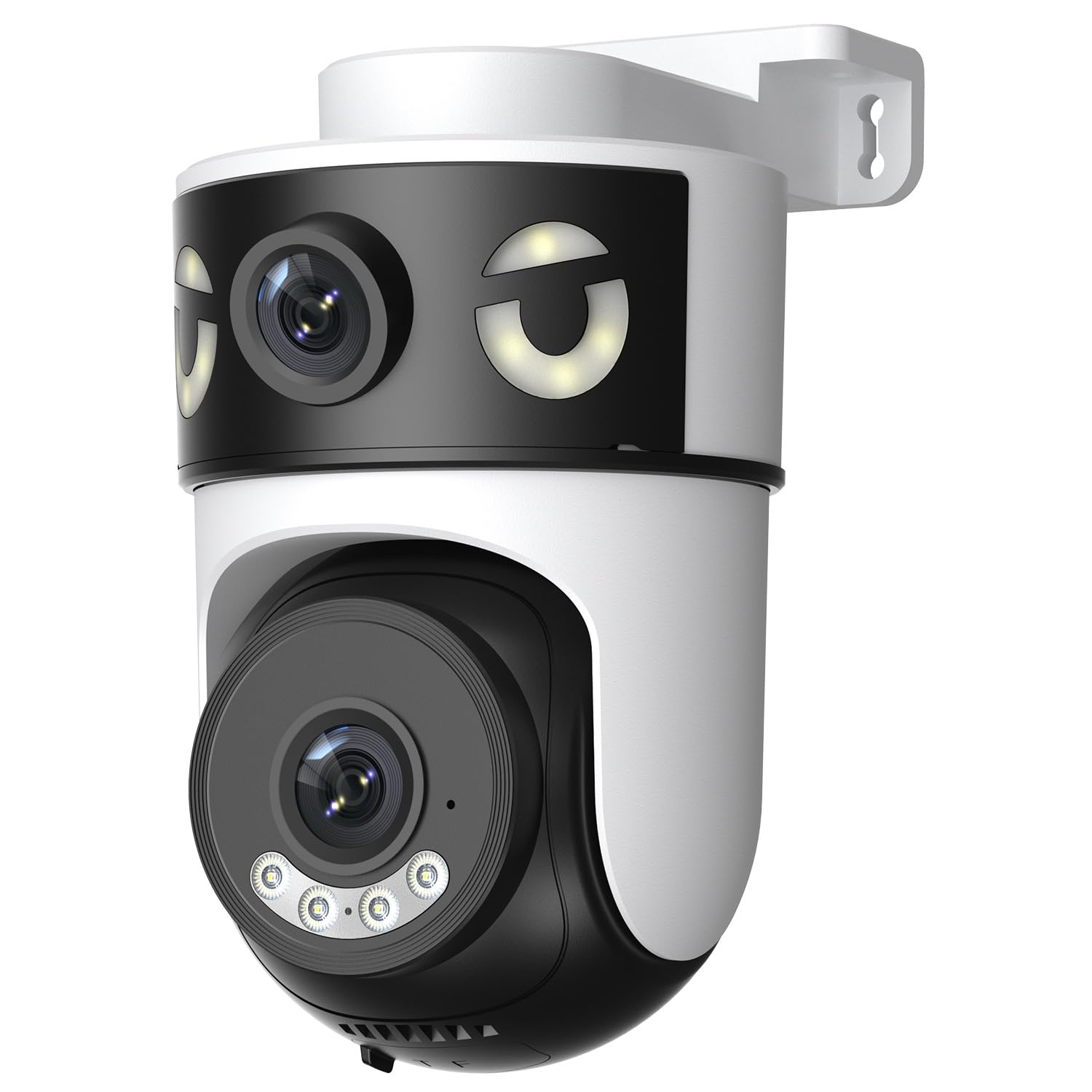
Image: Reobiux 2K Outdoor WiFi Surveillance Camera, Model K6Q-1P. This image shows the camera unit with its dual lenses, two external antennas, and a wall-mount bracket.
שליסל פֿעיִקייטן
- Dual Lens & 355° View: Unique 2-in-1 design supporting fixed area surveillance and mobile full-view monitoring. Features two high-resolution lenses; one fixed and one rotatable for wide panoramic views.
- 2K Resolution & Color Night Vision: Delivers clear and detailed images and videos. Offers three night vision modes: Infrared, Color, and Smart Night Vision for reliable 24-hour surveillance.
- Motion Detection & Alarm Siren: Advanced motion detection sends real-time alarm notifications to your mobile device upon detecting movement.
- Two-Way Audio & Multi-User Access: Built-in microphone and speaker allow for remote communication. Supports sharing camera access with multiple users.
- SD Card/Cloud Storage & Alexa Compatibility: Supports 24-hour continuous recording to a Micro SD card (max 128GB) or cloud server. Compatible with Amazon Alexa for voice control.
סעטאַפּ גייד
1. מאָונטינג די קאַמעראַ
The camera is designed for wall mounting. Choose a suitable location that provides the desired surveillance coverage and is within range of your Wi-Fi network and a power outlet.
- מאַרקירט די בויער־פונקטן אויף דער וואַנט ניצנדיק די קאַמעראַ'ס באַזע ווי אַ מוסטער.
- Drill holes and insert the wall plugs if necessary.
- Secure the camera to the wall using the provided mounting screws.
- Ensure the camera is firmly attached and the waterproof cover kit is properly installed to protect connections.
2. פּאַוערינג אויף
Connect the provided power adapter to the camera's power input and then plug it into a standard electrical outlet. The camera will power on and initiate its startup sequence.
3. נעץ פֿאַרבינדונג (Wi-Fi)
The camera connects via 2.4GHz Wi-Fi. Follow these steps to connect your camera to your home network:
- אָפּלאָדירן די O-kam Pro application from the App Store (iOS) or Google Play Store (Android) on your smartphone or tablet.
- רעגיסטרירט זיך פֿאַר אַ נײַעם אַקאַונט אָדער לאָגט זיך אײַן אויב איר האָט שוין אײנס.
- פֿאָלגט די אינסטרוקציעס אין דער אַפּ צו לייגן צו אייער נייע קאַמעראַ. דאָס באַדייט טיפּיש סקענען אַ QR קאָד אויף דער קאַמעראַ אָדער מאַנועל אַרייַנגעבן איר ID.
- Select your 2.4GHz Wi-Fi network and enter the password when prompted.
- Wait for the camera to connect to the network. A voice prompt or indicator light will confirm a successful connection.

Image: Reobiux camera with a smartphone displaying the O-kam Pro app interface, demonstrating remote control and live view קייפּאַבילאַטיז.
אַפּערייטינג ינסטראַקשאַנז
לעבן View און פּאַן/טילט קאָנטראָל
Once connected, open the O-kam Pro app to access the live feed from your camera. The dual-lens system provides both a fixed wide view and a movable PTZ (Pan-Tilt-Zoom) view.
- דריקט אויף דער קאַמעראַ אין דער אַפּ צו view די לעבן טייַך.
- Use the on-screen controls to pan (horizontal rotation up to 355°) and tilt (vertical movement) the movable lens to adjust the viewינג ווינקל.
- Switch between the fixed and movable lens views within the app interface.
נאַכט זעאונג מאָדעס
די קאַמעראַ אָפפערט דריי נאַכט זעאונג מאָדעס:
- ינפרערעד נאַכט זעאונג: Provides black and white images in low-light conditions using infrared LEDs.
- קאָליר נאַכט זעאונג: Utilizes built-in spotlights to provide full-color images at night.
- Smart Night Vision: אויטאָמאַטיש טוישט צווישן אינפֿראַרויט און קאָליר נאַכט זעאונג באַזירט אויף דעטעקטירטע באַוועגונג אָדער ליכט באדינגונגען.
- You can select your preferred night vision mode in the O-kam Pro app settings.
באַוועגונג דעטעקשאַן און אַלערץ
Configure motion detection settings and receive alerts on your mobile device:
- Navigate to the camera settings in the O-kam Pro app.
- Enable motion detection and adjust sensitivity levels as needed.
- Set up alert notifications to be sent to your smartphone.
- You can also enable the alarm siren to deter intruders.
צוויי-וועג אַודיאָ
Use the two-way audio feature to communicate through the camera:
- אין דער לעבן view interface of the O-kam Pro app, tap the microphone icon to speak. Your voice will be transmitted through the camera's speaker.
- צאַפּן אויף דעם רעדנער בילדל צו הערן אַודיאָ פֿון דער קאַמעראַ'ס אַרומיקע געגנט.
ווידעא רעקאָרדינג און סטאָרידזש
The camera supports continuous 24-hour recording. You have two storage options:
- מיקראָ סד קאַרד: Insert a Micro SD card (up to 128GB, not included) into the designated slot on the camera. The camera will automatically begin recording to the card.
- וואָלקן סטאָרידזש: Subscribe to a cloud storage plan through the O-kam Pro app for secure off-site video storage.
- אַקסעס רעקאָרדעד פאָאָtage via the O-kam Pro app.
אַמאַזאָן אַלעקסאַ ינטעגראַטיאָן
Integrate your Reobiux camera with Amazon Alexa for voice control:
- עפֿענען די Amazon Alexa אַפּ אויף דיין רירעוודיק מיטל.
- Go to "Skills & Games" and search for the "O-kam Pro" skill.
- Enable the skill and link your O-kam Pro account.
- Discover devices. You can now use voice commands like "Alexa, show me the front door camera" to view the live feed on compatible Alexa devices.
וישאַלט
- רייניקונג: ווישט רעגולער אויס די קאַמעראַ לינז און קערפּער מיט אַ ווייכן, דamp שטאָף צו באַזייַטיקן שטויב און שמוץ. ניצט נישט שטרענגע כעמיקאַלן אָדער שאַרפע רייניקונגסמיטלען.
- וועטער שוץ: The camera is waterproof, but ensure all connections are sealed properly, especially the power cable and any SD card slots, to maintain its weather resistance.
- Firmware דערהייַנטיקונגען: Check the O-kam Pro app periodically for firmware updates to ensure optimal performance and security.
טראָובלעשאָאָטינג
- די אַפּאַראַט מאַכט נישט אויף:
- Ensure the power adapter is securely connected to both the camera and a working electrical outlet. Verify the outlet has power.
- נישט געקענט זיך פארבינדן צו Wi-Fi:
- Ensure your Wi-Fi network is 2.4GHz. Check your Wi-Fi password for accuracy. Move the camera closer to your Wi-Fi router to improve signal strength. Restart your router and the camera.
- ניט לעבן view or recording:
- Check your internet connection. Ensure the camera is connected to Wi-Fi. Verify that the Micro SD card is inserted correctly and not full, or that your cloud storage subscription is active.
- Motion detection alerts not received:
- Check app notification settings on your phone and within the O-kam Pro app. Ensure motion detection is enabled and sensitivity is set appropriately. Verify your phone has an active internet connection.
- צוויי-וועג אודיאָ אַרבעט נישט:
- Ensure your phone's microphone and speaker are enabled for the O-kam Pro app. Check the volume settings on your phone and within the app. Ensure there are no obstructions blocking the camera's microphone or speaker.
ספּעסאַפאַקיישאַנז
| שטריך | באַשרייַבונג |
|---|---|
| סאָרט | Reobiux |
| מאָדעל נאָמען | K6Q-1P |
| מאָדעל נומער | REO-K6Q-1P |
| מאַונטינג טיפּ | וואנט בארג |
| ווידעא רעקאָרדינג האַכלאָטע | 2K |
| נומער פון זאכן | 1 |
| ווירעלעסס קאָמוניקאַציע טעכנאָלאָגיע | ווי-פי (2.4 גהז) |
| Viewינג אַנגלע | 355 גראַד (פּאַן) |
| ייַנמאָנטירונג טיפּ | שרויף-אין |
| מאַטעריאַל | פּלאַסטיק |
| Voltage | 5 וואלטס (דק) |
| מאַכט | 5 וואטס |
| וואַסער קעגנשטעל מדרגה | וואָטערפּרוף |
| ספּעציעלע פֿעיִקייטן | Two-Way Audio, Local Recording, HD Resolution, PTZ Technology |
| רעקאַמענדיד נוצן | דרויסנדיק זיכערהייַט |
| קאַמפּאַטאַבאַל דעוויסעס | לאַפּטאָפּ, סמאַרטפאָון, טאַבלעט, טעלעוויזיע |
| מאַכט מקור | עלעקטריק קאַבלע |
| קאַנעקטיוויטי פּראָטאָקאָל | RTSP |
| קאָנטראָללער טיפּ | O-kam Pro App |
וואָראַנטי און שטיצן
For warranty information and technical support, please refer to the official Reobiux website or contact Reobiux customer service directly. Keep your purchase receipt as proof of purchase for warranty claims.
Manufacturer: Reobiux