
1. הקדמה
This manual provides essential instructions for the safe and efficient operation of your WISCENT Bluetooth Stereo System WTB-799. Please read this manual thoroughly before using the product and retain it for future reference.
The WISCENT WTB-799 is a compact home audio system featuring a CD player, Bluetooth 5.0 wireless streaming, FM radio, USB playback, and a 3.5mm AUX-in port. It delivers 40W peak power (2 x 20W RMS) through its two-way speaker system, designed for balanced sound reproduction.
2. זיכערקייַט אינפֿאָרמאַציע
- מאַכט מקור: פאַרזיכערן די מאַכט צושטעלן וואָלtage matches the rating indicated on the unit.
- ווענטילאַטיאָן: בלאָקירט נישט די ווענטילאַציע עפענונגען. לאָזט גענוג פּלאַץ אַרום דעם אַפּאַראַט פֿאַר געהעריקן לופטפלוס.
- וואַסער און נעץ: שטעלט נישט אויס דעם אַפּאַראַט צו רעגן, פייכטקייט, אדער טראָפּנדיקע/שפּריצנדיקע פליסיקייטן. שטעלט נישט קיין זאכן אָנגעפילט מיט פליסיקייטן, ווי וואַזעס, אויף דעם אַפּאַראַט.
- היץ: האַלט דעם אַפּאַראַט אַוועק פֿון היץ־קוואַלן ווי ראַדיאַטאָרן, היץ־רעגיסטערס, אויוון, אָדער אַנדערע אַפּאַראַטן (אַרייַנגערעכנט ampליפיערס) וואָס פּראָדוצירן היץ.
- רייניקונג: נעמט ארויס דעם אַפּאַראַט פֿון דער וואַנט־ווענטיל איידער איר רייניקט. ניצט אַ ווייכן, טרוקענעם שטאָף. ניצט נישט קיין פֿליסיקע רייניגער אָדער אַעראָזאָל־רייניגער.
- סערוויס: דו זאלסט נישט פּרווון צו דינען דעם פּראָדוקט זיך. קאָנטאַקט אַלע קוואַלאַפייד סערוויס פּערסאַנעל.
- קאָמפּאַקטדיסק שפּילער: This product contains a laser. Do not open the CD compartment while a disc is playing. Avoid direct exposure to the laser beam.
3. פּעקל אינהאַלט
פּאַקט פֿאָרזיכטיק אויס אַלע זאַכן און מאַכט זיכער אַז איר האָט באַקומען די פֿאָלגנדיקע:
- Main Unit (Stereo System)
- 2 x Bookshelf Speakers
- ווײַטקאָנטראָל (AAA באַטעריעס נישט אַרייַנגערעכנט)
- אַק מאַכט קאַבלע
- 3.5 מם AUX קאַבלע
- באַניצער מאַנואַל (דעם דאָקומענט)

4. פּראָדוקט איבערview
4.1 פראָנט פּאַנעל קאָנטראָלס

- POWER קנעפּל: טורנס די אַפּאַראַט אויף אָדער אַוועק.
- שפּיל / פּויזע קנעפּל: Starts or pauses playback for CD, USB, or Bluetooth.
- SKIP/TUNE Buttons (◀◀ / ▶▶): Skips tracks on CD/USB, navigates radio frequencies, or fast forwards/rewinds.
- SCAN קנעפּל: Initiates automatic scanning for FM radio stations.
- RPT (REPEAT) Button: Cycles through repeat modes (one, all, random) for CD/USB.
- VOLUME קנופּ: אַדזשאַסטירט דעם הויפּט באַנד לעוועל.
- EQ/FUN Button: Selects sound equalizer presets or switches input functions (CD, Bluetooth, FM, USB, AUX).
- וסב פּאָרט: For connecting USB storage devices for MP3 playback.
- AUX-IN דזשאַק: פֿאַר פֿאַרבינדן עקסטערנע אַודיאָ דעוויסעס דורך אַ 3.5 מם קאַבל.
- כעדפאָון דזשאַק: פֿאַר פּריוואַט צוהערן מיט כעדפאָונז.
4.2 דערציען פּאַנעל קאַנעקשאַנז
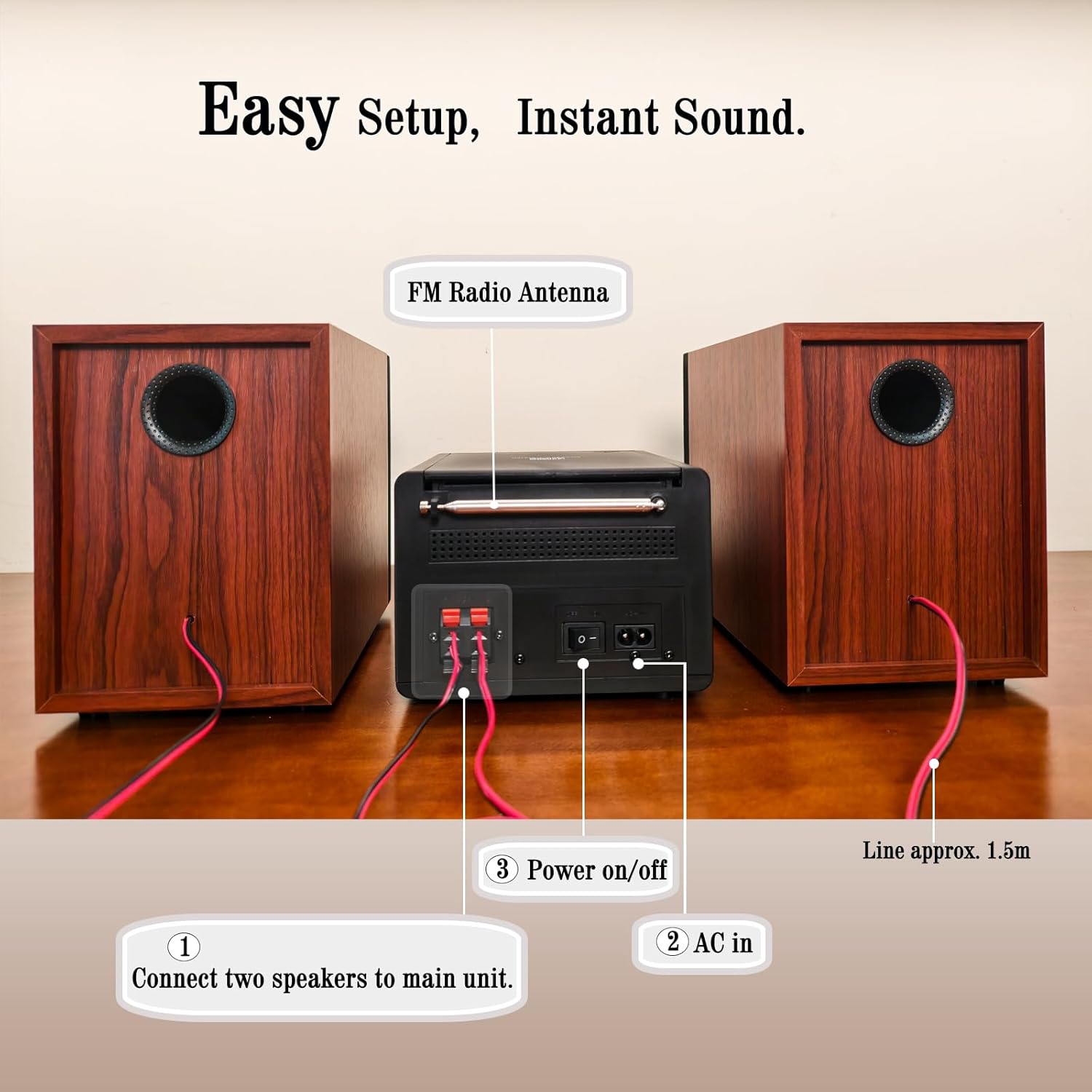
- ספּיקער טערמינאַלס: Connect the included bookshelf speakers.
- FM ראַדיאָ אַנטענע: Extend for optimal FM signal reception.
- AC IN: פאַרבינדן די אַק מאַכט קאַבלע.
- מאַכט אויף / אַוועק סוויטש: הויפּט מאַכט באַשטימען פֿאַר די אַפּאַראַט.
5. סעטאַפּ
5.1 פֿאַרבינדן די רעדנערס
- Identify the speaker wires. Each speaker has two wires, typically red (+) and black (-).
- Connect the red wire from each speaker to the red (+) terminal on the main unit.
- Connect the black wire from each speaker to the black (-) terminal on the main unit.
- Ensure a secure connection for both speakers.
5.2 פֿאַרבינדן די FM אַנטענע
Extend the FM wire antenna located at the rear of the main unit for improved radio reception. Position it for the best possible signal.
5.3 קאַנעקטינג מאַכט
- Plug the AC power cable into the AC IN port on the rear of the main unit.
- שטעקט אריין דעם אנדערן עק פונעם AC שטראָם קאַבל אין א נאָרמאַלן וואַנט אַוטלעט.
- Ensure the main Power On/Off switch on the rear panel is in the 'ON' position.
6. אַפּערייטינג ינסטרוקטיאָנס
6.1 מאַכט אויף / אַוועק
דרוק די מאַכט button on the front panel or the remote control to turn the unit on or off (standby mode).
6.2 מקור סעלעקציע
דרוק די EQ/שפּאַס button repeatedly on the front panel or the פונקציע button on the remote control to cycle through available input sources: CD, Bluetooth, FM Radio, USB, AUX-in.
6.3 סי פּלייבאַק

- Open the CD compartment cover on top of the main unit.
- Place a CD (CD, CD-R, CD-RW, or MP3 CD) onto the spindle with the label side facing up.
- נאָענט די קאָמפּאַקטדיסק אָפּטייל דעקן.
- Select 'CD' mode using the EQ/שפּאַס קנעפּל.
- Playback should start automatically. If not, press the שפּיל / פּויזע קנעפּל.
- ניצן די SKIP/TUNE קנעפּלעך צו נאַוויגירן טראַקס.
- דרוק די RPT button to select repeat modes (Repeat One, Repeat All, Random Play).
6.4 בלועטאָאָטה פּערינג
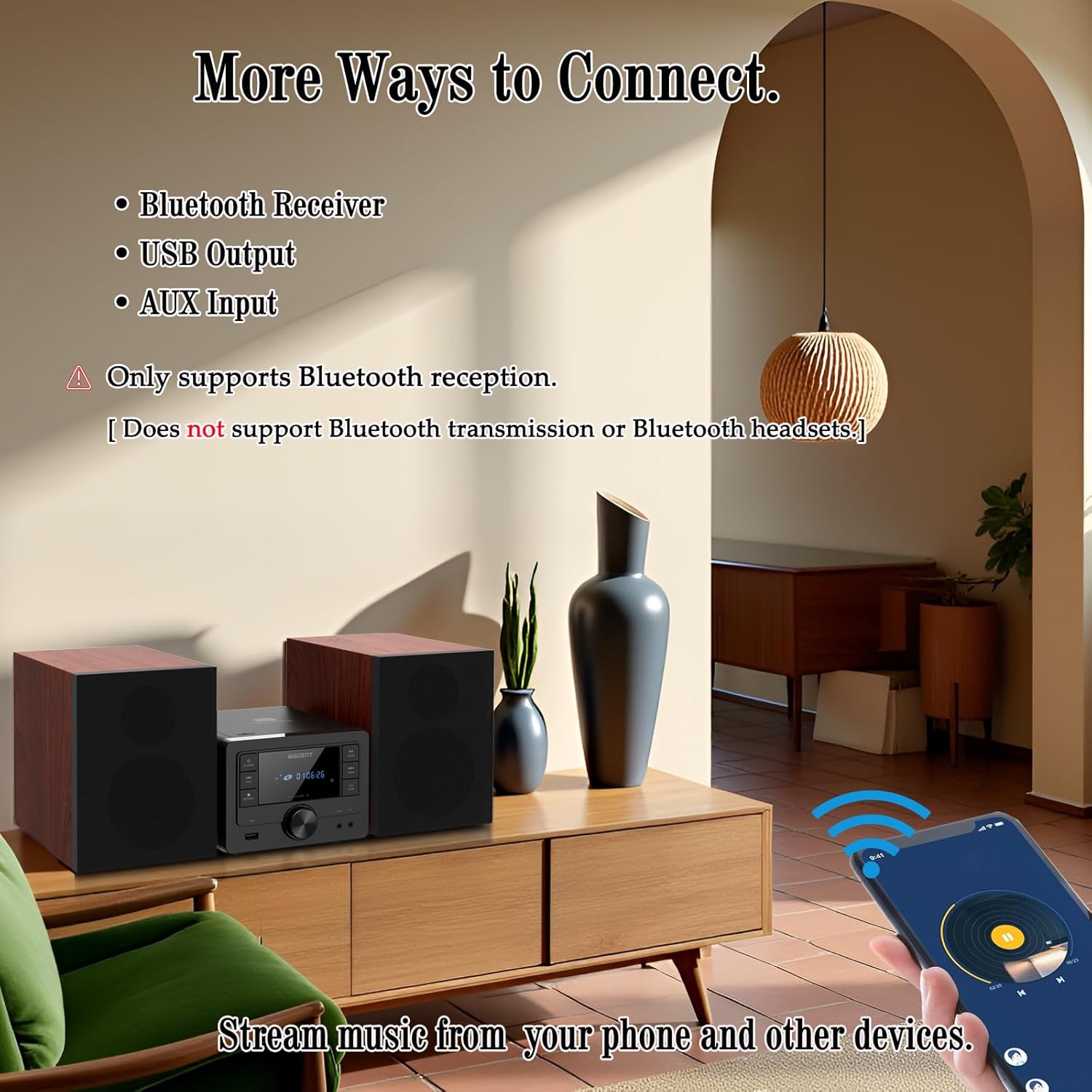
- Select 'Bluetooth' mode using the EQ/שפּאַס button. The display will show 'BT' and flash, indicating it's in pairing mode.
- On your Bluetooth-enabled device (smartphone, tablet), go to its Bluetooth settings and enable Bluetooth.
- זוכן פֿאַר available devices and select 'WTB-799' from the list.
- Once paired, the display will stop flashing and show 'BT' steadily.
- You can now stream audio from your device to the stereo system.
- באַמערקונג: This system supports Bluetooth reception only. It cannot transmit audio to Bluetooth headphones or other Bluetooth speakers.
6.5 FM ראַדיאָ אָפּעראַציע
- Select 'FM' mode using the EQ/שפּאַס קנעפּל.
- דרוק די יבערקוקן קנעפּל צו אויטאָמאַטיש סקענען און ראַטעווען פאַראַן FM סטאנציעס.
- ניצן די SKIP/TUNE buttons to manually tune to a specific frequency or navigate through saved stations.
6.6 יו-עס-בי פּלייבּעק
- Insert a USB flash drive (formatted with MP3 files) into the USB port on the front panel.
- Select 'USB' mode using the EQ/שפּאַס קנעפּל.
- Playback should start automatically. If not, press the שפּיל / פּויזע קנעפּל.
- ניצן די SKIP/TUNE קנעפּלעך צו נאַוויגירן טראַקס.
- דרוק די RPT button to select repeat modes (Repeat One, Repeat All, Random Play).
6.7 AUX-in Connection
- Connect one end of the 3.5mm AUX cable to the AUX-IN jack on the front panel of the stereo system.
- Connect the other end of the AUX cable to the headphone jack or audio output of your external audio device (e.g., smartphone, MP3 player).
- Select 'AUX' mode using the EQ/שפּאַס קנעפּל.
- קאָנטראָליר ווידערשפּיל און באַנד פֿון דיין עקסטערנעם מיטל.
6.8 Sound Settings (EQ Modes)
דרוק די EQ/שפּאַס button (or EQ button on the remote) repeatedly to cycle through the available equalizer presets:
- פלאַך: Neutral sound profile.
- שטיין: Enhanced bass and treble.
- פּאָפּ: Slightly boosted bass and vocals.
- קלאַסיש: Emphasizes mid-range frequencies.
- דזשאַז: Slightly boosted bass and treble with a warm tone.
6.9 רימאָוט קאָנטראָל באַניץ
The included remote control allows for convenient operation from a distance. Insert two AAA batteries (not included) into the remote control before use. Point the remote control towards the main unit's front panel sensor.
7. וישאַלט
- רייניקונג: ניצט אַ ווייכע, טרוקענע שטאָף צו רייניקן די אויסערלעכע זייט פון דעם אַפּאַראַט. ניצט נישט קיין שרײַבנדיקע רייניגער, וואַקסן אָדער סאָלווענטן.
- CD Player Lens: אויב עס פּאַסירן פּראָבלעמען מיטן ווידערשפּילן סי-די, ניצט אַ קאמערציעל בנימצא סי-די לינז רייניגער דיסק.
- סטאָרידזש: ווען נישט אין באַנוץ פֿאַר לענגערע צייטן, נעמט אַרויס דעם עלעקטרישן פֿאָן פֿון דער עלעקטרישער נעץ און לייגט עס אַוועק אין אַ קילן, טרוקענעם אָרט.
8. טראָובלעשאָאָטינג
| פּראָבלעם | מעגלעך סיבה | לייזונג |
|---|---|---|
| קיין מאַכט | Power cable not connected; Rear power switch off; Wall outlet not active. | Check power cable connection; Ensure rear power switch is ON; Test wall outlet with another device. |
| קיין געזונט | Volume too low; Incorrect input source; Speakers not connected properly; Mute function active. | Increase volume; Select correct input source; Check speaker wire connections; Deactivate mute. |
| סי-די שפּילט נישט | CD inserted incorrectly; CD dirty/scratched; Incorrect source selected. | Reinsert CD label side up; Clean or replace CD; Select 'CD' source. |
| בלועטאָאָטה איז נישט פּערינג | Unit not in pairing mode; Bluetooth on device off; Device too far. | Select 'Bluetooth' source (display flashes); Enable Bluetooth on your device; Move device closer to the unit. |
| נעבעך עפעם אָפּטראָג | די אַנטענע נישט אויסגעשטרעקט/ריכטיג פּאַזיציאָנירט. | Fully extend and reposition the FM antenna. |
| וסב ניט דערקענט | USB דרייוו נישט ריכטיק פֿאָרמאַטירט; נישט קאָמפּאַטיבל file types; USB drive damaged. | Ensure USB is FAT32 formatted with MP3 fileס; פרובירט אן אנדערן USB דרייוו. |
| ווייַט קאָנטראָל נישט ארבעטן | באַטעריעס אויסגעשעפּט/נישט ריכטיק אַרײַנגעשטעלט; שטערונג צווישן ווײַטקאָנטראָל און אַפּאַראַט. | Replace batteries (AAA); Ensure correct battery polarity; Remove obstructions. |
9. ספּעסאַפאַקיישאַנז
- סאָרט: וויסענט
- מאָדעל: ווטב-799
- קאַנעקטיוויטי טעכנאָלאָגיע: Auxiliary, Bluetooth 5.0, USB
- רעדנער טיפּ: Stereo, 2-way (Woofer & Tweeter)
- רעזולטאַט מאַכט: 40W Peak (2 x 20W RMS)
- CD קאַמפּאַטאַבילאַטי: סי-די, סי-די-ר, סי-די-רוו, MP3 סי-די
- FM ראַדיאָ אָפטקייַט: 87.5 ~ 108 מהז
- וסב פּאָרט: USB 2.0 (for MP3 playback)
- Product Dimensions (Main Unit): 6.3" x 7.5" x 4.7" (160x190x120 מ"מ)
- פּראָדוקט דימענסיעס (יעדער רעדנער): 5.3" x 8.1" x 7.5" (135x205x190 מ"מ)
- נומער וואָג: בעערעך 3.3 פונט
- קאָליר: שוואַרץ
10. וואָראַנטי און שטיצן
For warranty information and technical support, please refer to the warranty card included with your product or contact the retailer where you purchased the WISCENT Bluetooth Stereo System WTB-799. You may also visit the official WISCENT webפּלאַץ פֿאַר ווייַטער הילף.
פאַבריקאַנט: וויסענט