
הקדמה
This manual provides instructions for the setup, operation, and maintenance of your replacement remote control for Casio Projectors. Please read this manual thoroughly before use to ensure proper functionality and to maximize the lifespan of your device.
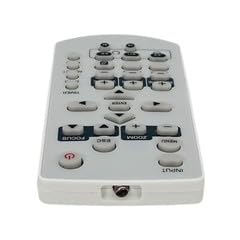
בילד 1: איבערview of the replacement remote control.
פּעקל אינהאַלט
- 1 x פאַרבייַט ווייַט קאָנטראָל
באַמערקונג: Batteries are not included and must be purchased separately. This is a replacement remote control and may not offer all functions of the original remote. Minor scratches may be present due to bulk item storage.
סעטאַפּ
1. באַטאַרייע ייַנמאָנטירונג
- געפֿינען די באַטאַרייע אָפּטייל אויף די צוריק פון די ווייַט קאָנטראָל.
- רוק עפענען די באַטאַרייע דעקן.
- אַרײַנשטעלן צוויי AAA באַטעריעס (נישט אַרייַנגערעכנט), און זיכער מאַכן אַז די ריכטיקע פּאָלאַריטעט (+ און -) איז אָנגעוויזן אין דעם אָפּטייל.
- פאַרמאַכן די באַטאַרייע דעקן סיקיורלי.
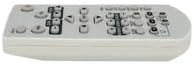
Image 2: Battery compartment for AAA batteries.
2. Pairing (Not Required)
This remote control operates via infrared (IR) technology and typically does not require pairing. It is designed to work directly with compatible Casio projector models upon battery installation.
אַפּערייטינג ינסטראַקשאַנז
Point the remote control directly at the infrared receiver on your Casio projector. Ensure there are no obstructions between the remote and the projector.
יקערדיק פאַנגקשאַנז:
- מאַכט אויף / אַוועק: דרוק די מאַכט קנעפּל צו קער די פּראַדזשעקטער אויף אָדער אַוועק.
- אַרייַנשרייַב סעלעקציע: ניצן די אַרייַנשרייַב or source buttons to cycle through available input sources (e.g., HDMI, VGA).
- נאַוויגאַציע: Use the directional arrow buttons (אַרויף, אַראָפּ, לינקס, רעכטס) און די אַרייַן or OK קנעפּל צו נאַוויגירן מעניוז.
- באַנד קאָנטראָל: If your projector has audio output, use the באַנד +/- קנעפּלעך צו סטרויערן די געזונט מדרגה.
- מעניו אַקסעס: דרוק די MENU button to access the projector's on-screen display (OSD) menu.
- ארויסגאַנג/צוריק: ניצן די אַרויסגאַנג or צוריק button to close menus or return to the previous screen.
Refer to your Casio projector's original manual for specific functions and button layouts, as this replacement remote aims to replicate common controls.
וישאַלט
- רייניקונג: ווישט אָפּ די ווײַטקאָנטראָל מיט אַ ווייכן, טרוקענעם שטאָף. ניצט נישט קיין פֿליסיקע רייניגער אָדער שרײַבנדיקע מאַטעריאַלן.
- באַטערי פאַרבייַט: טוישט די באַטעריעס ווען די ווײַטקאָנטראָל רעאַקציע ווערט טראָג אָדער הערט אויף צו אַרבעטן. טוישט שטענדיק ביידע באַטעריעס אין דער זעלבער צײַט מיט נײַע פֿון דעם זעלבן טיפּ (AAA).
- סטאָרידזש: אויב די ווײַטקאָנטראָל וועט נישט ווערן גענוצט פֿאַר אַ לענגערע צײַט, נעמט אַרויס די באַטעריעס כּדי צו פֿאַרמײַדן ליקאַדזש און מעגלעכע שאָדן. האַלט אין אַ קיל, טרוקן אָרט.
- ויסמיידן שעדיקן: Do not drop the remote control or expose it to extreme temperatures, humidity, or direct sunlight.
טראָובלעשאָאָטינג
- ווייַט ניט ארבעטן:
- זיכער מאַכן אַז די באַטעריעס זענען ריכטיק אַרײַנגעשטעלט מיט דער ריכטיקער פּאָלאַריטעט.
- פאַרבייַטן אַלטע באַטעריעס מיט נייַע AAA באַטעריעס.
- קוקט איבער פֿאַר יעדע שטערונג צווישן דער ווײַטקאָנטראָל און דעם פּראָיעקטאָר'ס IR ופנעמער.
- Ensure you are within the maximum operating range (approximately 5 meters).
- עטלעכע פונקציעס ארבעטן נישט:
- This is a replacement remote. Some advanced or specific functions of your original projector remote may not be supported.
- Verify the function exists on your projector model.
ספּעסאַפאַקיישאַנז
| מאָדעל נומער | ATFO-RPL-RMT-070925-22182 |
| קאָמפּאַטיבלע פּראָיעקטאָרן | Casio XJ-FC330XN, XJ-F210WN, XJ-UT310WN |
| קאַנעקטיוויטי טעכנאָלאָגיע | ינפרערעד (IR) |
| מאַקסימום קייט | בעערעך 5 מעטער (16 פֿיס) |
| באַטערי טיפּ | 2 X AAA (ניט אַרייַנגערעכנט) |
| קאָליר | ווייס/ליכט גרוי |
| ספּעציעלע שטריך | ערגאַנאַמיק פּלאַן |
| פאַבריקאַנט | VieRemote |
וואָראַנטי און שטיצן
This product is a replacement remote control. For specific warranty information, please refer to the seller's policy at the time of purchase. For technical support or inquiries, please contact the seller directly through the platform where the purchase was made.