
הקדמה
The Peplink MAX BR1 Pro 5G (HW3) is a rugged, enterprise-grade 5G router designed to provide high-speed, reliable internet connectivity in various environments. Featuring an X65 5G modem, Wi-Fi 6, and advanced networking capabilities like SpeedFusion, this device ensures consistent performance for business-critical applications, vehicles, and remote sites. This manual provides essential information for setting up, operating, and maintaining your router.
פּעקל אינהאַלט
באַשטעטיקט אַז אַלע זאכן וואָס זענען אויסגערעכנט אונטן זענען אַרייַנגערעכנט אין אייער פּעקל:
- 1x BR1 Pro 5G (HW3) Router
- 4x LTE/5G אַנטענעס
- 2x Dual Band Wi-Fi Antennas
- 1x GPS Active Antenna
- 1x 12V 2A 4 Pin DC Power Supply

פּראָדוקט איבערview
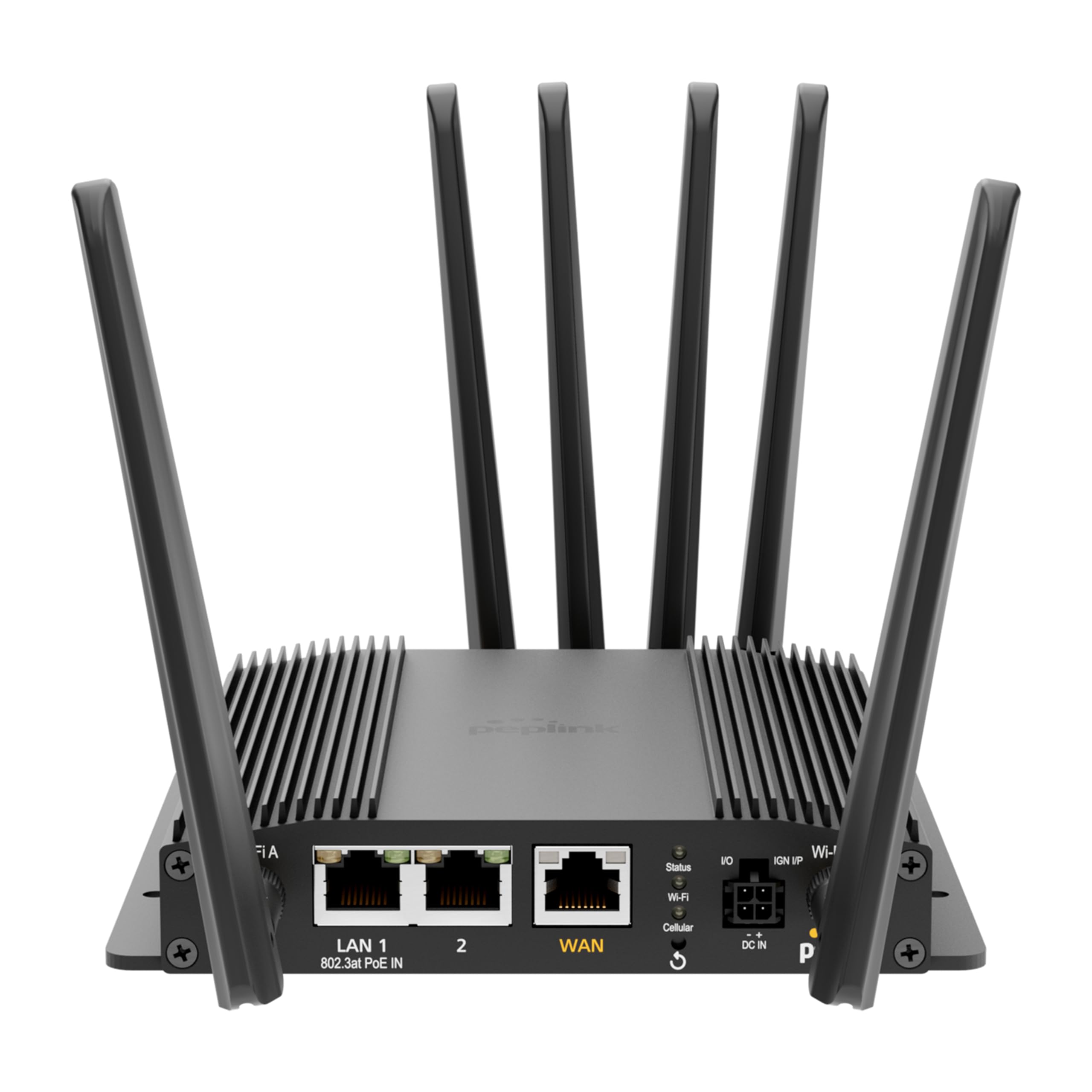
The Peplink MAX BR1 Pro 5G (HW3) features a robust design with multiple connectivity options and indicators.
פראָנט פּאַנעל

- LAN 1 (802.3at PoE IN): Gigabit Ethernet port with Power over Ethernet input capability.
- לאַן 2: גיגאַביט עטהערנעט פּאָרט.
- וואַן: Gigabit Ethernet port for primary internet connection.
- Wi-Fi Antenna A & B: Connectors for dual-band Wi-Fi antennas.
- סטאַטוס געפירט: Indicates device operational status.
- Wi-Fi LED: ווײַזט אָן Wi-Fi אַקטיוויטעט.
- Cellular LED: Indicates cellular signal strength and connection status.
- I/O & IGN I/P: Input/Output and Ignition Input ports for specialized applications.
- דק אין: מאַכט אַרייַנשרייַב פּאָרט.
דערציען פּאַנעל
- Cellular A, B, C, D: Connectors for LTE/5G cellular antennas.
- גפּס: Connector for the GPS active antenna.
- Cellular SIM: Redundant SIM slots for 5G/LTE connectivity.
סעטאַפּ
1. סים קאָרט ינסטאַלירונג
- מאַכן זיכער אַז די ראַוטער איז פּאַוערד אַוועק.
- Locate the Cellular SIM slots on the rear panel.
- Insert your activated Nano-SIM cards into the designated slots until they click into place. The router supports redundant SIM slots for failover.
2. אַנטענע קאַנעקשאַן
- Connect the 4 LTE/5G antennas to the Cellular A, B, C, and D ports on the rear panel.
- Attach the 2 Dual Band Wi-Fi antennas to the Wi-Fi Antenna A and B ports on the front panel.
- Connect the GPS Active Antenna to the GPS port on the rear panel.
- Ensure all antenna connections are finger-tight.
3. מאַכט קאַנעקשאַן
- Connect the 12V 2A 4 Pin DC Power Supply to the DC IN port on the front panel.
- Alternatively, if using Power over Ethernet, connect an 802.3at PoE-compliant power source to the LAN 1 port.
4. ערשט קאָנפיגוראַטיאָן
- Power on the router. Wait for the Status LED to indicate readiness.
- Connect a computer to one of the LAN ports or connect to the default Wi-Fi network (SSID and password usually found on a label on the device).
- עפענען א web בלעטערער און גיי צו די ראַוטער'ס פעליקייט IP אַדרעס (למשל, http://192.168.50.1).
- Follow the on-screen wizard to set up your administrative password, time zone, and initial WAN connections.
אַפּערייטינג ינסטראַקשאַנז
נעץ קאַנעקטיוויטי
- 5G/LTE Cellular: The router automatically detects and connects to available 5G or LTE networks via the installed SIM cards. It supports major US carriers (AT&T, Verizon, T-Mobile, FirstNet) and global bands.
- Wi-Fi 6: The built-in Wi-Fi 6 (802.11ax) supports 2x2 MU-MIMO technology, operating in both Wi-Fi WAN and/or AP Mode for fast wireless connections.
- עטהערנעט וואַן: Connect a wired internet source to the WAN port for primary or backup connectivity.
אַוואַנסירטע פֿעיִקייטן
- SpeedFusion: Utilize Peplink's SpeedFusion bonding and Hot Failover technologies to ensure unbreakable connections and maintain uptime for critical applications.
- GPS & Fleet Ready: Integrated GPS with InControl 2 provides real-time location tracking and remote management capabilities, ideal for mobile deployments.
- Edge Intelligence: Run lightweight applications and diagnostics directly on the router, leveraging its Docker support and 8GB storage.
- PoE-in Power: Supports Power over Ethernet input for flexible deployment in locations with limited power outlets.

וישאַלט
Firmware דערהייַנטיקונגען
רעגולער טשעקן און אינסטאלירן פירמווער דערהייַנטיקונגען דורך די ראַוטער'ס web administration interface. Firmware updates provide new features, security enhancements, and bug fixes. Refer to the Peplink official webוועבזייטל פֿאַר די לעצטע פירמווער און דערהייַנטיקונג אינסטרוקציעס.
רייניקונג
Use a soft, dry cloth to clean the exterior of the router. Avoid using liquid cleaners or aerosols, which may damage the device. Ensure ventilation slots are clear of dust and debris to prevent overheating.
טראָובלעשאָאָטינג
If you encounter issues with your Peplink MAX BR1 Pro 5G (HW3) router, consider the following:
- קיין אינטערנעט פֿאַרבינדונג: Check the Cellular LED for signal strength. Ensure SIM cards are properly inserted and activated. Verify WAN cable connection if using Ethernet.
- סלאָו ספּידז: Check cellular signal strength. Ensure antennas are correctly positioned. Consider network congestion or data plan limits.
- Wi-Fi Issues: Verify Wi-Fi antennas are connected. Check Wi-Fi LED. Ensure devices are within range and connected to the correct SSID.
- מאַכט ישוז: Ensure the power adapter is securely connected or PoE is active on LAN 1.
- פאַבריק באַשטעטיק: If problems persist, a factory reset may resolve configuration issues. Refer to the device's web interface or the official Peplink documentation for instructions on performing a factory reset.
ספּעסאַפאַקיישאַנז
| שטריך | דעטאַל |
|---|---|
| סאָרט | פּעפּלינק |
| מאָדעל נאָמען | MAX BR1 Pro 5G (HW3) |
| קאַנעקטיוויטי טעכנאָלאָגיע | 5G, Ethernet, Wi-Fi |
| ווירעלעסס קאָמוניקאַציע סטאַנדאַרד | 802.11 אַקס (ווי-פי 6) |
| אָפטקייַט באַנד קלאַס | צווייענדיק-באַנד |
| דאַטאַ אַריבערפירן קורס | 1 Gigabits Per Second (LAN), up to 4.1 Gbps (5G downlink) |
| Maximum Upstream Data Transfer Rate | 900 מעגאביץ פּער סעקונדע |
| נומער פון פּאָרץ | 3 (LAN 1, LAN 2, WAN) |
| פּאָע ינפּוט | 802.3at PoE IN on LAN 1 |
| SIM סלאָץ | Redundant Cellular SIM slots |
| גפּס | Integrated GPS with Active Antenna support |
| עדזש קאַמפּיוטינג | Docker support, 8GB storage |
| זיכערהייט פּראָטאָקאָל | WPA2-Enterprise, WPA2-PSK, WPA3 |
| פּונקט וואָג | 0.43 קילאָגראַמס |
| נומער דימענשאַנז ל x וו x ה | 5.78"ל x 5.68"בר x 1.15"ה |
וואָראַנטי און שטיצן
The Peplink MAX BR1 Pro 5G (HW3) comes with a 1 Year PrimeCare Warranty. For detailed warranty terms, technical support, and additional resources, please visit the official Peplink webזייטל אדער קאנטאקט זייער קאסטומער סערוויס. האלט אייער קויף קוויטל פאר גאראנטיע טענות.
For further assistance, refer to the comprehensive documentation available on the Peplink Official Webפּלאַץ.