
1. הקדמה און איבערview
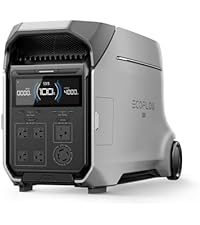
The EF ECOFLOW DELTA 3 Ultra Plus Portable Power Station with 2x400W Solar Panels is a versatile power solution designed for reliable energy supply in various scenarios, including home backup, outdoor activities, and off-grid living. This system features a 3072Wh LiFePO4 battery, capable of delivering 3600W of continuous power with a 7200W surge capacity. Its modular design allows for expandable capacity from 3kWh up to 11kWh, adapting to diverse power requirements.
The power station is engineered for durability and longevity, utilizing an advanced LiFePO4 battery and an EV-grade cell-to-chassis (CTC) structure, ensuring a 10-year lifespan under daily use. It incorporates a 24/7 smart battery management system (BMS) for protection against extreme temperatures and heavy loads. The system also offers multiple charging options and a rapid <10ms Uninterruptible Power Supply (UPS) feature for seamless power transfer during outages.

בילד 1.1: The DELTA 3 Ultra Plus providing stable power to household appliances, demonstrating its 3600W output and 7200W surge capability.

בילד 1.2: איבערview of the six versatile charging methods available for the DELTA 3 Ultra Plus, highlighting its rapid charging capabilities.
2. וואָס איז אַרייַנגערעכנט
דיין פּעקל כולל די פאלגענדע קאַמפּאָונאַנץ:
- 1 x EF ECOFLOW DELTA 3 Ultra Plus Portable Power Station
- 2 x EF ECOFLOW 400W Portable Solar Panels
- Necessary charging cables (AC charging cable, car charging cable, solar charging cable)
- באַניצער מאַנואַל און וואָראַנטי קאָרט
Please inspect all items upon receipt to ensure they are present and undamaged. If any items are missing or damaged, contact customer support immediately.
3. סעטאַפּ
3.1 ערשט אָפּצאָל
Before first use, fully charge the DELTA 3 Ultra Plus. Connect the AC charging cable to a standard wall outlet. The display will show the charging progress. A full charge from 0% to 80% typically takes under an hour using X-Stream fast charging.
3.2 זונ פּאַנעל פֿאַרבינדונג
To connect the 400W solar panels:
- Unfold the solar panels and position them in direct sunlight for optimal charging.
- Connect the solar charging cable to the solar input port on the DELTA 3 Ultra Plus.
- Connect the other end of the solar charging cable to the solar panels. Ensure a secure connection.
The power station's display will indicate solar input wattage. For maximum efficiency, adjust the panel angle throughout the day to follow the sun.

בילד 3.1: Connecting the solar panel to the DELTA 3 Ultra Plus for solar charging, illustrating an outdoor setup.
3.3 Home Connection Options
The DELTA 3 Ultra Plus offers two primary methods for home integration:
- Manual Transfer Switch: Allows seamless switching between grid power and the DELTA 3 Ultra Plus to meet diverse energy needs.
- Inlet Box: Connect the built-in AC socket with an Inlet Box to power your home appliances directly.
בילד 3.2: Visual representation of connecting the power station to a home using either a manual transfer switch or an inlet box.
4. אַפּערייטינג ינסטרוקטיאָנס
4.1 פּאַוערינג אויף / אַוועק
Press and hold the main power button for 3 seconds to turn the unit on or off. The LCD screen will illuminate, displaying battery status and output information.
4.2 אַק רעזולטאַט
צו נוצן די AC אַוטלעץ:
- Ensure the DELTA 3 Ultra Plus is powered on.
- Press the AC ON/OFF button to activate the AC output. The AC indicator on the screen will light up.
- Plug your devices into the available AC outlets. The unit provides 4 x 120V, 20A AC outputs and 1 x TT-30 RV Port (120V, 30A).
- To turn off AC output, press the AC ON/OFF button again.

בילד 4.1: Front panel of the DELTA 3 Ultra Plus, detailing the various output ports including AC, USB-A, and USB-C.
4.3 DC and USB Output
To use DC or USB ports:
- Ensure the DELTA 3 Ultra Plus is powered on.
- Press the DC ON/OFF button (if applicable) to activate DC output.
- Plug your devices into the USB-A (18W), USB-C (140W, 45W), or 12V cigarette lighter port.
- To turn off DC/USB output, press the corresponding ON/OFF button.
ווידעא 4.2: Official product video from EcoFlow Inc. demonstrating the DELTA 3 Ultra Plus in various usage scenarios, including powering home appliances and charging devices. This video highlights the product's versatility and ease of use.
4.4 קלוגע אַפּ פֿעיִטשערס
The EcoFlow app provides enhanced control and monitoring capabilities:
- Smart Remote Switching: Reduce waste and increase runtime for essential devices by remotely managing power output.
- Smart Power Reserve: Set a desired battery threshold to automatically shed non-essential loads during outages.
- קינסטלעכע אינטעליגענץ מאָדע: Optimize charging during low-cost periods and use during peak times to save on electricity bills.
- זעלבסט-מאכט: Store solar energy to reduce grid dependency and lower electricity costs.
- Deeper Insights: Monitor energy usage, savings, and solar generation with an intuitive dashboard, tracking battery status, real-time electricity rates, and financial savings.

בילד 4.3: The EcoFlow app interface demonstrating smart remote switching and power reserve functionalities for optimized energy management.
5. וישאַלט
5.1 אַלגעמיינע קער
- Keep the power station and solar panels clean and dry. Use a soft, dry cloth for cleaning.
- Avoid exposing the unit to extreme temperatures or direct sunlight for prolonged periods when not in use.
- Ensure proper ventilation around the unit during operation and charging.
5.2 באַטעריע לאַנגלעבעדיקייט
The DELTA 3 Ultra Plus is designed for 10 years of daily use thanks to its LiFePO4 battery. To maximize battery lifespan:
- סטאָר די אַפּאַראַט אין אַ קיל, טרוקן אָרט ווען ניט אין נוצן.
- For long-term storage, maintain a charge level between 30% and 80%.
- פֿאַרמײַדט אָפֿט פֿולשטענדיק אויסצולאָדן די באַטעריע.

בילד 5.1: The advanced Smart Battery Management System (BMS) ensures 24/7 protection and extends battery life by monitoring various parameters.
6. טראָובלעשאָאָטינג
If you encounter issues with your DELTA 3 Ultra Plus, refer to the following common problems and solutions:
| פּראָבלעם | מעגלעך סיבה | לייזונג |
|---|---|---|
| דער אַפּאַראַט טוט נישט מאַכט אויף | Low battery, power button not pressed correctly | Charge the unit. Press and hold the power button for 3 seconds. |
| AC רעזולטאַט איז נישט ארבעטן | AC output not activated, overload, low battery | Press AC ON/OFF button. Reduce load. Charge the unit. |
| זונ טשאַרדזשינג טוט נישט אַרבעטן | Insufficient sunlight, incorrect panel connection, damaged cable/panel | Ensure direct sunlight. Check cable connections. Inspect panels/cables for damage. |
| אַפּאַראַט דיספּלייז אַ טעות קאָד | Internal fault, specific issue | Refer to the full user manual for specific error code meanings and solutions. Contact customer support if the issue persists. |
For more detailed troubleshooting, please consult the comprehensive user manual provided with your product or visit the official EF ECOFLOW support webפּלאַץ.
7. ספּעסאַפאַקיישאַנז
Key technical specifications for the EF ECOFLOW DELTA 3 Ultra Plus Portable Power Station and 400W Solar Panels:
| שטריך | באַשרייַבונג |
|---|---|
| סאָרט | EF ECOFLOW |
| מאָדעל נאָמען | DELTA 3 Ultra Plus with 2x400W Solar Panels |
| מאָדעל נומער | EF-DL-H02-3UP |
| באַטערי טיפּ | LiFePO4 |
| באַטאַרייע קאַפּאַציטעט | 3072Wh (Expandable to 11kWh) |
| אַק רעזולטאַט מאַכט | 3600 וו (7200 וו סורגע) |
| גאַנץ AC אַוטלעץ | 4 x 120V, 20A AC Outlets + 1 x TT-30 RV Port (120V, 30A) |
| וסב-C רעזולטאַט | 1 x 140 וואט מאקס, 2 x 45 וואט מאקס |
| וסב-א רעזולטאַט | 1 רענטגענ 18 וו מאַקס |
| דק רעזולטאַט | 12V Cigarette Lighter Port, Anderson Port (12V, 30A) |
| אַק טשאַרדזשינג אַרייַנשרייַב | 1800W (0-80% in 89 mins) |
| זונ טשאַרדזשינג אַרייַנשרייַב | 1600W (0-80% in 101 mins with 400W panels) |
| UPS פֿונקציע | <10ms Auto-Switch |
| ראַש מדרגה | 25dB (under 600W load) |
| פּראָדוקט דימענשאַנז | 24.1"ל x 12.9"בר x 15.6"ה |
| Solar Panel Rated Power | 400 וואט פּער פּאַנעל |
| זונ פּאַנעל עפיקאַסי | 22.40% |
| Solar Panel Waterproof Rating | IP68 |

בילד 7.1: Detailed specifications for the 400W Portable Solar Panel, including its construction and electrical characteristics.
8. וואָראַנטי און שטיצן
8.1 וואָראַנטי אינפֿאָרמאַציע
The EF ECOFLOW DELTA 3 Ultra Plus Portable Power Station comes with a 5-יאָר פאַבריקאַנט וואָראַנטידי וואָראַנטי דעקט חסרונות אין מאַטעריאַלן און אַרבעט אונטער נאָרמאַל נוצן. ביטע האַלטן דיין קויפן באַווייַז פֿאַר וואָראַנטי קליימז.
8.2 קונה שטיצן
For technical assistance, troubleshooting, or warranty inquiries, please contact EF ECOFLOW customer support through their official website or the contact information provided in your product packaging. You can also find additional resources and FAQs online.
אָנליין רעסורסן: באַזוכן די EcoFlow Inc. Brand Store פֿאַר פּראָדוקט אינפֿאָרמאַציע און שטיצע.