
1. הקדמה
This manual provides essential instructions for the setup, operation, and maintenance of your Laxasfit H9 Pro Max Smart Watch. Designed for daily wear, this smartwatch combines modern technology with a user-friendly interface to help you monitor your health and stay connected. Please read this manual thoroughly before using your device to ensure proper functionality and longevity.
2. פּעקל אינהאַלט
באַשטעטיקט אַז אַלע זאכן וואָס זענען אויסגערעכנט אונטן זענען פאַראַן אין אייער פּראָדוקט פּאַקעט:
- H9 Pro Max Smart Watch
- וסב טשאַרדזשינג קאַבלע
- באַניצער מאַנואַל
- Extra Strap (Black Silicone)

אַן איבערהויפּט view of the H9 Pro Max Smart Watch package contents, including the watch with a pink strap, an additional black strap, a USB charging cable, and the product box.
3. געטינג סטאַרטעד
3.1. אויפלאָדן דעם סמאַרט וואַך
Before initial use, fully charge your H9 Pro Max Smart Watch. Connect the provided USB charging cable to the charging dock and align the watch with the magnetic pins on the dock. Connect the USB end to a standard USB power adapter (not included) or a computer USB port. A full charge typically takes approximately 2 hours.
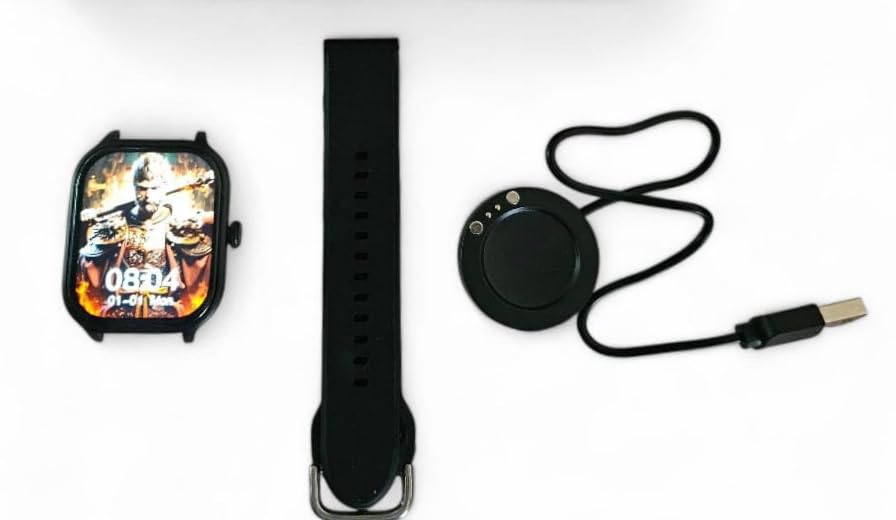
The H9 Pro Max Smart Watch face, a black silicone strap, and the circular USB charging dock laid out separately.
3.2. פּאָווערינג אויף / אויסגעלאשן
- צו מאַכט אויף: דריק און האלט דעם זייט קנעפל ביז דער עקראַן באלויכטנט זיך.
- צו מאַכט אַוועק: דריק און האלט דעם זייט קנעפל, און סעלעקטיר די 'אויסלעשן' אפציע אויפן עקראן.
3.3. רימען אינסטאַלאַציע
The H9 Pro Max Smart Watch comes with interchangeable straps. To attach or change a strap, align the spring bar with the lug holes on the watch body and gently push until it clicks into place. Ensure both ends of the spring bar are securely seated.
3.4. אַפּ אינסטאַלאַציע און מיטל פּערינג
To unlock the full functionality of your smartwatch, download the companion application on your smartphone. The app is compatible with both Android and iOS devices.
- Scan the QR code in the user manual (if provided) or search for the official app in your smartphone's app store.
- אינסטאַלירן די אַפּליקאַציע אויף דיין סמאַרטפאָון.
- געבן בלועטאָאָטה אויף דיין סמאַרטפאָנע.
- Open the app and follow the on-screen instructions to pair your H9 Pro Max Smart Watch. Ensure the watch is powered on and within Bluetooth range of your phone.
4. אפערירן אייער סמאַרט וואַך
4.1. יקערדיק נאַוויגאַציע
The H9 Pro Max Smart Watch features a responsive touchscreen display for navigation:
- שלעפּן אַרויף / אַראָפּ: סקראָלן דורך מעניוז אדער נאָוטאַפאַקיישאַנז.
- שלעפּן לינקס / רעכט: צוטריט פֿאַרשידענע ווידזשעטס אָדער שנעלע סעטטינגס.
- צאַפּן: אויסקלייבן אַן אייטעם אָדער באַשטעטיקן אַן אַקציע.
- דריקן די זייט קנעפל: Return to the home screen or activate a specific function (configurable in settings).
4.2. קאַסטאַמייזן זייגער פּנים
Personalize your smartwatch by changing the watch face. You can select from various pre-installed designs or download additional options through the companion app. To change the watch face directly on the device, press and hold the current watch face, then swipe left or right to browse available options and tap to select.
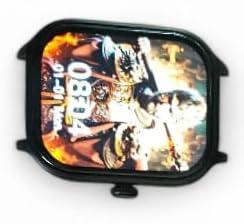
אַ נאָענט-אַרויף view of the H9 Pro Max Smart Watch display, showing a customized watch face with time and date.
4.3. סמאַרט פֿעיִקייטן
The H9 Pro Max Smart Watch offers several features to support your daily activities and health monitoring:
- אַקטיוויטעט טראַקער: Monitors steps taken, distance covered, and calories burned.
- האַרץ קורס מאָניטאָר: Provides real-time heart rate readings.
- שלאָף מאָניטאָר: טראַקט שלאָף פּאַטערנז און קוואַליטעט.
Access these features through the watch's menu or the companion app for detailed insights and historical data.
4.4. נאָוטאַפאַקיישאַנז
Once paired with your smartphone, the H9 Pro Max Smart Watch can display notifications for calls, messages, and app alerts. Ensure notification permissions are enabled in both your phone's settings and the companion app.
5. וישאַלט
5.1. רייניקונג
To maintain the appearance and functionality of your smartwatch:
- ווישט דעם עקראַן און זייגער־קערפּער מיט אַ ווייכן, לינט־פֿרייעם שטאָף.
- פֿאַר שווערע פֿלעקן, אַ ביסל דampשווענק דעם שטאָף מיט וואַסער. פֿאַרמייַדט ניצן שאַרפע כעמיקאַלן אָדער אַברייסיוו מאַטעריאַלן.
- רייניקט די טשאַרדזשינג קאָנטאַקטן פּעריִאָדיש צו ענשור עפעקטיוו טשאַרדזשינג.
5.2. באַטערי קער
צו פאַרלענגערן די באַטאַרייע לעבן:
- פֿאַרמײַדט עקסטרעמע טעמפּעראַטורן, ווײַל זיי קענען פֿאַרערגערן די באַטאַריע־פּערפאָרמאַנס.
- לאָדט די זייגער רעגולער, אָבער פֿאַרמייַדט עס צו לאָזן גאָר אויסגעלאָדן פֿאַר לענגערע פּעריאָדן.
- If storing the watch for a long time, charge it to about 50% before storage.
6. טראָובלעשאָאָטינג
If you encounter issues with your H9 Pro Max Smart Watch, try the following common troubleshooting steps:
- זייגער גייט נישט אן: זיכער מאַכן אַז די זייגער איז גאָר אויפגעלאָדן. פֿאַרבינדט עס צום טשאַרדזשער פֿאַר לפּחות 30 מינוט.
- קען נישט צוזאמענשטעלן מיט סמאַרטפאָון: Check that Bluetooth is enabled on your phone and the watch. Restart both devices and try pairing again. Ensure the companion app has necessary permissions.
- נישט פּינקטלעכע געזונט דאַטן: זייט זיכער אז די זייגער טראָגט זיך גוט אויף אייער האַנטגעלענק, נישט צו ענג אדער צו לויז. רייניקט דעם סענסאָר אויף דער הינטערשטער זייגער.
- נאטיפיקאציעס דערשיינען נישט: Verify that notifications are enabled in your phone's settings and within the smartwatch companion app. Check that the watch is connected via Bluetooth.
- עקראַן רעאַגירט נישט: Try restarting the watch by pressing and holding the side button. If unresponsive, allow the battery to fully drain and then recharge.
7. פּראָדוקט ספּעסאַפאַקיישאַנז
| שטריך | באַשרייַבונג |
|---|---|
| סאָרט | Laxasfit |
| מאָדעל | H9 Pro Max |
| ווייַז גרייס | 1.9 אינטשעס |
| ווייַז טיפּ | דיגיטאַל |
| אַפּערייטינג סיסטעם קאַמפּאַטאַבילאַטי | אַנדרויד, יאָס |
| קאַמפּאַטאַבאַל דעוויסעס | סמאַרטפאָנעס |
| ספּעציעלע פֿעיִקייטן | Activity Tracker, Heart Rate Monitor, Sleep Monitor |
| זכּרון סטאָרידזש קאַפּאַסיטי | 1 מב |
| באַטערי טיפּ | Lithium Metal (Built-in) |
| באַטערי דורכשניטלעך לעבן | אַרויף צו 1 טאָג |
| טשאַרדזשינג צייט | 2 שעה |
| ווירעלעסס קאַנעקטיוויטי | בלועטאָאָטה |
| קאַנעקטער טיפּ | וסב |
| Primary Interface | טאָוטשסקרעען |
| מאַטעריאַלס | מעטאַל, פּלאַסטיק |
| פּונקט וואָג | 85 ג |
| פּעקל דימענשאַנז | 15 X 12 X 8.5 סענטימעטער |
8. וואָראַנטי און שטיצן
Your Laxasfit H9 Pro Max Smart Watch comes with a 3-חודש וואָראַנטי פֿון דעם קויפֿדאַטום. די וואָראַנטי דעקט פֿאַבריקאַציע־דעפֿעקטן אונטער נאָרמאַלן באַנוץ. ביטע באַהאַלטן אייער קויפֿבאַווײַז פֿאַר וואָראַנטי־קליימז.
For technical assistance, troubleshooting beyond this manual, or warranty inquiries, please refer to the contact information provided with your purchase documentation or visit the official Laxasfit support webפּלאַץ.