
1. הקדמה
Thank you for choosing the OMOTON WK209 Wireless Keyboard and Mouse Set. This manual provides detailed instructions for setting up, operating, and maintaining your new wireless peripheral set. Please read this manual carefully before use to ensure optimal performance and longevity of your product.
2. פּעקל אינהאַלט
The OMOTON WK209 Wireless Keyboard and Mouse Set package includes the following items:
- 1 x OMOTON WK209 Wireless Keyboard
- 1 x OMOTON Wireless Mouse
- 1 x USB 2.4 GHz Receiver
Note: AAA batteries are required for operation but are not included in the package.
3. סעטאַפּ גייד
3.1. ינסטאָלינג באַטעריז
Before using the keyboard and mouse, you need to install batteries.
- געפינט די באַטעריע אָפּטייל אויף דער אונטערשטער זייט פון דער קלאַוויאַטור און מויז.
- עפֿנט די באַטעריע דעקלען.
- Insert two AAA batteries into the keyboard and one AAA battery into the mouse, ensuring correct polarity (+/-).
- פֿאַרמאַכט די באַטעריע דעקלעך זיכער.

This image displays the battery compartments for the OMOTON WK209 keyboard and mouse. The keyboard requires two AAA batteries, and the mouse requires one AAA battery. Please note that batteries are not included with the product.
3.2. פֿאַרבינדן דעם USB ריסיווער
The OMOTON WK209 set uses a single USB receiver for both the keyboard and mouse.
- Locate the USB 2.4 GHz receiver, usually stored in the mouse's battery compartment or packaging.
- Plug the USB receiver into an available USB port on your computer (laptop or desktop PC).
- The system will automatically detect and install the necessary drivers. This is a Plug & Play process and typically requires no manual installation.
- Turn on the mouse using the ON/OFF switch located on its underside. The keyboard does not have a separate power switch; it activates when keys are pressed.

This image illustrates the 2.4 GHz wireless connection of the OMOTON WK209 keyboard and mouse set. It highlights features such as Plug & Play functionality, a stable 2.4G connection, and a wireless range of up to 10 meters (33 feet).
3.3. קאַמפּאַטאַבילאַטי
The OMOTON WK209 set is compatible with a wide range of Windows operating systems.
- אַפּערייטינג סיסטעמס: Windows 11, Windows 10, Windows 8, Windows 7, Windows XP.
- מכשירים: Laptop, Desktop PC.

This image demonstrates the broad compatibility of the OMOTON WK209 set with different Windows operating systems, including Windows 7, 8, 10, and 11, across desktop PCs and laptops.
4. אַפּערייטינג ינסטרוקטיאָנס
4.1. קלאַוויאַטור יוז
The WK209 keyboard features a full-size QWERTZ layout with multimedia keys for enhanced productivity. Simply begin typing after successful connection.
- מולטימעדיאַ שליסלען: Access functions like volume control, play/pause, and more directly from the keyboard.
- QWERTZ Layout: Standard German keyboard layout for familiar typing experience.
- 8° טילט: The keyboard is designed with a natural 8-degree tilt for ergonomic comfort during extended use.

This image provides the physical dimensions of the OMOTON WK209 full-size QWERTZ keyboard (43.8 cm x 12.4 cm) and mouse (10.3 cm x 6.6 cm x 3.6 cm). It also notes the keyboard's natural 8-degree tilt for comfortable typing.
4.2. מויז באַניץ
The WK209 mouse offers precise control and several functional buttons.
- לינק קליקט: סטאַנדאַרט סעלעקציע און אַקטיוואַציע.
- רעכט גיט: Accesses context menus.
- סקראָל ראָד: פֿאַר ווערטיקאַל סקראָלינג און מיטל-קליק פאַנגקשאַנאַליטי.
- צוריק קנעפּל: נאַוויגירט צוריק אַרײַן web בראַוזערז אָדער file עקספּלאָרערס.
- פֿאָרווערטס קנעפּל: נאַוויגירט פאָרויס אין web בראַוזערז אָדער file עקספּלאָרערס.
- Desktop Show/Hide Button: Quickly minimizes all open windows to show the desktop, and restores them with another press.

This image highlights the features of the OMOTON WK209 wireless mouse, including the scroll wheel, left-click button, right-click button, back button, forward button, and a button for showing/hiding the desktop. It also emphasizes its ergonomic design and quiet click functionality.
5. פֿעיִקייטן
- 2.4 GHz ווירעלעס פֿאַרבינדונג: Provides a stable and reliable connection with a range of up to 10 meters (33 feet).
- צאַפּן און שפּיל: Easy setup without the need for additional software or drivers.
- Full-size QWERTZ Layout: Comfortable and familiar typing experience.
- מולטימעדיאַ שליסלען: Convenient access to media controls.
- ערגאָנאָמיק פּלאַן: The mouse is shaped for comfortable use, and the keyboard features a natural 8-degree tilt.
- שטיל אָפּעראַציע: Both the keyboard and mouse are designed for silent clicks and keystrokes, ideal for quiet environments.
- נידעריק באַטערי ינדיקאַטאָר: The keyboard features an indicator light to alert you when batteries are running low.

This image illustrates the quiet operation of the OMOTON WK209 keyboard and mouse, highlighting its silent keys and noiseless mouse clicks, suitable for quiet environments.
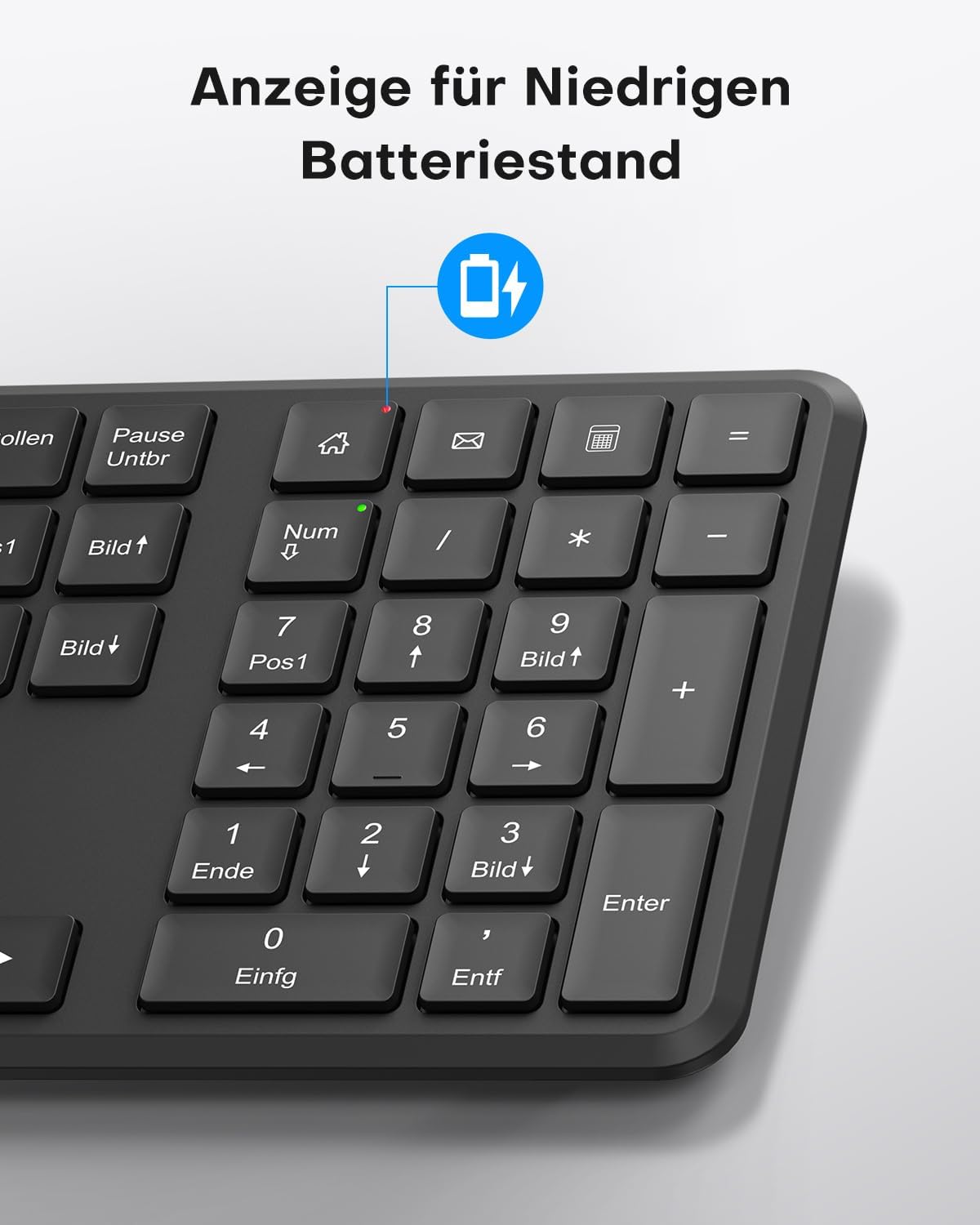
This image points out the low battery indicator on the OMOTON WK209 keyboard, which illuminates to alert the user when batteries need to be replaced.
6. וישאַלט
To ensure the longevity and optimal performance of your OMOTON WK209 set, follow these maintenance guidelines:
- רייניקונג: ניצט אַ ווייכע, טרוקענע שטאָף צו רייניקן די ייבערפלאַכן פון דער קלאַוויאַטור און מויז. פֿאַר שווערע שמוץ, ניצט אַ ביסל טרוקן שטאָף.amp מען קען ניצן אַ שטאָף, אָבער זאָרגט זיך אַז קיין נאַס זאָל נישט אַרײַנגיין אין די דעוויסעס.
- באַטערי פאַרבייַט: Replace batteries promptly when the low battery indicator appears or when performance degrades. Always use fresh, high-quality AAA batteries.
- סטאָרידזש: ווען נישט אין באַנוץ פֿאַר לענגערע פּעריאָדן, אַרויסנעמען די באַטעריעס צו פאַרמייַדן ליקאַדזש. האַלטן די דעוויסעס אין אַ קיל, טרוקן אָרט.
- ויסמיידן ליקווידס: Keep the keyboard and mouse away from liquids to prevent damage.
7. טראָובלעשאָאָטינג
If you encounter issues with your OMOTON WK209 set, try the following troubleshooting steps:
- קיין ענטפער פון קלאַוויאַטור/מויז:
- Ensure batteries are correctly installed and not depleted. Replace them if necessary.
- Make sure the mouse's ON/OFF switch is in the 'ON' position.
- איבערצייגט אז דער USB ריסיווער איז זיכער אריינגעשטעקט אין א ארבעטנדיקן USB פארט אויף אייער קאמפיוטער. פרובירט אן אנדערן USB פארט.
- ריסטאַרט דיין קאָמפּיוטער.
- פארשפּעטיקונג אדער איבערצייטיגע פארבינדונג:
- ריקט די קלאַוויאַטור און מויז נענטער צום USB ופנעמער.
- Ensure there are no large metal objects or other wireless devices (e.g., Wi-Fi routers, cordless phones) interfering with the 2.4 GHz signal.
- Try plugging the USB receiver into a front USB port or using a USB extension cable to bring it closer to the devices.
- שליסלען ארבעטן נישט ריכטיג:
- קוק נאך פאר קיין שמוץ אונטער די קנעפלעך.
- Ensure the keyboard layout setting on your computer matches the QWERTZ layout.
- מויז קורסאָר שפּרינגט אָדער איז נישט פּינקטלעך:
- רייניקט דעם אָפּטישן סענסאָר אויף דער אונטערשטער זײַט פֿון דער מויז.
- ניצט די מויז אויף אַ ריינער, נישט-רעפלעקטיווער ייבערפלאַך אָדער אַ מויז פּאַד.
8. ספּעסאַפאַקיישאַנז
| שטריך | דעטאַל |
|---|---|
| סאָרט | אָמאָטאָן |
| מאָדעל | WK209 |
| קאָליר | שוואַרץ |
| קאַנעקטיוויטי טעכנאָלאָגיע | ווירעלעסס 2.4 גהז |
| קלאַוויאַטור אויסלייג | Full-size QWERTZ (German Layout) |
| ספּעציעלע פֿעיִקייטן | 2.4 GHz, Full-size, QWERTZ-layout, Battery-operated, Multimedia keys |
| קאַמפּאַטאַבאַל דעוויסעס | לאַפּטאַפּ, פּיסי |
| קאַמפּאַטאַבאַל אַפּערייטינג סיסטעמס | Windows 11/10/8/7/XP |
| מאַכט מקור | Battery-Powered (2x AAA for keyboard, 1x AAA for mouse - not included) |
| וואָג פון דעם פּראָדוקט (אומגעפער) | 514 Grams (total set, including packaging) |
| פּעקל דימענשאַנז | 44.79 X 13.9 X 5.3 סענטימעטער |
| ASIN | B0FQNS3FFB |
9. וואָראַנטי און שטיצן
OMOTON products are designed for reliability and performance. For warranty information and customer support, please refer to the warranty card included with your purchase or visit the official OMOTON website. If you experience any issues that cannot be resolved using the troubleshooting guide, please contact OMOTON customer service for assistance.


