
הקדמה
This manual provides detailed instructions for the setup, operation, and maintenance of your LIGE EF19-A Smartwatch. This device features a 1.85-inch HD display, Bluetooth calling capabilities, extensive health monitoring, and over 100 sports modes. It is designed for durability with IP68 waterproofing and a robust build. Please read this manual thoroughly to ensure proper use and to maximize the functionality of your smartwatch.
1. סעטאַפּ
1.1 פּעקל אינהאַלט
- 1 x LIGE EF19-A Smartwatch
- 2 x Watch Straps (1 steel, 1 silicone)
- 1 x וסב טשאַרדזשינג קאַבלע
- 1 X Type-C טשאַרדזשינג קאַבלע
- 1 x Strap Adjuster (Regulator)
- 1 x באַניצער מאַנואַל
1.2 אויפלאָדן די סמאַרטוואַטש
Before initial use, fully charge your smartwatch.
- פֿאַרבינדט דעם מאַגנעטישן טשאַרדזשינג קאַבל צו די טשאַרדזשינג קאָנטאַקטן אויף דער הינטערשטער זייגער פֿון דער סמאַרטוואַטש.
- Connect the other end of the charging cable (USB or Type-C) to a compatible power source (e.g., USB wall adapter, computer USB port, power bank, car charger).
- דער זייגער אויסשטעל וועט ווייזן דעם טשאַרדזשינג סטאַטוס. א פולע טשאַרדזשינג נעמט טיפּיש אַרום 2 שעה.

Image: The smartwatch connected to a charging cable, illustrating its 1000 mAh battery capacity and charging process.
A fully charged battery provides up to 7-15 days of normal use and up to 50 days in standby mode.
1.3 אַפּ אינסטאַלאַציע און פּערינג
To access all features, download the companion app on your smartphone. The smartwatch is compatible with Android 5.1 and higher, and iOS 9.0 and higher.
- Scan the QR code provided in the manual or on the watch packaging, or search for the app name (usually specified in the quick start guide) in your phone's app store (Google Play Store for Android, Apple App Store for iOS).
- אינסטאלירט די אַפּ און שאַפֿט אַ חשבון אויב געבעטן.
- מאַכן זיכער אַז בלועטאָאָטה איז ענייבאַלד אויף דיין סמאַרטפאָנע.
- עפֿנט די אַפּ און פֿאָלגט די אינסטרוקציעס אויף דעם עקראַן צו לייגן צו אייער דעווייס. די אַפּ וועט זוכן אייער סמאַרטוואַטש.
- Select your smartwatch (e.g., "EF19-A" or similar Bluetooth name) from the list of available devices to pair.
- Confirm the pairing request on both your smartphone and smartwatch if a prompt appears.
1.4 Strap Installation/Adjustment
The smartwatch comes with two interchangeable straps: a steel strap and a silicone strap.
- צו צוטשעפּען אַ רימען: Align the spring bar with the lug holes on the watch body and slide the pin into place.
- צו באַזייַטיקן אַ רימען: Locate the small lever on the spring bar, pull it inwards, and gently detach the strap from the watch body.
- For the steel strap: Use the provided strap adjuster (regulator) to remove or add links for a comfortable fit. Refer to the specific instructions for the strap adjuster if needed.
2. אַפּערייטינג ינסטרוקטיאָנס
2.1 יקערדיק נאַוויגאַציע
- טאָוטשסקרעען: סווייפּ לינקס/רעכטס, אַרויף/אַראָפּ צו נאַוויגירן דורך מעניוז און פֿעיִקייטן. צאַפּן צו סעלעקטירן.
- זייט קנעפּל(ן): Typically, one button serves as a power on/off, back, or home button. Long press for power options, short press to return to the watch face or previous screen.
2.2 בלועטוט רופן און נאטיפיקאציעס
Once paired with your smartphone, the smartwatch allows you to manage calls and receive notifications.
- מאַכן/באַקומען רופן: When a call comes in, the watch will display the caller ID. You can answer or reject calls directly from the watch. You can also dial numbers or select contacts from the watch interface.
- אָנזאָג נאָטיפיקאַטיאָנס: Receive notifications for SMS, Facebook, WhatsApp, Twitter, TikTok, and other apps directly on your watch. Swipe down from the watch face to view לעצטע מעלדונגען.

Image: The smartwatch showing an incoming call, message notifications, and the voice assistant interface.
2.3 געזונט מאָניטאָרינג
די סמאַרטוואַטש מאָניטאָרט קעסיידער פֿאַרשידענע געזונט מעטריקס.
- הארץ ראטע: Access the heart rate monitoring function to view your current heart rate and historical data.
- בלוט זויערשטאָף (SpO2): מעסט אייערע בלוט זויערשטאָף לעוועלס.
- שלאָפן קוואַליטעט: The watch automatically tracks your sleep patterns, including deep sleep, light sleep, and wake times. View detailed sleep reports in the companion app.
- סטרעס לעוועל: Monitor your stress levels throughout the day.
- ברידינג טריינינג: Engage in guided breathing exercises to help manage stress.

Image: A user wearing the smartwatch, with the display showing real-time heart rate, blood oxygen saturation, and breathing exercise prompts.
באַמערקונג: This device is not a medical device. Health monitoring data is for reference only and should not be used for medical diagnosis or treatment.
2.4 ספּאָרט מאָדעס
The smartwatch supports over 100 sports modes for tracking your physical activity.
- Navigate to the "Workout" or "Sports" menu on your watch.
- Select your desired activity (e.g., running, cycling, swimming, hiking, yoga, badminton, basketball, golf).
- די זייגער וועט אָנהייבן טראַקינג מעטריקס אַזאַ ווי טריט, דיסטאַנסע, קאַלאָריעס פארברענט, און האַרץ קורס.
- End the workout by following the on-screen prompts. Detailed summaries are available on the watch and in the companion app.

Image: A person cycling while wearing the smartwatch, with the display showing steps, distance, calories, and heart rate for different sports activities.
2.5 Torch Function
The smartwatch includes a built-in torch function for instant illumination.
- Access the torch function from the quick settings menu or app list.
- It offers different modes such as constant light, warning mode, and SOS mode.
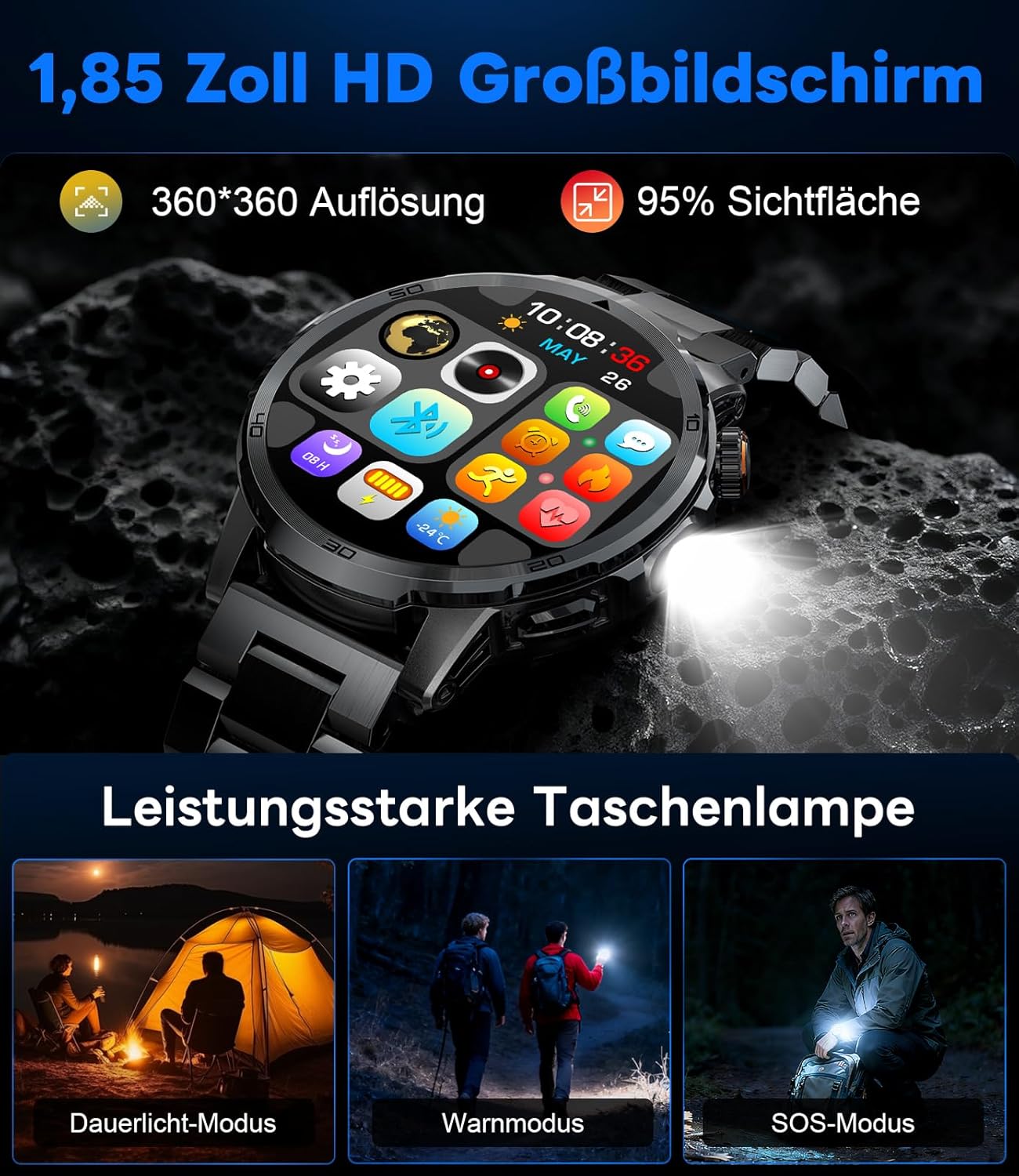
Image: The smartwatch displaying its 1.85-inch HD screen and demonstrating its powerful flashlight feature with different modes.
2.6 אנדערע פאַנגקשאַנז
- שטימע אַססיסטאַנט: Activate the voice assistant to control your phone or get information (e.g., "What's the weather?").
- מוזיק קאָנטראָל: Control music playback on your smartphone (play, pause, skip tracks, adjust volume) directly from your watch.
- אַפּאַראַט קאָנטראָל: ניצט אייער זייגער ווי אַ ווייַט לאָדן פֿאַר אייער סמאַרטפאָון קאַמעראַ.
- וועטער פאָרעקאַסט: View איצטיקע וועטער באדינגונגען און פאָרויסזאָגן.
- אַלאַרמס און טיימערס: Set alarms and use stopwatch/timer functions.
- דערמאָנונג פון טרינקען: Set reminders to drink water.
- וואַך פנימער: Customize your watch face from over 100 options or upload your own photos via the app.

Image: The smartwatch interface displaying icons for music control, flashlight, camera control, weather, alarm, and drink reminders.

Image: A selection of diverse watch faces available for customization on the LIGE EF19-A Smartwatch.
3. וישאַלט
3.1 רייניקונג
- Regularly clean your smartwatch and straps with a soft, dry, lint-free cloth.
- אויב נייטיק, נוצן אַ ביסל דamp שטאָף מיט מילד זייף, און דערנאָך ווישן טרוקן.
- פֿאַרמײַדט די נוצן פֿון שאַרפֿע כעמיקאַלן, אַברייזיווע רייניגער, אָדער סאָלווענטן, ווײַל די קענען שאַטן די זייגער'ס ענדיקונג און פֿאַרזיגלונגען.
- זיכער מאַכן אַז די טשאַרדזשינג קאָנטאַקטן זענען ריין און טרוקן איידער טשאַרדזשינג.
3.2 וואַסער קעגנשטעל (IP68)
The LIGE EF19-A Smartwatch is IP68 waterproof, meaning it is resistant to dust and can withstand immersion in water up to 1.5 meters for up to 30 minutes.
- It is suitable for daily use, such as hand washing, rain, and shallow water swimming.
- Avoid using the watch in hot water, saunas, or steam rooms, as steam can penetrate the seals and cause damage.
- דריק נישט די קנעפלעך אונטערן וואסער.
- After exposure to water, wipe the watch dry before charging or using.

Image: The smartwatch highlighting its robust military-grade design, including resistance to temperature extremes, shock, dust, and IP68 water resistance.
4. טראָובלעשאָאָטינג
4.1 זייגער טוט זיך נישט אן
- זיכער מאַכן אַז די זייגער איז גאָר אויפגעלאָדן. פֿאַרבינדט עס צום טשאַרדזשער פֿאַר לפּחות 30 מינוט.
- Try long-pressing the side button for 10-15 seconds to force a restart.
4.2 נישט געקענט זיך צופּאַרן מיטן סמאַרטפאָן
- מאַכן זיכער אַז בלועטאָאָטה איז ענייבאַלד אויף דיין סמאַרטפאָנע.
- Ensure the smartwatch is within Bluetooth range (typically 10 meters).
- ריסטאַרט ביידע דיין סמאַרטפאָון און סמאַרטוואַטש
- Check if the app has the necessary permissions (location, Bluetooth, etc.).
- If previously paired, try "forgetting" the device in your phone's Bluetooth settings and re-pairing through the app.
4.3 אומגענויע געזונטהייט דאַטן
- זייט זיכער אז די זייגער טראָגט גוט אויף אייער האַנטגעלענק, בערך איין פינגער'ס ברייט העכער דעם האַנטגעלענק ביין.
- פֿאַרמײַדן איבערגעטריבענע באַוועגונג בעת מעסטונגען.
- רייניקט דעם סענסאר אויף דער הינטערשטער זייגער.
- סביבה'דיקע פאקטארן און יחידישע פיזיאלאגיע קענען אפעקטירן לייענונגען.
4.4 נאטיפיקאציעס דערשייַנען נישט
- Verify that the watch is successfully paired with your smartphone.
- Check notification settings within the companion app to ensure desired apps are enabled for notifications.
- Ensure your phone's notification settings allow the companion app to display notifications.
- Make sure your phone is not in "Do Not Disturb" mode.
5. ספּעסאַפאַקיישאַנז
| שטריך | באַשרייַבונג |
|---|---|
| מאָדעל נומער | EF19-A |
| ווייַז | 1.85-inch IPS HD Touch Screen, 360x360 pixels |
| באַטאַרייע קאַפּאַציטעט | 1000 מאַה ליטהיום פּאָלימער |
| באַטעריע לעבן (נאָרמאַל נוצן) | 7-15 טעג |
| באַטאַרייע לעבן (סטאַנדביי) | אַרויף צו 50 טעג |
| טשאַרדזשינג צייט | בעערעך. 2 שעה |
| קאַנעקטיוויטי | בלועטאָאָטה 5.2 |
| וואַסער קעגנשטעל | IP68 (וואָטערפּרוף) |
| זכּרון סטאָרידזש קאַפּאַסיטי | 128 מב |
| קאַמפּאַטאַבאַל דעוויסעס | אַנדרויד 5.1+ / iOS 9.0+ סמאַרטפאָונז |
| געזונט מאָניטאָרינג | Heart Rate, Blood Oxygen, Sleep Quality, Stress Level |
| ספּאָרט מאָדעס | 100+ (e.g., Running, Cycling, Swimming, Hiking, Yoga) |
| נאָך פֿעיִקייטן | Bluetooth Calls, Message Notifications, Torch, Voice Assistant, Music Control, Camera Control, Weather, Alarms, Timers, Drink Reminder, Customizable Watch Faces |
| גפּס | דורך סמאַרטפאָנע |
| ציל וילעם | מענטשן |
6. וואָראַנטי אינפֿאָרמאַציע
The LIGE EF19-A Smartwatch comes with a 2 יאָר וואָראַנטי פֿון דעם קויפֿדאַטום. די וואָראַנטי דעקט פֿאַבריקאַציע חסרונות און מאַלפאַנגקשאַנז אונטער נאָרמאַל נוצן.
די וואָראַנטי טוט נישט דעקן:
- Damage caused by improper use, accident, abuse, neglect, or unauthorized modification.
- Normal wear and tear, including scratches, dents, or cosmetic damage.
- Damage caused by exposure to extreme temperatures, liquids (beyond IP68 rating), or corrosive environments.
- Damage to accessories (straps, charging cables) unless defective upon receipt.
To claim warranty service, please retain your proof of purchase and contact customer support.
7. קונה שטיצן
If you encounter any issues or have questions regarding your LIGE EF19-A Smartwatch that are not covered in this manual, please contact our customer support team.
- Refer to the contact information provided on the product packaging or the official LIGE webפּלאַץ.
- When contacting support, please provide your product model number (EF19-A) and a detailed description of the issue.