
1. הקדמה
This manual provides essential instructions for the installation, operation, and maintenance of your Aninerel 3000W Hybrid Solar Inverter, model ANJ-3KW-LV-WIFI. This device is designed to convert 24V DC power to 110V AC pure sine wave power, suitable for various off-grid and backup power applications. Please read this manual thoroughly before installation and use to ensure safe and efficient operation.
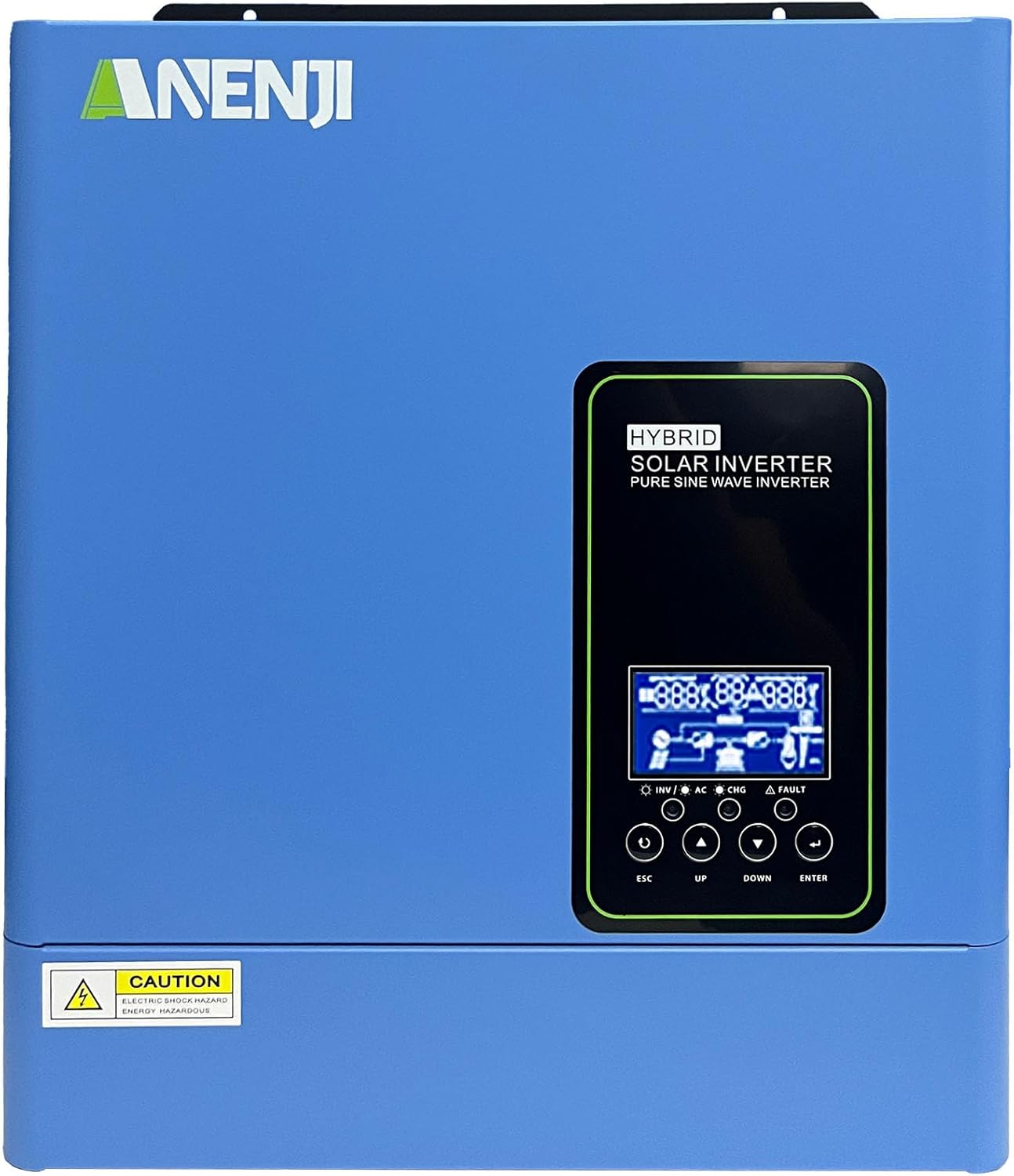
פיגורע 1.1: פראָנט view of the Aninerel 3000W Hybrid Solar Inverter. The inverter features a blue casing with the Aninerel logo and a central LCD display panel with control buttons.
2. זיכערקייַט אינסטרוקציעס
שטענדיק אָבסערווירן די פאלגענדע זיכערהייט מיטלען צו רעדוצירן דעם ריזיקע פון עלעקטרישן קלאַפּ, פייַער אָדער שאָדן:
- Read all instructions and cautionary markings on the unit and in this manual before installation or operation.
- Do not disassemble the inverter. Refer servicing to qualified personnel. Incorrect reassembly may result in electric shock or fire.
- כדי צו רעדוצירן דעם ריזיקע פון עלעקטרישן שאק, דאן אפשטעלן אלע דראטן איידער איר פרובירט קיין אויפהאלטונג אדער רייניקונג.
- This inverter is designed for indoor or semi-outdoor use with an IP65 rating. Avoid direct exposure to rain or snow.
- Ensure proper ventilation around the inverter to prevent overheating. Do not block ventilation openings.
- ניצט צוגעפאסטע מכשירים און פערזענלעכע שוץ-עקוויפּמענט בעת די אינסטאַלאַציע.
- Ensure all wiring connections are tight and secure to prevent loose connections that can cause overheating.
- Do not connect the inverter to a public utility grid without proper authorization and safety measures.
3. פּראָדוקט איבערview
The Aninerel 3000W Hybrid Solar Inverter integrates a pure sine wave inverter, an MPPT solar charge controller, and a battery charger into one compact unit. It is designed to provide uninterrupted power support.
3.1 שליסל פֿעיִקייטן
- 3000 וואט ריין סינוס כוואַליע רעזולטאַט: Converts 24V DC to 110V AC, providing stable power for sensitive electronics.
- Integrated 100A MPPT Solar Charge Controller: Maximizes solar energy harvesting with up to 500VDC PV input.
- Flexible Charging and Output Modes: Offers multiple modes (Solar Only, AC Priority, Hybrid Charging; Mains Priority, PV Priority, Hybrid Output) for diverse power management.
- ברייט באַטעריע קאָמפּאַטאַבילאַטי: Supports AGM, GEL, Lead-acid, Li-ion, and LiFePO4 24V batteries.
- קלוגע על-סי-די דיספּלעי: Provides real-time monitoring and allows for easy configuration of system settings.
- געבויט-אין ווי-פי: Enables remote monitoring of the inverter status (registration required).
- שטאַרק פּלאַן: IP65-rated enclosure for durability in various environments, with intelligent cooling.
- קאָמפּרעהענסיוו פּראַטעקשאַנז: כולל אָווערוואָלtage, ונדעראָלtage, reverse polarity, and short circuit protection.

פיגור 3.1: פראנט און הינטערשטער פאנעל איבערview. This diagram labels the LCD display, indicators, function buttons, RS485 communication port, grounding terminal, battery input, dry contact port, built-in Wi-Fi, AC input, AC output, PV input, and power on/off switch.
3.2 פראָנט פּאַנעל און אינדיקאַטאָרן
- LCD ווייַז: Shows system status, operational data, and configuration settings.
- טשאַרדזשינג ינדיקאַטאָר: Illuminates to indicate battery charging status.
- סטאַטוס ינדיקאַטאָר: Provides general operational status of the inverter.
- שולד ינדיקאַטאָר: Lights up to signal system errors or warnings.
- Function Buttons (ESC, UP, DOWN, ENTER): Used for navigating menus and adjusting settings on the LCD.
3.3 דערציען פּאַנעל קאַנעקשאַנז
- RS485 קאָמוניקאַציע פּאָרט: For external communication and monitoring.
- גראַונדינג טערמינאַל: עסענציעל פֿאַר זיכערהייט גראַונדינג.
- באַטערי אַרייַנשרייַב: פֿאַרבינדט זיך צו דער 24V באַטעריע באַנק.
- טרוקן קאָנטאַקט פּאָרט: פֿאַר עקסטערנער קאָנטראָל אָדער סיגנאַלינג.
- Built-in Wi-Fi Module: פֿאַר וויירלעס מאָניטאָרינג.
- AC אַרייַנשרייַב: Connects to grid utility or generator AC power.
- אַק רעזולטאַט: Connects to household loads.
- פּוו אַרייַנשרייַב: פֿאַרבינדט זיך צו זונ - פּאַנעל אַררייז.
- מאַכט אויף / אַוועק סוויטש: Controls the main power to the inverter.
4. ייַנמאָנטירונג & סעטאַפּ
Proper installation is crucial for the safe and efficient operation of your hybrid solar inverter. Ensure all connections are made by a qualified electrician and adhere to local electrical codes.
4.1 מאַונטינג די ינווערטער
- קלייבט אויס אַ פּאַסיק אָרט וואָס איז טרוקן, גוט ווענטילירט, און באַשיצט פון דירעקט זונשייַן און נעץ.
- Ensure sufficient clearance around the inverter for proper airflow and cooling.
- מאָנטירן דעם ינווערטער ווערטיקאַל אויף אַ שטאַרקער ייבערפלאַך מיט פּאַסיקע פאַסטנערס.
4.2 וויירינג קאַנעקשאַנז
Follow the wiring diagram carefully. All wiring should be performed with the inverter and all power sources disconnected.
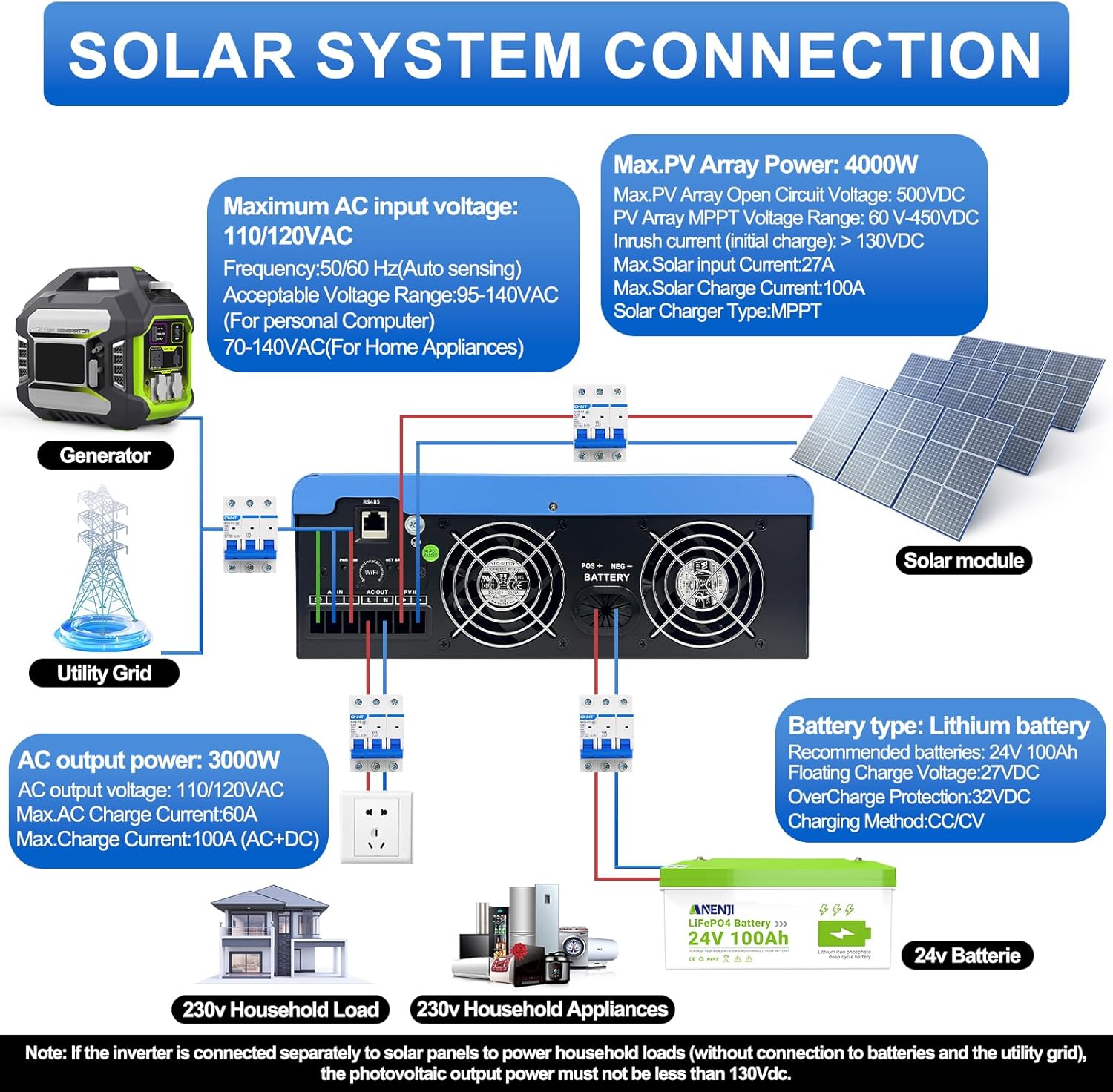
Figure 4.1: Solar System Connection Diagram. This diagram illustrates the connections for solar panels, generator, utility grid, 24V battery, and household loads to the inverter. It shows the PV input, battery input, AC input, and AC output terminals.
4.2.1 באַטערי קאַנעקשאַן
- Connect the 24V battery bank to the battery input terminals on the inverter. Ensure correct polarity (+ to + and - to -).
- Use appropriate cable gauges for the battery connections to handle the expected current.
- The ANJ-3KW-LV-WIFI model supports a 24-volt DC system and is recommended for use with batteries of at least 100 ampere-hours capacity.

Figure 4.2: Inverter Battery Connection. This diagram shows wiring configurations for both 12-volt and 24-volt battery systems, emphasizing correct series/parallel connections for the desired voltage.
4.2.2 PV (זונ פּאַנעל) פֿאַרבינדונג
- Connect the solar panel array to the PV input terminals. Observe correct polarity.
- Ensure the total open circuit voltage of the PV array does not exceed 500VDC.
- The MPPT voltage range is 60-450VDC. Ensure your PV array voltage falls within this range for optimal charging.
4.2.3 אַק אַרייַנשרייַב קאַנעקשאַן
- Connect the utility grid or generator AC power to the AC input terminals.
- The inverter supports 110/120VAC input with auto-sensing frequency (50/60Hz).
4.2.4 אַק רעזולטאַט קאַנעקשאַן
- Connect your household loads or appliances to the AC output terminals.
- The inverter provides 3000W continuous AC output at 110/120VAC.
4.3 ערשט מאַכט-אַרויף
- After all connections are secure, switch on the battery breaker first.
- Then, switch on the PV array breaker (if applicable).
- Finally, switch on the AC input breaker (if applicable) and the inverter's main power switch.
- Observe the LCD display for initial boot-up and status indicators.
5. אָפּעראַציע
The inverter offers various configurable settings to optimize power management based on your specific needs.
5.1 על-סי-די דיספּלעי און סעטטינגס
The LCD display provides real-time information and allows you to configure operational parameters using the function buttons.
- ניצן די UP און אַראָפּ קנעפּלעך צו נאַוויגירן דורך מעניו אָפּציעס.
- דרוק אַרייַן צו אויסקלייבן אַן אָפּציע אָדער באַשטעטיקן אַ סעטינג.
- דרוק ESC to exit a menu or cancel an action.
5.2 Charging Priority Modes
These settings determine how the battery bank is charged from available power sources.

Figure 5.1: Charger Source Priority. This diagram illustrates three charging priority options: Solar First (solar panels charge first, AC input only if solar is unavailable), Solar and AC Input Simultaneously (both solar and utility charge at the same time), and Solar Only (solar energy is the exclusive charging source).
- זונ - ערשט: Prioritizes solar power for charging. AC input will only charge the battery when solar power is insufficient or unavailable.
- AC Priority (Utility Priority): Prioritizes AC input (utility or generator) for charging. Solar power will supplement or take over if AC input is unavailable.
- בלויז זונשייַן: The inverter will only charge the battery bank from solar power. AC input will not be used for charging.
5.3 אויסגאַנג פּריאָריטעט מאָדעס
These settings determine the power source for your connected loads.

Figure 5.2: Output Source Priority. This diagram shows three output priority options: Solar First (power from solar first, AC input supplements if solar is insufficient), AC First (redirects AC input to power loads, uses solar/batteries when AC is unavailable), and DC Priority (prioritizes solar first, then battery, then AC input only when voltage drops to a programmable value).
- Solar First (PV Priority): Prioritizes solar power to supply loads. If solar power is insufficient, the battery bank will supplement, and then AC input will be used.
- AC First (Mains Priority): Prioritizes AC input (utility or generator) to power loads. If AC input is unavailable, the inverter will switch to battery power.
- DC Priority (Battery Priority): Prioritizes solar power first, then battery power. AC input will only engage when the battery voltage drops below a programmable threshold.
5.4 Wi-Fi Monitoring
The built-in Wi-Fi module allows for remote monitoring of your inverter's performance and status via a dedicated application. Registration may be required to access this feature.

Figure 5.3: Wi-Fi Monitoring. This image depicts a user monitoring the hybrid inverter's status wirelessly via a smartphone application, highlighting the convenience of the built-in Wi-Fi feature.
6. וישאַלט
Regular maintenance helps ensure the longevity and optimal performance of your Aninerel Hybrid Solar Inverter.
- רייניקונג: רייניקן פּעריִאָדיש די אויסערלעכע טייל פֿון דעם ינווערטער מיט אַ טרוקענעם שטאָף. זיכער מאַכן אַז די ווענטילאַציע עפענונגען זענען פֿרײַ פֿון שטויב און שמוץ.
- פֿאַרבינדונגען: Annually check all electrical connections (battery, PV, AC input/output) for tightness and corrosion. Tighten any loose connections.
- סוויווע: זיכער מאַכן אַז די אינסטאַלאַציע סביבה בלייבט אין די ספּעציפֿישע טעמפּעראַטור און הומידיטי ריינדזשאַז.
- פירמוואַרע: קוק די פאַבריקאַנט ס webזייטל פֿאַר קיין בנימצא פירמווער דערהייַנטיקונגען פֿאַר פֿאַרבעסערטע פאָרשטעלונג אָדער נייַע פֿעיִקייטן.
7. טראָובלעשאָאָטינג
די סעקציע גיט לייזונגען צו געוויינטלעכע פראבלעמען וואָס איר קענט באַגעגענען. אויב די פּראָבלעם בלייבט, קאָנטאַקטירט קונה שטיצע.
| פּראָבלעם | מעגלעך סיבה | לייזונג |
|---|---|---|
| אינווערטער טוט זיך נישט אן | קיין באַטעריע פֿאַרבינדונג אָדער נידעריק באַטעריע וואָלומעןtage; Power switch off; Loose wiring. | קוק די באַטאַרייע קאַנעקשאַנז און וואָלtage; Ensure power switch is ON; Verify all wiring is secure. |
| קיין AC רעזולטאַט | Overload; Short circuit on output; Inverter in fault mode; Output priority setting. | Reduce load; Check for short circuits; Refer to LCD fault codes; Adjust output priority settings. |
| באַטעריע לאָדט זיך נישט אויף פֿון זון-זאָלאַר | Low PV voltage; Incorrect PV connection; Solar charging disabled; Faulty solar panels. | Check PV array voltage (must be >60VDC); Verify PV polarity; Check charging priority settings; Inspect solar panels. |
| אָוווערכיטינג ווארענונג | Insufficient ventilation; Excessive ambient temperature; Overload. | Ensure clear airflow around inverter; Relocate to cooler area; Reduce connected load. |
| Wi-Fi monitoring not working | No Wi-Fi signal; Incorrect app configuration; Registration issue. | Check Wi-Fi signal strength; Reconfigure app settings; Contact support for registration issues. |
8. ספּעסאַפאַקיישאַנז
Technical specifications for the Aninerel 3000W Hybrid Solar Inverter ANJ-3KW-LV-WIFI:
| שטריך | באַשרייַבונג |
|---|---|
| מאָדעל נומער | ANJ-3KW-LV-WIFI |
| קעסיידערדיק מאַכט רעזולטאַט | 3000 וו |
| שפּיץ מאַכט רעזולטאַט | 6000 וו |
| דק אַרייַנשרייַב חלקtage | 24V |
| אַק רעזולטאַט וואָלtage | 110V AC |
| רעזולטאַט וואַוועפאָרם | ריין סיין וואַווע |
| מאַקס. פּוו אַרייַנשרייַב מאַכט | 4000 וו |
| MPPT קאָנטראָללער קראַנט | 100 א |
| מאַקס. PV Open Circuit Voltage | 500VDC |
| PV Array MPPT VoltagE ראַנגע | 60-450VDC |
| מאַקס. אַק אַרייַנשרייַב קראַנט | 60 א |
| רעזולטאַט אָפטקייַט | 50/60 הז (אַוטאָ סענסינג) |
| באַטערי קאַמפּאַטאַבילאַטי | AGM, GEL, Lead-acid, Li-ion, LiFePO4 (24V) |
| שוץ רייטינג | IP65 |
| פּראָדוקט דימענשאַנז | 15 X 6.98 X 18 אינטשעס |
| פּונקט וואָג | 16.5 פונט |
9. וואָראַנטי & שטיצן
For warranty information, please refer to the warranty card included with your product or visit the official Aninerel website. For technical support, troubleshooting assistance, or service inquiries, please contact Aninerel customer service through their official channels.
Manufacturer: Shenzhen Anenji Energy Technology Co.,Ltd