
1. הקדמה
The STRICH SEP-88F is a full-size 88-key digital piano designed for portability and versatility. Featuring semi-weighted, touch-sensitive keys, it offers a realistic playing experience suitable for beginners, teens, and adults. Its ultra-slim, 180° foldable design allows for easy transport and storage, making it an ideal instrument for practice, performance, and creative music-making anywhere.

Figure 1: The STRICH SEP-88F digital piano fully extended.
2. וואָס איז אין דער קעסטל
Your STRICH SEP-88F package includes the following items:
- STRICH SEP-88F Foldable Digital Piano
- ונטערהאַלטן פּעדאַל
- כעדפאָונז
- מוזיק רעסט
- 5 mm Padded Carrying Bag
- יו-עס-בי-סי טשאַרדזשינג קאַבל און מאַכט אַדאַפּטער
- Key Stickers for Beginners
- Dust Cover Cloth

Figure 2: Contents of the STRICH SEP-88F package.
3. סעטאַפּ
3.1 Unfolding the Piano
- Place the folded piano on a flat, stable surface.
- Gently unfold the two halves of the piano until it is fully extended.
- Locate the locking mechanism on the underside of the piano at the hinge point.
- Rotate the lock switch to the 'ON' position to secure the piano in its extended state. This prevents accidental folding during use.

Figure 3: Steps for unfolding and locking the piano.
3.2 אנשטעלן די מוזיק-שטיצע
Insert the music rest into the designated slots on the top panel of the piano. Ensure it is firmly seated to hold your sheet music or tablet securely.
3.3 מאַכט אויף
The SEP-88F features a long-lasting internal battery. To power on, press the 'POWER' button located on the control panel. The display will illuminate, indicating the piano is ready for use. If the battery is low, connect the USB-C charging cable to the DC 5V port and plug the adapter into a power outlet.

Figure 4: The SEP-88F is equipped with a long-lasting internal battery.
4. אַפּערייטינג ינסטרוקטיאָנס
4.1 קאָנטראָל פּאַנעל איבערview
The control panel provides access to all piano functions. Familiarize yourself with the buttons and the digital display.

Figure 5: Main control panel of the digital piano.
4.2 אויסקלייבן טענער און ריטמען
The piano offers 128 voices (tones) and 128 rhythms. Use the 'TONE' and 'RHYTHM' buttons to cycle through the available options. The digital display will show the selected number.
4.3 דעמאָנסטראַציע לידער
Access 80 built-in demonstration songs by pressing the 'DEMO' button. Use the arrow buttons to navigate through the songs.
4.4 Touch Sensitivity
The SEP-88F features adjustable touch response. Press the 'TOUCH' button to cycle through different sensitivity levels, allowing you to customize the key response to your playing style.

Figure 6: Adjustable touch response for semi-weighted keys.
4.5 מעטראָנאָם
Activate the metronome function by pressing the 'METRONOME' button. Adjust the tempo using the 'TEMPO' controls.
4.6 רעקאָרדינג און פּלייבאַק
Use the 'RECORD' button to start recording your performance. Press 'PLAY' to listen to your recorded track.
4.7 קאַנעקטיוויטי
The piano offers various connectivity options:
- Headphone Jack (PHONE): פֿאַרבינדט כעדפאָונז פֿאַר פּריוואַטער פּראַקטיק.
- Audio Output (OUT): פאַרבינדן צו עקסטערנע רעדנערס אָדער אַ ampליפער.
- USB-C (DC 5V): פֿאַר אָפּלאָדן די אינעווייניקסטע באַטאַרייע.
- מיקראָפאָן אַרייַנגאַנג (MIC): פאַרבינדן אַ מיקראָפאָן.
- MP3 Input (MP3): Connect an external audio device to play along with music.
- Sustain Pedal (SUS): Connect the included sustain pedal for expressive playing.
- MIDI Interface (MIDI): Connect to computers or other MIDI devices for advanced music production or learning software.
- USB (USB): For additional connectivity options.
- ווירעלעס (בלוטוט): Connect wirelessly to phones, tablets, or computers for learning apps and creative software.
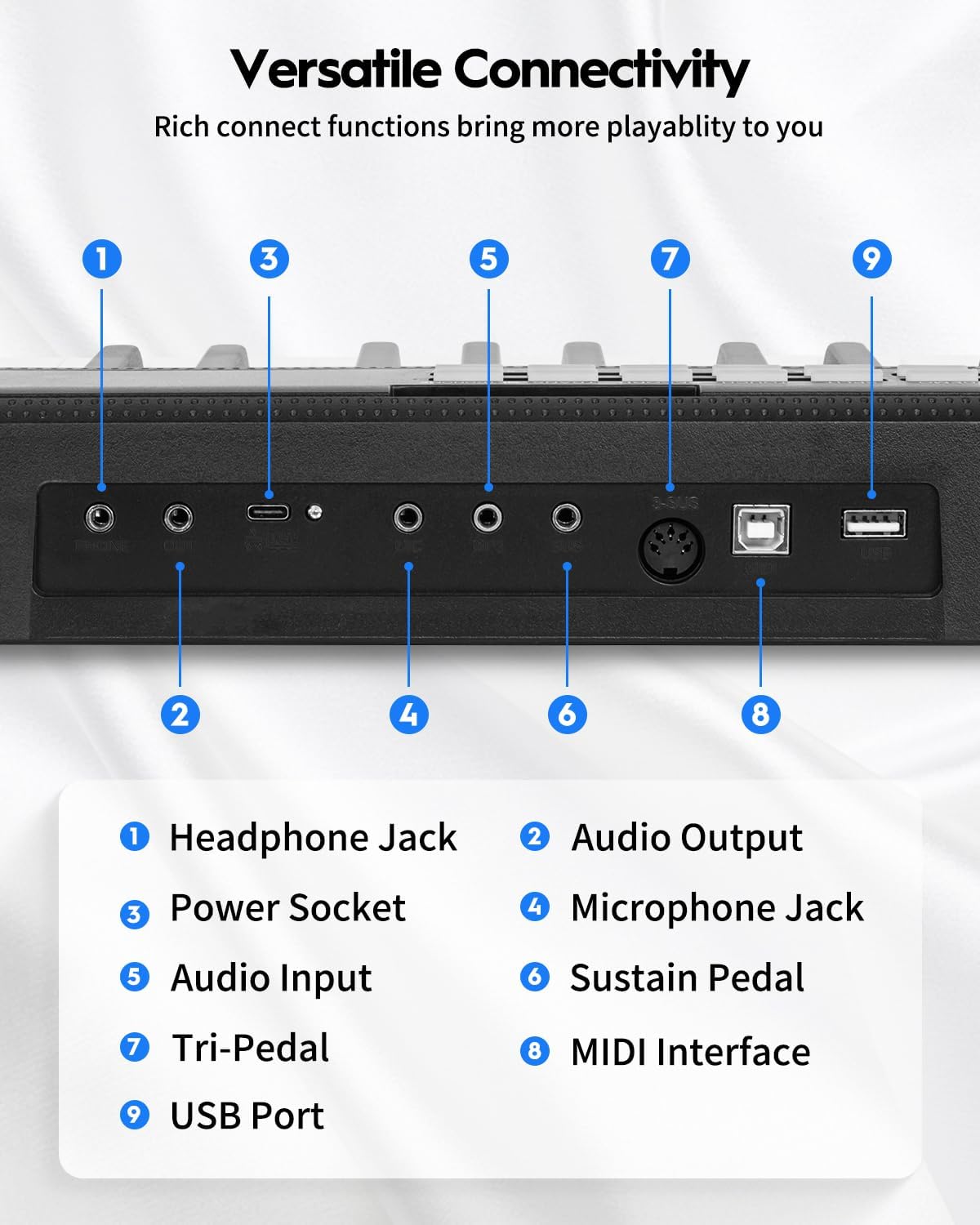
Figure 7: Connectivity ports on the rear of the piano.

Figure 8: Wireless and USB-MIDI connectivity for learning and creativity.
5. וישאַלט
To ensure the longevity and optimal performance of your STRICH SEP-88F digital piano, follow these maintenance guidelines:
- רייניקונג: Use the provided dust cover cloth to keep the keys and control panel free from dust and debris. For stubborn marks, wipe gently with a soft, slightly damp שטאָף. פֿאַרמײַדט שאַרפֿע כעמיקאַלן אָדער אַברייסיוו מאַטעריאַלן.
- סטאָרידזש: When not in use, fold the piano and store it in its padded carrying bag to protect it from impacts and environmental factors. Store in a dry place away from direct sunlight and extreme temperatures.
- באַטערי זאָרגן: To prolong battery life, avoid fully discharging the battery frequently. Charge the piano regularly, even if not in constant use. If storing for an extended period, ensure the battery is partially charged (around 50%) and recharge every few months.
- האַנדלינג: Always handle the piano carefully, especially when folding or unfolding. Avoid placing heavy objects on the keys or control panel.
6. טראָובלעשאָאָטינג
If you encounter any issues with your STRICH SEP-88F, refer to the following common troubleshooting steps:
- קיין מאַכט: Ensure the piano is charged. Connect the USB-C charging cable and power adapter to a working outlet. Check if the power button is pressed firmly.
- קיין קול: Check the volume knob and ensure it is turned up. If using headphones, ensure they are properly plugged into the 'PHONE' jack. If connected to external speakers, verify their power and connection.
- קנעפּלעך רעאַגירן נישט: Ensure the piano is fully unfolded and the locking mechanism is engaged. If specific keys are unresponsive, gently clean around them.
- בלועטאָאָטה קאַנעקטיוויטי ישוז: Ensure Bluetooth is enabled on both the piano and your device. Try unpairing and re-pairing the devices. Move closer to the piano to ensure a strong signal.
- פאַרקרימט סאָונד: Lower the volume. Check for loose connections if using external audio devices.
If the problem persists after attempting these steps, please contact STRICH customer support for further assistance.
7. ספּעסאַפאַקיישאַנז
| שטריך | באַשרייַבונג |
|---|---|
| מאָדעל נאָמען | SEP-88F |
| נומער פון קיז | 88 |
| שליסל טיפּ | Semi-Weighted, Touch-Sensitive |
| פאָלדאַבלע פּלאַן | 180° צוזאַמענפֿאַלטבאַר |
| דימענסיעס (עפענען) | 50"W x 8.6"D x 2"H (127cm x 22cm x 5cm) |
| דימענשאַנז (פאָלדעד) | 25"W x 8.6"D x 4"H (63.5cm x 22cm x 10cm) |
| פּונקט וואָג | 11.43 פונט (5.19 קג) |
| טאָנעס | 128 |
| רהיטמס | 128 |
| דעמאָ סאָנגס | 80 |
| קאַנעקטיוויטי | USB, Wireless (Bluetooth), MIDI, Headphone Jack, Audio Out, Mic, MP3 |
| מאַכט מקור | Corded Electric & Battery Powered (Rechargeable) |
| מאַטעריאַל טיפּ | Plastic/Plastic Composite |
| קאָליר | שוואַרץ |
8. וואָראַנטי און שטיצן
For warranty information, product registration, or technical support, please refer to the warranty card included in your package or visit the official STRICH webזייטל. האַלט אייער קויף קוויטל ווי אַ באַווייַז פון קויפן פֿאַר קיין וואָראַנטי קליימז.