
1. הקדמה
This manual provides detailed instructions for the FULODE X1-16C 16-Channel Audio Mixer. Please read this manual thoroughly before operating the device to ensure proper usage and to maximize its performance and longevity. This professional audio console is designed for various applications including studio recording, live performances, DJ events, and karaoke.

2. זיכערקייַט אינפֿאָרמאַציע
To prevent electric shock, fire, or damage to the device, please observe the following safety precautions:
- נישט עפענען דעם אפאראט casinז. איבערגעבן אלע סערוויסינג צו קוואַליפֿיצירטע פּערסאָנעל.
- פאַרזיכערן די מאַכט צושטעלן וואָלtage שוועבעלעך די רעקווירעמענץ ספּעסיפיעד אויף די מיטל.
- Keep the device away from water, moisture, and excessive heat.
- Do not operate the device if the power cord is damaged or frayed.
- שטענדיק אָפּשטעקן די מאַכט צושטעל איידער רייניקונג אָדער וישאַלט.
- ניצן בלויז אַטאַטשמאַנץ / אַקסעסעריז ספּעסיפיעד דורך דער פאַבריקאַנט.
3. פּעקל אינהאַלט
באַשטעטיקן אַז אַלע זאכן זענען פאַראַן אין פּעקל:
- FULODE X1-16C 16-Channel Audio Mixer
- Power Adapter (AC 90-240V, 50-60Hz)
- באַניצער מאַנואַל
4. פּראָדוקט איבערview: קאָנטראָלס און קאַנעקשאַנז
The FULODE X1-16C mixer features a comprehensive layout for intuitive control over your audio. Familiarize yourself with the various inputs, outputs, and control elements.

4.1 פראָנט פּאַנעל קאָנטראָלס
- Composite Interface: Combination XLR/TRS input for microphones and line-level signals.
- פאַנטאָם סוויטש: אַקטיוויזירט +48V פאַנטאָם מאַכט פֿאַר קאָנדענסער מיקראָפאָנען.
- געווינס אַדזשאַסטמאַנט: Controls the input sensitivity of each channel.
- Treble/Midrange/Bass Adjustment (3-Band EQ): Equalization controls for high, mid, and low frequencies on each channel.
- AUX אַדזשאַסטמענט: Controls the auxiliary send level for external effects or monitor mixes.
- Adjustment of Effect: קאָנטראָלירט די מאָס פון אינערלעכן DSP עפֿעקט וואָס ווערט געווענדט צום קאַנאַל.
- Pan Balance: Adjusts the stereo position of the channel signal.
- Channel Mute Switch: שטומט אדער אנשטומט דעם יחידישן קאַנאַל.
- Channel Volume Pusher: Fader to control the output level of each channel.
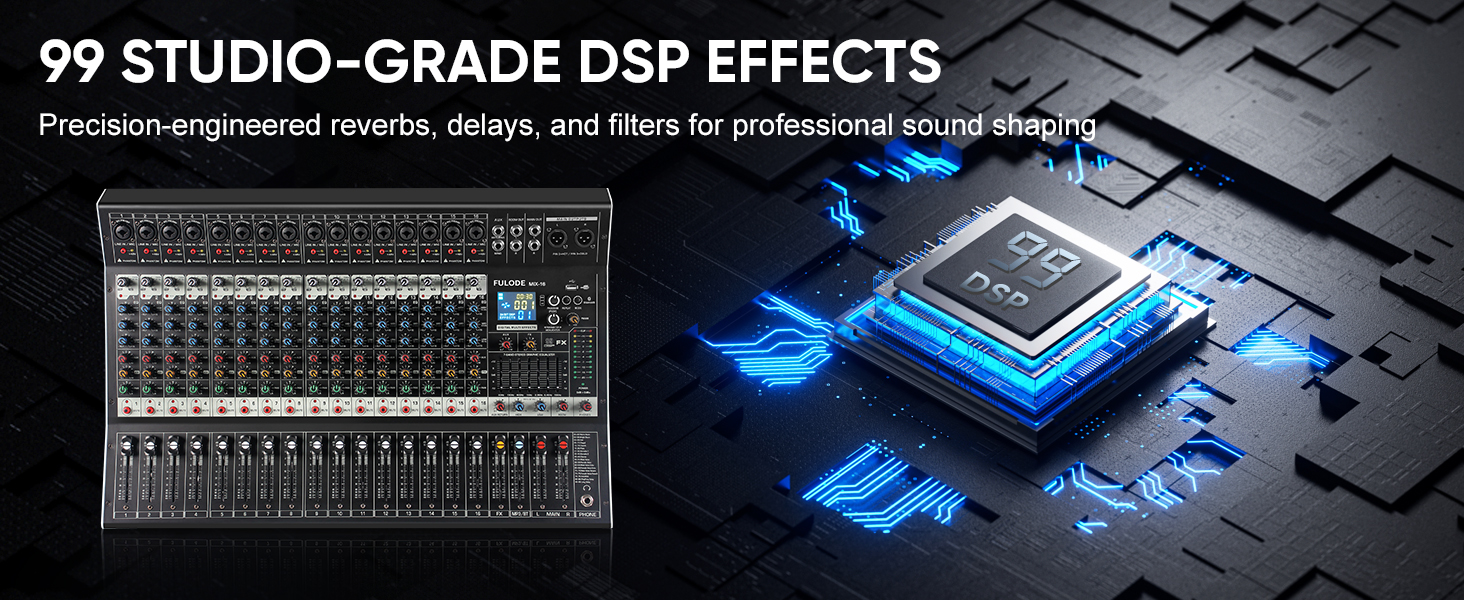
- Reverberation Effect Selection: Knob to select from 99 built-in DSP effects.
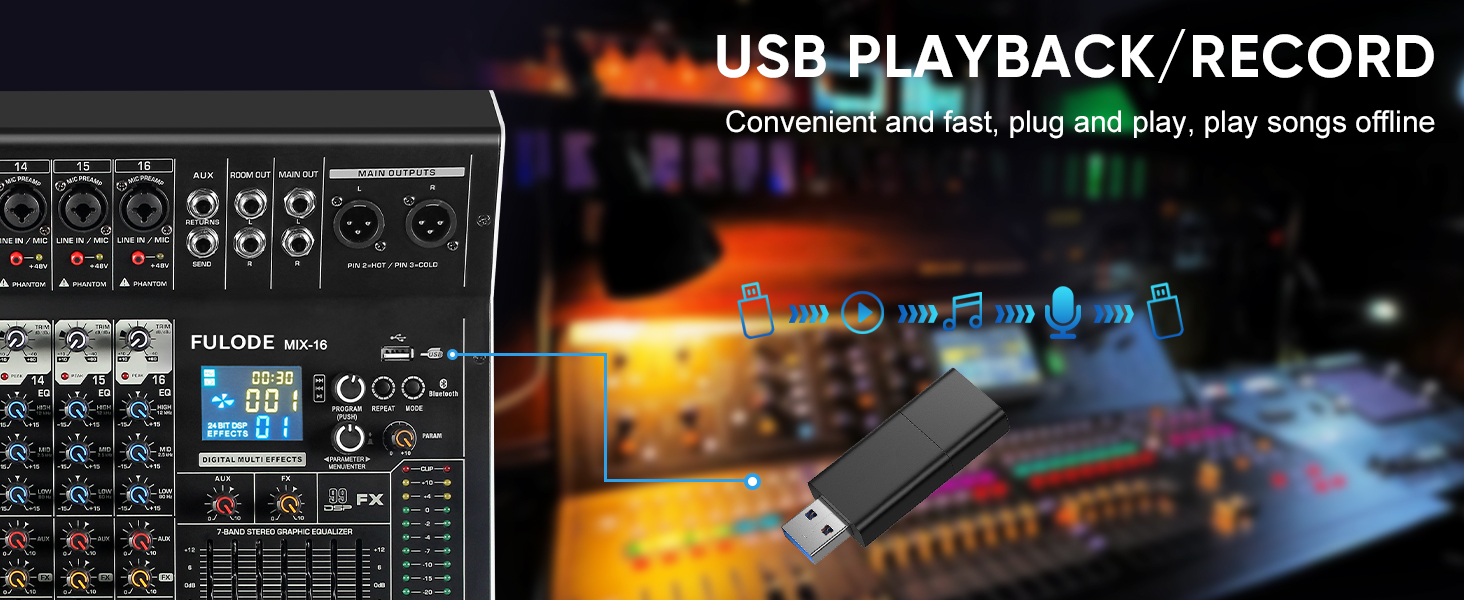
- USB/MP3 Playback: Section for USB drive and Bluetooth audio input, with transport controls and digital display.
- מדרגה ינדיקאַטאָר ליכט: Visual display of output levels.
- Main Channel Seven Segment Balance: Graphic equalizer for the main stereo output.
- Monitor Volume Adjustment: קאָנטראָלס די באַנד פון די כעדפאָון רעזולטאַט.
- Effect Main Volume Adjustment: Controls the overall level of the selected DSP effect.
- Left/Right Main Volume Adjustment: Faders for the main stereo output.
- Earphone Monitoring Interface: 1/4" jack for headphone monitoring.
- MP3 Main Volume Adjustment: Controls the output level of the USB/MP3/Bluetooth section.
4.2 דערציען פּאַנעל קאַנעקשאַנז
- מאַכט סוויטש: קער די מיקסער אויף אָדער אַוועק.
- מאַכט צובינד: פֿאַרבינדט זיך צום צוגעשטעלטן מאַכט אַדאַפּטער.
5. סעטאַפּ
Follow these steps for initial setup of your FULODE X1-16C Audio Mixer.
5.1 מאַכט קאַנעקשאַן
- זיכער מאַכן אַז דער מיקסער'ס מאַכט סוויטש איז אין דער אויסגעלאָשן פּאָזיציע.
- Connect the power adapter to the Power Interface on the rear panel of the mixer.
- Plug the power adapter into a suitable AC power outlet (110V).
- Turn the mixer's power switch to the ON position. The digital display should illuminate.
5.2 פֿאַרבינדן מיקראָפֿאָנען און אינסטרומענטן
- For microphones or line-level instruments, connect them to the Composite Interface (XLR or 1/4" TRS) on the desired channel.
- If using a condenser microphone, press the פאַנטאָם סוויטש (+48V) for that specific channel. An indicator light will confirm activation.
- סטרויערן די געווינען אַדזשאַסטמאַנט knob for each input channel to achieve an optimal signal level without clipping.

5.3 פֿאַרבינדן אַרויסגאַנג דעוויסעס
- פֿאַרבינדט אייערע הויפּט רעדנערס אָדער ampליפיער צו די Main Output Interface (XLR or 1/4" TRS) on the top right of the mixer.
- For monitoring, connect headphones to the Earphone Monitoring Interface.
6. אַפּערייטינג ינסטרוקטיאָנס
6.1 קאַנאַל קאָנטראָל
- געווינס: Adjust the input gain for each channel to prevent clipping (indicated by the PEAK LED) and ensure a strong signal.
- 3-באַנד עק: Use the HI, MID, and LOW knobs to shape the tone of each input.
- AUX: Control the amount of signal sent to the auxiliary output for external effects or monitor mixes.
- פקס: Adjust the level of the internal DSP effect applied to the channel.
- פּאַן: Position the channel's signal in the stereo field (left to right).
- שטום: Press the MUTE button to instantly silence a channel.
- קאַנאַל פאַדער: Use the fader to control the overall volume of the channel in the main mix.
6.2 די-עס-פי עפעקטן
The mixer includes 99 built-in 24-bit DSP effects for enhancing your sound.
- ניצן די Reverberation Effect Selection knob to browse through the 99 available effects (e.g., Warm Room, Bright Room, Hall, Plate, Chorus, Delay). The digital display will show the selected effect number.
- דרוק דעם קנופּ צו באַשטעטיקן דיין סעלעקציע.
- סטרויערן די Effect Main Volume Adjustment to control the overall wet/dry mix of the effects.
- Use the individual channel's FX knob to send more or less of that channel's signal to the effects processor.

6.3 USB/MP3/בלוטוט ווידערשפּיל
The mixer supports audio playback from USB drives and Bluetooth-enabled devices.
- וסב פּלייַבאַקק: אַרייַנלייגן אַ וסב פאָר מיט mp3 files into the USB port. Use the transport controls (Play/Pause, Skip) and the MP3 Main Volume Adjustment צו קאָנטראָלירן ווידערשפּיל.
- בלועטאָאָטה קאַנעקשאַן: Press the MODE button on the USB/MP3 section until 'BT' appears on the digital display. On your smart device, search for 'MIX-BT' (or similar) and pair. Once connected, you can stream audio wirelessly to the mixer.

6.4 הויפּט אַרויסגאַנג און מאָניטאָרינג
- ניצן די Left/Right Main Volume Adjustment faders to control the overall output level of the mix.
- די גלייַך ינדיקאַטאָר ליכט provides visual feedback on the main output levels. Adjust faders to keep levels within the optimal range (avoiding red/clipping).
- די Main Channel Seven Segment Balance (graphic EQ) allows for fine-tuning the overall frequency response of your main mix.
- סטרויערן די מאָניטאָר באַנד אַדזשאַסטמענט for comfortable listening through headphones.

6.5 Official Product Video Demonstration
Watch this video for a visual demonstration of the FULODE mixer's features and operation. Note: The video features a MIX-12 model, which shares many similar functionalities with the X1-16C.
7. וישאַלט
געהעריגע אויפהאלטונג גאראנטירט די לאנגעוויטי און אפטימאלע פאָרשטעלונג פון אייער מיקסער.
- רייניקונג: Use a soft, dry cloth to wipe the surface of the mixer. Do not use liquid cleaners or solvents, as they may damage the finish or internal components.
- סטאָרידזש: Store the mixer in a cool, dry place away from direct sunlight and extreme temperatures. If storing for extended periods, cover the unit to protect it from dust.
- ווענטילאַטיאָן: זאָרגט פֿאַר געהעריקע ווענטילאַציע אַרום דעם מיקסער צו פֿאַרמייַדן איבערהיצונג. פֿאַרשטאָפּט נישט די ווענטילאַציע עפענונגען.
8. טראָובלעשאָאָטינג
If you encounter issues with your FULODE X1-16C mixer, refer to the following common problems and solutions:
| פּראָבלעם | מעגלעך סיבה | לייזונג |
|---|---|---|
| קיין מאַכט | Power cable not connected; Power switch off; Faulty power adapter/outlet | Check power cable connection; Ensure power switch is ON; Try a different power outlet or adapter. |
| קיין קלאַנג פֿון אַ קאַנאַל | Channel muted; Gain too low; Cable issue; Phantom power not activated (for condenser mics) | Check MUTE button; Increase Gain; Verify cable connections; Activate +48V phantom power if needed. |
| No sound from main output | הויפּט פֿיידערס אַראָפּ; אַרויסגאַנג קאַבלען אָפּגעטיילט; Amplifier/speakers off | Raise Main Volume faders; Check output cable connections; Ensure amplifier/speakers are powered on and connected. |
| בלועטאָאָטה איז נישט קאַנעקטינג | Mixer not in Bluetooth mode; Device too far; Already connected to another device | Press MODE until 'BT' appears; Ensure device is within 33 ft; Disconnect from other devices. |
| פאַרקרימט געזונט | Gain too high (clipping); EQ settings extreme; Faulty cable/microphone | Reduce Gain (ensure PEAK LED is not constantly lit); Adjust EQ to neutral or moderate settings; Test with different cables/microphones. |
9. ספּעסאַפאַקיישאַנז
Technical specifications for the FULODE X1-16C 16-Channel Audio Mixer:
- מאָדעל: X1-16C
- נומער פון טשאַנאַלז: 16
- דספּ יפעקץ: 99 built-in 24-bit effects
- יקוואַליזיישאַן: 3-band EQ per channel, 7-band graphic EQ on main output
- פאַנטאָם מאַכט: +48V (אויסשאַלטבאַר פּער קאַנאַל)
- קאַנעקטיוויטי: USB (playback/recording), Bluetooth, XLR, 1/4" TRS
- מאַכט מקור: קאָרדעד עלעקטריק
- Voltage: 110 וואלטס (AC)
- פּראָדוקט דימענשאַנז: 15.55" ד x 18.9" ב x 4.13" ה (39.5 ס״מ ד x 48 ס״מ ב x 10.5 ס״מ ה)
- נומער וואָג: 18.16 פונט (8.24 קג)
10. וואָראַנטי און שטיצן
For warranty information and technical support, please refer to the documentation included with your purchase or contact FULODE customer service through their official channels. Keep your proof of purchase for any warranty claims.