
1. הקדמה
The ThermoPro WiFi Hygrometer Thermometer provides accurate, real-time monitoring of temperature and humidity levels in your environment. This device connects to your smartphone via Wi-Fi and Bluetooth, allowing for remote tracking, data storage, and instant alerts. Designed for reliability and ease of use, it helps maintain optimal conditions for various applications.

Image 1.1: ThermoPro WiFi Hygrometer Thermometer and its companion app interface.
2. וואָס איז אין דער קעסטל
- WiFi Hygrometer Thermometer
- טשאַרדזשינג קאַבלע
- ינסטראַקשאַנז מאַנואַל
3. פּראָדוקט פֿעיִקייטן
- Wireless Real-Time Tracking: Stable Wi-Fi and Bluetooth connectivity via the ThermoPro App for remote data monitoring. Requires a 2.4GHz Wi-Fi network.
- הויך אַקיעראַסי סענסאָר: Equipped with an advanced NTC humidity sensor, providing ±0.5°F temperature and ±2% humidity accuracy with fast response.
- 2-Year Data Storage & Export: Supports 24/7 data tracking and allows export of minute/hourly records for detailed analysis.
- מעלדונג אַלאַרץ: Set personalized thresholds for humidity and temperature to receive instant notifications when levels exceed limits.
- מער באַטאַרייע לעבן: Features a rechargeable design for stable signal transmission and extended operation without frequent battery replacement.
- ווערסאַטאַל נוצן: Suitable for monitoring diverse locations such as bedrooms, offices, greenhouses, garages, RVs, crawl spaces, attics, and more.

בילד 3.1: איבערview of the Smart Thermo-Hygrometer's key features.

Image 3.2: Details on the device's temperature and humidity accuracy.
4. סעטאַפּ
4.1 אַפּ אראפקאפיע און ינסטאַלירונג
To begin using your ThermoPro WiFi Hygrometer Thermometer, download the 'ThermoPro Sensor' app from your device's app store (available on iOS and Android).
4.2 דעווייס פּערינג און Wi-Fi פֿאַרבינדונג
- Open the 'ThermoPro Sensor' app and register for an account.
- מאַכן זיכער אַז בלועטאָאָטה איז ענייבאַלד אויף דיין סמאַרטפאָנע.
- In the app, tap the '+' icon to add a new device. The app will search for your ThermoPro sensor.
- Follow the on-screen instructions to connect your device to your 2.4GHz Wi-Fi network. This enables remote monitoring.
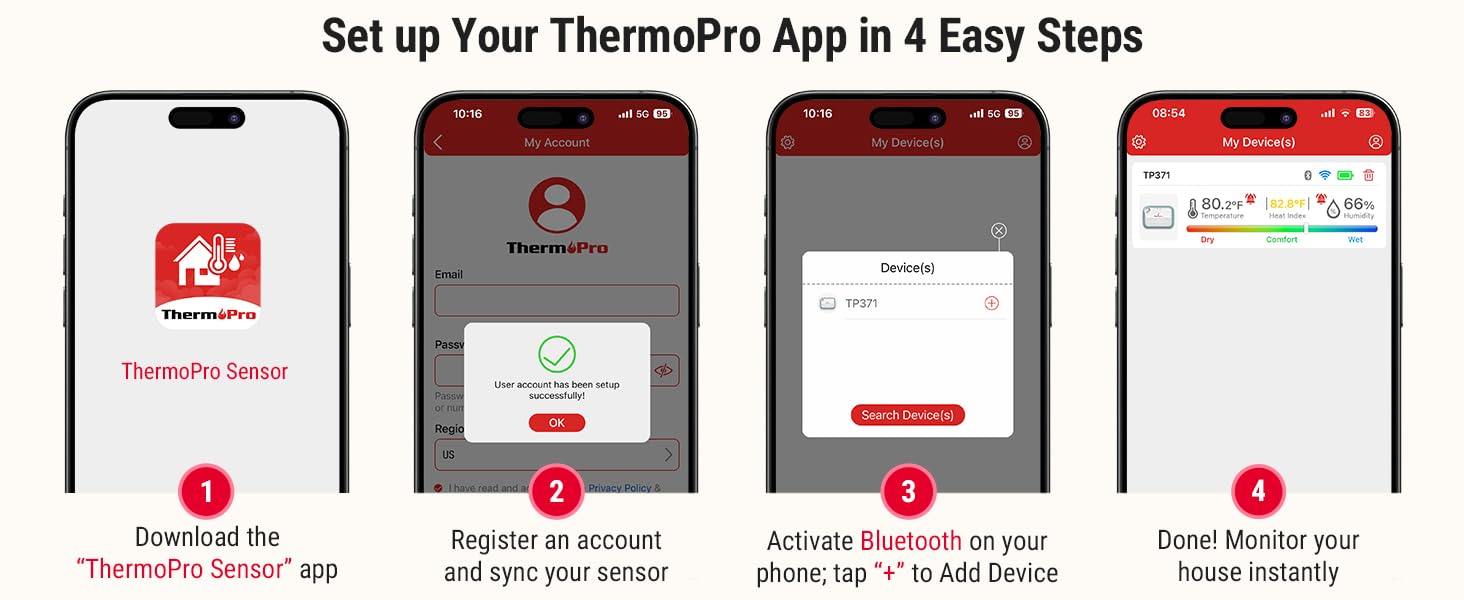
Image 4.1: Step-by-step guide for initial app setup and device connection.
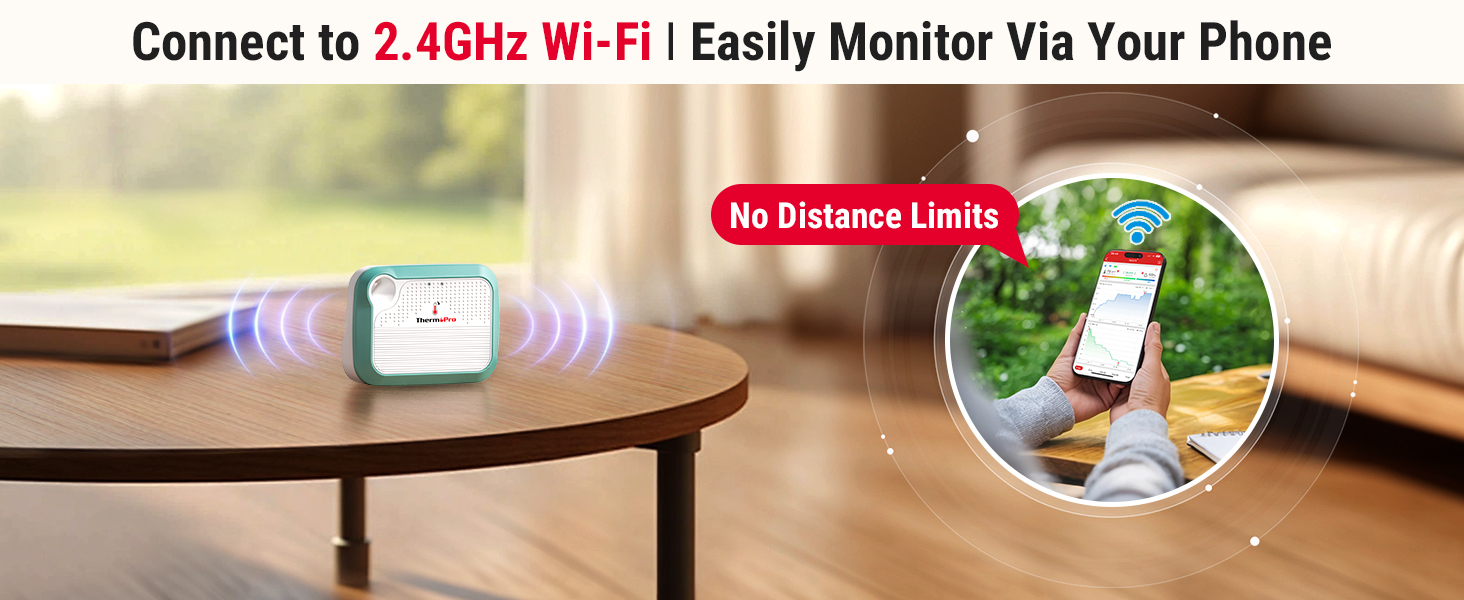
Image 4.2: Visual representation of seamless Wi-Fi connectivity.
5. אַפּערייטינג ינסטרוקטיאָנס
5.1 App Interface and Real-Time Monitoring
Once connected, the ThermoPro app displays real-time temperature and humidity readings. You can view historical data, current conditions, and a comfort indicator (Dry, Comfort, Wet) based on humidity levels.

Image 5.1: Comfort indicator displayed on the ThermoPro app.
5.2 Setting Up Alerts
To set custom temperature and humidity thresholds:
- Navigate to the 'Alert Setting' section within the app.
- Define your desired minimum and maximum values for temperature and humidity.
- The app will send instant notifications to your smartphone if readings fall outside these set ranges.

בילד 5.2: עקס.ample of an instant temperature alert notification.
5.3 דאַטן סטאָרידזש און עקספּאָרט
The device supports 24/7 data tracking, storing up to 2 years of minute/hourly records. You can access this historical data within the app and export it for further analysis.
5.4 מיטל ייַנטיילונג
The ThermoPro app allows you to share your device's monitoring data with family and friends. This feature enables multiple users to track environmental conditions from their own devices.

Image 5.3: Device sharing functionality within the ThermoPro app.
6. וישאַלט
6.1 טשאַרדזשינג די מיטל
The ThermoPro WiFi Hygrometer Thermometer features a rechargeable battery. Connect the provided charging cable to the device and a suitable USB power source when the battery level is low. A full charge ensures extended operation.

Image 6.1: The rechargeable battery design provides longer operational life.
6.2 דיווייס פּלייסמאַנט
The device can be placed on a flat surface using its integrated stand or hung using the included lanyard. Choose a location that provides accurate readings of the ambient environment, away from direct sunlight, heat sources, or drafts.
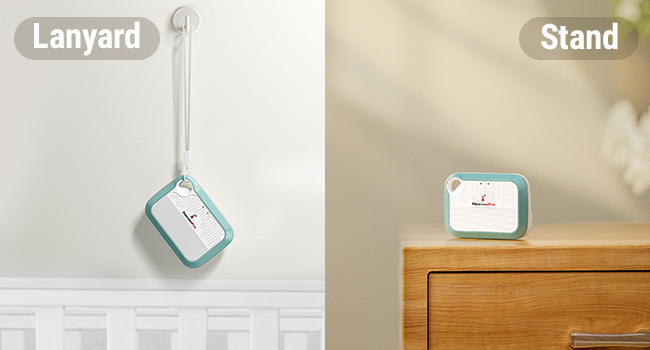
Image 6.2: Versatile placement options using the lanyard or integrated stand.
7. טראָובלעשאָאָטינג
- מיטל ניט קאַנעקטינג צו אַפּ: Ensure Bluetooth is enabled on your phone and the device is within range. For Wi-Fi connection, verify your network is 2.4GHz and the password is correct. Try restarting both the device and your phone.
- ומפּינקטלעך רידינגז: Ensure the device is placed in a location free from direct heat sources, cold drafts, or high humidity areas (e.g., directly above a humidifier). Allow the device to stabilize for at least 30 minutes after placement.
- App Not Updating Data: Check your internet connection. If using Wi-Fi, ensure the device is connected to your home network. If using Bluetooth, ensure your phone is close to the device.
- די באַטערי דריינז געשווינד: Ensure the device is fully charged. Frequent disconnections and reconnections to Wi-Fi can consume more power.
8. ספּעסאַפאַקיישאַנז
| באַשרייַבונג | דעטאַל |
|---|---|
| מאָדעל | B0DQ19WXBZ |
| סאָרט | טהערמאָפּראָ |
| טעמפּעראַטור אַקקוראַסי | ±0.5°F |
| טעמפּעראַטור ראַנגע | -22°F צו 140°F |
| הומידיטי אַקיעראַסי | ±2% רה |
| הומידיטי ראַנגע | 10% רה צו 99% רה |
| באַטערי טיפּ | ריטשאַרדזשאַבאַל נישט-סטאַנדאַרט באַטאַרייע (אַרייַנגערעכנט) |
| קאַנעקטיוויטי | ווי-פי (2.4 גהז), בלועטאָאָטה |
| דאַטאַ סטאָרידזש | אַרויף צו 2 יאר |
| פּעקל דימענשאַנז | 4.29 X 3.9 X 1.14 אינטשעס |
| וואָג | 4.16 אונסעס |
9. וואָראַנטי און שטיצן
ThermoPro products are designed for quality and reliability. For warranty information, technical support, or any questions regarding your ThermoPro WiFi Hygrometer Thermometer, please visit the official ThermoPro website or contact their customer service directly. Contact details are typically found on the product packaging or the ThermoPro webפּלאַץ.
10. זיכערקייַט אינפֿאָרמאַציע
- שטעלט נישט אויס דעם אפאראט צו עקסטרעמע טעמפעראטורן אדער דירעקטער זון פאר לענגערע צייטן.
- Avoid placing the device in areas with high moisture or direct water contact.
- האַלטן אויס פון דערגרייכן פון קינדער.
- פרובירט נישט צו צענעמען אדער מאדיפיצירן דעם אפאראט, ווייל דאס וועט בטל מאכן די גאראנטיע.
- ניצט נאָר דעם צוגעשטעלטן טשאַרדזשינג קאַבל אָדער אַ סערטיפיצירטן עקוויוואַלענט.


