
1. הקדמה
This manual provides essential instructions for the safe operation, setup, and maintenance of your FINOTI RG806 MAX GPS Drone. Please read this manual thoroughly before operating the drone to ensure proper function and to prevent damage or injury. The RG806 MAX features a 5.6-inch integrated display, three-sided visual obstacle avoidance, GPS and optical flow positioning, and a 4K camera for high-quality aerial photography and videography.
2. זיכערקייַט אינפֿאָרמאַציע
WARNING: Failure to follow these safety guidelines may result in injury, damage to the drone, or property damage.
- Keep the drone away from naked flames or direct heat sources.
- זיכער מאַכן אַז אַלע פּראָפּעלער זענען זיכער באַפעסטיקט איידערן פלי.
- Operate the drone in open areas, away from people, animals, and obstacles.
- Do not operate the drone in strong winds (above 10 KM/H).
- שטענדיק האַלטן די וויזועלע ליניע פון זעאונג מיטן דראָון בעתן פלי.
- פליט נישט לעבן לופטפעלדער אדער באגרענעצטע לופטפעלדער.
- Refer to local regulations regarding drone operation.
- דערוואַקסענע השגחה איז רעקאָמענדירט פֿאַר קינדער וואָס אַרבעטן מיטן דראָון.
3. פּעקל אינהאַלט
Verify that all items listed below are included in your package. If any items are missing or damaged, contact customer support.
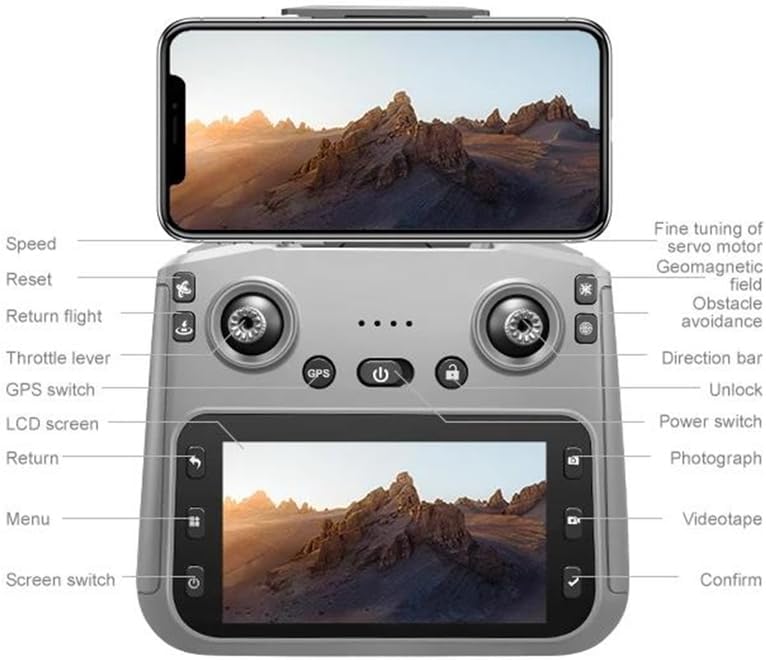
Image: Package contents of the FINOTI RG806 MAX drone. This image displays the drone, a remote control with an integrated screen, three batteries, a screwdriver, eight spare propellers, a 64GB high-speed memory card, a card reader, two instruction manuals, a charging cable, a storage bag, and a gift box.
- RG806 MAX Drone x 1
- ווײַטקאָנטראָל מיט עקראַן x 1
- Flight Battery x 3 (Triple Battery version)
- Propellers x 8 (4 installed, 4 spare)
- שרויפנ - ציער רענטגענ 1
- 64GB High-Speed Memory Card x 1
- קאָרט לייענער x 1
- טשאַרדזשינג קאַבלע X 1
- סטאָרידזש באַג X 1
- Instruction Manual x 2 (This document and a quick start guide)
4. פּראָדוקט איבערview און פֿעיִקייטן
The FINOTI RG806 MAX is designed for stable and intelligent flight, offering advanced features for both beginners and experienced pilots.
4.1 שליסל פֿעיִקייטן
- 5.6-inch Integrated Display: Provides real-time, high-definition viewing directly on the remote control.
- Three-Sided Obstacle Avoidance: Intelligent visual sensors detect and avoid obstacles from three directions, enhancing flight safety.
- GPS and Optical Flow Positioning: Ensures precise hovering, stable flight indoors and outdoors, and accurate return-to-home functions.
- 4K HD ווידעא רעקאָרדינג: Capture high-resolution photos and videos with the onboard camera.
- ברושלעס מאָטאָרן: Provides powerful, quiet, and efficient flight performance with increased durability.
- Custom Course Planning: Plan specific flight paths for automated shooting.
- Smart Return to Home: Automatically returns to the takeoff point in case of low battery, signal loss, or user command.
4.2 אַפּאַראַט פֿעיִקייטן
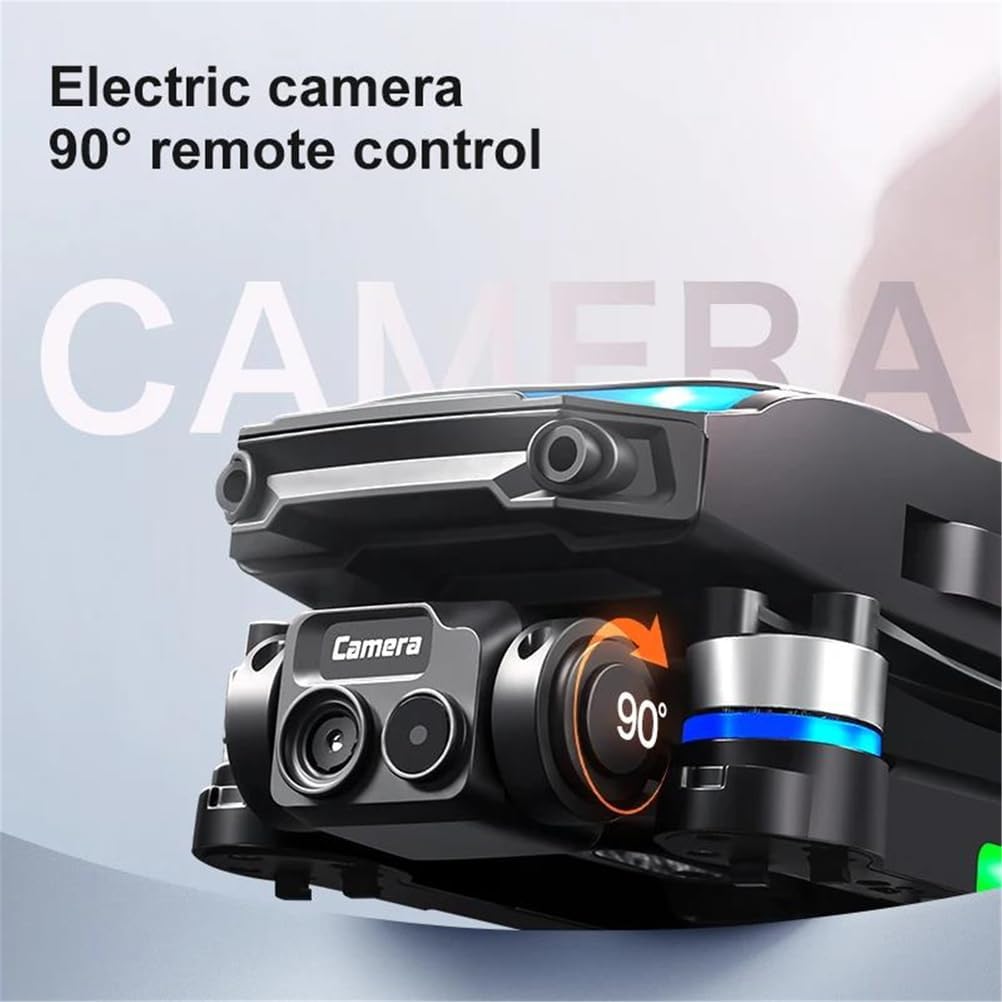
Image: The drone's camera module, highlighting its ability for 90-degree remote-controlled electric camera adjustment.
The drone features an electric camera with 90-degree remote control adjustment, allowing for flexible shooting angles during flight. It supports 4K HD video recording and high-resolution still images.
4.3 Obstacle Avoidance System

Image: The FINOTI RG806 MAX drone demonstrating its 3-way intelligent perception for obstacle avoidance, with sensors detecting surroundings.
Equipped with a three-sided intelligent perception system, the drone can detect and avoid obstacles, significantly reducing the risk of collisions during flight.
4.4 GPS Smart Return to Home
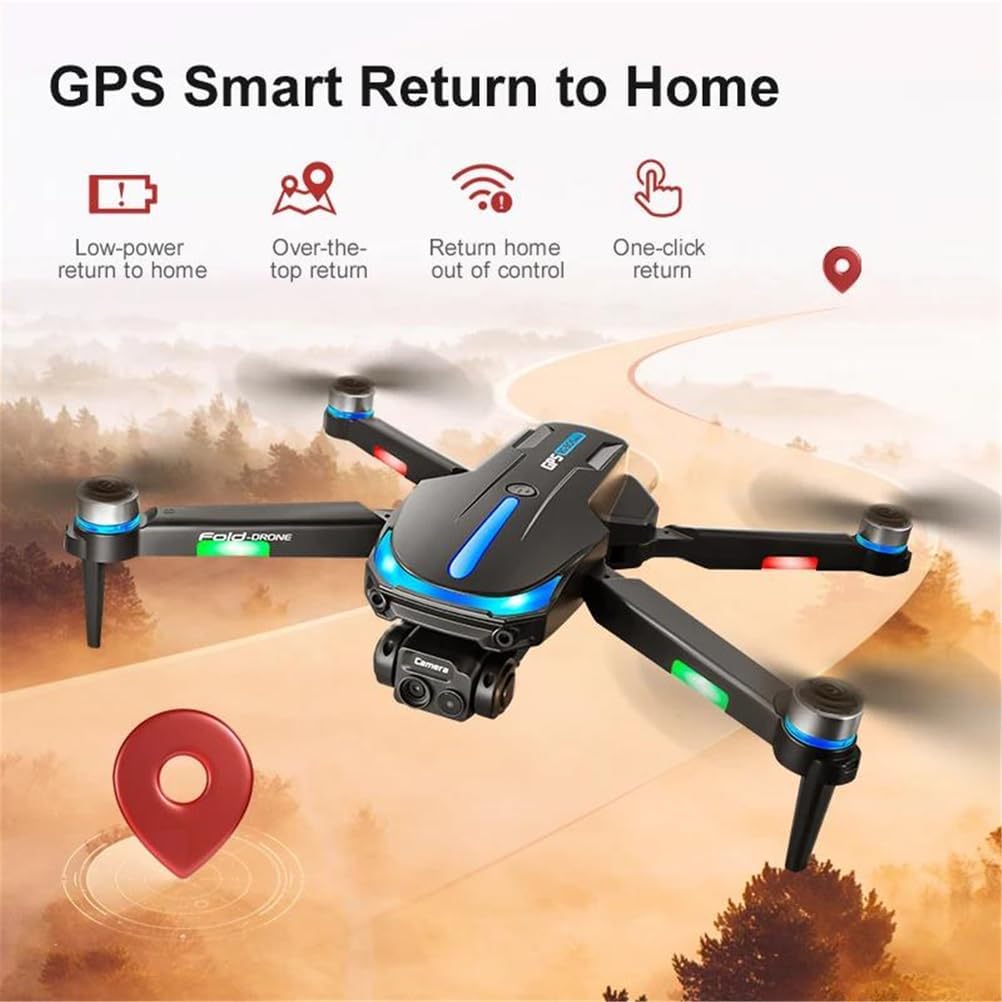
Image: An illustration detailing the GPS Smart Return to Home functions, including return due to low power, exceeding flight limits, loss of control, and a user-initiated one-click return.
The GPS system enables multiple return-to-home functions:
- נידעריק מאַכט צוריקקומען: The drone automatically returns when the battery is critically low.
- אויסער קאנטראל צוריקקער: If the drone loses signal with the remote control, it will automatically return to the takeoff point.
- איין-קליק צוריקקער: Initiate return to home with a single button press on the remote control.
5. סעטאַפּ גייד
5.1 טשאַרדזשינג די באַטעריז
Before first use, fully charge the drone's flight batteries and the remote control battery.
- Connect the charging cable to the battery and a suitable USB power adapter (not included).
- The indicator light on the battery will show charging status (e.g., red for charging, green for full).
- די אויפלאדונג צייט איז בערך 60-90 מינוט פער באטעריע.
5.2 אינסטאַלירן פּראָפּעלער
Ensure propellers are installed correctly according to their rotation direction (A and B). Incorrect installation will prevent flight.
- Match the 'A' propellers to the motor arms marked 'A' and 'B' propellers to 'B' motor arms.
- Secure each propeller with the provided screws using the screwdriver.
5.3 Inserting Flight Battery
- פאַרזיכערן אַז די דראָון איז פּאַוערד אַוועק.
- Insert a fully charged flight battery into the battery compartment on the drone until it clicks into place.
5.4 רימאָוט קאָנטראָל סעטאַפּ
- זיכער מאַכן אַז די ווײַטקאָנטראָל איז אויפֿגעלאָדן.
- מאַכט אויף די ווייַט קאָנטראָל.
- The remote control's screen will display flight information and video feed once connected to the drone.
6. אַפּערייטינג ינסטרוקטיאָנס
6.1 פּאַוערינג אויף / אַוועק
- צו מאַכט אויף: Press and hold the power button on the drone and then on the remote control until indicator lights illuminate.
- צו מאַכט אַוועק: Press and hold the power button on the drone and then on the remote control until indicator lights turn off.
6.2 צוזאמענשטעלן דעם דראָון און ווײַטקאָנטראָל
- שטעלן די דראָון אויף אַ פלאַך, גלייַך ייבערפלאַך.
- צינד אן דעם דראָון, דערנאָך דעם ווײַטקאָנטראָל.
- Push the left joystick up then down to complete the pairing process. The drone's indicator lights will stop flashing and remain solid once paired.
6.3 GPS Signal Acquisition
For outdoor flight, wait for the drone to acquire a sufficient GPS signal before takeoff. This is indicated by a specific light pattern or message on the remote control screen.
6.4 Basic Flight Controls (Refer to Remote Control Diagram)
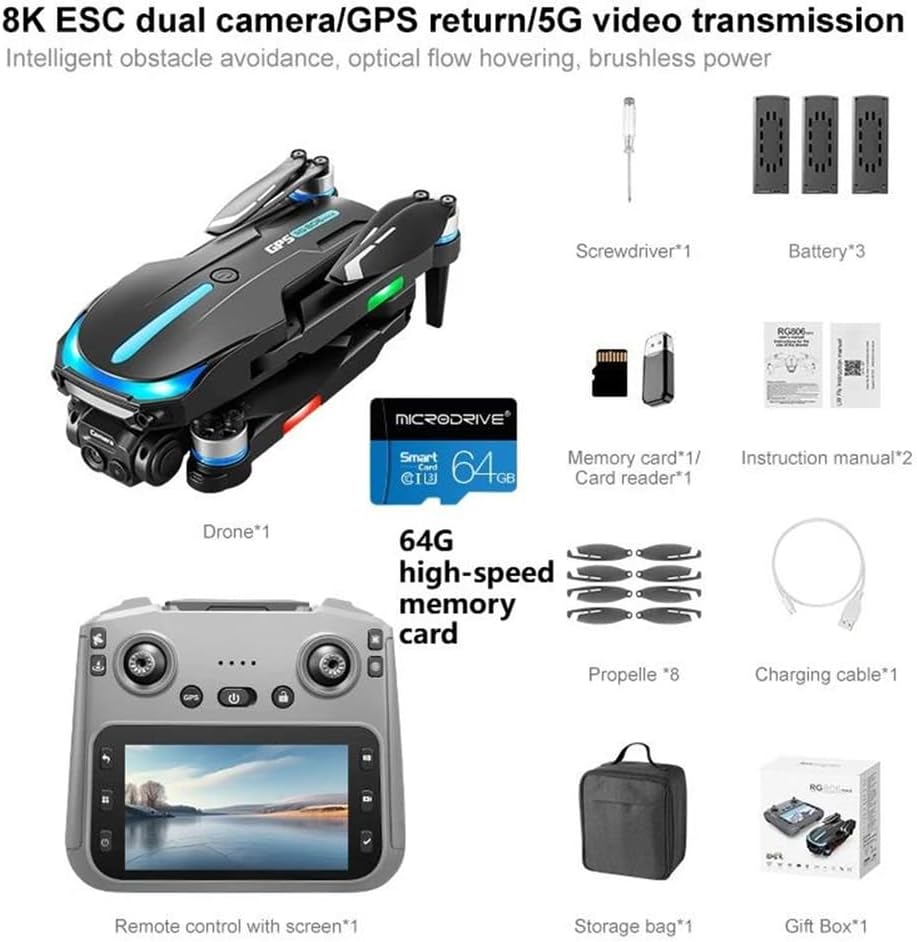
Image: Detailed diagram of the FINOTI RG806 MAX drone remote control, showing the functions of all buttons, joysticks, and the integrated screen. Labels include Speed, Reset, Return flight, Throttle lever, GPS switch, LCD screen, Return, Menu, Screen switch, Fine tuning of servo motor, Geomagnetic field, Obstacle avoidance, Direction bar, Unlock, Power switch, Photograph, Videotape, and Confirm.
The remote control features two joysticks and various buttons for precise control. Familiarize yourself with the layout:
- Left Joystick (Throttle Lever): Up/Down for altitude, Left/Right for yaw (rotation).
- Right Joystick (Direction Bar): Up/Down for forward/backward, Left/Right for left/right strafe.
- איין-קנעפל אויפשטייג/לאנדונג קנעפל: איניציאירט אויטאמאטישע אויפשטייג אדער לאנדונג.
- Return Flight Button: Activates GPS Smart Return to Home.
- פאָטאָ קנעפּל: Takes a still image.
- Videotape Button: הייבט אָן/שטעלט אָפּ ווידעאָ רעקאָרדינג.
- גיכקייַט קנעפּל: טוישט צווישן פארשידענע פלי-גיכקייטן.
- שטערונג אויסמיידונג סוויטש: Activates or deactivates the obstacle avoidance system.
6.5 Advanced Flight Functions
- Custom Course: Use the remote control screen to draw a flight path, and the drone will follow it automatically.
- האַווייַע קאָנטראָל: Perform specific hand gestures for photo or video capture (refer to the full manual for details).
- אָפּטיש פלאָו פּאַזישאַנינג: For stable hovering in indoor environments where GPS is unavailable.
7. וישאַלט
- רייניקונג: Use a soft, dry cloth to clean the drone and remote control. Do not use solvents.
- פּראָפּעלער דורכקוק: קאָנטראָלירט רעגולער די פּראָפּעלערס פֿאַר שאָדן (ריסן, בייגן). פאַרבייטן די געשעדיגטע פּראָפּעלערס גלייך.
- באַטערי זאָרגן: Store batteries in a cool, dry place. Do not overcharge or over-discharge. If storing for extended periods, charge to approximately 50-60%.
- סטאָרידזש: Store the drone and accessories in the provided storage bag to protect them from dust and physical damage.
8. טראָובלעשאָאָטינג
| פּראָבלעם | מעגלעך סיבה | לייזונג |
|---|---|---|
| דראָון טוט זיך נישט אָן | באַטעריע נישט אויפגעלאָדן אָדער נישט ריכטיק אַרײַנגעשטעלט. | זיכער מאַכן אַז די באַטאַרייע איז גאָר אויפגעלאָדן און ריכטיק אַרײַנגעשטעלט. |
| Drone cannot take off or flies unstably | Propellers installed incorrectly; drone not calibrated; strong wind. | Check propeller installation (A/B). Calibrate the drone on a flat surface. Avoid flying in strong winds. |
| No video feed on remote control | Drone and remote not paired; WiFi connection issue. | Re-pair the drone and remote. Ensure strong WiFi signal. |
| דזשי-פי-עס סיגנאַל נישט באַקומען | פליען אינעווייניק אדער אין א געגנט מיט שוואכן סאטעליט אויפנאם. | אריבערגיין צו אן אפענע דרויסנדיקע פלאץ מיט קלארן הימל view. Wait for GPS lock. |
| שטערונג אויסמיידונג ארבעט נישט | System deactivated; sensors obstructed or dirty. | Ensure obstacle avoidance is enabled. Clean sensors. |
9. ספּעסאַפאַקיישאַנז
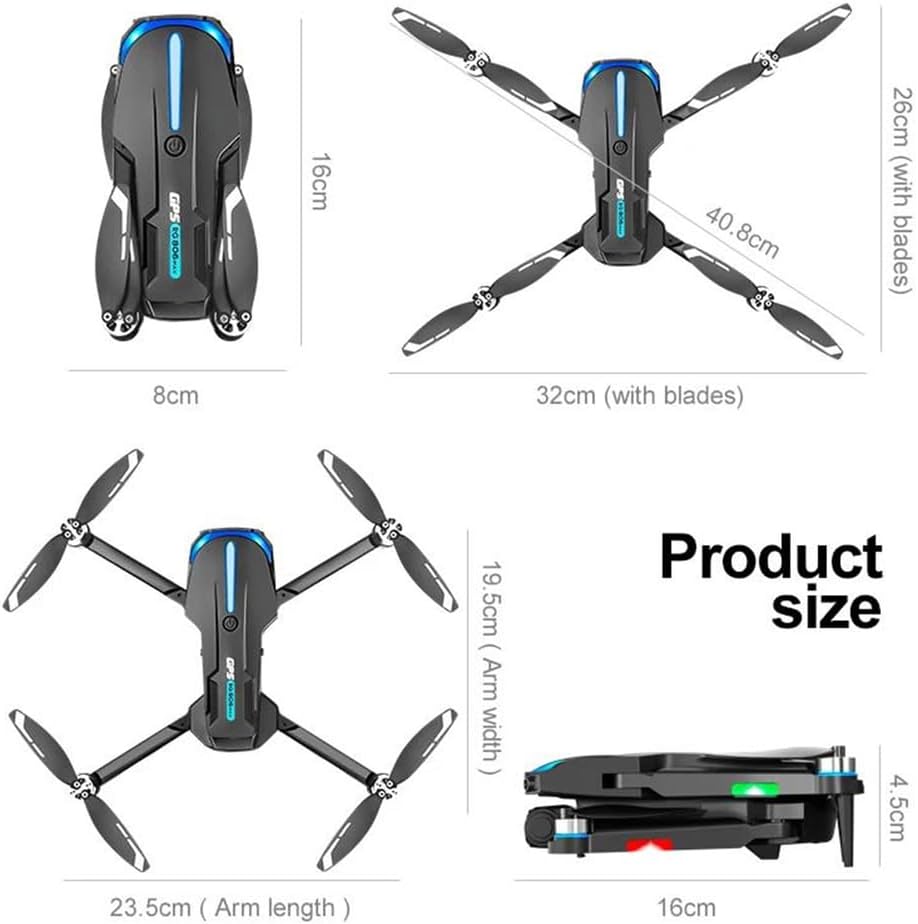
Image: Product size diagram for the FINOTI RG806 MAX drone. Dimensions include 26cm (with blades) and 32cm (with blades) for width, 16cm for length, 19.5cm (arm width), 23.5cm (arm length), and 4.5cm for height when folded, with a folded length of 16cm.
| שטריך | באַשרייַבונג |
|---|---|
| מאָדעל | RG806 MAX |
| דראָון וואָג | 190ג |
| מאַקסימום טייקאָף וואָג | <1 קג |
| פלי צייט | אַרויף צו 20 מינוט |
| ווייַט דיסטאַנסע | 250 ם |
| ערקראַפט אַפּערייטינג אָפטקייט | 5GHz (WiFi) |
| ווידעא מאַקסימום רעזאָלוציע | 4K (4096*2160) |
| סענסאָר גרייס | 1/1.28 אינטשעס |
| מאָטאָר טיפּ | ברושלעסס מאָטאָר |
| שטערונג אויסמיידונג טיפן | Visual avoidance (Three-sided) |
| מאַקס ווינד ספּיד קעגנשטעל | <10 קילאמעטער/ה |
| קאַנעקטיוויטי | WiFi, GPS |
| ווייַז קאָנטראָל | YES (5.6-inch integrated screen) |
| לאַנד פון אָריגין | כינע |
| צוזאַמענגעפאַלטענע גרייסן (אומגעפער) | 16 סענטימעטער (ל) רענטגענ 8 סענטימעטער (ב) רענטגענ 4.5 סענטימעטער (ה) |
| Unfolded Dimensions (approx.) | 32cm (W with blades) x 26cm (W with blades) x 23.5cm (Arm length) |
10. וואָראַנטי און שטיצן
For warranty information, technical support, or service inquiries, please refer to the warranty card included in your package or contact FINOTI customer service directly. Keep your purchase receipt as proof of purchase.
Manufacturer: FINOTI
Item Model Number: 66593658-TRIPLEBATTERY