
1. הקדמה
This manual provides essential information for the safe operation and maintenance of your FINOTI XIL 017 4K Camera Drone. Please read this manual thoroughly before operating the drone to ensure proper usage and to prevent damage or injury. The XIL 017 is a lightweight, foldable quadcopter equipped with a 4K camera and a 3-axis gimbal, designed for high-quality aerial photography and videography.
2. זיכערקייַט גיידליינז
אפערירן א דראָון פארלאנגט פֿאַראַנטוואָרטלעכקייט. פֿאָלגט די פֿאָלגנדיקע זיכערהייט גיידליינז:
- לייענען דעם מאַנואַל: Understand all instructions and warnings before flight.
- פאַר-פלי טשעק: Ensure the drone, remote control, and batteries are in good condition and fully charged.
- ענוויראָנמענטאַל וויסיקייַט: Fly in open areas, away from people, animals, buildings, and obstacles. Avoid flying over private property without permission.
- וועטער טנאָים: Do not fly in strong winds (above Level 5), rain, snow, or fog.
- האַלטן די שורה פון דערזען: האַלט שטענדיק דעם דראָון אין אייער וויזועלן ליניע פון זעאונג.
- רעספּעקט פּריוואַטקייט: ניצט נישט דעם דראָון צו פאָטאָגראַפֿירן אָדער רעקאָרדירן מענטשן אָן זייער צושטימונג.
- באַטערי זיכערקייַט: Use only approved chargers and batteries. Do not overcharge or puncture batteries. Store batteries in a cool, dry place.
- נויטפאַל פּראַסידזשערז: Familiarize yourself with emergency landing procedures.
3. פּעקל אינהאַלט
באַשטעטיקן אַז אַלע זאכן זענען פאַראַן אין דיין פּעקל:
- FINOTI XIL 017 Drone
- ווײַטקאָנטראָל מיט אײַנגעבויטן עקראַן
- Intelligent Flight Batteries (Quantity may vary based on purchase, e.g., Triple Battery)
- וסב טשאַרדזשינג קאַבלע
- ספּער פּראַפּעלערז
- שרויפנ - ציער
- באַניצער מאַנואַל
4. פּראָדוקט איבערview
4.1 דראָון קאָמפּאָנענטן
The FINOTI XIL 017 drone features a compact, foldable design for portability and ease of use. It weighs under 249g, which may exempt it from certain registration requirements in some regions.

Image: The FINOTI XIL 017 drone in both its folded, compact state and its unfolded, flight-ready configuration. The image highlights its portability and its weight being under 249g, indicating no registration is required in some jurisdictions.
- פאָלדאַבאַל אָרעמס: פֿאַר קאָמפּאַקט סטאָרידזש און טראַנספּאָרט.
- פּראָפּעללערס: Efficient flight.
- 4K Camera with 3-Axis Gimbal: Provides stable, high-resolution video and photos.
- באַטערי אָפּטייל: Houses the intelligent flight battery.
- TOF Sensors: For precise positioning and stable hovering.
4.2 רימאָוט קאָנטראָל
The remote control features a built-in screen for direct live view, eliminating the need for a separate smartphone. It offers a stable 10KM HD image transmission range.

Image: The remote control for the FINOTI XIL 017 drone, featuring a large built-in screen that displays live footage. The image emphasizes the 10KM HD image transmission range and the convenience of not needing a separate phone.

Image: A detailed diagram illustrating the various buttons and functions of the remote control, including roller camera adjustment, record button, speed key, throttle, steering, one-touch takeoff/landing, return button, forward/backward/left/right flying keys, obstacle avoidance switch, GPS switch, and On/Off key.
- קאָנטראָל סטיקס: For flight direction and altitude.
- געבויט-אין ווייַז: For real-time video feed and flight data.
- פונקציע קנעפּלעך: Dedicated buttons for takeoff/landing, return to home, photo/video, gimbal control, and flight modes.
- אַנטענאַז: פֿאַר סטאַביל סיגנאַל טראַנסמיסיע.
5. סעטאַפּ
5.1 טשאַרדזשינג באַטעריז
- Connect the USB charging cable to the intelligent flight battery.
- Plug the other end of the USB cable into a compatible USB power adapter (not included).
- Charge until the battery indicator lights show a full charge.
- לאָדט אויף די ווײַטקאָנטראָל ניצנדיק זײַן באַזונדערן טשאַרדזשינג פּאָרט און קאַבל.
5.2 אויסלייגן דעם דראָון
- לײַכט עפֿנט אויס די פֿאָדערשטע אָרעמס פֿון דער דראָון ביז זיי פֿאַרשליסן זיך אין פּלאַץ.
- Then, unfold the rear arms.
- Ensure all propellers are free to rotate.
5.3 ינסטאָלינג די באַטאַרייע
- Slide the fully charged intelligent flight battery into the battery compartment on the drone until it clicks securely into place.
- Ensure the battery is firmly seated to prevent dislodgement during flight.
5.4 פּאַוערינג אויף / אַוועק
- דראָון: Press the power button once briefly, then press and hold for 2 seconds until the indicator lights illuminate.
- ווייַט קאָנטראָל: Press the power button once briefly, then press and hold for 2 seconds.
- To power off, repeat the same sequence.
5.5 צוזאמענשטעלן דעם דראָון און ווײַטקאָנטראָל
The drone and remote control are typically pre-paired. If re-pairing is necessary, refer to the specific instructions in the full manual or the drone's companion app for the pairing procedure.
6. אפערירן דעם דראָון
6.1 פאַר-פלי טשעקליסט
- זיכער מאַכן אַז די דראָון און ווײַט קאָנטראָל באַטעריעס זענען פֿולשטענדיק אויפֿגעלאָדן.
- קאָנטראָלירט די פּראָפּעלערס פֿאַר שאָדן און זיכערט זיך אַז זיי זענען זיכער באַפעסטיקט.
- Verify the camera gimbal is free to move.
- Choose an open, clear flying area.
- Wait for sufficient GPS signal acquisition before takeoff.
6.2 אויפשטייג און לאַנדונג
- One-Touch Takeoff: Press the dedicated takeoff button on the remote control. The drone will ascend to a safe altitude and hover.
- מאַנועלע אָפּפֿליִען: Push both control sticks down and outwards to start the motors, then slowly push the left stick up to ascend.
- One-Touch Landing: Press the dedicated landing button. The drone will descend and land automatically.
- מאַנואַל לאַנדינג: Slowly pull the left control stick down to descend. Once landed, push both sticks down and inwards to stop the motors.
6.3 גרונטלעכע פלי קאָנטראָלן
Refer to the remote control diagram for button locations.
- לינקער שטעקן (גאַז/גיי): אַרויף/אַראָפּ פֿאַר הייך, לינקס/רעכטס פֿאַר ראָטאַציע (יאָו).
- רעכטער שטעקן (פּיטש/ראָול): Up/Down for forward/backward movement (pitch), Left/Right for left/right movement (roll).
- Speed Key: Adjusts flight speed (e.g., beginner, normal, sport modes).
6.4 אַפּאַראַט אָפּעראַציע
The drone is equipped with a 4K camera and a 3-axis brushless gimbal for stable, clear shots.

בילד: א דעטאַלירטע view of the drone's 3-axis brushless gimbal, showing its range of motion for stabilization. It also highlights the 4K HD video capability and electronic image stabilization (EIS).
- פאָטאָ / ווידעא קנעפּל: Press once to take a photo, press and hold to start/stop video recording.
- גימבאַל קאָנטראָל: Use the roller on the remote control to adjust the camera's vertical angle (90° adjustable).
- AI Night Scene: The camera automatically enhances low-light scenes for clearer images.
6.5 ינטעליגענט פלי מאָדעס
Utilize smart features for cinematic results.

Image: A composite image detailing the drone's intelligent flight capabilities. This includes 360° Smart Tracking, which follows a subject, Smart Flight Path Planning, allowing users to draw a route, and TOF Visual & Optical Flow Positioning for stable hovering.
- 360° Smart Tracking: The drone can lock onto and follow a designated subject from any direction.
- Smart Flight Path Planning: Draw a desired flight route in the companion app, and the drone will follow it automatically.
- TOF Visual & Optical Flow Positioning: Achieves precise and stable hovering, especially useful in indoor environments or when GPS is weak.
6.6 HD Image Transmission
The drone provides up to 10KM HD digital transmission, allowing for smooth, real-time viewינג פון פוtage directly on the remote control's screen.
7. וישאַלט
7.1 רייניקונג
- ווישט דעם דראָון קערפּער מיט אַ ווייכן, טרוקענעם שטאָף.
- Clean the camera lens with a microfiber cloth designed for optics.
- Remove any debris from propellers and motors.
7.2 באַטערי קער
- Store batteries in a cool, dry place, away from direct sunlight.
- Do not store fully charged or completely depleted batteries for extended periods. Charge them to approximately 50-60% for long-term storage.
- If a battery appears swollen, damaged, or leaks, discontinue use immediately and dispose of it properly.
7.3 פּראָפּעלער פאַרבייַט
If a propeller is damaged, replace it with a new one from the spare parts kit. Use the provided screwdriver to remove and install propellers, ensuring they are correctly oriented (e.g., 'A' with 'A', 'B' with 'B').
8. טראָובלעשאָאָטינג
| פּראָבלעם | מעגלעך סיבה | לייזונג |
|---|---|---|
| דראָון טוט זיך נישט אָן | Battery depleted or not installed correctly. | Charge battery fully. Reinstall battery securely. |
| No image on remote control screen | Drone and remote not paired. Signal interference. | Ensure drone and remote are paired. Move to an area with less interference. |
| דראָון דריפֿט בעתן פֿלוג | Insufficient GPS signal. Calibration needed. Wind interference. | Wait for strong GPS signal. Perform IMU/compass calibration. Avoid flying in strong winds. |
| שלעכטע ווידעא/פאָטאָ קוואַליטעט | Dirty camera lens. Gimbal obstruction. Low light conditions. | Clean lens. Check gimbal for obstructions. Utilize AI Night Scene feature. |
| קורץ פלי צייט | Battery not fully charged. Old/damaged battery. Aggressive flying. | Ensure full charge. Replace old batteries. Fly more conservatively. |
9. ספּעסאַפאַקיישאַנז
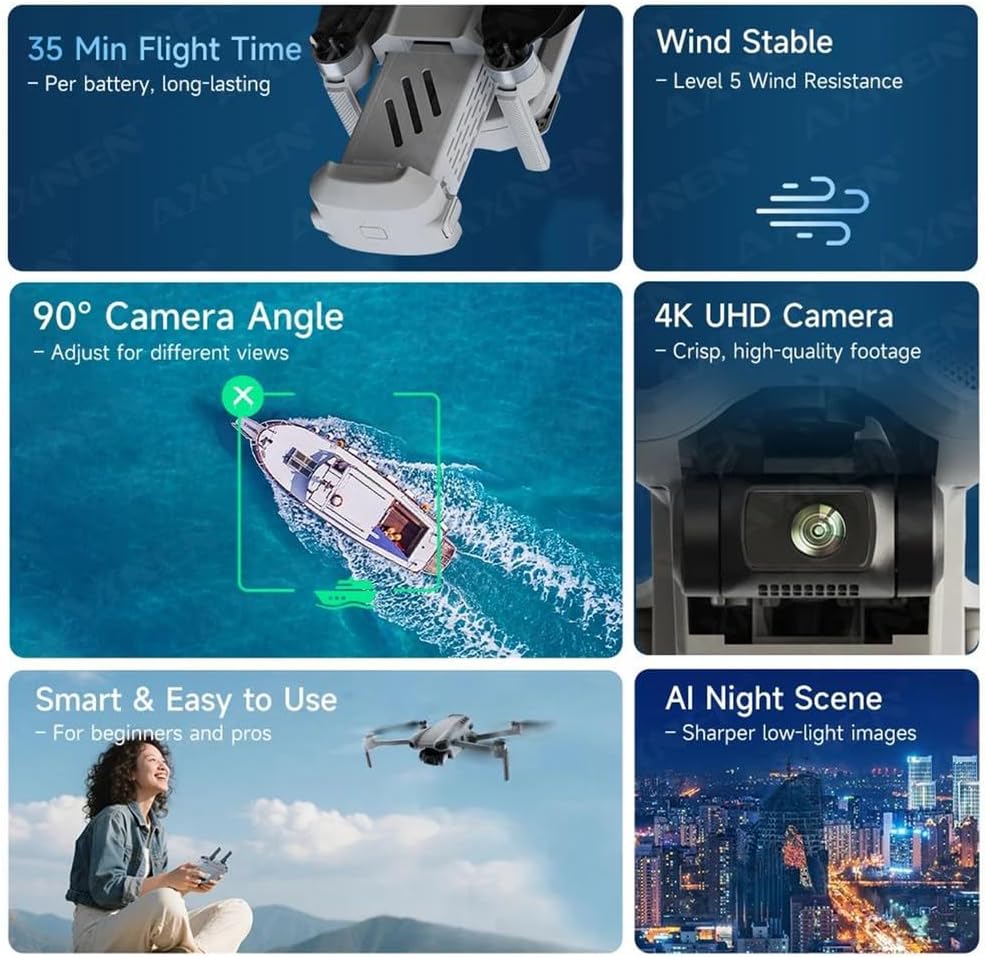
Image: An infographic summarizing key performance features of the drone, including 35 minutes of flight time per battery, Level 5 wind resistance, a 90° adjustable camera angle, 4K UHD camera capabilities, ease of use, and AI Night Scene enhancement.

Image: A diagram illustrating the physical dimensions of the FINOTI XIL 017 drone, both in its folded state (e.g., 11cm x 20cm x 8.5cm) and unfolded state, providing clear measurements for portability and operational size.
- מאָדעל: XIL 017
- וואָג: אונטער 249 ג
- אַפּאַראַט: 4K UHD
- גימבאַל: 3-אַקס ברושלעס
- פלי צייט: אַרויף צו 35 מינוט פּער באַטאַרייע
- בילד טראַנסמיסיע: 10KM HD
- ווינט קעגנשטעל: מדרגה 5
- פּאַזישאַנינג: GPS, TOF Visual, Optical Flow
- אַדזשאַסטאַבאַל אַפּאַראַט ווינקל: 90°
10. וואָראַנטי און שטיצן
For warranty information and technical support, please refer to the warranty card included with your product or visit the official FINOTI website. Keep your proof of purchase for warranty claims. If you encounter issues not covered in this manual, contact FINOTI customer service for assistance.