
1. הקדמה
Thank you for choosing the Aigostar 100W RGB Solar LED Floodlight. This manual provides essential information for the safe and efficient use of your new solar floodlight. Please read these instructions carefully before installation and operation, and retain them for future reference.
2. זיכערקייַט אינפֿאָרמאַציע
כדי צו זיכער מאַכן זיכערע אָפּעראַציע און פאַרמייַדן שאָדן, ביטע אָבסערווירן די פאלגענדע זיכערהייט מיטלען:
- Always handle the solar panel and floodlight with care.
- פרובירט נישט צו צענעמען אדער מאדיפיצירן דאס פראדוקט. דאס וועט בטל מאכן די גאראנטיע און קען פארשאפן שאדן אדער שאָדן.
- האַלט דעם פּראָדוקט אַוועק פון אָפֿענע פֿלאַמען אָדער עקסטרעמע היץ־קוואַלן.
- Ensure the solar panel is installed in a location that receives direct sunlight for optimal charging.
- Avoid looking directly into the LED light source when it is active, as it may cause eye strain.
- דער פּראָדוקט איז IP66 וואַסערפּרוף, פּאַסיק פֿאַר נוצן אינדרויסן, אָבער פֿאַרמייַדט עס צו טונקען אין וואַסער.
- קינדער זאָל זיין סופּערווייזד צו ענשור אַז זיי טאָן ניט שפּילן מיט די אַפּפּליאַנסע.
3. פּעקל אינהאַלט
באַשטעטיקן אַז אַלע קאָמפּאָנענטן זענען פאַראַן אין דיין פּעקל:
- Aigostar 100W RGB Solar LED Floodlight (4 units)
- Solar Panel (4 units)
- ווייַט קאָנטראָל (1 אַפּאַראַט)
- Mounting Accessories (screws, anchors, brackets)
- Ground Stake (for solar panel, if applicable)

Image: Contents of the Aigostar 100W RGB Solar LED Floodlight package, showing the floodlight, solar panel, remote control, and various mounting accessories.
4. פּראָדוקט איבערview
The Aigostar 100W RGB Solar LED Floodlight is designed for versatile outdoor and indoor illumination, featuring a powerful 100W LED, an 8000mAh high-capacity battery, and an efficient monocrystalline silicon solar panel. It offers RGB color options and is controlled via a remote.
שליסל פֿעיִקייטן:
- הויך עפעקטיווקייט זונ פּאַנעל: Monocrystalline silicon panel with up to 25% photoelectric conversion efficiency.
- לאנג באַטאַרייע לעבן: 8000mAh battery provides up to 14 hours of continuous operation after 4-6 hours of charging.
- RGBW Multi-purpose LED: 16 static colors and 4 dynamic modes (Flash, Strobe, Fade, Smooth) for various ambiance settings.
- דוראַבאַל און וועטערפּרוף: IP66 rating, resistant to cold (-10°C) and heat (50°C), made from ABS and tempered glass.
- אָטאַמאַטיק מאָדע: Built-in light sensor for automatic dusk-to-dawn operation.
- ווייַט קאָנטראָל: Convenient control of colors, modes, and brightness.
- אַדזשאַסטאַבאַל בראַקאַץ: 180° rotatable steel tube holder for flexible positioning.

Image: The Aigostar Solar LED Floodlight highlighting its large solar panel, 8000mAh battery capacity, and efficient charging/working times.

Image: Illustration of the floodlight's IP66 waterproof rating and its ability to withstand extreme temperatures, from -10°C to 50°C, shown in sunny, snowy, and rainy environments.

Image: The floodlight in an outdoor setting, demonstrating its RGB capabilities with 15 static colors and 4 dynamic modes, suitable for creating festive atmospheres.
5. סעטאַפּ און ייַנמאָנטירונג
The Aigostar solar floodlight is designed for easy installation on walls, ceilings, or floors. It comes with a 5-meter cable for flexible placement of the solar panel.
וויכטיק באַטראַכטונגען:
- סאָלאַר פּאַנעל אָרט: Install the solar panel in an area that receives maximum direct sunlight throughout the day. Adjust its angle for optimal sun exposure.
- ערשט אָפּצאָל: It is recommended to charge the solar panel for 24 hours before the first use to ensure the battery is fully charged.
- ינסטאַלירונג הייך: For optimal light distribution, an installation height of 3-6 meters is recommended.
Installation Steps (Wall Mount):
- Mark the desired drilling points on the wall for the floodlight bracket.
- Drill holes and insert wall anchors. Secure the floodlight bracket using screws.
- Attach the solar panel bracket to the wall in a location with good sunlight.
- Connect the solar panel cable to the floodlight cable, ensuring a secure, waterproof connection.
- Adjust the angle of both the floodlight and the solar panel as needed.
Installation Steps (Floor/Ground Mount):
- Attach the ground stake to the solar panel bracket.
- Insert the ground stake into soft ground in a location with good sunlight.
- Position the floodlight on a stable surface or mount it using its bracket.
- Connect the solar panel cable to the floodlight cable, ensuring a secure, waterproof connection.
- Adjust the angle of both the floodlight and the solar panel as needed.

Image: Visual guide for installing the solar floodlight, illustrating both wall and ground mounting options for the solar panel and floodlight unit.
6. אַפּערייטינג ינסטרוקטיאָנס
The Aigostar Solar LED Floodlight can be operated using the included remote control and features an automatic light sensor.
רימאָוט קאָנטראָל פאַנגקשאַנז:
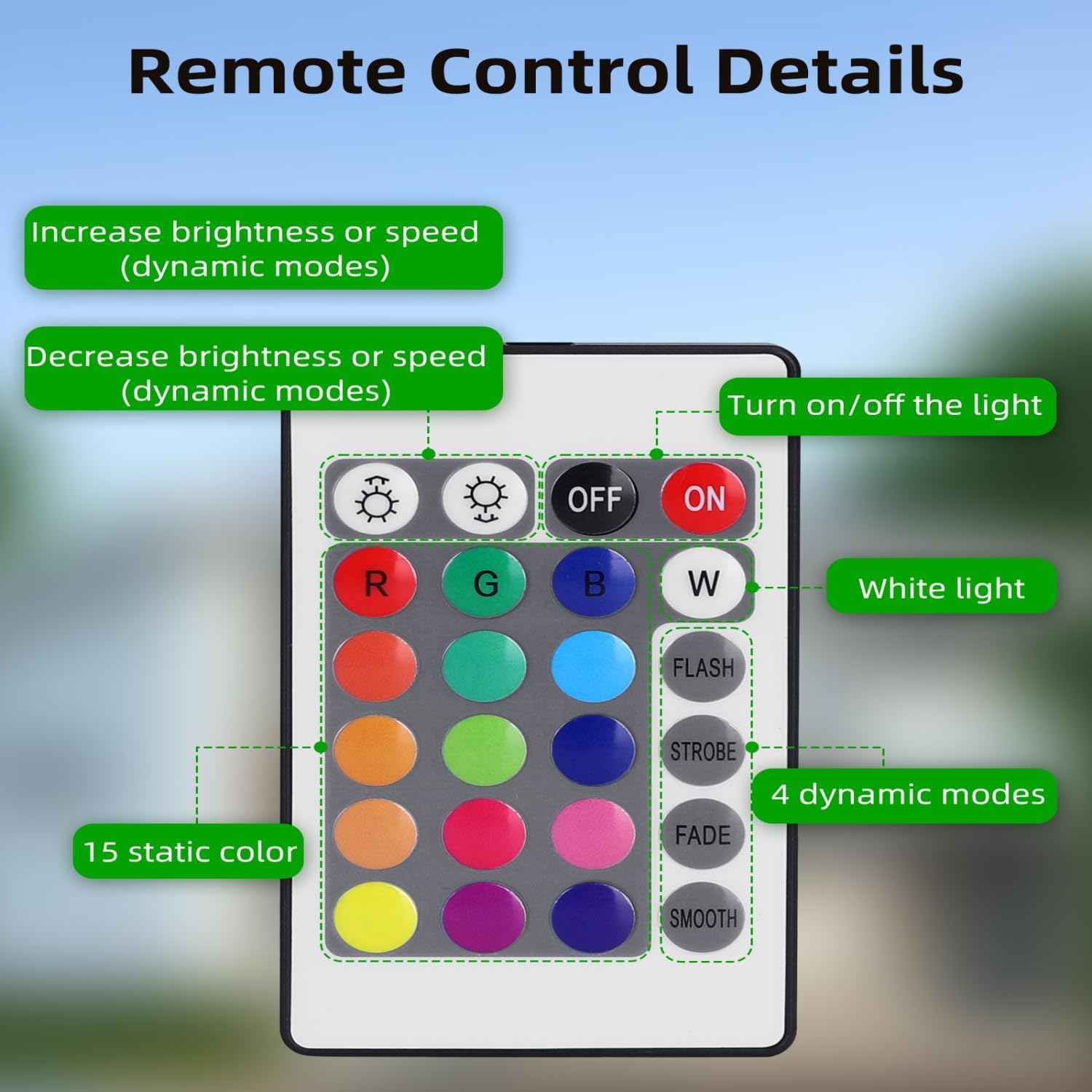
Image: Layout of the remote control, detailing buttons for power, brightness adjustment, 16 static color selections (including White), and 4 dynamic lighting modes.
- ON/OFF קנעפּל: דרוק צו דרייען די ליכט אויף אָדער אַוועק.
- ברייטקייט/גיך אַדזשאַסטמענט: ניצן די + און - buttons to increase/decrease brightness for static colors or adjust speed for dynamic modes.
- סטאַטיק קאָלאָרס: Select from 16 predefined colors, including White (W), Red (R), Green (G), Blue (B), and various shades.
- דינאַמיש מאָדעס:
- פלאַש: שנעלע קאָליר ענדערונגען.
- סטראָבע: Flashing of a single color.
- FADE: Gradual transition between colors.
- SOOTH: Smooth, continuous color cycling.
אָטאַמאַטיק מאָדע:
- The floodlight has a built-in light sensor that automatically turns the light on at dusk and off at dawn.
- To disable Automatic Mode: Press and hold the "OFF" button on the remote control for 3 seconds. The light will flash twice to confirm the mode is deactivated.
- To re-enable Automatic Mode: Press the "ON" button on the remote control.
7. וישאַלט
Regular maintenance ensures the longevity and optimal performance of your solar floodlight.
- זונ פּאַנעל רייניקונג: Clean the solar panel regularly (at least once a year, or more frequently in dusty environments) with a soft, damp cloth. This prevents dust accumulation and maintains charging efficiency.
- אַלגעמיינע רייניקונג: Wipe the floodlight housing with a soft, damp cloth as needed. Do not use abrasive cleaners or solvents.
- באַטערי: The integrated battery is designed for long-term use. Do not attempt to replace it yourself.
- דורכקוק: Periodically check the cables and connections for any signs of wear or damage. Ensure all mounting hardware remains secure.
8. טראָובלעשאָאָטינג
If you encounter issues with your Aigostar Solar LED Floodlight, try the following steps:
- ליכט נישט קערן אויף:
- זיכער מאַכן אַז די זונ - פּאַנעל באַקומט גענוג דירעקט זונשייַן פֿאַר אָפּלאָדן.
- Verify that the cable connection between the solar panel and floodlight is secure.
- Check if the automatic mode is active or if the light was manually turned off via the remote.
- Allow for an initial 24-hour charge before first use.
- Light dim or short working time:
- Clean the solar panel surface to remove any dust or debris that may be obstructing sunlight.
- פאַרזיכערן אַז די זונ טאַפליע איז פּאַזישאַנד פֿאַר מאַקסימום זון ויסשטעלן.
- Cloudy weather or insufficient sunlight will reduce charging efficiency and working time.
- רימאָוט קאָנטראָל נישט ארבעטן:
- Ensure there are no obstructions between the remote and the floodlight.
- קאָנטראָלירט די באַטעריע פֿון דער ווײַטקאָנטראָל און פֿאַרבײַטט אויב נייטיק.
If problems persist, please contact Aigostar customer support.
9. ספּעסאַפאַקיישאַנז
| סאָרט | אַיגאָסטאַר |
| מאָדעל נומער | ZQ-JXRGB-100W |
| מאַכט | 100 וו |
| ליכט קאָליר | RGB |
| באַטאַרייע קאַפּאַציטעט | 8000 מאַה |
| זונ פּאַנעל עפיקאַסי | אַרויף צו 25% |
| וואַסער קעגנשטעל שאַץ | IP66 |
| אַפּערייטינג טעמפּעראַטור | -10°C צו 50°C |
| מאַטעריאַל | אַבס, טעמפּערד גלאז |
| קאָנטראָל מעטאָד | ווײַטקאָנטראָל (אינפֿראַרויט) |
| Cable Length (Solar Panel to Light) | 5 מעטער |
| Dimensions (Floodlight) | Approx. 34L x 35.8W x 26.1H cm (based on product dimensions) |
| נומער פון לייץ | 4 (as per product title, assuming 4-pack) |

Image: Detailed dimensions of the solar panel and floodlight, including the 5-meter connection cable.
10. וואָראַנטי און שטיצן
Aigostar products are manufactured to high-quality standards. For warranty information, please refer to the specific terms provided at the point of purchase or visit the official Aigostar webפּלאַץ.
If you require technical assistance, have questions about your product, or need to report a defect, please contact Aigostar customer support through their official channels. Please have your model number (ZQ-JXRGB-100W) and purchase details ready when contacting support.
איר קענט אָפט געפֿינען שטיצע קאָנטאַקט אינפֿאָרמאַציע אויף דער בראַנד'ס באַאַמטער webוועבזייטל אדער דורך דעם פארקויפער וואו איר האט געקויפט דעם פראדוקט.