
1. הקדמה
Thank you for choosing the BOSGAME P3 Mix Mini PC. This manual provides essential information for setting up, operating, maintaining, and troubleshooting your new mini PC. Please read it carefully before use and retain it for future reference.
2. וואָס איז אין דער קעסטל
באַשטעטיקט אַז אַלע זאכן וואָס זענען אויסגערעכנט אונטן זענען אַרייַנגערעכנט אין אייער פּעקל:
- 1x P3 MIX Mini PC
- 1x HDMI קאַבלע
- 1x VESA Mount & Screws
- 1x מאַכט אַדאַפּטער
- 1x באַניצער מאַנואַל
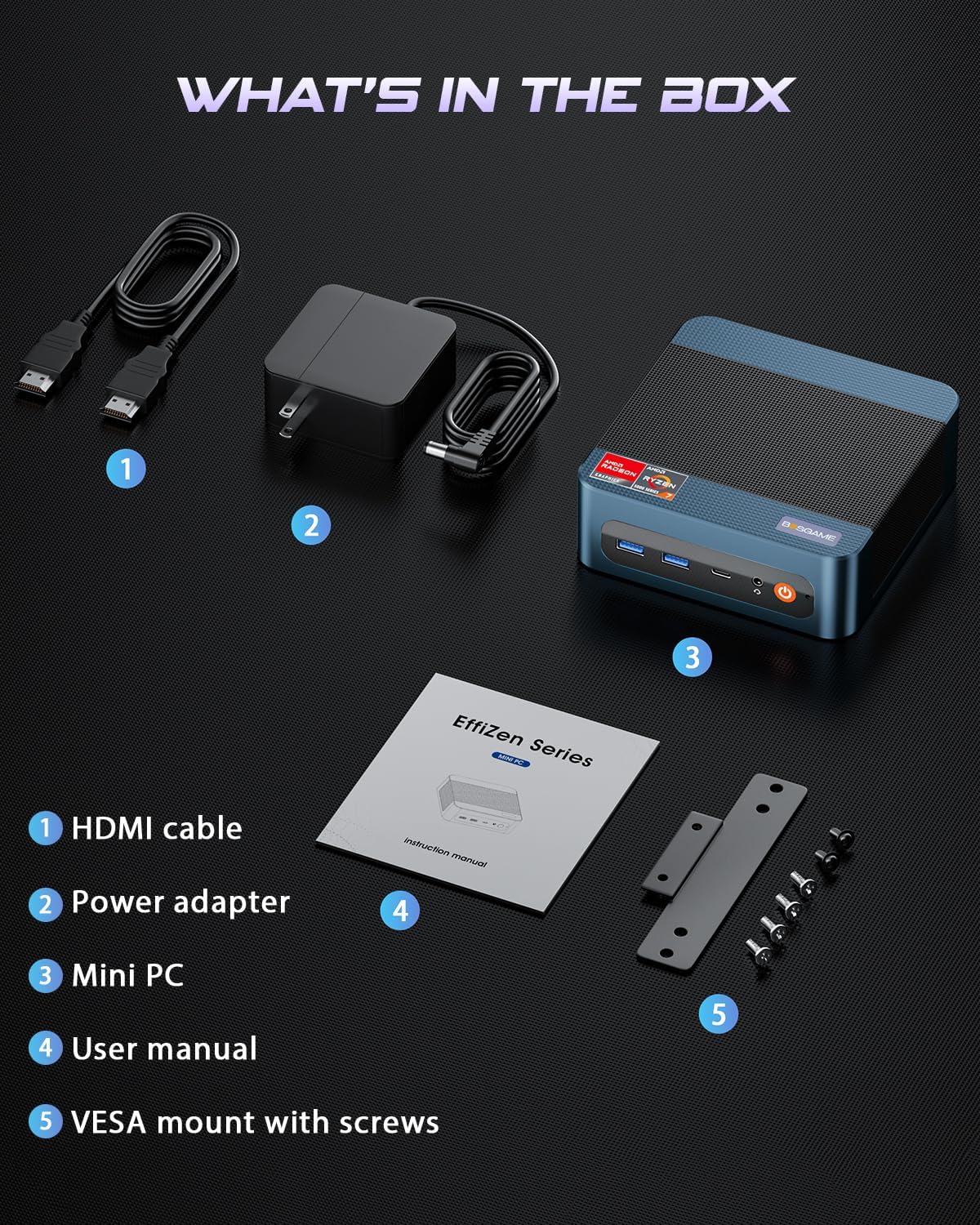
This image displays the BOSGAME P3 Mix Mini PC and its included accessories: an HDMI cable, a power adapter, the mini PC unit, a user manual, and a VESA mount with screws for installation.
3. פּראָדוקט איבערview
The BOSGAME P3 Mix Mini PC is a compact desktop computer designed for various applications, from home office tasks to gaming and 4K video editing. It features a powerful AMD Ryzen 7640HS processor and Radeon 760M graphics.

This image highlights the core specifications of the mini PC, including its AMD Ryzen 5 7640HS processor, AMD Radeon 760M GPU, 16GB DDR5 RAM, 512GB M.2 PCIe 3.0 x4 SSD, support for 8K 60Hz display, USB-4 (40Gbps) connectivity, Wi-Fi 6E AX210, and Bluetooth 5.2.
This diagram illustrates the various input/output ports available on the mini PC, including power input, dual 2.5G LAN, HDMI, DisplayPort, USB 2.0, USB 4, USB 3.2 ports, and a 3.5mm audio jack.
Video 3.1: BOSGAME Ryzen 5 7640HS MINI PC Overviewדאס ווידעא גיט א וויזועלע איבערבליקview of the BOSGAME P3 Mix Mini PC, showcasing its compact design, internal components, port layout, and connectivity features.
4. סעטאַפּ אינסטרוקציעס
4.1 פֿאַרבינדן דעם מאַכט אַדאַפּטער
- Connect the power adapter cable to the DC 19V 6.3 port on the rear of the mini PC.
- צאַפּן די מאַכט אַדאַפּטער אין אַ וואַנט ווענטיל.
4.2 פֿאַרבינדן זיך צו אַן עקראַן
The P3 Mix Mini PC supports triple display output via HDMI, DisplayPort, and USB4.
- Connect one end of an HDMI cable to the HDMI port on the mini PC and the other end to your monitor.
- For additional displays, connect a DisplayPort cable to the DP port and/or a USB4 cable to the USB4 port, then connect to your respective monitors.
- זייט זיכער אז אייערע מאָניטאָרן זענען אנגעצונדן און איינגעשטעלט צו דער ריכטיקער אינפוט מקור.

This image demonstrates how to set up a triple display configuration with the mini PC, utilizing the DP 1.4, HDMI 2.0, and USB4 ports to connect to multiple monitors.
4.3 קאַנעקטינג פּעריפעראַלס
- Connect your USB keyboard and mouse to any available USB ports (USB 2.0, USB 3.2).
- פֿאַר דראָטיקער נעץ אַקסעס, פֿאַרבינדט אַן עטהערנעט קאַבל צו איינעם פֿון די 2.5G לאַן פּאָרטן.
- For audio output, connect speakers or headphones to the 3.5mm audio jack.
4.4 ערשט מאַכט אויף
- After connecting all necessary cables, press the power button located on the front of the mini PC.
- The system will boot up, and you should see the operating system on your connected display(s).
5. אַפּערייטינג ינסטרוקטיאָנס
5.1 מאַכט אויף / אַוועק
- צו מאַכט אויף: דרוק די מאַכט קנעפּל אַמאָל.
- צו פאַרמאַכן אַראָפּ: From the operating system, select 'Shut Down'. Alternatively, press and hold the power button for 5 seconds to force a shutdown (use only when necessary).
- צו ריסטאַרט: From the operating system, select 'Restart'.
5.2 נעץ קאָנעקטיוויטי
- ווייערד קשר: Connect an Ethernet cable to one of the two 2.5G LAN ports. The system will automatically detect the connection.
- Wireless Connection (Wi-Fi 6E): Navigate to your operating system's network settings, select the desired Wi-Fi network, and enter the password.
5.3 בלועטוט קאָנעקטיוויטי
The mini PC supports Bluetooth 5.2 for connecting wireless peripherals.
- מאַכן זיכער אַז דיין בלועטאָאָטה מיטל איז אין פּערינג מאָדע.
- On your mini PC, go to the operating system's Bluetooth settings.
- זוכן פֿאַר and select your device to pair.
6. וישאַלט און ופּגראַדעס
6.1 ראַם און SSD אַפּגרעידס
The BOSGAME P3 Mix Mini PC allows for easy upgrades of its DDR5 RAM and M.2 PCIe SSD. Always power off and unplug the device before performing any internal maintenance.

This image provides a visual guide for upgrading the RAM and SSD. The process involves removing screws, carefully opening the base plate, repositioning the system fan, and then replacing the memory modules and SSD.
- מאַכט אַוועק און אָפּשטויסן: Ensure the mini PC is completely powered off and disconnected from the power source.
- אַראָפּנעמען סקרוז: Locate and remove the screws securing the bottom panel.
- Open Base Plate: Carefully open the base plate to access the internal components.
- צוטריט קאָמפּאָנענטן: You may need to gently move the system fan or other components to gain full access to the RAM and SSD slots.
- Replace RAM/SSD: Install new DDR5 SO-DIMM RAM modules into the dual channel slots (up to 64GB supported) or a new M.2 2280 NVMe PCIe 3.0 SSD (up to 4TB per slot, 8TB total capacity).
- ריאַסעמבאַל: Carefully reassemble the mini PC, ensuring all connections are secure and screws are tightened.
6.2 רייניקונג
- Regularly clean the exterior of the mini PC with a soft, dry cloth.
- Use compressed air to clear dust from ventilation grilles to ensure optimal airflow and prevent overheating. Do not insert objects into the vents.
7. טראָובלעשאָאָטינג
7.1 קיין מאַכט
- זיכער מאַכן אַז דער מאַכט אַדאַפּטער איז זיכער פארבונדן צו ביידע די מיני פּיסי און אַ אַרבעטנדיק מאַכט ווענטיל.
- באַשטעטיקן אַז די עלעקטרישע ווענטיל אַרבעט דורך אַרײַנשטעקן אַן אַנדער דעוויס.
- פּרוּווט אַן אַנדערן מאַכט אַדאַפּטער אויב עס איז פֿאַראַן און קאָמפּאַטיבל.
7.2 קיין אַרויסווייַזונג רעזולטאַט
- Check all display cable connections (HDMI, DP, USB4) between the mini PC and the monitor(s).
- Ensure the monitor(s) are powered on and set to the correct input source.
- Try connecting to a single monitor using a different cable or port.
- If you recently reinstalled the operating system, ensure all display drivers are correctly installed. Some users have reported needing specific drivers from the manufacturer for optimal display performance.
7.3 נעץ קאָנעקטיוויטי פּראָבלעמען
- ווייערד: קאָנטראָלירט די עטערנעט קאַבל פֿאַרבינדונג. באַשטעטיקט אַז אייער ראַוטער/מאָדעם אַרבעט ריכטיק.
- ווירעלעסס: Ensure Wi-Fi is enabled in your operating system settings. Re-enter the Wi-Fi password. Restart your router/modem.
7.4 פּראָבלעמען מיט פאָרשטעלונג
- שליסט אומנייטיקע אַפּליקאַציעס וואָס לויפן אין הינטערגרונט.
- Ensure the mini PC has adequate ventilation and is not overheating.
- Check for operating system updates and driver updates.
- Verify that the RAM and SSD are properly seated if you have performed an upgrade.
8. ספּעסאַפאַקיישאַנז
| שטריך | באַשרייַבונג |
|---|---|
| סאָרט | BOSGAME |
| מאָדעל נאָמען | P3 |
| קפּו מאָדעל | AMD Ryzen 5 7640HS (6C/12T, ביז 5.0 GHz) |
| גראַפיקס קאָופּראַסעסער | Radeon 760M (Integrated) |
| באַראַן זכּרון | 16GB DDR5 4800MHz (2x8GB), Max 64GB |
| זכּרון סטאָרידזש קאַפּאַסיטי | 512GB PCIe 3.0 SSD (M.2 2280), Max 8TB (2x4TB) |
| אָפּערייטינג סיסטעם | OS11 Support Win/Ubuntu/Linux |
| וידאו רעזולטאַט צובינד | HDMI 2.0, DisplayPort 1.4, USB4 (8K@60Hz) |
| קאַנעקטיוויטי טעכנאָלאָגיע | Dual 2.5G LAN, Wi-Fi 6E (802.11ax), Bluetooth 5.2 |
| וסב פּאָרץ | 3x USB 3.2 (10Gbps), 1x USB 4 (40Gbps), 2x USB 2.0 (480Mbps) |
| אַודיאָ רעזולטאַט | 3.5 מם אַודיאָ דזשאַק |
| פּונקט וואָג | 1.26 קילאָגראַמס |
| מאַכט פּלוג טיפּ | Type A - 2 pin (North American) |
9. וואָראַנטי און שטיצן
9.1 וואָראַנטי אינפֿאָרמאַציע
BOSGAME offers a 1-year limited warranty for the P3 Mix Mini PC. This warranty covers manufacturing defects and ensures product quality.
9.2 קונה שטיצן
For any product-related inquiries, technical assistance, or warranty claims, please contact BOSGAME customer support. You can reach out via the following methods:
- בליצפּאָסט: Qingzhuomao@163.com
- אָנליין: Visit the BOSGAME store on Amazon or their official webוועבזייטל פֿאַר אָפֿט געשטעלטע פֿראַגעס און שטיצע רעסורסן.
A professional after-sales team is available to assist you with your needs.