
1. הקדמה
This manual provides detailed instructions for the setup, operation, maintenance, and troubleshooting of your Muddy Pro Cam 20 MP Trail Camera. Please read this manual thoroughly before using the camera to ensure proper function and longevity of the device. The Muddy Pro Cam 20 MP is designed for capturing high-resolution images and videos of wildlife with its 20MP sensor and 720p video capabilities.

פיגורע 1: פראָנט view of the Muddy Pro Cam 20 MP Trail Camera.
2. פּעקל אינהאַלט
באַשטעטיקט אַז אַלע זאכן וואָס זענען אויסגערעכנט אונטן זענען אַרייַנגערעכנט אין אייער פּעקל:
- Muddy Pro Cam 20 Megapixel Trail Camera with Video Function
3. שליסל פֿעיִקייטן
- הויך-האַכלאָטע ימאַגינג: 20MP camera with 850nm LEDs for clear day and night captures. Supports 20MP, 8MP, and 4MP resolution images.
- הויך-דעפֿיניציע ווידעא: Captures 720p videos at 30 frames per second (FPS).
- שנעלע טריגער גיכקייט: 0.5-second trigger speed to capture quick movements.
- Versatile Burst Mode: Captures 1 to 3 images per triggering event.
- Extensive Detection Range: 80-foot detection range for broad coverage.
- מאַכט מקור: Operates on eight AA batteries.
- זיכערהייט: Integrated Python lock latch for theft deterrence.
4. סעטאַפּ
4.1. באַטאַרייע ייַנמאָנטירונג
- עפֿנט די קאַמעראַ הויזינג לאַטש.
- געפינען די באַטאַרייע אָפּטייל.
- Insert eight (8) AA batteries, ensuring correct polarity (+/-) as indicated inside the compartment.
- פאַרמאַכן די באַטאַרייע אָפּטייל סיקיורלי.
4.2. סד קאַרד ינסטאַללאַטיאָן
- מיט די קאַמעראַ אויסגעלאָשן, זוכט דעם SD קאַרטל שפּאַלט.
- Insert a standard SD card (up to 32GB, not included) into the slot with the metal contacts facing down, until it clicks into place.
- To remove, press the SD card gently to release it.
4.3. מאָונטינג די קאַמעראַ
The camera can be mounted using the included strap or a compatible mounting accessory.
- Select a suitable location, such as a tree or post, ensuring a clear view פון דער געוואלט געגנט.
- Thread the mounting strap through the slots on the back of the camera.
- Securely fasten the strap around the mounting surface.
- Adjust the camera angle to optimize the field of view and detection zone.
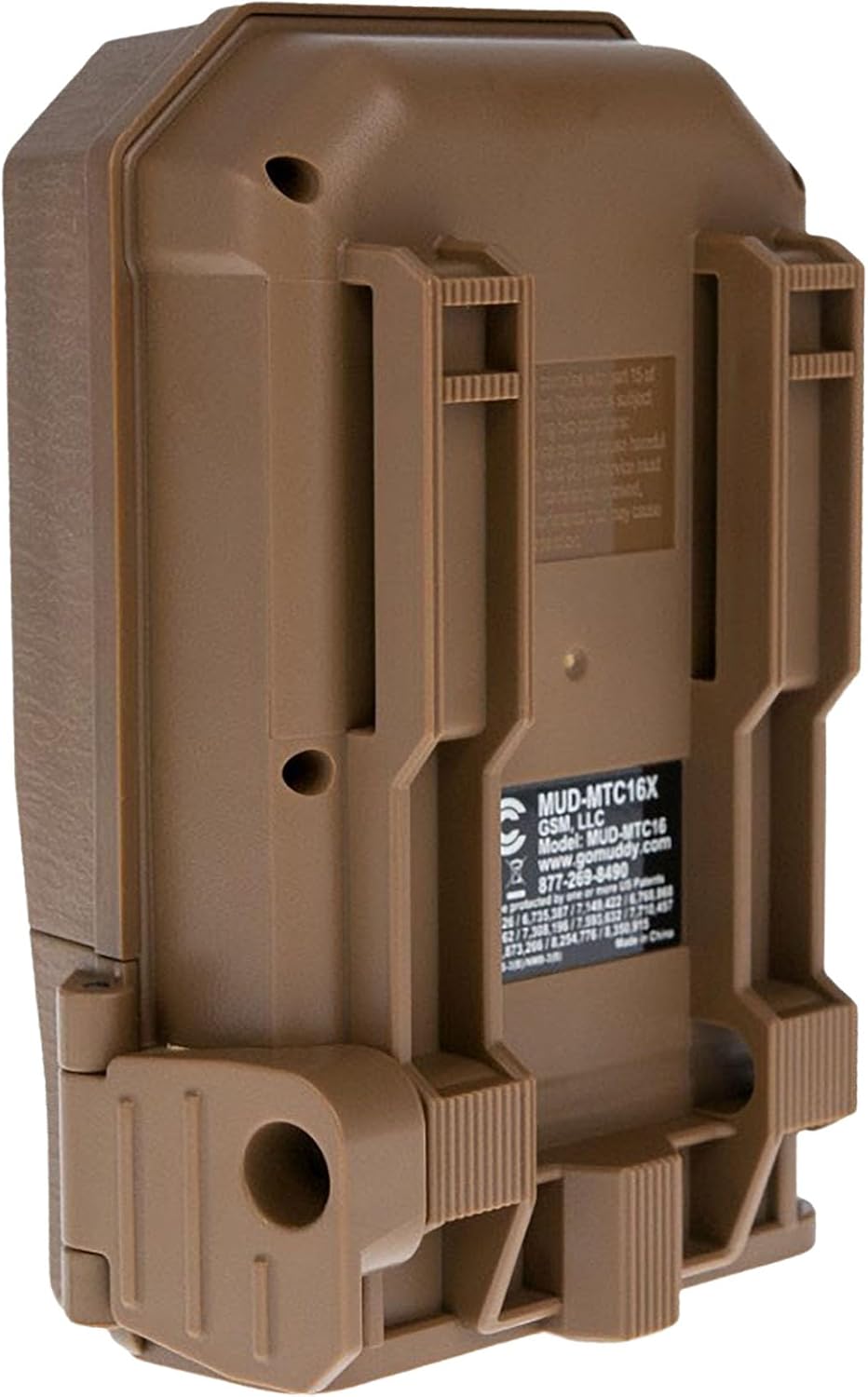
פיגורע 2: צוריק view of the camera showing mounting slots and product label.
5. אַפּערייטינג ינסטרוקטיאָנס
5.1. פּאָווערינג אויף / אויסגעלאשן
- To power on, slide the power switch to the 'ON' position. The camera will perform a self-check.
- צו אויסלאָשן, רוקט דעם מאַכט קנעפּל צו דער 'אויס' פּאָזיציע.
5.2. מעניו נאַוויגאַציע
Use the navigation buttons (Up, Down, Left, Right, OK) to move through the menu options and confirm selections. The display screen will show current settings.
5.3. פאָטאָ מאָדע סעטטינגס
In the menu, navigate to 'Photo Settings' to adjust:
- רעזאלוציע: Select 20MP, 8MP, or 4MP for image quality. Higher resolution results in larger file סיזעס.
- פּלאַצן מאָדע: Set the number of images captured per trigger (1 to 3 photos).
- פאַרהאַלטן: Set the time interval between consecutive triggers.
5.4. וידאו מאָדע סעטטינגס
In the menu, navigate to 'Video Settings' to adjust:
- רעזאלוציע: Set to 720p for video capture.
- ווידעא לענג: Specify the duration of each video clip.
- אַודיאָ רעקאָרדינג: Enable or disable audio capture with video.
5.5. Detection and Trigger
The camera features an 80-foot detection range and a 0.5-second trigger speed. Ensure the detection area is clear of obstructions that might cause false triggers, such as swaying branches.
6. וישאַלט
6.1. באַטערי פאַרבייַט
When the battery indicator shows low power, replace all eight AA batteries with new ones to ensure optimal performance and prevent data loss.
6.2. סד קאָרט מאַנאַגעמענט
Regularly check the SD card capacity. Format the SD card periodically to maintain optimal performance and prevent corruption. Always power off the camera before inserting or removing the SD card.
6.3. רייניקונג
Use a soft, dry cloth to clean the camera lens and housing. Avoid using abrasive cleaners or solvents. Ensure the camera is dry before closing the housing.
7. טראָובלעשאָאָטינג
- די אַפּאַראַט מאַכט נישט אויף: קאָנטראָלירט די באַטעריע אינסטאַלאַציע און זיכערט זיך אַז די באַטעריעס זענען פריש.
- No images/videos captured: Verify SD card is inserted correctly and has sufficient space. Check camera settings for proper mode selection and trigger delay.
- שלעכטע בילד/ווידעא קוואַליטעט: Ensure the lens is clean. Check resolution settings.
- פאַלשע טריגערס: Adjust camera placement to avoid moving branches or excessive sunlight in the detection zone.
8. ספּעסאַפאַקיישאַנז
| שטריך | באַשרייַבונג |
|---|---|
| מאָדעל נומער | MUD-MTC20X |
| בילד האַכלאָטע | 20 מפּ, 8 מפּ, 4 מפּ |
| ווידעא האַכלאָטע | 720p @ 30 FPS |
| דעטעקשאַן ראַנגע | 80 פֿיס |
| צינגל ספּיד | 0.5 סעקונדעס |
| פלאַש זכּרון טיפּ | SD (ביז 32 גיגאבייט) |
| מאַכט מקור | 8 רענטגענ אַאַ באַטעריז |
| פאָטאָ סענסאָר טעכנאָלאָגיע | קמאָס |
| קאַנעקטיוויטי טעכנאָלאָגיע | ינפרערעד |
| פּונקט וואָג | 12.3 אונסעס |
| פּראָדוקט דימענשאַנז | 1 X 1 X 1 אינטשעס |
9. וואָראַנטי אינפֿאָרמאַציע
For detailed warranty information, please refer to the official MUDDY webזייטל אדער קאנטאקט קאסטומער סופארט. האלט אייער קויף קוויטל אלס באווייז פון קויפן.
10. שטיצן
If you require further assistance or have questions not covered in this manual, please visit the MUDDY support page on their official webזייטל אדער קאנטאקטירן זייער קאסטומער סערוויס דעפארטמענט. קאנטאקט אינפארמאציע קען געווענליך געפונען ווערן אויף דער פראדוקט פאקאדזש אדער דעם פאבריקאנט'ס webפּלאַץ.