
Beetel B29 Corded Landline Phone User Manual
מאָדעל: B29
1. הקדמה
This manual provides comprehensive instructions for the setup, operation, and maintenance of your Beetel B29 Corded Landline Phone. Please read this manual carefully before using the product to ensure proper functionality and longevity.

Image: The Beetel B29 Corded Landline Phone in grey and white, showcasinג זײַן גלאַטן דיזײַן.
2. פּעקל אינהאַלט
באַשטעטיקן אַז אַלע זאכן זענען פאַראַן אין פּעקל:
- Beetel B29 Corded Landline Phone Unit
- כאַנדסעט
- קוילד כאַנדסעט שנור
- שורה שנור
- באַניצער מאַנואַל
3. סעטאַפּ
Follow these steps to set up your Beetel B29 phone:
3.1 פֿאַרבינדן דעם טעלעפֿאָן
- פֿאַרבינדן דעם האַנדסעט: Plug one end of the coiled handset cord into the handset and the other end into the jack labeled with a handset icon on the side of the phone base.
- פֿאַרבינדט דעם ליניע שנור: Plug one end of the line cord into the jack labeled with a telephone icon on the back of the phone base. Plug the other end into your telephone wall jack.

בילד: הינטערשטע view of the Beetel B29 phone, illustrating the connection points for the handset and line cords.
3.2 פּלאַצירונג אָפּציעס
The Beetel B29 offers flexible placement:
- שרייַבטיש באַרג: Place the phone on any flat surface. Ensure the cords are not tangled.
- וואנט בארג: The phone can be mounted on a wall. Use appropriate screws (not included) and the integrated wall-mount slots on the base.
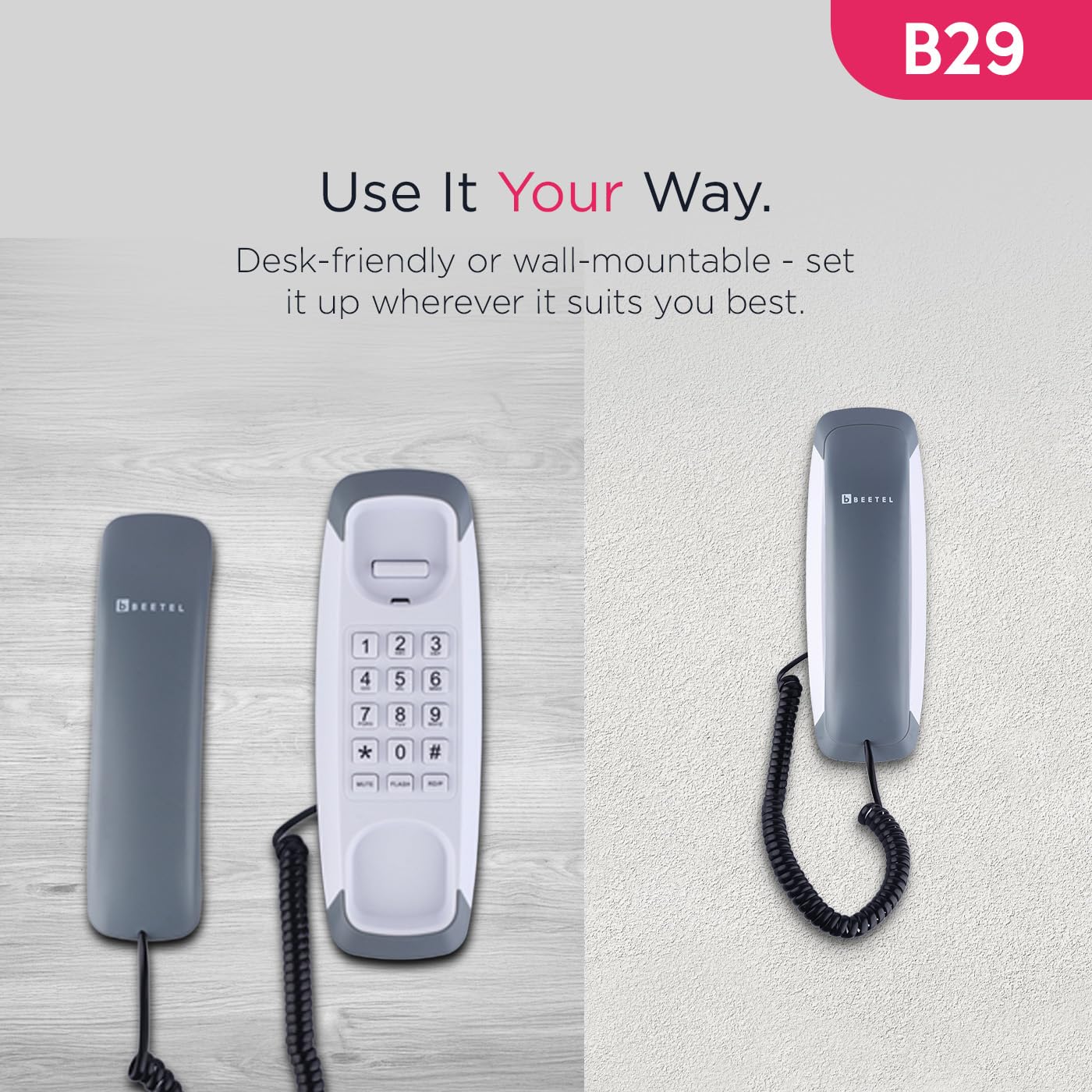
Image: The Beetel B29 phone shown in a wall-mounted configuration, demonstrating its versatility.
4. אַפּערייטינג ינסטרוקטיאָנס
4.1 מאַכן אַ רוף
- הייבן די כאַנדסעט.
- הערן פֿאַר אַ רעדל טאָן.
- דייעל די געוואונטשענע טעלעפאָן נומער ניצנדיק די קלאַוויאַטור.
- Once the call is complete, replace the handset.
4.2 באַקומען אַ רוף
- ווען דער טעלעפאָן קלינגט, הייבט אויף דעם האַנדסעט צו ענטפֿערן דעם רוף.
- Once the call is complete, replace the handset.
4.3 Ringer Volume Control
The ringer volume can be adjusted using the switch located on the side or bottom of the phone base. Select between high and low volume settings according to your preference.
4.4 ספּעציעלע פאַנגקשאַנז
The Beetel B29 includes several convenient features:
- ווידער-דייאַל פונקציע: דרוק די אָפּלייקענונג קנעפּל צו אויטאָמאַטיש רופן די לעצטע גערופן נומער.
- פלאַש פֿונקציע: דרוק די בליץ button to switch between calls or access network services (e.g., call waiting) if supported by your telephone service provider.
- שטום פֿונקציע: דרוק די שטום button during a call to temporarily disable your microphone, allowing you to speak privately without the other party hearing you. Press again to unmute.
- Tone/Pulse Dialing: The phone supports both Tone (DTMF) and Pulse dialing modes, ensuring compatibility with various telephone systems. This setting is usually configured automatically or via a switch on the phone base.

Image: Close-up of the Beetel B29 keypad, highlighting the Redial, Flash, and Mute function buttons.
5. וישאַלט
To ensure the longevity and optimal performance of your Beetel B29 phone:
- רייניקונג: ווישט די טעלעפאָן'ס ייבערפלאַך מיט אַ ווייכן, דamp שטאָף. ניצט נישט קיין שרײַבנדיקע רייניגער אָדער סאָלווענטן, ווײַל די קענען שאַטן די ענדיקונג.
- ויסמיידן ליקווידס: האַלט דעם טעלעפאָן אַוועק פון וואַסער און אַנדערע פליסיקייטן.
- טעמפּעראַטור: Store and operate the phone in a moderate temperature environment.
- קאָרד זאָרגן: Avoid stretching or tangling the handset and line cords excessively to prevent damage.
6. טראָובלעשאָאָטינג
If you encounter issues with your Beetel B29 phone, refer to the following common problems and solutions:
| פּראָבלעם | מעגלעך סיבה | לייזונג |
|---|---|---|
| קיין רעדל טאָן | Line cord not connected properly; service outage. | Ensure the line cord is securely plugged into both the phone and the wall jack. Check with your service provider for outages. |
| קען נישט הערן דעם רופער / רופער קען מיך נישט הערן | Handset cord loose; Mute function activated. | Check that the handset cord is securely connected. If you cannot be heard, ensure the Mute function is not active. |
| דער טעלעפאָן קלינגט נישט | Ringer volume set to low; service issue. | Adjust the ringer volume switch to a higher setting. Verify with your service provider if the issue persists. |
| Cannot dial out | No dial tone; incorrect dialing mode. | Check for a dial tone. Ensure the phone is set to the correct Tone/Pulse dialing mode for your telephone line. |
7. ספּעסאַפאַקיישאַנז
Key technical specifications for the Beetel B29 Corded Landline Phone:
| שטריך | דעטאַל |
|---|---|
| מאָדעל | B29 |
| פּראָדוקט דימענשאַנז | 20 X 8 X 8 סענטימעטער |
| פּונקט וואָג | 400 ג |
| מאַונטינג אָפּציעס | Desk / Wall Mountable |
| דיאַלינג מאָדע | Tone / Pulse |
| פאַנגקשאַנז | Redial, Flash, Mute |
| Ringer Control | אַדזשאַסטאַבאַל באַנד |
| פאַבריקאַנט | Beetel Teletech Limited |
| לאַנד פון אָריגין | אינדיע |
8. וואָראַנטי און שטיצן
For warranty information, please refer to the documentation included with your product packaging or visit the official Beetel website. For technical support or service inquiries, please contact Beetel customer service through their official channels.
פאַבריקאַנט: Beetel Teletech Limited
Webפּלאַץ: www.beetel.in (עקסampדער לינק, דער פאקטישער לינק קען זיין אנדערש)