
1. פּראָדוקט איבערview
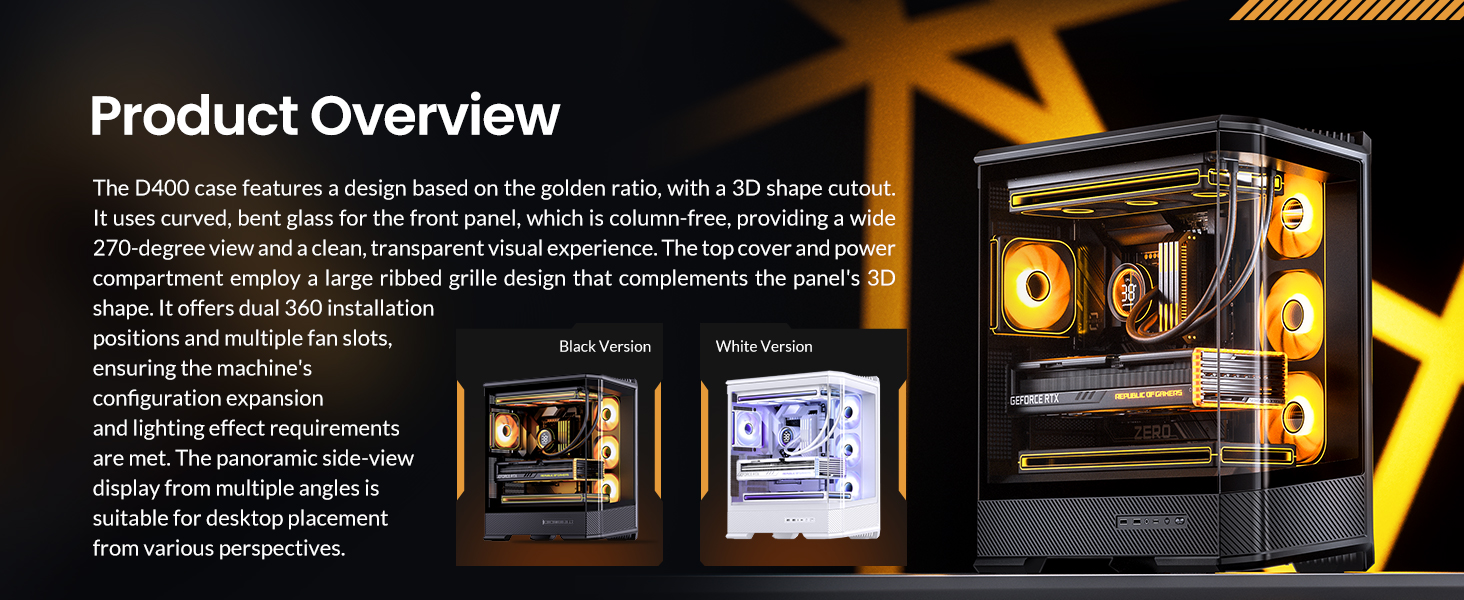
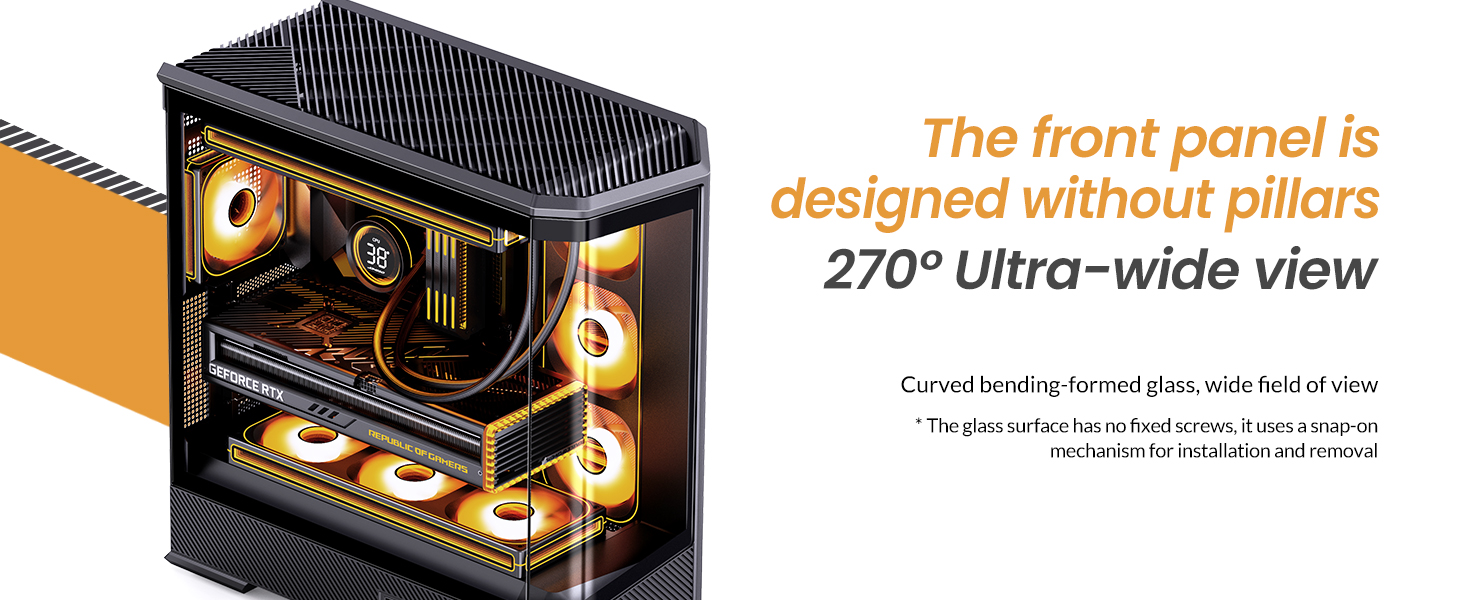
The JONSBO D400 is a white ATX Mid-Tower PC case featuring a three-dimensional beveled curved glass design, allowing for clear visibility of internal hardware. It supports BTF motherboards, ATX power supplies, and dual 360mm AIO liquid coolers, offering extensive cooling and component compatibility.
שליסל פֿעיִקייטן:
- דימענסיעס: 488mm (L) x 239mm (W) x 514mm (H) (including feet).
- פּלאַן: Three-dimensional beveled curved glass for enhanced aesthetics and hardware visibility.
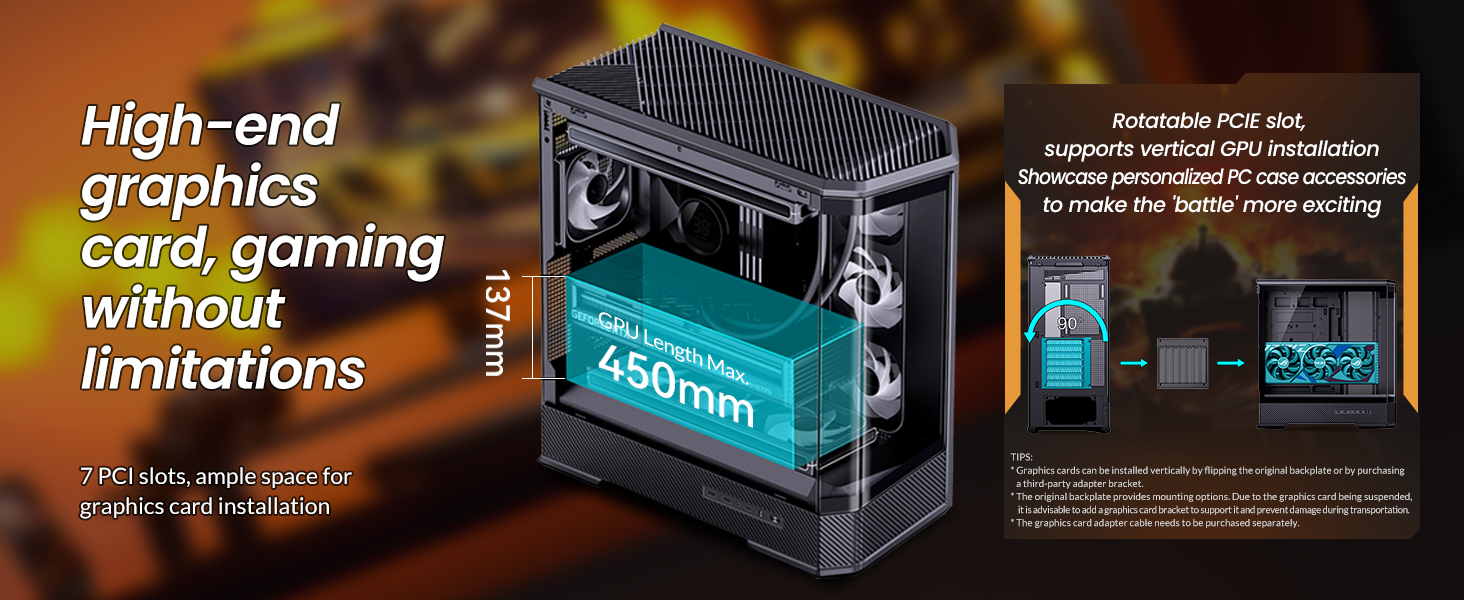
- גפּו שטיצן: Graphics cards up to 450mm in length.
- PSU שטיצן: ATX PS2 power supplies.
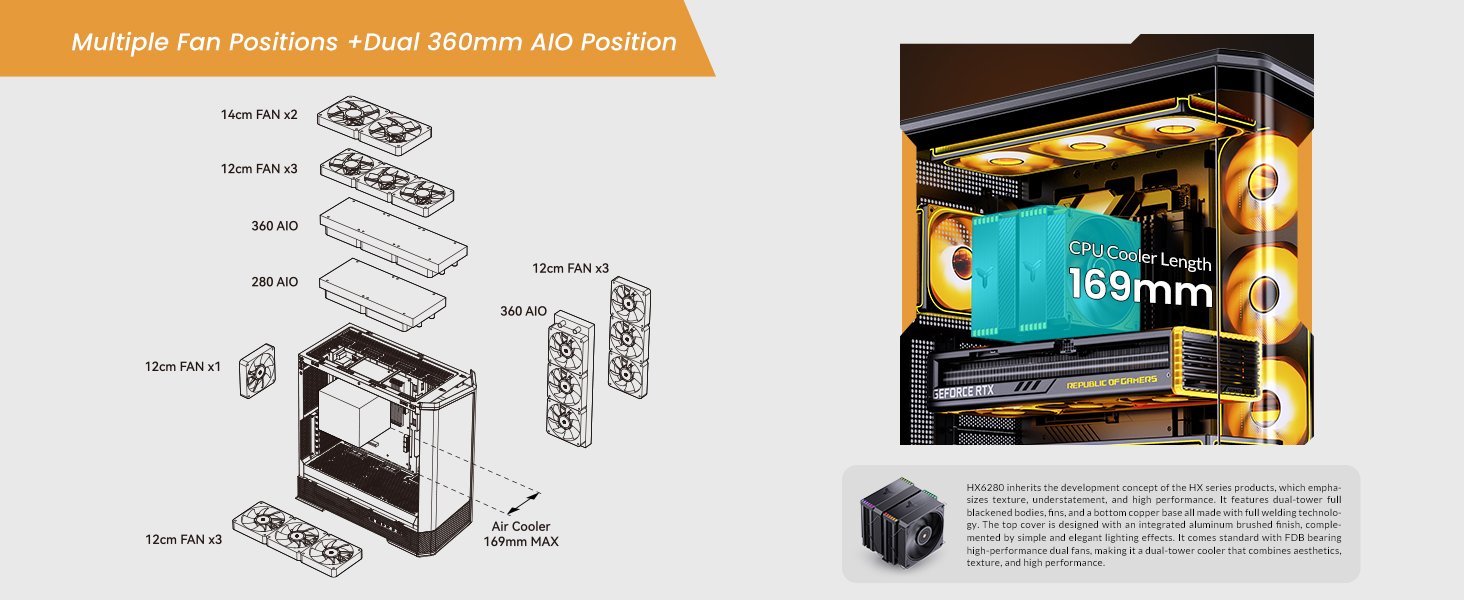
- Air Cooling: CPU coolers up to 169mm in height.
- Liquid Cooling (AIO): Supports top-mounted 240mm, 280mm, or 360mm AIOs, and side-mounted 360mm AIOs.
- Fan Positions: Up to 10 fan positions for optimal airflow (Top: 3x120mm/2x140mm; Side: 3x120mm; Rear: 1x120mm; Power Compartment: 3x120mm).
- דרייוו בייס: Flexible storage options including 2x 2.5" SSDs, or 1x 3.5" HDD + 1x 2.5" SSD (back side), and 1x 2.5" SSD or 1x 3.5" HDD (PSU compartment).
- פראָנט I/O: 1x USB3.2 Gen2 Type-C, 2x USB3.0, 1x AUDIO + 1x MIC (2-in-1).
- יקספּאַנשאַן סלאָץ: 7.

2. ספּעסאַפאַקיישאַנז
| שטריך | דעטאַל |
|---|---|
| סאָרט | דזשאָנסבאָ |
| מאָדעל נאָמען | D400 |
| טיפּ פון קאַסטן | מיד טאַוער |
| קאָליר | ווייַס |
| מאַטעריאַל | מעטאַל |
| פּראָדוקט דימענשאַנז (LxWxH) | 19.21 X 9.21 X 20.43 אינטשעס (488 X 239 X 514 מם) |
| פּונקט וואָג | 23.6 פונט |
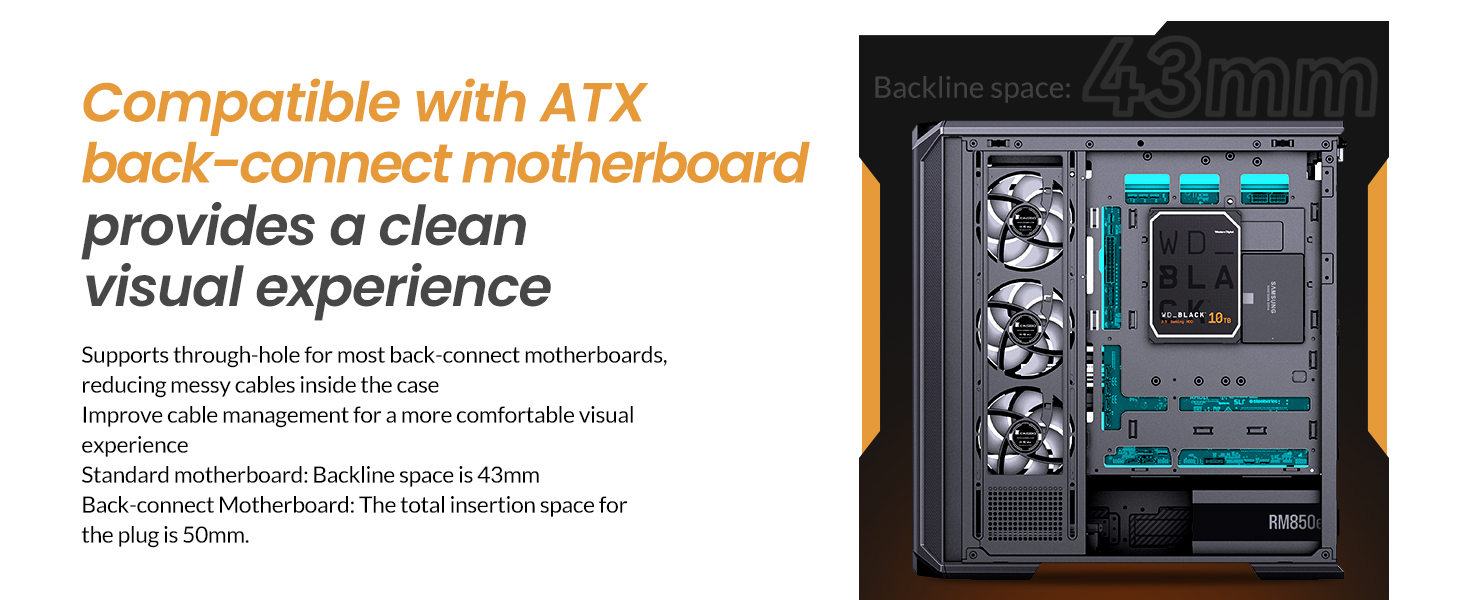
| מאָטהערבאָאַרד קאַמפּאַטאַבילאַטי | ATX, Micro ATX, Mini ITX, BTF Motherboard |
| GPU Length (Max) | ≤450מם |
| CPU Cooler Height (Max) | 169 מם |
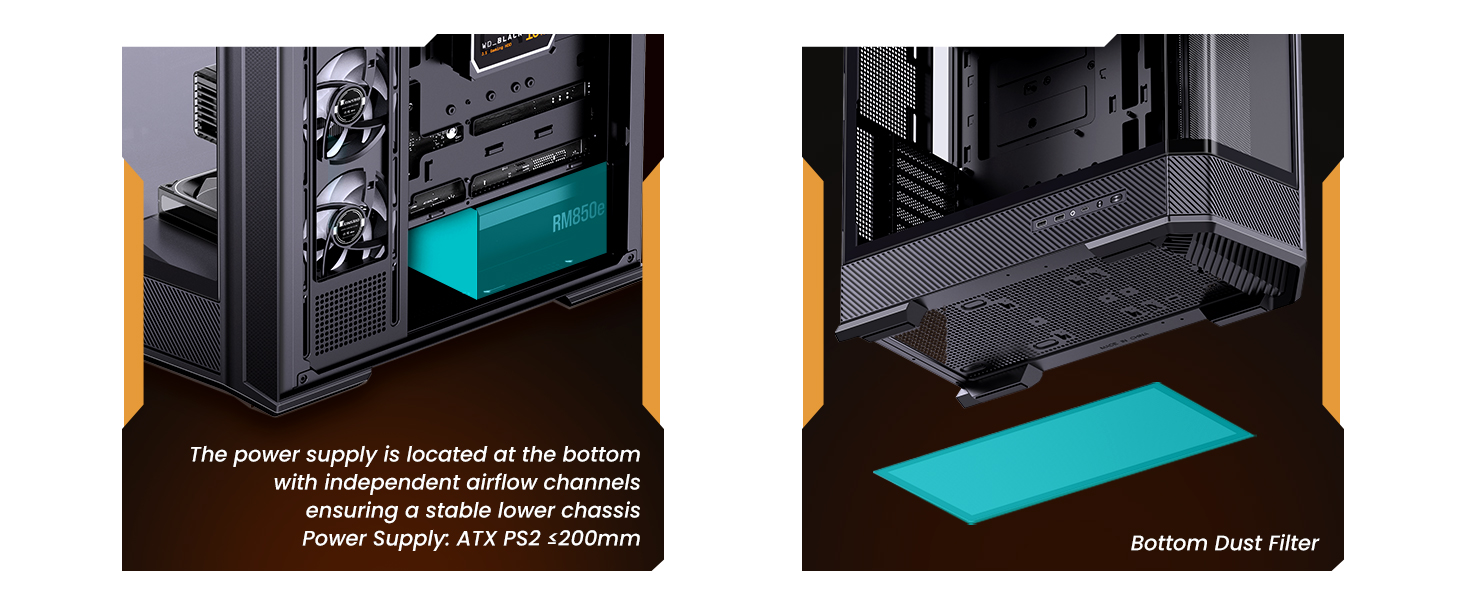
| PSU שטיצן | ATX PS2 (≤200mm), Bottom Mount |
| AIO שטיצע | Top: 240mm/280mm/360mm (optional); Side: 360mm (optional) |
| Fan Positions | Top: 3x120mm/2x140mm; Side: 3x120mm; Rear: 1x120mm; Power Compartment: 3x120mm |
| פאָר בייס | Back Side: 2x 2.5" SSD or 1x 3.5" HDD + 1x 2.5" SSD; PSU Compartment: 1x 2.5" SSD or 1x 3.5" HDD |
| פראָנט איך / אָ פּאָרץ | 1x USB3.2 Gen2 Type-C, 2x USB3.0, 1x AUDIO + 1x MIC (2-in-1) |
| יקספּאַנשאַן סלאָץ | 7 |
3. סעטאַפּ און ייַנמאָנטירונג
This section provides general guidelines for installing components into your JONSBO D400 PC case. Always refer to the specific manuals for your individual components (motherboard, GPU, PSU, etc.) for detailed instructions.
3.1 צוגרייטן דעם פאַל
- Carefully remove the side glass panels. The beveled curved glass design allows for easy access.
- Identify the motherboard standoffs. Ensure they match your motherboard's form factor (ATX, Micro ATX, Mini ITX, or BTF).

3.2 מאָטהערבאָאַרד ינסטאַללאַטיאָן
- Align your motherboard with the standoffs in the case.
- באַפֿעסטיקן די מאַדערבאָרד מיט די צוגעשטעלטע שרויפֿן.
- Connect the front I/O cables (USB 3.0, USB Type-C, Audio, Power/Reset switches, LED indicators) to the appropriate headers on your motherboard.
3.3 מאַכט סופּפּלי יוניט (פּסו) ינסטאַלירונג
- The JONSBO D400 supports ATX PS2 power supplies and features a bottom-mount design.
- Install the PSU into its designated compartment at the bottom rear of the case.
- באַזײַטיקט די PSU מיט שרויפן.
- פירט די נויטיקע מאַכט קייבאַלז דורך די קאַבל פאַרוואַלטונג אויסשניטן.
3.4 גראַפיקס קאַרטל (GPU) ינסטאַלירונג
- דער קעיס שטיצט GPUs ביז 450 מ״מ אין לענג.
- אַראָפּנעמען די נייטיקע יקספּאַנשאַן סלאָט דעקל אויף די הינטערשטע טייל פון די קעסטל.
- Insert your GPU into the primary PCIe slot on your motherboard and secure it with screws.
- Connect the required PCIe power cables from your PSU to the GPU.
3.5 Cooling System Installation (Fans & AIO)
- The D400 offers 10 fan positions: Top (3x120mm/2x140mm), Side (3x120mm), Rear (1x120mm), and Power Compartment (3x120mm).
- For AIO liquid coolers, the case supports up to 360mm radiators on the top and side.
- Install fans or radiators into your desired positions, ensuring proper airflow direction (intake/exhaust).
- Connect fan and AIO pump cables to your motherboard headers or a fan controller.
3.6 סטאָרידזש דרייוו אינסטאַלאַציע
- The case provides mounting options for 2.5" SSDs and 3.5" HDDs.
- Install your drives into the designated drive bays (back side of motherboard tray or PSU compartment).
- Secure the drives with screws and connect SATA data and power cables.

4. אַפּערייטינג ינסטרוקטיאָנס
Once all components are installed and secured, and the side panels are reattached, your JONSBO D400 PC is ready for operation.
4.1 מאַכט אויף
- Ensure all external cables (power, monitor, peripherals) are securely connected.
- Flip the power switch on your PSU to the 'On' position.
- Press the power button on the front I/O panel of your case to start your system.
4.2 Using Front I/O Ports
The front I/O panel provides convenient access to various ports:
- USB3.2 Gen2 Type-C: פֿאַר הויך-גיכקייט דאַטן אַריבערפירן מיט קאָמפּאַטיבלע דעוויסעס.
- וסב 3.0: For connecting USB devices such as external drives, keyboards, and mice.
- AUDIO (2-in-1): For connecting headphones or headsets with a combined audio/microphone jack.
5. וישאַלט
רעגולערע אויפהאלטונג העלפט זיכער מאכן די בעסטע פאָרשטעלונג און לאַנגלעבעדיקייט פון אייערע פּיסי קאָמפּאָנענטן.
5.1 Cleaning Dust Filters
- The JONSBO D400 features a removable bottom dust filter.
- Periodically remove and clean the dust filter to prevent dust buildup and maintain good airflow.
- Use compressed air or a soft brush to remove dust.
5.2 רייניקונג פון אויסערלעכע ייבערפלאַכן
- Wipe the exterior surfaces, including the glass panels, with a soft, lint-free cloth.
- פֿאַר שווערע פֿלעקן אויף גלאָז, ניצט אַ מילדן גלאָז רייניגער וואָס מען טוט אויף דעם שטאָף (נישט גלייך אויף דעם גלאָז).
6. טראָובלעשאָאָטינג
If you encounter issues with your JONSBO D400 PC case or its installed components, consider the following common troubleshooting steps:
6.1 קיין מאַכט
- Ensure the PSU is switched on and the power cable is securely connected to both the PSU and the wall outlet.
- Verify that the front panel power button cable is correctly connected to the motherboard.
6.2 איבערהייצונג פראבלעמען
- Check that all installed fans are spinning and oriented correctly for optimal airflow (e.g., front/side intake, rear/top exhaust).
- Ensure CPU cooler and AIO radiators are properly seated and fans are functioning.
- Clean any dust filters and internal components to improve heat dissipation.
6.3 Component Fit Issues
- If a component does not fit, double-check its dimensions against the case specifications (GPU length ≤450mm, CPU cooler height ≤169mm, PSU length ≤200mm).
- Ensure proper alignment and removal of any necessary modular parts of the case during installation.
6.4 Front I/O Not Functioning
- Verify that all front I/O cables (USB, Audio) are correctly connected to their respective headers on the motherboard.
- Check your motherboard's manual for correct pin assignments.
7. וואָראַנטי און שטיצן
7.1 צוריקקומען פּאָליטיק
This product is subject to a 30-day return/replacement policy from the date of purchase. Please refer to your retailer's specific return terms and conditions.
7.2 טעכניש שטיצן
For technical assistance or further inquiries, please visit the official JONSBO website or contact their customer support. Keep your proof of purchase handy when seeking support.
8. ווידעא דעמאַנסטראַציעס
JONSBO D400 ATX PC Case Overview
דעם ווידעא גיט אַ פולשטענדיק איבערview of the JONSBO D400 ATX PC case, showcasing its design, features, and internal layout. It highlights the aesthetic appeal and functional aspects of the case.


