
TOPUTURE TP5
TOPUTURE TP5 Folding Treadmill User Manual
Model: TP5 | Brand: TOPUTURE
הקדמה
This manual provides essential instructions for the safe and efficient use of your TOPUTURE TP5 Folding Treadmill. Please read this manual thoroughly before operating the device and retain it for future reference.
וויכטיק סאַפעטי אינסטרוקציעס
כדי צו רעדוצירן דעם ריזיקע פון ערנסטע שאָדן, לייענט אַלע וויכטיקע פאָרזיכטיגקייטן און אינסטרוקציעס אין דעם מאַנואַל איידער איר ניצט דעם טרעדמיל. דער פאַבריקאַנט נעמט נישט קיין פֿאַראַנטוואָרטלעכקייט פֿאַר פּערזענלעכע שאָדן אָדער שאָדן צו פאַרמעגן וואָס ווערט געשען דורך אָדער דורך דעם באַניץ פון דעם פּראָדוקט.
- Always ensure the safety key is properly attached to your clothing before starting the treadmill.
- האַלטן קינדער און פּעץ אַוועק פון די טרעדמיל בעשאַס אָפּעראַציע.
- Place the treadmill on a level surface with adequate clearance around it.
- ניצט נישט דעם טרעדמיל אויב עס האט א צעבראכענעם שנור אדער פלאג, אדער אויב עס ארבעט נישט ריכטיג.
- באַראַטנ זיך אַ דאָקטער איידער איר אָנהייבן קיין געניטונג פּראָגראַם.
סעטאַפּ און אַסעמבלי
The TOPUTURE TP5 treadmill comes largely pre-assembled. Follow these steps for quick setup:
- אויספּאַקן: Carefully remove the treadmill from its packaging. Ensure all components are present.
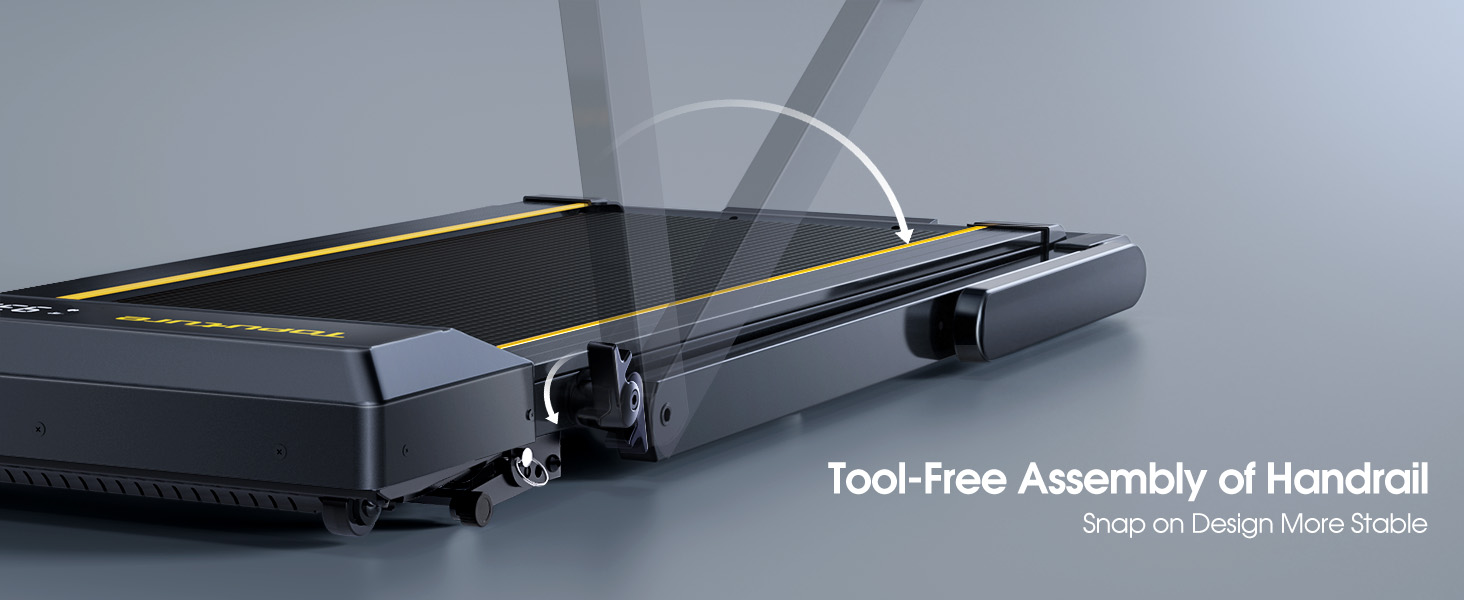
- אויסלייגן דעם האַנטל: Gently lift the handlebar into its upright position until it locks securely. The quick-release snaps allow for easy transition between walking pad and running treadmill configurations.
- קאַנעקטינג מאַכט: צאַפּן די מאַכט שנור אין אַ גראָונדעד עלעקטריקאַל ווענטיל.
- ערשט טשעק: Before first use, ensure the running belt is centered and properly tensioned. Refer to the maintenance section for belt adjustment if needed.

אַפּערייטינג ינסטראַקשאַנז
קאָנטראָל פּאַנעל און ווייַז
The treadmill features a multifunctional LED display and touch controls. Information displayed includes time, speed, calories burned, distance, and heart rate.

Starting and Adjusting Speed
- אָנהייב / האַלטן: Press the Start/Pause button on the control panel or remote to begin/end your workout.
- גיכקייט אַדזשאַסטמאַנט: Use the Speed +/- buttons on the control panel or remote to adjust the speed from 0.6 to 10 MPH.
- אַפּ קאָנטראָל: Connect your smartphone or tablet via Bluetooth to control the treadmill and access guided workouts.

שיפּוע פֿונקציע
The treadmill offers three manual incline levels: 1%, 6%, and 12%. Adjust the incline by manually setting the support legs at the rear of the treadmill to the desired position.

בלועטאָאָטה רעדנער
Connect your device to the treadmill's built-in Bluetooth speaker to enjoy music or audio during your workout.
האַרץ קורס מאָניטאָר
Grip the hand sensors on both sides of the display to monitor your heart rate during exercise.
וישאַלט
- שמירן: Regularly apply treadmill lubricant under the running belt to ensure smooth operation and prolong belt life. Refer to the lubricant instructions for frequency.
- רייניקונג: ווישט אַראָפּ די טרעדמיל מיט אַדamp שטאָף נאָך יעדער נוצן צו באַזייַטיקן שווייס און שטויב.
- גאַרטל אַדזשאַסטמאַנט: If the running belt feels loose or is off-center, use the provided tools to adjust the tension and alignment as per the detailed instructions in the full manual.

טראָובלעשאָאָטינג
אויב איר טרעפט פראבלעמען מיט אייער טרעדמיל, ביטע באציעט זיך צו די פאלגנדע געוויינלעכע לייזונגען:
- טרעדמיל הייבט זיך נישט אן: Ensure the power cord is securely plugged in and the safety key is correctly placed on the console. Check the power switch on the treadmill.
- גאַרטל סליפּינג: The running belt may need tensioning. Refer to the maintenance section or the full manual for instructions on adjusting belt tension.
- ומגעוויינטלעך נויזיז: Check for any loose parts or foreign objects under the belt. Lubricate the running belt if it has not been done recently.
- דיספּליי אַרבעט נישט: מאַכן זיכער אַז אַלע קאַנעקשאַנז זענען זיכער. אויב די אַרויסגעבן בלייַבט, קאָנטאַקט קונה שטיצן.
ספּעסאַפאַקיישאַנז
| שטריך | דעטאַל |
|---|---|
| סאָרט | TOPUTURE |
| מאָדעל נאָמען | TP5 |
| קאָליר | שוואַרץ |
| פּראָדוקט דימענשאַנז | 52.3"ד רענטגענ 28.2"וו רענטגענ 5.1"ה |
| פּונקט וואָג | 78 פונט |
| מאַטעריאַל | אַללוי סטיל |
| מאַקסימום גיכקייַט | 10 מייל פּער שעה |
| מאַקסימום ינקליין פּראָצענטtage | 12% |
| מאַקסימום כאָרספּאַוער | 2.5 הפּ |
| מאַקסימום וואָג רעקאָממענדאַטיאָן | 300 פונט |
| ווייַז | געפירט |
| קאַנעקטיוויטי טעכנאָלאָגיע | בלועטאָאָטה |
| ספּעציעלע פֿעיִקייטן | Built-In Speaker, Foldable, Heart Rate Monitor, Portable, Shock Absorbent |
| אַסעמבלי פארלאנגט | No (Pre-assembled) |
| אַרייַנגערעכנט קאַמפּאָונאַנץ | מאַכט שנור |
וואָראַנטי און שטיצן
Your TOPUTURE TP5 Treadmill comes with a איין יאָר וואָראַנטי. For any assistance, questions, or warranty claims, please contact TOPUTURE customer support.
ווי צו קאָנטאַקט שטיצן:
- קלאָץ אין צו דיין אַמאַזאָן חשבון.
- גיי צו "דיינע אָרדערס".
- Find the order ID for your treadmill.
- Click "Contact Seller".
Please have your model name (TP5) and purchase details ready when contacting support.
Ask a question about this manual
Ask about setup, troubleshooting, compatibility, parts, safety, or missing instructions. Manuals+ will review the question and use this page’s manual context to help answer it.