
1. איבערview
The Element 32-inch 720p HD Xumo Smart TV offers reliable performance and smart functionality in a compact design. Ideal for smaller spaces such as kitchens, dorm rooms, guest rooms, or offices, this television combines a clear HD display with a versatile smart platform and modern connectivity options.
Key features include a 720p resolution display, a 120Hz effective refresh rate for smooth motion, and the integrated Xumo OS for access to numerous streaming applications and free live channels. Connectivity is robust with multiple HDMI ports, USB, LAN, Bluetooth, and Apple AirPlay support. The TV also comes with a voice remote for convenient navigation.
2. וואָס איז אין דער קעסטל
Upon unboxing your Element 32-inch Xumo Smart TV, please ensure all the following components are present:
- 32-inch Element Xumo TV
- Voice Remote + 2 AAA batteries
- TV Stand & Screws
- שנעל אָנהייב גייד

Image: The contents of the TV box, showing the 32-inch television, its remote control, two stand feet, and a bag of screws for assembly. Dimensions of the TV are also displayed.
3. סעטאַפּ
3.1 אנשטעלן דעם טעלעוויזיע שטאנד
- לייגט פֿאָרזיכטיק דעם טעלעוויזיע־עקראַן אַראָפּ אויף אַ ווייכער, ריינער ייבערפֿלאַך כּדי צו פֿאַרמייַדן קראַצן.
- גלייכט יעדן שטאַנד פֿוס מיט די קאָרעספּאָנדירנדיקע שרויף לעכער אויף דער אונטערשטער טייל פֿון דער טעלעוויזיע.
- Secure each stand foot using the provided screws. Ensure they are tightened firmly but do not overtighten.
- הייב פֿאָרזיכטיק דעם טעלעוויזאָר און שטעל אים אויף אַ סטאַבילער, גלייכער ייבערפֿלאַך.
Alternatively, the TV supports VESA mounting for wall installation (wall mount hardware sold separately).
3.2 מאַכט קאַנעקשאַן
Connect the power cord to the TV's power input and then plug it into a standard electrical outlet. A pilot light on the TV will indicate that it is receiving power.
3.3 Initial Setup (Xumo OS)
ביים ערשטן מאָל אנצינדן, וועט דער טעלעוויזיע אייך פירן דורך דעם ערשטן סעטאַפּ פּראָצעס. דאָס נעמט אַרײַן:
- שפּראַך סעלעקציע: קלייַבן דיין בילכער שפּראַך.
- נעץ קאַנעקשאַן: Connect the TV to your home Wi-Fi network or via an Ethernet cable.
- Xumo OS Account Setup: Follow on-screen prompts to set up or log in to your Xumo OS account. This is necessary to access smart features and apps.
- קאַנאַל יבערקוקן: If connecting an antenna, the TV will scan for available channels.

Image: The Element 32-inch Xumo Smart TV is shown on a wooden TV stand, displaying its smart interface with various streaming app icons.
4. קאַנעקשאַנז
The Element Xumo Smart TV provides a variety of ports for connecting external devices:
- HDMI פּאָרטן (3): Connect high-definition devices such as Blu-ray players, gaming consoles, or cable/satellite boxes. One HDMI port supports eARC (enhanced Audio Return Channel) for simplified audio connections to compatible soundbars or AV receivers.
- יו-עס-בי פּאָרט (1): פֿאַרבינדט USB סטאָרידזש דעוויסעס צו view בילדער, שפּילן מוזיק, אָדער קוקן ווידיאס.
- לאַן (עטהערנעט) פּאָרט: פֿאַר אַ דראָטיקער אינטערנעט פֿאַרבינדונג.
- Audio Out (Optical) / Headphone Jack: פֿאַר פֿאַרבינדן עקסטערנע אַודיאָ סיסטעמען אָדער כעדפאָונז.
- Composite Input / Analog Tuner: For connecting older devices or an antenna.
5. אַפּערייטינג דיין טעלעוויזיע
5.1 רימאָוט קאָנטראָל
The included voice remote allows for intuitive control of your TV. It features dedicated buttons for popular streaming services and a microphone for voice commands.
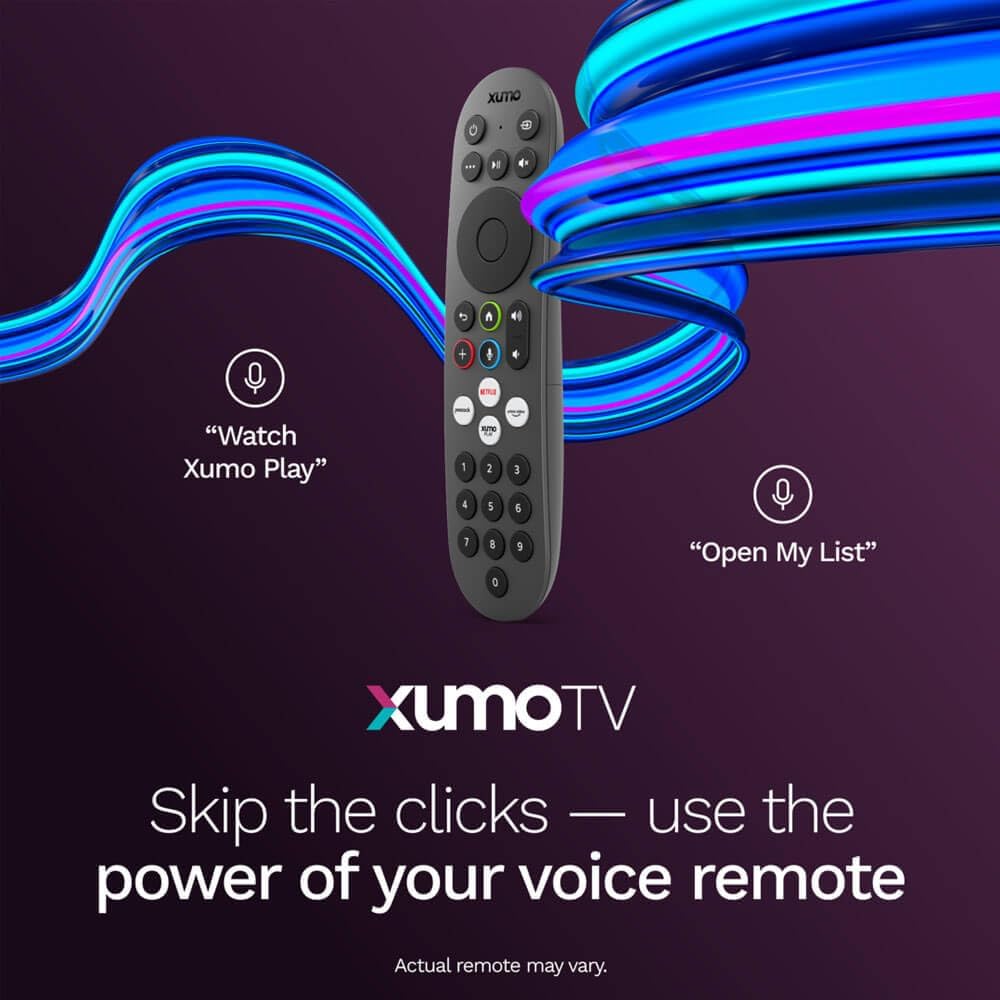
Image: A close-up of the Element Xumo Smart TV voice remote, highlighting its various buttons including a microphone for voice commands and quick access buttons for streaming services.
5.2 Smart Features & Streaming (Xumo OS)
The Xumo OS provides access to over 250 preloaded apps and more than 750 free live channels. You can:
- Search Content: Use the unified search function to find content across all your installed apps.
- My List: Curate your personal watchlist for easy access to your favorite shows and movies.
- Free On-Demand Libraries: Explore a wide selection of free on-demand content.
- קול קאָנטראָל: Use the voice remote to navigate, search, and control your TV hands-free.

Image: The Xumo TV interface showing a selection of popular streaming applications and content recommendations.
5.3 בילד און קלאַנג סעטטינגס
Your TV delivers a crisp 720p HD display with a 120Hz effective refresh rate, minimizing motion blur for clear visuals. Dolby Audio processing enhances the sound experience. You can adjust picture and sound settings via the TV's menu to suit your preferences.
- בילד מאָדעס: Select from various preset picture modes (e.g., Standard, Vivid, Movie, Sports) or customize settings like brightness, contrast, and color.
- געזונט מאָדעס: Choose from different sound modes (e.g., Standard, Music, Movie, Speech) or adjust bass and treble levels.
5.4 Apple AirPlay & Home Support
Seamlessly stream content or mirror your screen from your iPhone, iPad, or Mac directly to your Element TV using Apple AirPlay. With Apple Home support, you can integrate your TV into your Apple smart home ecosystem for convenient control.
6. וישאַלט
To ensure the longevity and optimal performance of your Element Xumo Smart TV, follow these maintenance guidelines:
- רייניקונג די פאַרשטעלן: ווישט אָפּ דעם עקראַן מיט אַ ווייכן, טרוקענעם, לינט-פֿרײַעם שטאָף. פֿאַר שווערע פֿלעקן, ווישט לײַכטampווישט דעם שטאָף מיט וואַסער אָדער אַ רייניקונג לייזונג ספּעציפֿיש פֿאַר דעם עקראַן (שפּריצט קיינמאָל נישט גלייך אויף דעם עקראַן).
- רייניקונג די קאַבינעט: ניצט אַ ווייכע, טרוקענע שטאָף צו רייניקן דעם טעלעוויזיע קאַבינעט. פֿאַרמייַדט ניצן אַברייסיוו רייניגער אָדער סאָלווענטן.
- ווענטילאַטיאָן: זיכערט זיך אז די ווענטילאציע עפענונגען אויף דער הינטערשטער זייט פון דעם טעלעוויזאר זענען נישט פארשטאפט כדי צו פארמיידן איבערהיצונג.
- מאַכט אַוועק ווען ניט אין נוצן: מאַכט אויס דעם טעלעוויזאָר ווען עס איז נישט אין באַנוץ צו שפּאָרן ענערגיע און פֿאַרלענגערן זיין לעבן.
7. טראָובלעשאָאָטינג
If you encounter any issues with your Element Xumo Smart TV, refer to the following common troubleshooting tips:
- קיין מאַכט: קאָנטראָלירט צי דער עלעקטרישער שנור איז זיכער אריינגעשטעקט אין ביידע דעם טעלעוויזיע און דעם עלעקטרישן אַוטלעט. מאַכט זיכער אַז דער אַוטלעט אַרבעט.
- קיין בילד/קלאַנג: Verify that the correct input source is selected. Check all cable connections (HDMI, antenna, etc.) for secure fit.
- ווייַט ניט ארבעטן: טוישט די AAA באַטעריעס אין דער ווײַטקאָנטראָל. מאַכט זיכער אַז עס זענען נישטאָ קיין שטערונגען צווישן דער ווײַטקאָנטראָל און דעם טעלעוויזיע'ס IR סענסאָר.
- נעץ פֿאַרבינדונג פּראָבלעמען: Restart your Wi-Fi router. Check the TV's network settings to ensure it's connected to the correct network and the password is entered correctly.
- Smart App Problems: Try restarting the app. If the issue persists, clear the app's cache or reinstall it. Ensure your TV's software is up to date.
For persistent issues, please contact Element customer support.
8. ספּעסאַפאַקיישאַנז
| שטריך | באַשרייַבונג |
|---|---|
| מאָדעל נומער | E300AE32C |
| פאַרשטעלן גרייס | 32 אינטשעס |
| ווייַז האַכלאָטע | 720p (1366x768) |
| דערפרישן קורס | 60 Hz (120Hz Effective) |
| אַספּעקט פאַרהעלטעניש | 1.78:1 |
| אָפּערייטינג סיסטעם | Xumo OS |
| קאַנעקטיוויטי | 3x HDMI (1x eARC), 1x USB, LAN (Ethernet), Optical Audio Out, Headphone Jack, Composite Input, Wi-Fi, Bluetooth |
| ספּעציעלע פֿעיִקייטן | Bezel-Less Design, Built-In Speaker, Voice Remote, Apple AirPlay & Home Support |
| TV with Stand Dimensions (W x H x D) | 28.8" x 19.2" x 7.0" |
| TV without Stand Dimensions (W x H x D) | 28.8" x 17.0" x 2.7" |
| פּונקט וואָג | 8.8 פונט |
9. וואָראַנטי און שטיצן
The Element 32-inch 720p HD Xumo Smart TV comes standard with a 2-יאָר מאַנופאַקטורער וואָראַנטידי וואָראַנטי דעקט חסרונות אין מאַטעריאַלן און אַרבעט אונטער נאָרמאַל נוצן. ביטע האַלטן דיין קויפן באַווייַז פֿאַר וואָראַנטי קליימז.
For technical support, warranty inquiries, or further assistance, please refer to the contact information provided in your Quick Start Guide or visit the official Element Electronics webפּלאַץ.