
Laxasfit LF-01
Laxasfit LF-01 Smart Watch User Manual
Model: LF-01
1. הקדמה
Welcome to the user manual for your Laxasfit LF-01 Smart Watch. This guide provides essential information on setting up, operating, and maintaining your device to ensure optimal performance and a seamless user experience. Please read this manual thoroughly before using your smart watch.
1.1 וואָס איז אין דער קעסטל
- סמאַרטוואַטטש
- טשאַרדזשינג קאַבלע
- באַניצער מאַנואַל
2. סעטאַפּ
2.1 טשאַרדזשינג די מיטל
Before initial use, fully charge your Laxasfit LF-01 Smart Watch. Connect the provided charging cable to the charging port on the back of the watch and plug the USB end into a standard USB power adapter (not included) or a computer's USB port. The watch display will indicate charging status. A full charge typically takes approximately 2 hours.
2.2 אַפּ ינסטאַלירונג
To unlock the full potential of your smart watch, download and install the companion application on your smartphone. The application allows for data synchronization, notification management, and watch face customization.
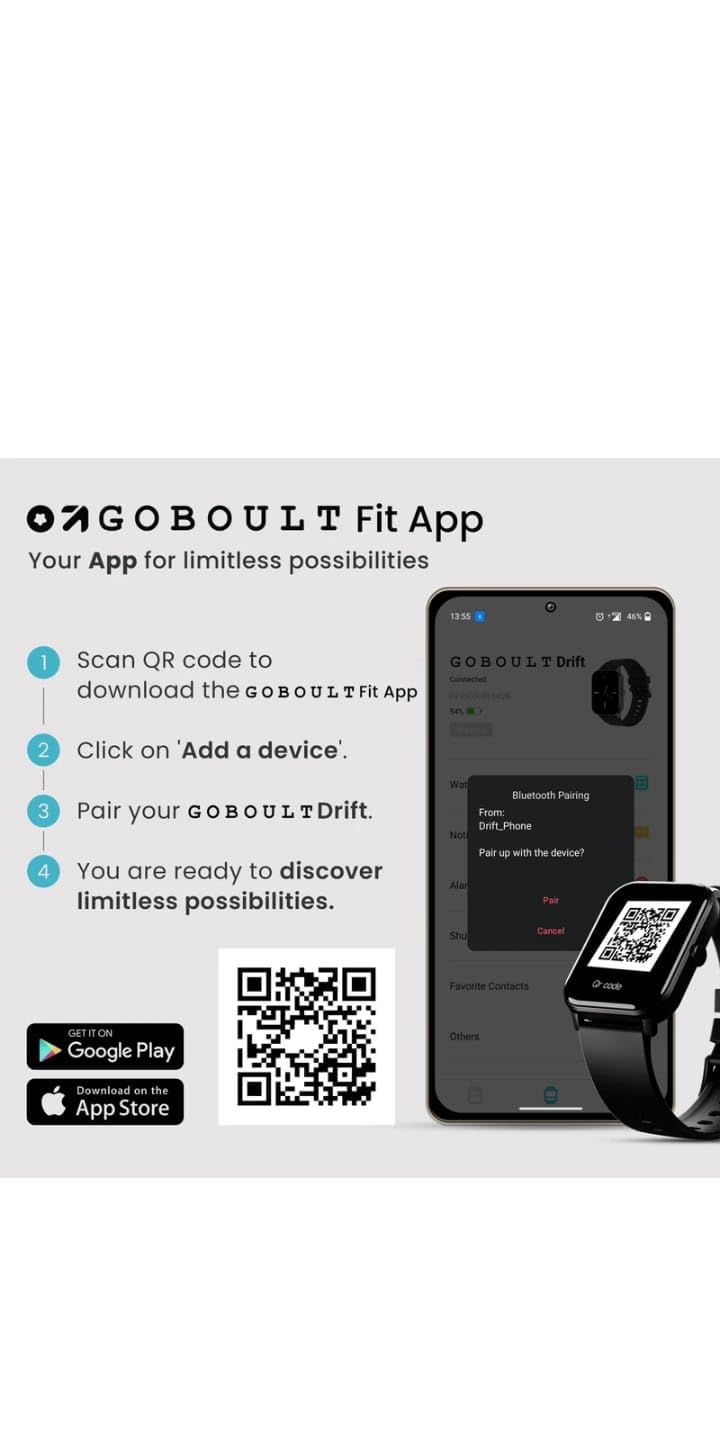
- Scan the QR code provided in the image below or search for "Boult Fit App" in your smartphone's app store (Google Play Store for Android, Apple App Store for iOS).
- ינסטאַלירן די אַפּלאַקיישאַן.
- Open the application and follow the on-screen instructions to create an account or log in.

בילד באַשרייַבונג: This image displays a smartphone screen with instructions for downloading and pairing the companion app. It shows four steps: "Scan QR code to download the Boult Fit App", "Click on 'Add a device'", "Pair your Boult Drift", and "You are ready to discover limitless possibilities." Below these steps are QR codes for both Google Play and the App Store, along with their respective logos. The right side of the image shows a smartwatch display and a phone screen demonstrating the Bluetooth pairing process within the app.
Download the Boult Fit App: https://app.moyoung.com/app-download/BoultFit
2.3 פארבינדן מיט אייער סמאַרטפאָון
After installing the app, follow these steps to pair your smart watch:
- מאַכן זיכער אַז בלועטאָאָטה איז ענייבאַלד אויף דיין סמאַרטפאָנע.
- Open the companion app and navigate to the "Add Device" or "Pair Device" section.
- The app will search for available devices. Select "Laxasfit LF-01" or a similar device name from the list.
- באַשטעטיקט די פּאָרינג בקשה אויף ביידע אייער סמאַרטפאָון און די סמאַרטוואַטש אויב געבעטן.
- Once paired, the watch will synchronize data with your phone.
3. שליסל פֿעיִקייטן
The Laxasfit LF-01 Smart Watch offers a range of features designed to enhance your daily life and fitness tracking.
3.1 געזונט מאָניטאָרינג
Monitor your vital health parameters directly from your wrist.
- האַרץ קורס מאָניטאָר: טראַקט דיין האַרץ טעמפּאָ איבערן טאָג.
- שלאָף טראַקינג: אנאליזירט אייערע שלאף-מוסטערן, אריינגערעכנט טיפע שלאף, לייכטע שלאף, און אויפוואך-צייטן.
- אַקטיוויטעט טראַקינג: רעקאָרדירט טריט, דיסטאַנץ און קאַלאָריעס פארברענט.

בילד באַשרייַבונג: This image shows a collage of smartwatch features. Prominently featured is a smartwatch display showing a heart rate monitor with a graph and current heart rate (108 bpm). Other elements include icons for 7-day battery life, IP68 water resistance, 60 sports modes, mini games, 1.69" HD display, Bluetooth calling, and multiple watch faces.
3.2 ספּאָרט מאָדעס
The watch supports over 60 workout modes to accurately track various physical activities.
- Track specific metrics for activities like running, cycling, walking, and more.
- View real-time data such as duration, calories burned, and heart rate during workouts.

בילד באַשרייַבונג: A man is shown performing an exercise with a battle rope, wearing a smartwatch on his wrist. The image highlights the watch's capability to track over 60 workout modes. An overlay shows a smartwatch display with fitness metrics: "Steps 25969", "Distance 10.56 km", and "Calories 2982 Kcal".
3.3 בלועטאָאָטה פאַך
With its built-in speaker and microphone, the Laxasfit LF-01 allows you to manage calls directly from your wrist when connected to your smartphone via Bluetooth.
- Receive incoming call notifications.
- Answer or reject calls.
- Make calls using the watch's interface (requires phone connection).
בילד באַשרייַבונג: This image shows a smartwatch worn on a wrist, displaying an incoming call notification. The screen shows "Mom" as the caller, along with green (answer) and red (decline) call icons. Text above the watch states "Manage calls, the smart way." and "Bluetooth calling" with "Dedicated Speaker & Microphone" below.
3.4 אַרויסווייַז און זייגער פּנים
- ווייַז טיפּ: LCD touchscreen for clear visibility and easy interaction.
- קוסטאָמיזאַבלע וואַך פנימער: Choose from over 140 watch faces via the companion app to personalize your device.
4. אָפּעראַציע
4.1 יקערדיק נאַוויגאַציע
- טאָוטשסקרעען: סווייפּ לינקס/רעכטס, אַרויף/אַראָפּ צו נאַוויגירן דורך מעניוז און פֿעיִקייטן. צאַפּן צו סעלעקטירן.
- זייַט קנעפּל: Typically used to wake the screen, return to the home screen, or access the app menu. Refer to the on-screen prompts for specific functions.
4.2 Using Fitness Tracking
To start a workout:
- Swipe on the watch face to find the "Workout" or "Sports Modes" icon.
- Tap to select your desired activity (e.g., Running, Cycling).
- Tap "Start" to begin tracking.
- בעת די טרענירונג, קענט איר view פאַקטיש-צייט דאַטן.
- Tap "Pause" or "End" to stop the workout. Data will sync with the app.
4.3 פאַרוואַלטן נאָוטאַפאַקיישאַנז
Once paired with your smartphone, the watch will display notifications for calls, messages, and other app alerts.
- Swipe down from the watch face to view לעצטע מעלדונגען.
- Tap on a notification to read the full message (if supported).
- Notifications can be managed and filtered through the companion app settings.
5. וישאַלט
5.1 רייניקן אייער סמאַרט וואַך
- Wipe the watch screen and strap regularly with a soft, damp שטאָף.
- פֿאַרמײַדט די נוצן פֿון שאַרפֿע כעמיקאַלן אָדער אַברייזיוו מאַטעריאַלן, ווײַל די קענען שאַטן דעם אַפּאַראַט.
- זיכער מאַכן אַז די טשאַרדזשינג קאָנטאַקטן זענען ריין און טרוקן איידער טשאַרדזשינג.
5.2 באַטערי קער
- ויסמיידן יקספּאָוזינג די וואַך צו עקסטרעם טעמפּעראַטורעס.
- לאָזט נישט די זייגער גאָר אויסגעלאָדן פֿאַר לענגערע פּעריאָדן.
- For optimal battery life, charge the device before it completely runs out of power.
6. טראָובלעשאָאָטינג
If you encounter issues with your Laxasfit LF-01 Smart Watch, refer to the following common solutions:
- זייגער טוט זיך נישט אן: זיכער מאַכן אַז די זייגער איז גאָר אויפגעלאָדן. פֿאַרבינדט עס צום טשאַרדזשער פֿאַר לפּחות 30 מינוט.
- קען נישט צוזאמענשטעלן מיט סמאַרטפאָון:
- מאַכן זיכער אַז בלועטאָאָטה איז ענייבאַלד אויף דיין טעלעפאָן.
- זייט זיכער אז די זייגער איז אין דער דערגרייכונג פון אייער טעלעפאָן.
- Restart both your phone and the smart watch.
- פרובירט אפצופּאַרן און ווידער צופּאַרן דעם דעווייס דורך די אַפּ.
- נישט פּינקטלעכע פֿיטנעס דאַטן:
- זייט זיכער אז די זייגער טראָגט גוט אויף אייער האַנטגעלענק, בערך איין פינגער'ס ברייט העכער דעם האַנטגעלענק ביין.
- Calibrate the device through the app if an option is available.
- נאטיפיקאציעס דערשיינען נישט:
- קוק די אַפּ נאָטיפיקאַציע סעטטינגס אויף דיין טעלעפאָן און אין דער באַגלייטנדיקער אַפּ.
- זיכער מאַכן אַז די זייגער איז ריכטיק פארבונדן דורך בלועטוט.
- עקראַן רעאַגירט נישט: Restart the watch by pressing and holding the side button (if applicable) or by connecting it to the charger.
If problems persist, consult the companion app's help section or contact customer support.
7. טעכניש ספּעסאַפאַקיישאַנז
| שטריך | באַשרייַבונג |
|---|---|
| מאָדעל | LF-01 |
| ווייַז טיפּ | לקד |
| קאַנעקטיוויטי | בלועטאָאָטה |
| אָפּערייטינג סיסטעם | Proprietary OS |
| זכּרון סטאָרידזש קאַפּאַסיטי | 32 גיגאבייט |
| ספּעציעלע פֿעיִקייטן | Fitness Tracking, Heart Rate Monitor, Notifications, Sleep Tracking |
| קאַמפּאַטאַבאַל דעוויסעס | סמאַרטפאָנע, טאַבלעט |
| טשאַרדזשינג צייט | 2 שעה |
| מאַטעריאַל | פּלאַסטיק, סיליקאָן |
| פּונקט וואָג | 200 ג |
| לאַנד פון אָריגין | כינע |
8. וואָראַנטי און שטיצן
8.1 וואָראַנטי אינפֿאָרמאַציע
Your Laxasfit LF-01 Smart Watch typically comes with a standard warranty. Please refer to your purchase documentation for specific warranty terms and conditions. A 10-day replacement policy may apply, and extended warranty options might be available for purchase.
8.2 קונה שטיצן
For further assistance, technical support, or warranty claims, please refer to the contact information provided with your product packaging or visit the official Laxasfit website (if available). You may also contact the seller directly for support.