
1. הקדמה
The Raddy SH-908 is a versatile and robust emergency radio designed to keep you informed and connected in various situations, from power outages to outdoor adventures. It features multiple power sources, including a 10,000mAh internal battery, solar panel, hand crank, and USB-C charging, along with AM/FM/SW radio reception, an LED flashlight, a reading lamp, an SOS alarm, and a built-in compass. This manual provides detailed instructions for its proper use and maintenance.
2. זיכערקייַט אינסטרוקציעס
- שטעלט נישט אויס דעם אפאראט צו עקסטרעמע טעמפעראטורן אדער דירעקטער זון פאר לענגערע צייטן.
- האַלטן די מיטל אַוועק פון שטאַרק מאַגנעטיק פעלדער.
- נעמט נישט אויס דעם אפאראט אדער פרובירט נישט צו פאררעכטן אליין. ווענדט זיך צו קוואַליפֿיצירטע סערוויס פּערסאָנעל.
- Ensure all ports are dry before charging to prevent damage.
- When using the hand crank, apply steady, moderate force. Excessive force may cause damage.
- אַוועקוואַרפן באַטעריז לויט די היגע רעגיאַליישאַנז.
3. פּעקל אינהאַלט
באַשטעטיקן אַז אַלע זאכן זענען פאַראַן אין פּעקל:
- Raddy SH-908 Emergency Radio
- וסב-C טשאַרדזשינג קאַבלע
- האַנטגעלענק רימען
- קליין שרויפנ - ציער
- רייניקונג באַרשט
- באַניצער מאַנואַל (דעם דאָקומענט)

Image: Raddy SH-908 radio and its accessories, including a USB-C cable, wrist strap, small screwdriver, and cleaning brush.
4. פּראָדוקט איבערview
Familiarize yourself with the main components and controls of the Raddy SH-908 radio.
- ווייַז פאַרשטעלן: Shows frequency, battery level, and time.
- טונינג קנעפּל (TUN): אַדזשאַסטירט ראַדיאָ פרעקווענץ.
- באַנד קנעפּל (VOL): אַדזשאַסטירט אַודיאָ אַרויסגאַנג לעוועל.
- Band/Scan Button: Switches between AM/FM/SW bands and initiates auto-scan.
- שטיל קנעפּל: מיוטעס / אַנמיוט אַודיאָ.
- צייט קנעפּל: Sets time.
- M-/M+ Buttons: Navigate through preset stations or fine-tune frequency.
- SOS קנעפּל: Activates emergency alarm and light.
- פלאַשליגהט: Integrated LED light on one end.
- לייענען לamp: Fold-out lamp פֿאַר אַמביאַנט לייטינג.
- זונ פּאַנעל: Top-mounted panel for solar charging.
- האַנט קראַנק: Foldable crank for manual power generation.
- USB-C אַרייַנשרייַב פּאָרט: For charging the radio's internal battery.
- USB-A רעזולטאַט פּאָרט: פֿאַר טשאַרדזשינג עקסטערנע דעוויסעס.
- AAA Battery Compartment: For optional backup power.
- טעלאַסקאָפּיק אַנטענע: פֿאַר פֿאַרבעסערטן ראַדיאָ אָפּנאַם.
- קאָמפּאַס: Built-in for navigation.
5. אויפשטעלן און ערשטע באנוץ
5.1 ערשט טשאַרדזשינג
Before first use, fully charge the internal 10,000mAh battery using the USB-C port.
- Connect the provided USB-C cable to the radio's USB-C input port.
- פֿאַרבינדט דעם אַנדערן עק פֿונעם קאַבל צו אַ נאָרמאַלן USB מאַכט אַדאַפּטער (נישט אַרייַנגערעכנט) אָדער אַ קאָמפּיוטער USB פּאָרט.
- The battery indicator on the display will show charging status. Charging is complete when the indicator shows full.
5.2 Installing AAA Batteries (Optional)
For additional backup power, you can install 3 AAA batteries (not included).
- Locate the AAA battery compartment cover, usually on the side or back of the radio.
- ניצט דעם צוגעשטעלטן שרויפנציהער צו עפענען דעם קאמפארטמענט.
- אַרײַנשטעלן 3 AAA באַטעריעס, און זיכער מאַכן אַז די פּאָלאַריטעט איז ריכטיק (+/-).
- פאַרמאַכן די אָפּטייל דעקן סיקיורלי.
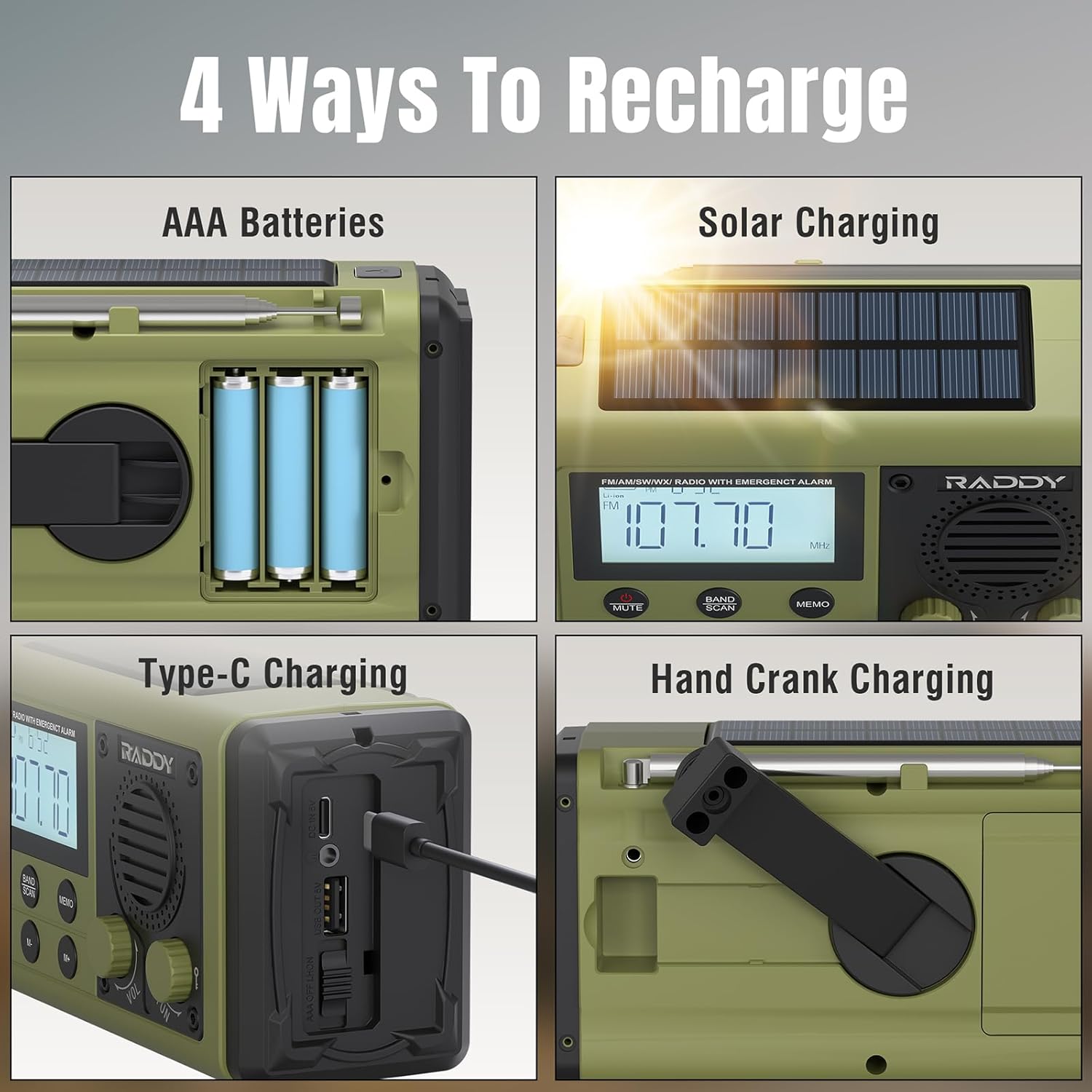
Image: The Raddy SH-908 radio demonstrating its four charging methods: AAA battery installation, solar panel charging, USB-C port charging, and hand crank operation.
6. אַפּערייטינג ינסטרוקטיאָנס
6.1 פּאַוערינג אויף / אַוועק
דריקן און האַלטן די מאַכט button (if available, otherwise assume a dedicated button or a long press on a multi-function button) to turn the radio on or off. The display will illuminate.
6.2 Radio Operation (AM/FM/SW)
- Extend the Antenna: Fully extend the telescopic antenna for optimal reception.
- אויסקלייבן באַנד: דרוק די BAND / SCAN button to cycle through FM, AM, and SW bands.
- שטעל סטאַנציעס:
- מאַנואַל טונינג: דרייען די TUN knob to manually adjust the frequency.
- אַוטאָ סקאַן: דריקן און האַלטן די BAND / SCAN button to automatically scan for and save available stations.
- Preset Navigation: ניצן די M- און M+ קנעפּלעך צו דורכגיין געראַטעוועטע פאָרגעשטעלטע סטאַנציעס.
- סטרויערן באַנד: דרייען די VOL קנופּ צו פאַרגרעסערן אָדער פאַרמינערן די באַנד.

Image: The Raddy SH-908 radio with its telescopic antenna extended, illustrating its AM/FM/SW radio capabilities.
6.3 Flashlight and Reading Lamp
- פלאַשליגהט: דרוק די דעדאַקייטאַד ליכט button (or similar) once to turn on the flashlight. Press again to turn off.
- לייענען לamp: Lift the reading lamp panel to activate the lamp. Close the panel to turn it off.
6.4 סאָס שרעק
In an emergency, activate the SOS alarm:
- דרוק די סאָס button. The radio will emit a loud siren and flash its lights.
- דרוק די סאָס button again to deactivate the alarm.
6.5 ניצן ווי אַ פּאַוער באַנק
The 10,000mAh internal battery can charge external devices.
- Connect your device's charging cable to the radio's וסב- א רעזולטאַט פּאָרט.
- The radio will begin charging your device. Monitor your device's charging status.

Image: The Raddy SH-908 radio charging a smartphone, demonstrating its 10,000mAh power bank functionality.
6.6 טשאַרדזשינג די ראַדיאָ
The Raddy SH-908 offers four ways to recharge its internal battery:
- USB-C טשאַרדזשינג: (Refer to Section 5.1 Initial Charging).
- האַנט קראַנק טשאַרדזשינג: Rotate the hand crank clockwise or counter-clockwise at a steady pace (approximately 120-150 RPM) for 3-5 minutes to generate power for short-term use.
- זונ טשאַרדזשינג: Place the radio with the solar panel facing direct sunlight. This method is primarily for maintaining battery charge or for slow charging in emergencies.
- AAA באַטעריז: If installed, the radio can draw power from the AAA batteries when the internal rechargeable battery is depleted.
6.7 Compass Usage
The integrated compass can assist with basic navigation. Hold the radio level and away from metallic objects to get an accurate reading.
7. וישאַלט
7.1 רייניקונג
ווישן די ראַדיאָ מיט אַ ווייך, דamp cloth. Do not use harsh chemicals or abrasive cleaners. Use the provided cleaning brush to remove dust from crevices.
7.2 וואַסער קעגנשטעל (IPX6)
The Raddy SH-908 is IPX6 waterproof, meaning it is protected against powerful water jets. It is not designed for submersion. Ensure all port covers are securely closed to maintain water resistance.

Image: The Raddy SH-908 radio being splashed with water, illustrating its IPX6 water resistance.
7.3 באַטערי קער
- For optimal battery life, fully charge the internal battery at least once every three months if not in regular use.
- Remove AAA batteries if the radio will not be used for an extended period to prevent leakage.
8. טראָובלעשאָאָטינג
| פּראָבלעם | מעגלעך סיבה | לייזונג |
|---|---|---|
| ראַדיאָ טוט זיך נישט אָן. | באַטערי איז דיפּליטיד. | Charge the radio via USB-C, hand crank, or solar panel. Check AAA batteries if installed. |
| נעבעך ראַדיאָ אָפּטראָג. | אַנטענע נישט אויסגעשטרעקט; שוואַך סיגנאַל; שטערונג. | Fully extend the telescopic antenna. Try repositioning the radio. |
| Cannot charge external device. | Radio battery is low; incorrect cable; device not compatible. | Ensure the radio's internal battery is sufficiently charged. Use a compatible USB cable. |
| Hand crank is stiff or not charging. | Crank mechanism obstructed or damaged. | Ensure no debris is obstructing the crank. Apply steady, moderate force. If persistent, contact support. |
9. ספּעסאַפאַקיישאַנז
| שטריך | דעטאַל |
|---|---|
| מאָדעל | ש-908 |
| ראַדיאָ באַנדס | AM, FM, SW |
| ינערלעך באַטערי | 10,000 מאַה (קריקאָנלאָדלעך) |
| באַקקופּ מאַכט | 3 X AAA באַטעריז (ניט אַרייַנגערעכנט) |
| טשאַרדזשינג מעטהאָדס | USB-C, Hand Crank, Solar Panel |
| רעזולטאַט פּאָרט | USB-A (for charging external devices) |
| וואַסער קעגנשטעל | IPX6 |
| לייטינג | LED Flashlight, Reading Lamp |
| נאָך פֿעיִקייטן | SOS Alarm, Built-in Compass |
| דימענסיעס (בעערעך) | 16.7 סענטימעטער (ל) רענטגענ 8.5 סענטימעטער (וו) רענטגענ 6.7 סענטימעטער (ה) |
| וואָג (בעערעך) | 680 ג |
10. וואָראַנטי און שטיצן
Raddy products are designed for reliability and performance. For warranty information, please refer to the warranty card included with your purchase or visit the official Raddy website. For technical support or inquiries, please contact Raddy customer service through the contact information provided on the product packaging or webפּלאַץ.
ביטע באַהאַלטן אייער קויפן-באַווייַז פֿאַר יעדע וואָראַנטי-פאָדערונג.