
הקדמה
א דאנק פארן קויפןasing the Anker Soundcore P31i True Wireless Earbuds. This manual provides detailed instructions on how to set up, operate, and maintain your earbuds to ensure optimal performance and longevity. Please read this manual carefully before use and retain it for future reference.
וואָס איז אַרייַנגערעכנט
Your Soundcore P31i package includes the following items:
- Soundcore P31i Earbuds (Left and Right)
- טשאַרדזשינג קאַסע
- Ear Tips (XS, S, M, L - M size pre-installed)
- USB-C צו USB-A טשאַרדזשינג קאַבלע
- שנעל אָנהייב גייד
- זיכערקייַט מאַנואַל
פּראָדוקט איבערview
The Soundcore P31i earbuds are designed for comfort and high-quality audio. Each earbud features a touch control area and an indicator light. The charging case protects the earbuds and provides additional battery life.
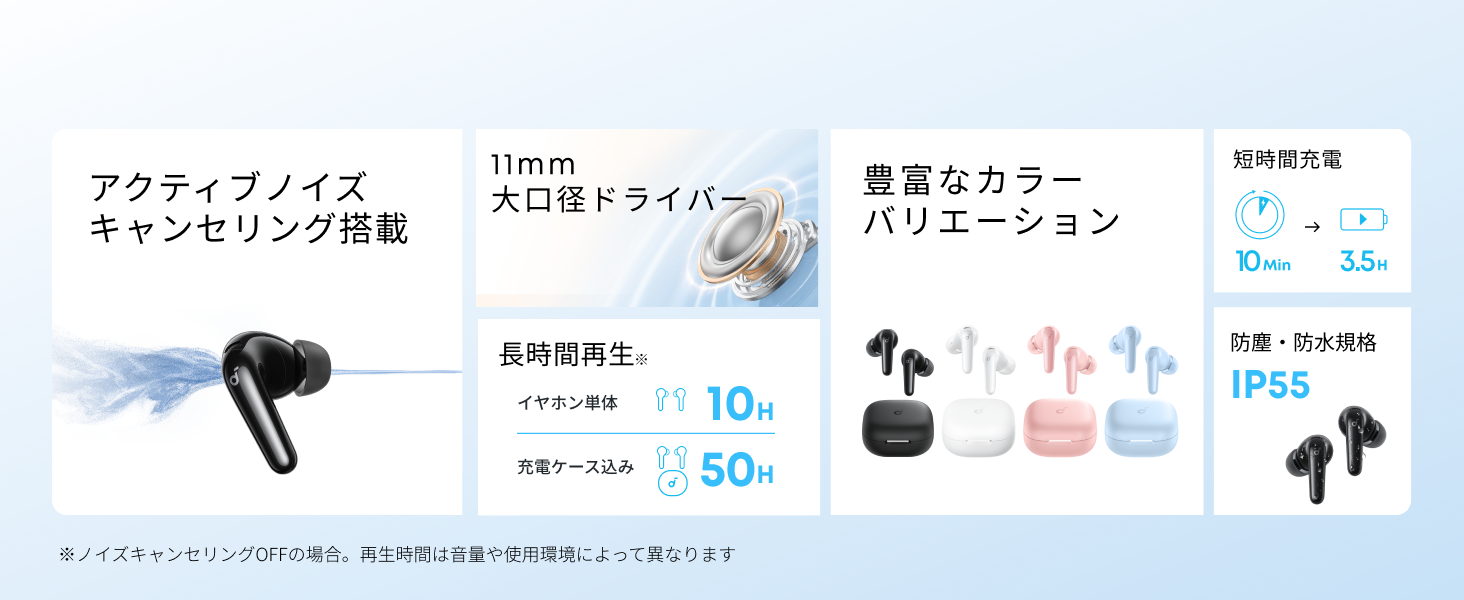
Diagram showing the Soundcore P31i earbuds and charging case with key components labeled.
עאַרבודז: Each earbud is equipped with an 11mm dynamic driver for powerful bass and clear sound. They feature active noise cancellation and AI noise reduction for calls. The ergonomic design ensures a secure and comfortable fit.
טשאַרדזשינג קאַסע: The compact charging case not only stores and protects your earbuds but also recharges them on the go. It has a USB-C charging port and a strap hole for portability.
טשאַרדזשינג דיין עאַרבודז און קאַסטן
פארן ערשטן באניץ, לאדט גוט אויף ביידע די אויערפאנען און דעם טשאַרדזשינג קעיס.
- טשאַרדזשינג די עאַרבודז: Place the earbuds into the charging case. The indicator lights on the earbuds will show charging status.
- טשאַרדזשינג די קאַסטן: Connect the charging case to a power source using the provided USB-C to USB-A cable. A full charge for the case and earbuds takes approximately 3 hours.
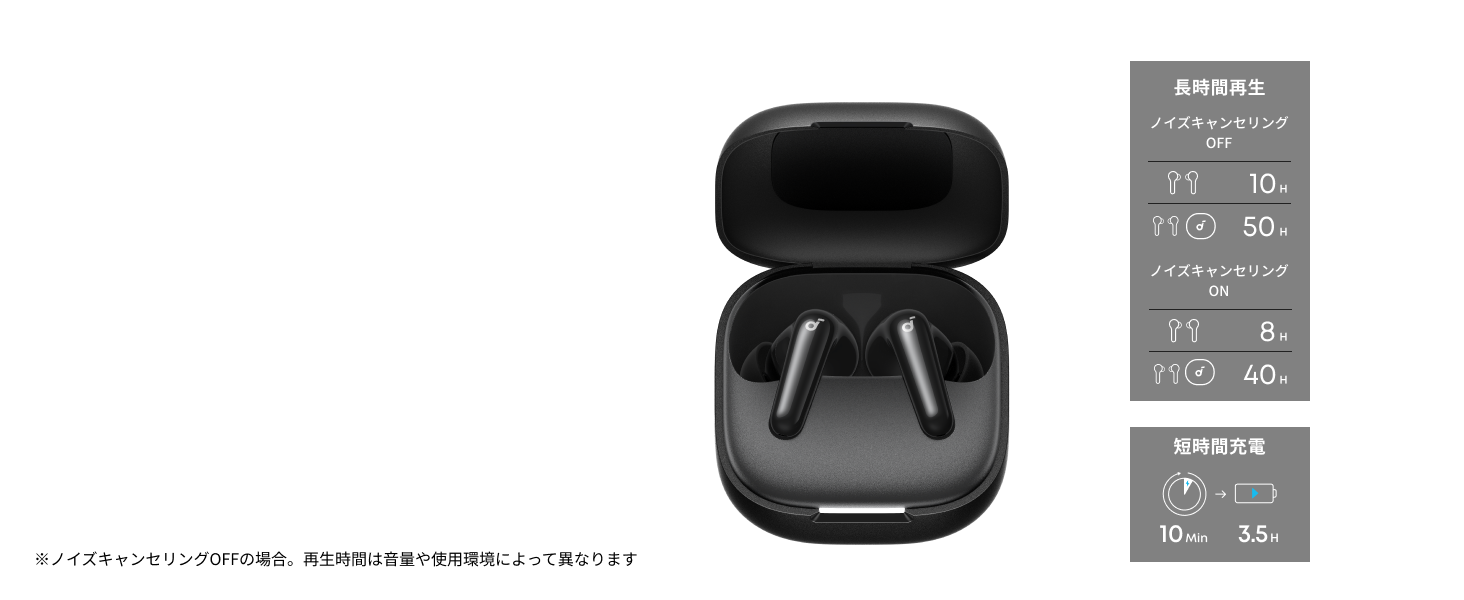
Diagram illustrating charging times and playback duration for Soundcore P31i earbuds.
באַטאַרייע לעבן:
- Up to 10 hours of playback on a single charge (earbuds only).
- ביז 50 שעה פון גאַנץ ווידערשפּיל מיטן טשאַרדזשינג קעסטל.
- A quick 10-minute charge provides up to 3.5 hours of listening time.
Note: Playback time varies depending on volume level and audio content.
ווערינג דיין עאַרבודז
For optimal sound quality and comfort, it is important to wear your earbuds correctly.
- קלייבט די רעכטע אויער עצות: Select the ear tips that provide the best seal and comfort for your ears. Experiment with different sizes (XS, S, M, L) to find the perfect fit.
- אַרייַנלייגן די עאַרבודז: פֿאָרזיכטיק אַרײַנשטעלן די אויער־קנעפּלעך אין אײַערע אויער־קאַנאַלן.
- Twist to Secure: Twist the earbuds slightly until they fit snugly and securely in your ears.

Image showing a person wearing the Soundcore P31i earbuds correctly.
בלועטאָאָטה פּערינג
Follow these steps to pair your Soundcore P31i earbuds with your device:
- ערשטער מאָל פּערינג:
- Open the charging case. The earbuds will automatically enter Bluetooth pairing mode. The indicator lights on the earbuds will flash white.
- אויף אייער דעווייס (סמאַרטפאָן, טאַבלעט, אאז"וו), גייט צו די בלועטוט סעטטינגס.
- Select "Soundcore P31i" from the list of available devices.
- Once connected, the indicator lights on the earbuds will turn solid white for 1 second and then turn off.
- פּערינג מיט אן אנדער מיטל:
- Place the earbuds in the charging case and leave the lid open.
- Press and hold the button on the charging case for 3 seconds until the earbud indicator lights flash white rapidly.
- Repeat steps 2 and 3 from "First-Time Pairing" on your new device.
קאָנטראָלס
The Soundcore P31i earbuds feature touch controls for managing playback, calls, and other functions. Specific control configurations can often be customized via the Soundcore app.
General Touch Controls (Default):
- שפּיל / פּויזע: צאַפּן אַמאָל אויף יעדער עאַרבוד.
- ווייַטער שפּור: טאָפּל צאַפּן אויף די רעכט עאַרבוד.
- פֿריִערדיקע שפּור: טאָפּל צאַפּן אויף די לינקס עאַרבוד.
- ענטפֿערן / סוף רופן: צאַפּן אַמאָל אויף יעדער עאַרבוד.
- אָפּוואַרפן רופן: דריקן און האַלטן יעדער עאַרבוד פֿאַר 2 סעקונדעס.
- אַקטאַווייט קול אַססיסטאַנט: Triple-tap either earbud (may vary).
- טוישן ANC/טראַנספּאַרענץ מאָדע: Press and hold the right earbud for 2 seconds (may vary).
For detailed and customizable controls, please refer to the Soundcore app or the included Quick Start Guide.
אַקטיוו ראַש קאַנסאַלינג (ANC)
The Soundcore P31i earbuds feature Active Noise Cancelling technology to minimize ambient noise, allowing for an immersive listening experience.

Illustration demonstrating the active noise cancelling feature of the Soundcore P31i earbuds.
ANC detects and reduces various types of noise, such as engine hum on trains or buses, and chatter in cafes. This allows you to enjoy your music or podcasts with greater clarity and fewer distractions.
To switch between ANC, Normal, and Transparency modes, use the touch controls on the earbuds or adjust settings within the Soundcore app.
געזונט קוואַליטי
The Soundcore P31i earbuds are engineered to deliver a rich audio experience.

Diagram illustrating the 11mm dynamic driver responsible for the audio output.
- 11 מם דינאַמיש דריווערס: Equipped with large 11mm drivers, these earbuds produce a wide frequency range and detailed sound.
- BassUp™ Technology: Anker's proprietary BassUp™ technology enhances low frequencies, delivering powerful and impactful bass.
You can further customize the sound profile using the equalizer settings within the Soundcore app.
רופן קוואַליטי
The Soundcore P31i earbuds ensure clear voice calls and web קאָנפֿערענצן.

Illustration depicting AI noise reduction technology for clear voice calls.
AI ראַש רעדוקציע: Integrated AI noise reduction technology effectively filters out background noise, ensuring your voice is transmitted clearly to the person on the other end of the call, even in noisy environments.
מולטי-פונט קאַנעקשאַן
The Soundcore P31i supports multi-point connection, allowing you to connect to two Bluetooth devices simultaneously.

Illustration showing the Soundcore P31i connected to multiple devices simultaneously.
This feature enables seamless switching between devices. For example, you can listen to music on your laptop and instantly switch to answer a call on your phone without manually re-pairing.
To enable multi-point connection, ensure both devices are paired with your earbuds. The earbuds will automatically connect to the last two paired devices when powered on.
סאָונדקאָרע אַפּ
Download the Soundcore app to enhance your experience with the P31i earbuds. The app offers various features and customization options.

Screenshots of the Soundcore app interface, highlighting customization features.
אַפּ פֿעיִטשערז אַרייַננעמען:
- קוסטאָמיזאַבלע קאָנטראָלס: Personalize touch controls for playback, calls, and voice assistant.
- Equalizer סעטטינגס: סטרויערן אַודיאָ פּראָfiles to your preference or choose from preset EQs.
- ANC/Transparency Mode Switching: Easily toggle between noise cancelling and transparency modes.
- Firmware דערהייַנטיקונגען: האַלט אייערע אויערן-קנעפּלעך דערהייַנטיקט מיט די לעצטע פֿעיִקייטן און פֿאַרבעסערונגען.
- AI Translation Function: (Available from Spring 2026, requires Soundcore app ver 4.0.0 or higher).
The Soundcore app is available for download on both iOS and Android devices.
פּראָדוקט איבערview ווידעא
אפיציעלע פּראָדוקט ווידעאָ שאָוasing the key features and design of the Soundcore P31i True Wireless Earbuds, including active noise cancellation, powerful bass, long battery life, and multi-point connectivity.
וישאַלט און זאָרג
Proper maintenance ensures the longevity and performance of your Soundcore P31i earbuds.
- רייניקונג: רייניקט רעגולער די אויערקנעפּלעך און די טשאַרדזשינג קעסטל מיט אַ ווייכן, טרוקענעם, לינט-פֿרייע שטאָף. ניצט נישט קיין שאַרפע כעמיקאַלן אדער אַברייסיוו מאַטעריאַלן.
- אויער עצות: אַראָפּנעמען די אויער שפּיץ און רייניקן זיי מיט וואַסער און מילדער זייף אויב נייטיק. זיכער מאַכן אַז זיי זענען גאָר טרוקן איידער איר צוריקשטעלן זיי.
- טשאַרדזשינג קאָנטאַקטן: האַלט די טשאַרדזשינג קאָנטאַקטן אויף ביידע די אויערן-קנעפּלעך און די קעסטל ריין און טרוקן צו ענשור געהעריק טשאַרדזשינג.
- סטאָרידזש: ווען נישט אין באַנוץ, לייגט די אויערקנעפּלעך אין זייער טשאַרדזשינג קעסטל צו באַשיצן זיי פון שטויב און שעדיקן.
- וואַסער קעגנשטעל: The earbuds are rated IP55 for dust and water resistance. This means they can withstand sweat and light rain, but are not designed for submersion in water. Ensure the earbuds are dry before placing them back in the charging case.

Image showing Soundcore P31i earbuds with water droplets, highlighting their IP55 water resistance.
טראָובלעשאָאָטינג
If you encounter any issues with your Soundcore P31i earbuds, refer to the following common solutions:
- עאַרבודז ניט פּערינג:
- פאַרזיכערן אַז ביידע עאַרבודז זענען גאָר באפוילן.
- Place earbuds in the case, close the lid, then open it again to re-enter pairing mode.
- Forget "Soundcore P31i" from your device's Bluetooth list and try pairing again.
- Reset the earbuds (refer to the Quick Start Guide for specific reset instructions).
- Only One Earbud Playing Audio:
- לייגט ביידע אויערקנעפּלעך צוריק אין דעם טשאַרדזשינג קעסטל און מאַכט צו דעם דעקל פֿאַר 5 סעקונדעס, און דערנאָך עפֿנט עס ווידער.
- Ensure both earbuds have sufficient battery.
- באַשטעטיק די עאַרבודז.
- נעבעך געזונט קוואַליטעט:
- Ensure the ear tips provide a good seal in your ear canal. Try different sizes.
- רייניקט יעדן דעבריס פון די אויערקנעפל נאַזאַלז.
- ריקט זיך נענטער צו אייער פארבונדענע דעווייס כדי צו פארמיידן אריינמישונג.
- טשאַרדזשינג ישוז:
- קאָנטראָלירט דעם טשאַרדזשינג קאַבל און אַדאַפּטער פֿאַר שעדיקן.
- זיכער מאַכן אַז די טשאַרדזשינג קאָנטאַקטן אויף די אויערקנעפּלעך און קעסטל זענען ריין.
- פּרוּווט אַ אַנדערש טשאַרדזשינג קאַבלע אָדער מאַכט מקור.
ספּעסאַפאַקיישאַנז
| שטריך | דעטאַל |
|---|---|
| סאָרט | סאָונדקאָרע |
| מאָדעל נאָמען | P31i |
| מאָדעל נומער | D1202 |
| קאָליר | Black (This specific variant) |
| פאָרם פאַקטאָר | אין אויער |
| קאַנעקטיוויטי טעכנאָלאָגיע | ווירעלעס (בלוטוט 6.1) |
| ראַש קאָנטראָל | אַקטיוו ראַש קאַנסאַליישאַן |
| דרייווער גרייס | 11 מם דינאַמיש דריווערס |
| שפּיל צייט (אויערקנעפּלעך) | אַרויף צו 10 שעה |
| גאַנץ שפּיל צייט (מיט קעסטל) | אַרויף צו 50 שעה |
| שנעל טשאַרדזשינג | 10 מינוט אָפּצאָל פֿאַר 3.5 שעה ווידערשפּיל |
| Charging Time (Full) | בעערעך 3 שעה |
| וואַסער קעגנשטעל | IP55 |
| מולטי-פונט קאַנעקשאַן | געשטיצט |
| UPC | 194644251543 |
| לאַנד פון אָריגין | כינע |
וואָראַנטי און קונה שטיצן
Soundcore provides a comprehensive warranty for your P31i earbuds.

Image detailing the warranty period and extension for Soundcore P31i.
- נאָרמאַל וואָראַנטי: An 18-month warranty is provided for products purchased from authorized retailer AnkerDirect.
- עקסטענדעד וואָראַנטי: Anker members can extend their warranty up to a maximum of 24 months.
- וויכטיק באַמערקונג: Purchases from unauthorized sellers may not be covered under warranty.
For product inquiries, delivery questions, or technical support, please contact Soundcore customer support. Contact details can typically be found on the official Soundcore webוועבזייטל אדער אין אייער שנעל-אנהייב גייד.
זיכערקייַט אינפֿאָרמאַציע
ביטע לייענט און פאלגט די זיכערהייט גיידליינז צו פאַרמייַדן שעדיקן צו אייער מיטל אָדער שאָדן צו זיך:
- נישט צענעמען אדער מאדיפיצירן די אויערפאנען אדער די טשאַרדזשינג קעיס.
- האַלט דעם אַפּאַראַט אַוועק פון עקסטרעמע טעמפּעראַטורן, דירעקט זונשייַן און אָפֿענע פֿלאַמען.
- Avoid exposing the device to excessive moisture or liquids, beyond its IP55 rating.
- Do not use the device at high volume levels for extended periods to prevent hearing damage.
- האַלטן אויס פון דערגרייכן פון קינדער און פּעץ.
- אָפּזאָגן דעם פּראָדוקט ריספּאַנסאַבלי לויט די היגע רעגיאַליישאַנז.